Buy anything from 5,000+ international stores. One checkout price. No surprise fees. Join 2M+ shoppers on Desertcart.
Desertcart purchases this item on your behalf and handles shipping, customs, and support to South Africa.
💼 Backup like a boss—secure, sleek, and Mac-ready!
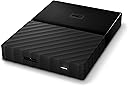
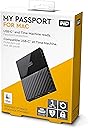
The Western Digital My Passport for Mac 1TB Portable Hard Drive offers a perfect blend of high-capacity storage, seamless Mac compatibility, and advanced security features. With USB-C and USB-A support, hardware encryption, and effortless plug-and-play setup, it’s the ultimate backup solution for professionals who demand reliability and style in their data management.


| ASIN | B0792DP87N |
| Box Contents | "Portable hard drive USB-C to USB Micro-B cable USB-A to USB Micro-B cable (compatible with USB 2.0) WD Discovery software • Quick install guide" |
| Brand | WD |
| Brand Name | WD |
| Cache Memory Installed Size | 1 |
| Color | Black |
| Compatible Devices | Desktop |
| Connectivity technology | USB |
| Customer Reviews | 4.5 out of 5 stars 3,582 Reviews |
| Data Transfer Rate | 626 Megabytes Per Second |
| Digital Storage Capacity | 1000 GB |
| Digital storage capacity | 1000 GB |
| Global Trade Identification Number | 00718037862156 |
| Hard Disk Description | Mechanical Hard Disk |
| Hard Disk Form Factor | 2.5 Inches |
| Hard Disk Interface | USB 2.0/3.0 |
| Hard disk form factor | 2.5 Inches |
| Hard disk interface | USB 2.0/3.0 |
| Hard-Drive Size | 1000 GB |
| Hardware Connectivity | USB 3.0 |
| Installation Type | External Hard Drive |
| Item Type Name | WD 1TB My Passport for Mac Portable Hard Drive – Time Machine ready with password protection |
| Item Weight | 168 g |
| Manufacturer | Western Digital |
| Model Name | My Passport for Mac |
| Model Number | WDBFKF0010BBK-WESE |
| Network Connectivity Technology | USB |
| Number of Items | 1 |
| Product Features | Portable |
| Product Warranty | Manufacturer waranty for 3 years |
| Read Speed | 109 Megabytes Per Second |
| Special feature | Portable |
| Specific Uses For Product | Personal , Multimedia , Business |
| UPC | 718037862156 |
R**D
Easy as... Time Machine
ALL of MY WD "My Passport" for MAC, portable hard drives that I've purchased over the last 8 years have worked straight out of the box without recourse to having to use the bundled WD software. They're sold as MAC and Time Machine compatible. No need to use the WD software. There's no need to even instal the software on your computer. Plug the WD drive into the USB socket on your computer and use Time Machine for backups just by following the Mac OS prompts to make sure you select the correct drive for your Time Machine to target. It's as easy as it gets. I just purchased my fourth such WD drive - a 2Tb version - in it's latest style (as of January 2019). But ALL FOUR of my WD Drives - and those bought by my daughter also - continue to perform perfectly when required. Two are permanently connected to my MAC and in daily use and the other two are offline archives. Oh! - and I also have one (a fifth) in my laptop bag for backups of an old MacBook Pro - still functioning perfectly as required using Time Machine. This month, I ran out of space on my last WD backup drive and Time Machine had started to delete the earliest back-ups from back in 2016. So strategically, I decided it was time for a new one. I had no hesitation in selecting a WD Drive on the strength of my experiences with them to date. As it was the new drive's first backup, I had about 680Gb of files to transfer initially (that's because ALL the files on my MAC needed to be written onto the new (empty) drive). On the only transfer rate I can manage (USB 2 - connected MAC) the transfer took about 11 hours in the background. It didn't interfere at all with my ongoing foreground use of the MAC. Subsequent backups, being incremental backups only, will, of course, take only a few minutes or seconds whenever Time Machine runs automatically thereafter. If my MAC had been a newer version, I guess my transfer rates would have been significantly higher using the USB-C cable connector that comes with the new edition of the WD Drive. (Both are in the box to maintain backward compatibility with earlier machinery - like mine). Although I've only discusses the Time Machine backup compatibility functionality, the WD Drives can of, course, be used for ad hoc data storage and management via the Finder App, alongside any Time Machine back-up folders that are automatically created and assigned drive space by Time Machine. SOME ADVICE FOR PROSPECTIVE PURCHASERS? Reading SOME of the issues that SOME people have had with their purchases, I'd like to share the following observation based on the fact that WD market external drives with some explicitly labelled as "For MAC". This implies there may be two versions of these drives already formatted for either Macs or PCs. (Maybe there are more.... I don't know!) The ones to which I refer in my review, I have specifically bought as formatted for, or labelled explicitly as MAC ready... NOT PC Versions, as I suspect some reviewers may have bought. I'm no expert, and therefore take care to try to get stuff that states what I need explicitly on the box, i.e. it says 'For MAC' on the online listing and on the box. So, I recommend to ALL prospective purchasers of these - or ANY other external drives, that you plan to use on specific machine platforms, that you make sure you're buying the right item for your particular type of computer. I THINK the differences on MACs and PC systems is in file structuring protocols. So, I presume WD pre-format them in the factory and then stream them for either MAC or PC use. But that's as far as my reasoning goes. TROUBLE WITH TIME MACHINE BACK-UPS WHEN MAC IN SLEEP MODE? Not until recently have I placed my MAC in sleep mode, so it was never a problem. However, I encountered a failure to complete Time Machine back-ups when awakening the Mac having done so recently. I explored a workaround. I found a Time Machine-generated file in the Back-up Folder on the WD Drive with the file extension '.inProgress' - it was a small ~ 8kB file and took a punt on it being the blocker to further progress. I temporarily disabled automatic back-ups via Time machine. I then tried deleting the .inProgress file. Failed. I got an error message. The system wouldn't let me delete the file. So, I reverted to 'Plan B'. I switched the Mac off and on again. This resulted in the file disappearing and immediate resumption of normal service! Purely by chance, I discovered another review that referred to this phenomenon, so I refer UK purchasers to the excellent product review listed in "Top Reviews from Other Countries" by Jonathan B from USA on 4 Aug 2018 on this matter, for the benefit of anyone who routinely would put their Mac and/or its connected USB power-driven external HDs to sleep. (It MAY NOT be an issue for external storage drives that are independently powered via separate mains supply rather than via the USB Connection, but I can't verify if that's the case or not). The above IS NOT a criticism of the integrity of WD Hard Drives. It's more of a reflection on how users may choose to operated their system components and the unexpected consequences of doing so. But as Jonathan B notes, it's something that WD (or APPLE, for that matter) might consider in future OS design developments. (They may have done so, for all I know!)
W**T
Saved My Computer. Excellent product.
My IMAC was at a stage where even Apple couldn't diagnose the problem and the only thing to do was to backup and reinstall the whole system. With this wonderful drive, it was effortless , though nerve wracking !..It just sits there quietly on my desk backing up ongoingly and I know now that should my system fail then I can depend on it. As far as longevity is concerned , I can't comment but at this time, a few months after purchasing, it's working away reliably.
M**M
Excellent product
Western Digital 4 TB My Passport for Mac - Just what I needed to help with my storage as my other backup drive WD My Passport 1 TB did not have the capacity to use it as my main Time Machine drive. I am impressed with the reliability of my previous WD drives, but needed a bigger capacity.Had no support issues as yet so cannot rate, but for ease of setup WD are very straight forward to use. My iMac (2014) recognised it easily.
S**S
Easy to use on my Mac
Worked out of the box. Software loaded easily and 'Finder' displayed the drive. It's quiet and unobtrusive but it is taking some time to transfer the data. Overall I am pleased with this purchase so far.
E**E
Saved my day
This is the best hard drive I’ve purchased in my life. It’s compatible with both mac and windows. With the included usb c and usb 3.0 cable, I can easily transfer files between my MacBook Air and the computers at university. Once it’s first arrived I plugged in to my iMac and backed up over night is fast and easy. As it’s time machine ready, all you need to do is just plug in and select back up on your time machine. This is also the best price that you can find on market for 2TB USB type C hard drive.
J**Y
Great little disk.
Despite using Time capsules to backup my Macs, as an old school techie I have a horror of H/W failures and like to have a few "spare" back ups stored around. I have a couple of these drives, one 4TB and one 5TB, that I lob a backup onto every now and then to prevent total disaster if everything goes belly up or the house burns down. The drives are compact, capacious, fast and inexpensive. An excellent product.
K**R
So far, so good
Reading some reviews I realise that these things can work well for a period and then pack up. So, with that in mind this review is written after a month. Everything works fine, it comes with a USB and a Thunderbolt connection so plugs straight into a Mac. My Mac recognised it without any problems. I use it for back-up, Time Machine on Mac, and have done a couple of back-ups without problems. Currently there are no problems and I have no complaints so I gave it five stars. I am sure it will be OK but will do another review if there is any change. You never can tell with technology!
A**N
Excellent Hard Drive For A Good Price
I have had these hard drives for quite some time now. Purchased several of them because I also wanted a back up of each drive in case one crashed. Turns out, that's never been necessary, despite dropping the 'originals' several times, taking them with me during travels or commute etc. I was cleaning out my closets and cupboards to keep quarantine boredom at bay and that's when I found them. Completely forgot I even had them because I've never needed the back ups which reminded me to leave a review. Highly recommended!
Trustpilot
1 month ago
3 days ago