


Desertcart purchases this item on your behalf and handles shipping, customs, and support to South Africa.
⚡ Power your productivity with the ultimate Thunderbolt 4 dock — because one cable should do it all.
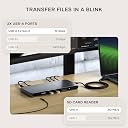
The Satechi Thunderbolt 4 Docking Station is a premium, compact hub designed for professionals demanding high-speed data transfer (up to 40Gbps), multi-display support (up to 4x 4K/60Hz monitors), and robust peripheral connectivity including 100W USB-C charging, Gigabit Ethernet, and UHS-II SD card reader. Compatible with the latest MacBook Air/Pro M5/M4 and Windows PCs, it offers a sleek space gray finish and a 2-year warranty, making it the go-to dock for seamless, clutter-free workstations.
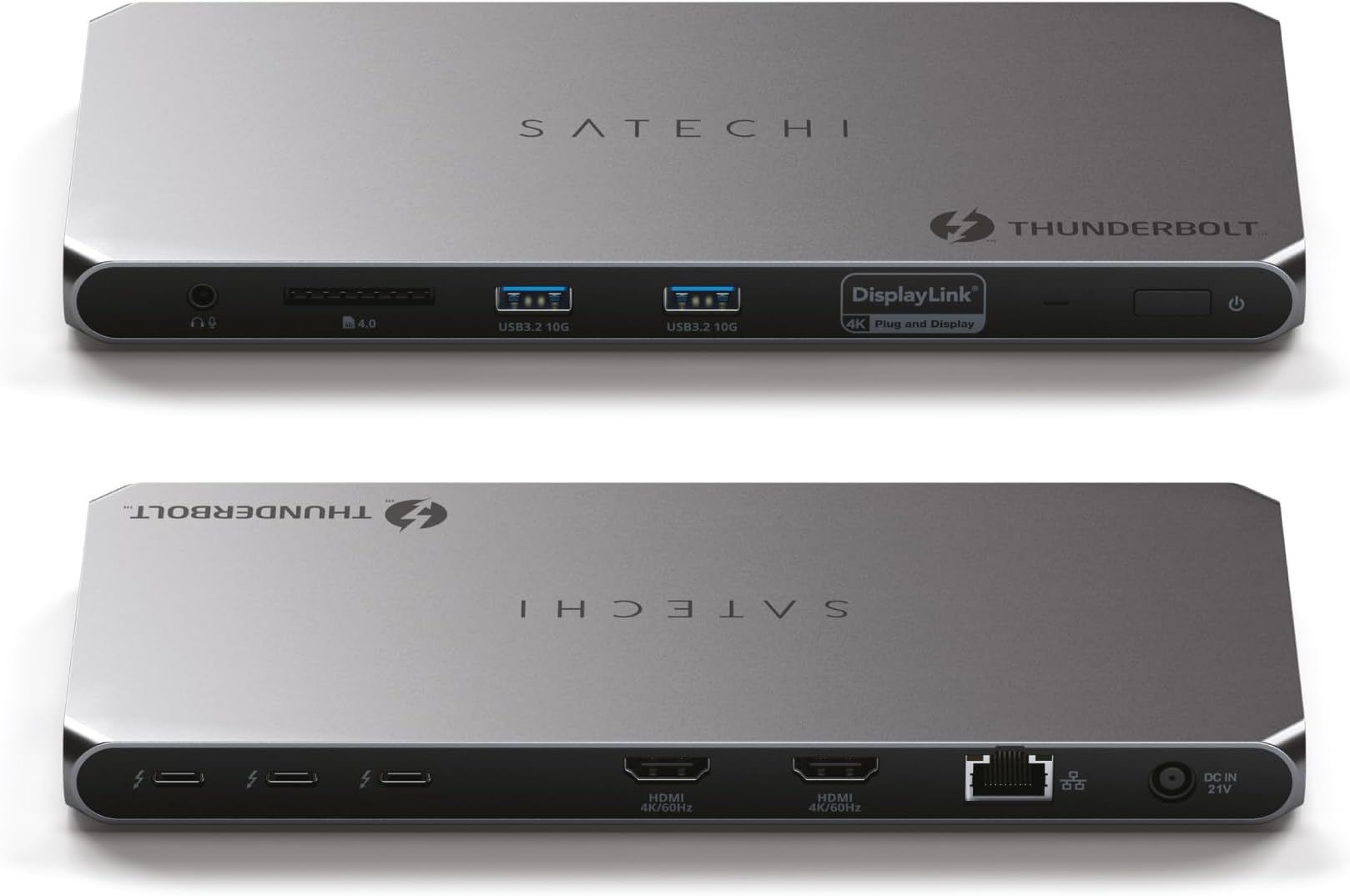




| ASIN | B0D4FGRBH8 |
| Best Sellers Rank | #6,499 in Computers & Accessories ( See Top 100 in Computers & Accessories ) #487 in Laptop Docking Stations |
| Brand | Satechi |
| Color | Space Gray |
| Compatible Devices | MacBook Pro 14/16-inch (2026 M5/M4/M3/M2/M1), MacBook Air 13/15-inch (2026 M5/M4/M3/M2/M1), Mac Mini (2024 M4/M2/M1), iMac (2024 M4/M3/M1), Mac Studio (2025 M4/M3/M2/M1), Lenovo ThinkPad, Microsoft Surface, Google Pixelbook. IMPORTANT: Intel-based Macs and certain M1–M3 MacBook models do not support refresh rates above 4Kat60Hz over HDMI. This is a limitation of the host device, not the cable, hub, or adapter. Compatible Devices MacBook Pro 14/16-inch (2026 M5/M4/M3/M2/M1), MacBook Air 13/15-inch (2026 M5/M4/M3/M2/M1), Mac Mini (2024 M4/M2/M1), iMac (2024 M4/M3/M1), Mac Studio (2025 M4/M3/M2/M1), Lenovo ThinkPad, Microsoft Surface, Google Pixelbook. IMPORTANT: Intel-based Macs and certain M1–M3 MacBook models do not support refresh rates above 4Kat60Hz over HDMI. This is a limitation of the host device, not the cable, hub, or adapter. See more |
| Customer Reviews | 4.2 out of 5 stars 116 Reviews |
| Global Trade Identification Number | 00810086361182 |
| Hardware Interface | Ethernet, HDMI, Secure Digital Card, Thunderbolt 4, USB Docking Station |
| Input Voltage | 180 volts_of_alternating_current |
| Item Dimensions L x W x H | 8.4"L x 3.7"W x 0.7"H |
| Item Highlight | 100W charging, 40 Gbps data transfer, 2 USB-A 3.2 ports, Ethernet, for MacBook Air/Pro M5, Mac, Windows, DisplayLink required |
| Item Weight | 1.1 pounds |
| Manufacturer | Satechi |
| Mfr Part Number | ST-DT4MDM-US |
| Model Number | ST-DT4MDM-US |
| Number of Items | 1 |
| Number of Ports | 12 |
| Product Dimensions | 8.4"L x 3.7"W x 0.7"H |
| Total Number of HDMI Ports | 2 |
| Total USB Ports | 2 |
| Total Usb Ports | 2 |
| UPC | 810086361182 |
| Unit Count | 1 Count |
| Warranty Description | 2 Years Manufacturer Warranty |
| Wattage | 180 |
M**N
Excellent TB4 dock
--Update 2: Long story short and after much troubleshooting, the original issues noted below are NOT the fault of the dock and were the fault of the Orico SSD enclosure- which I replaced with a Minisopuru 40GB unit. The dock's TB4 ports now run as well as my Yoga 7i notebook's ports. From my original review, the OEM reached out to me and provided excellent customer service. I would purchase from this firm again. --Update 1: The dock's TB4 ports are ~ 20% slower using the same TB4 device connected to the very consistent, notebook's TB4 ports. Using the same TB4 devices, I did receive a Windows message about the TB4 dock port(s) being slower than the device... I power cycled the dock and the message went away with the TB4 ports speed back up to 20%+ less than the notebook. The dock's Type-A 10Gb/s ports work as expected with an ADATA SE880 20Gb/s external SSD testing at the dock's 10Gb speed. --Original Review: Overall I am pleased with this Satechi dock. The first two purchased Wavlink docks failed miserably and I replaced them with this Satechi dock (purchased used- very good) that has initially worked well. All ports tested, except the two HDMIs (do not have a free monitor to test with) and work well-ish. All three TB4 ports test ~ 10%-15% slower with the Orico/Corsair SSD unit than when directly connected to the Yoga 7i- but are stable and consistent. The USB Type-A 10 Gb ports were only tested with my 5Gb SSD enclosure and the speeds were the same as with the notebook. The 3.5mm audio port worked well with my headphone and the SD card reader read music files well, but I did not check any speeds. The Speedtest.net tested Ethernet port speed was as expected on this notebook. Testing hardware: Corsair MP600 Mini 2TB in an Orico TB4 case with fan. Lenovo Yoga 7i Windows 11 notebook. Testing software: ATTO Disk Benchmark. File size: 256MB, Direct I/O, Bypass write cache, QD 1.
I**S
super premium dock
This has been a very good product thus far. Was hesitant at first because price is high, but the product is very premium. I have a dell dock at work, and this one is smaller, not as heavy and doesn't get as hot. Also has more ports. I really like the two HDMI ports because I did not want to have to also upgrade cables to USB-C. The device itself feels sturdy, like a macbook finish. It feels light for all it contains but not I am so glad I connect one cable to my laptop and everything else is set with this dock.
C**L
Does the job very well with a M1 MBP
I really love this product. It has numerous ports and provides ample power for all the devices I need to connect. The Thunderbolt connections offer more than enough speed, but the device does tend to heat up a bit. Just ensure there's enough airflow around it, and it will be fine. Both of my monitors work great with it!
C**N
Not easy to install...
Good product after getting help from the company's support chat line.
M**Y
Satechi Thunderbolt 4 Dock
After much research I decided on this docking station for my situation. First I did research on the MacBook and what is required to use multiple displays. For context, I was using a Win device with a dual monitor setup. I needed the MacBook to essentially replace the Win device and keep using the dual setup I had. After much research I knew that to accomplish what I wanted, I would need an M3 Pro chip Apple device. Do your research for your desire. Then I researched how to make my situation work. I chose an M3 Pro chip Apple MacBook Pro to accomplish multi-monitor support for my desire and to not have to replace current setup. This Satechi docking station accomplished exactly what I needed. I have the 14" MBP w/M3 Pro and I use the docking station when needed to display on my two external monitors. When connected I can have the laptop open and have three displays; laptop screen and dual monitors. If I close the laptop I lose the trackpad and keyboard but the dual monitors work. I can leave the laptop open and use the built in keyboard/trackpad and three displays are available. Then there is a need for external mouse/keyboard with laptop closed. I use an external bluetooth mouse/keyboard combo to fix this but even with laptop still open I just use the external mouse for efficiency. Laptop open means three displays, yay. The M3 Pro works for that, not sure about any Apple M3 (not Pro) or below, please research. The main flaw is having a MBP connection to the hub will mean the battery in your MBP will remain fully connected and charged. Research has shown that with rechargeable devices, depletion of a charge can be beneficial. Having your device at 100% charged all the time could lead to degradation to battery life. Researchers please don't abolish me.. All in all, this docking station has done exactly what I expected; dual monitor support and the laptop screen too is bonus. There are multiple additional ports available on the hub such as flash/USB that I haven't needed, but the dual displays and interoperability with my MPB have been fascinating.
N**O
Not recommended for Mac users
Requires an app on Mac and to share your screen with the app for the displays to work. Unacceptable especially when the app consumes 20% CPU.
A**N
Solid Mac OS Dock - utilizes DisplayLink Software
Dock works as intended, gets a bit hot when doing its thing. I like having the SD card and power button on the front. Build quality is phenomenal. Satechi is a company I'm going to trust as much as Anker moving forward.
K**N
DO NOT BUY THIS. DO NOT BUY FROM THIS COMPANY AT ALL.
AVOID THIS. You need to install display-link software on your MAC. This does not exist at the URL in the documentations. See image. Call Support they say 2 min wait time...after 5 min they say no support available. Send question to support you need to validate your email, but the email validation link times out when you click it 5 min later...recycle that attempt 3 times and you realize THERE IS NO CUSTOMER SUPPORT!!! DO NOT BUY THIS. DO NOT BUY FROM THIS COMPANY AT ALL. You have been warned.
J**J
Great Docking Station
Great docking station which allows me to run my 2020 M1 MacBook Pro with 2 external monitors. The doc can also be used when in clamshell mode. Highly recommend this product to those with a MacBook looking to use multiple monitors.
C**N
No funcionó como esperaba
Lo compré para conectar 3 monitores a mi computadora pero no funcionó. Tengo una 3080 ti así que no tiene problemas mostrando los monitores por separado.
J**S
nice product
nicely designed equipment, easy set up , now one laptop could connect three external display monitors(2 HDMI, 1 type C) , the SD card slot works well。
J**Z
No funciona en MacBook Pro
No funciona con MacBook Pro M3, solo sirve para cargar, intentaré devolverlo.. Si tienes Mac mejor busca otra opción y ahórrate una perdida de tiempo y dinero
P**N
Slim and does the job
Great
Trustpilot
4 days ago
5 days ago