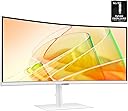
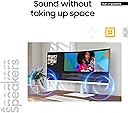
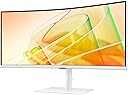
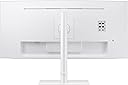
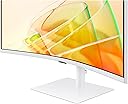
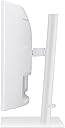
🚀 Elevate your workspace with Samsung’s ultra-wide powerhouse — see more, do more, stress less!
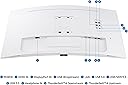
The Samsung 34" ViewFinity S65TC is a cutting-edge Ultra-WQHD curved monitor featuring a 1000R curve and 21:9 aspect ratio for immersive viewing. It offers HDR10 for vibrant colors, a 100Hz refresh rate with AMD FreeSync for smooth visuals, and Thunderbolt 4 connectivity with 90W charging to power your devices. Designed for professionals, it includes ergonomic adjustments and TÜV-certified eye care technology to reduce strain, making it ideal for productivity and entertainment.

| ASIN | B0CP6JXK9X |
| Adaptive Sync | FreeSync |
| Additional Features | Ultra wide screen, high resolution, high refresh rate, Thunderbolt 4 |
| Aspect Ratio | 21:9 |
| Aspect ratio | 21:9 |
| Best Sellers Rank | #22,339 in Computers ( See Top 100 in Computers ) #626 in Computer Monitors |
| Brand | Samsung |
| Brightness | 300 |
| Color | White |
| Color Gamut | 1.15 |
| Connectivity Technology | USB |
| Contrast Ratio | 2000:1 |
| Customer Reviews | 4.0 out of 5 stars 422 Reviews |
| Display Resolution Maximum | 3440 x 1440 Pixels |
| Display Technology | LED |
| Display Type | LCD |
| Hardware Connectivity | Thunderbolt, USB, USB 3.0, USB Type C |
| Has Color Screen | Yes |
| Image contrast ratio | 2000:1 |
| Is Electric | Yes |
| Item Dimensions D x W x H | 24.1D x 80.8W x 56.1H centimeters |
| Item Weight | 17.9 Pounds |
| Manufacturer | Samsung |
| Model Name | FBASAMLS34C650TA |
| Model Number | FBASAMLS34C650TA |
| Mounting Type | Wall Mount |
| Native Resolution | 3440x1440 |
| Number of Component Outputs | 1 |
| Picture Quality Enhancement Technology | HDR10, AMD FreeSync, 100Hz refresh rate |
| Power Consumption | 55 Watts |
| Refresh Rate | 100 Hz |
| Resolution | Ultra-WQHD |
| Response Time | 4 Milliseconds |
| Screen Finish | Curved |
| Screen Size | 34 Inches |
| Screen size | 34 Inches |
| Screen surface description | Curved |
| Series Number | 65 |
| Shape | Curved |
| Specific Uses For Product | personal |
| Total Number of HDMI Ports | 1 |
| Total Thunderbolt Ports | 1 |
| Total USB 3.0 Ports | 1 |
| Total Usb Ports | 2 |
| UPC | 887276791432 |
| Viewing Angle | 178 Degrees |
| Voltage | 110 Volts |
A**R
No cables were included!
The package is missing cables; no cables were included!
C**N
el producto llego defectuoso
El producto llego defectuoso no se podia calibrar los controles para volumen y para desplazarse en el menu no servian por eso tome la desicion de regresarlo
S**.
Love love love love love love
I recently purchased this and have been absolutely thrilled with the experience. As someone who isn't very tech-savvy, I would like to share a few tips for those who might be in the same boat. First Impressions: Okay, so the box and the setup and operations instructions were questionable. I guess this must have come from a third-party seller because Samsung could NEVER. However, out of the box, the monitor is a beauty. The screen is expansive, and the design is sleek and modern. It's perfect for my home office setup, surrounded by my plants and cozy decor. The ultrawide aspect ratio is a game-changer for productivity and gaming alike. Resolution Setup: Initially, I struggled to get the monitor to display its maximum resolution of 3440 x 1440. After some research and a bit of trial and error, I discovered that the secret lies in using a USB-C connection. If you’re like me and not too familiar with these things, here’s a simple guide: Check Your Cables: The monitor comes with an assortment of cables, including HDMI, DisplayPort, and USB-C. Make sure you're using the USB-C cable that supports video output. Not all USB-C cables are created equal, and some only support charging. Right Cable Choice: After downloading various programs to change my resolution and having no luck, I realized the provided USB-C cable (often referred to as a "lightning cable") was actually the fix. Switching to this cable instantly solved my resolution issues. Update Drivers: Ensure your graphics card drivers are up to date. This can often solve resolution issues. Adjust Settings: Go to your computer’s display settings. Under “Display Resolution,” select 3440 x 1440. If this option isn’t available, reconnect your USB-C cable and restart your computer. Performance: Once I got the resolution sorted, the display was breathtaking. The colors are vibrant, and the extra screen real estate makes multitasking a breeze. For gaming, the high resolution and refresh rate provide an immersive experience. I’ve also found it fantastic for video editing and other creative tasks, where the detailed visuals make a significant difference. Extra Features: The monitor comes with a few extras that are worth mentioning. The built-in blue light filter is excellent for long work sessions, and the customizable settings allow you to tweak the display to your liking. Conclusion: Overall, I highly recommend this monitor. It’s a fantastic investment for anyone looking to enhance their workspace or gaming setup. If you’re struggling with getting the correct resolution, remember to use the USB-C cable that comes with the monitor and keep your drivers updated. This monitor is worth every penny, and the setup is a minor hurdle for the massive benefits it provides.
J**S
Amazing with my MacBooks. Beautiful, colorful, sharp picture, and so much screen space!
I spent weeks looking into different monitors for my Mac Book pro for work and my Mac Book Air for school. I actually bought a different Samsung option originally that was more square, and it didn’t have the best picture. After even more research I figured out that for most Mac’s, it’s best to have a wider screen, especially one this size. The amount of pixels in a Mac screen is a lot more than the other brands of laptops, so in human terms, it needs more space to look good. I am so happy with this monitor! And ended up buying a second one! It easily adjusts to the angles I need it in any a given day. The color is bright and full. Looks amazing when watching my Apple TV shows. I’m able to have multiple windows pulled up at once, as well as all the widgets I’ve filled the screen with. I’ve yet to test out a high performance video game but everything else works great. There’s plenty of screen filter options that would allow for a better looking game no matter what you are playing. I saw some people complaining about the speakers, but I don’t buy a monitor for the speakers, and I don’t have any issue with them when I’m not connected to Bluetooth. Sturdy on the stand, and even better on the dual monitor mount I bought.
J**N
Arrived broken and damaged, like other reviews.
Came with a wonderful set of dead pixels and splitting center stand.
Trustpilot
2 weeks ago
2 days ago