Desertcart purchases this item on your behalf and handles shipping, customs, and support to South Africa.
🚀 Elevate your workday with power, precision, and premium security.
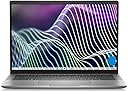
The Dell Latitude 7440 is a professional-grade 14-inch touchscreen laptop featuring a sharp WUXGA IPS display, 13th Gen Intel i7 deca-core processor, 16GB LPDDR5 RAM, and 512GB PCIe NVMe SSD. It offers advanced connectivity with dual Thunderbolt 4 ports, Wi-Fi 6E, and Bluetooth 5.3, alongside enterprise-level security via fingerprint authentication and Windows 11 Pro. Designed for the modern manager, it balances performance, portability, and security in a sleek Titan Gray chassis.
| ASIN | B0CVYL4SYB |
| Audio Output Type | Headphones |
| Audio features | Basic Audio Capabilities |
| Automatic Backup Software Included | Windows 11 Pro-64 |
| Battery Cell Type | Lithium Ion |
| Best Sellers Rank | #108,811 in Computers & Accessories ( See Top 100 in Computers & Accessories ) #19,971 in Traditional Laptop Computers |
| Biometric Security Feature | Fingerprint Recognition |
| Bluetooth Version | 5.3 |
| Brand | Dell |
| Built-In Media | Laptop, AC Adapter, Battery |
| CPU Codename | Tiger Lake |
| CPU L2 Cache | 12 MB |
| CPU L3 Cache | 12 MB |
| CPU Model | Core i7 |
| CPU Model Generation | 13th Gen |
| CPU Model Number | Intel i7-1365U |
| CPU Model Speed Maximum | 5200 MHz |
| Camera Description | Integrated |
| Color | Titan Gray |
| Compatible Devices | External displays, keyboards, mice, speakers (wired via HDMI or Thunderbolt, wireless via Wi-Fi or Bluetooth) |
| Connectivity Technology | Bluetooth, HDMI, USB, Wi-Fi |
| Control Method | Touch |
| Customer Reviews | 2.9 out of 5 stars 2 Reviews |
| Display Resolution Maximum | 1920 x 1200 pixels |
| Display Technology | IPS |
| Display Type | LCD |
| Form Factor | Clamshell |
| Graphics Coprocessor | Intel Iris Xe Graphics |
| Graphics Description | Integrated |
| Hard Disk Description | 512GB NVMe SSD |
| Hard Disk Interface | PCIe |
| Hard Disk Size | 512 GB |
| Hard-Drive Size | 512 GB |
| Hardware Interface | HDMI, Thunderbolt |
| Human-Interface Input | Microphone |
| Item Dimensions L x W x Thickness | 8.77"L x 12.32"W x 0.67"Th |
| Keyboard Description | Backlit |
| Keyboard Layout | QWERTY |
| Lithium-Battery Energy Content | 57 watt-hours |
| Manufacturer | Dell |
| Microphone Form Factor | Integrated microphone |
| Model Name | Latitude 14 |
| Model Number | 7440 |
| Model Year | 2023 |
| Native Resolution | 1920 x 1200 pixels |
| Notebook Pointing Device Description | Touchpad |
| Number Of Cells | 3 |
| Number of Drivers | 1 |
| Number of Ports | 3 |
| Operating System | Windows 11 Pro |
| Optical Storage Device | No Optical Drive |
| Other Special Features of the Product | Fingerprint Reader |
| Power Device | AC adapter |
| Processor Brand | Intel |
| Processor Count | 1 |
| Processor Series | Core i7 |
| Processor Speed | 1.8 GHz |
| RAM Memory Installed | 16 GB |
| RAM Memory Technology | Onboard ONLY |
| RAM Type | SDRAM |
| Ram Memory Maximum Size | 16 GB |
| Resolution | 1080p |
| Screen Bezel Thickness | 0.67 inches |
| Screen Finish | Glossy |
| Screen Size | 14 inches |
| Series Number | 7440 |
| Specific Uses For Product | Business |
| Total Number of HDMI Ports | 1 |
| Total Thunderbolt Ports | 2 |
| Total Usb Ports | 1 |
| Touch Screen Type | Capacitive |
| Touchpad Feature | Touchpad |
| UPC | 198361107350 |
| Unit Count | 1 Count |
| Video Output | HDMI, Thunderbolt 4 |
| Video Processor | Intel |
| Warranty Type | Limited |
| Wireless Compability | Bluetooth |
| Wireless Technology | Wi-Fi |
R**R
Worst FAn NOise Ever. Like crushed glass gently rubbed into my ears all day long.
My employer provided me this brand new. core i7 fully loaded. I hate the fan noise, worst ergonomic sound ever. It's like have crushed glass rubbed into my ears all day. It's fine when I'm using it in an annoyingly loud office but in a quite house where you can really hear the fan harmonics it its infuriating!!! (I'm 54 years old, I can't imagine how awful this would have been 30 years ago when my ears were excellent) I've been fighting with this for over a year. I've installed all the BIOS updates and nothing has helped. I've taken to setting the min processor state to 10% or less. I Solved the problem by disabling the lap-top lid switch and just putting the lap-top under my desk. I use an external monitor so I just don't use the lap-top screen at all. Hiding under the desk attenuates the ghastly fan noise.
E**D
Very nice service and product
All very nice.
Trustpilot
4 days ago
2 months ago