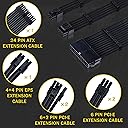
🔌 Power up your build with style and precision — because your rig deserves the best!
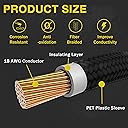
The Fstop Labs Clovertale Braided ATX Sleeved Cable Extension Kit offers a 6-piece set of premium, individually sleeved PSU cable extensions with 3-layer protection and certified 18 AWG copper wiring. Designed for superior power stability and aesthetic cable management, it includes 24 cable combs to keep your PC build clean, cool, and visually striking. Compatible with most power supplies, this kit enhances both performance and style for professional-grade custom PC builds.


| ASIN | B07BV6BDX7 |
| Best Sellers Rank | #1,528 in Computer Power Supplies |
| Brand | Fstop Labs |
| Brand Name | Fstop Labs |
| Cable Type | Power Supply (ATX) |
| Color | Black |
| Compatible Devices | PC |
| Connectivity Technology | wired |
| Connector Gender | Male-to-Female |
| Connector Type | 24 Pin ATX |
| Customer Reviews | 4.6 out of 5 stars 3,221 Reviews |
| Gauge | 18 |
| Indoor Outdoor Usage | Indoor, Outdoor |
| Item Length | 36 inches |
| Item Shape | Round |
| Item Weight | 9.92 ounces |
| Manufacturer | Fstop Labs |
| Maximum Voltage | 12 volts |
| Model | Sleeved Cable Black |
| Number of Items | 6 |
| Number of Pins | 8 |
| Other Special Features of the Product | Braided |
| Part Number | Sleeved Cable Black |
| Recommended Uses For Product | PC Power Supply Cable Extension |
| Special Feature | Braided |
| Specification Met | UL |
| Unit Count | 6 Feet |
| Wattage | 880 watts |
J**C
1st time trying custom extension cables
Used it in a build where the user wanted a clean, mostly white look. These extensions worked great. Keep in mind these aren't replacement cables, they connect to your existing power supply cables. They work with just about any power supply. It's a cheap way to get rid of those ugly "ketchup/mustard" power cables. It can also provide longer reach or more routing options if you have a huge case. I used it in an mATX case, so I had a lot of excess power cables to tuck away. It didn't matter since the user won't see it anyway, they only see the clean look from the front. The clear cable combs that come with the cables are just enough, I think. If you don't want clear combs, make sure to buy them separately. FYI on using it on a new build. For some reason, the computer wouldn't boot with the extension VGA power cables attached. I had to plug in the original power supply VGA power cables first in order to boot the system. Once I got into the BIOS to do my usually tweaking, I shut down, connected the extension cables again and the system boots up fine now. Not sure if it's the cables, my particular hardware set up or the ancient GTX 580 video card I used to do my initial set up. All in all, it was an easy fix if it happens to you. The cables still work and look great.
T**M
Cables make a huge difference on the appearance of your build.
Cables are the one thing you should not skip if you want your PC to look really good. The black cables that typically come with the PSU look really bad especially when you just spent a bunch on a nice case and lighting. I did not go overboard on my build but I think the cables made it look much better than it would have otherwise. I feel it's one thing you should spend the extra 40 bucks on. You will have to have a mess of cables in the back (at least I did) to get it to work. No one will see that though. I really like these. You will have to fight with them to get them to not get all tangled but with some patience and effort they will end up looking pretty good. I think my build came out much better with the improved cables. I am happy with my purchase.
I**C
Looks awesome and easy to install.
These are purely just extensions, and they do their job well. I had no problem with voltage issues. It comes with a great number of clips that help keep the cords looking neat and organized. My only complaint is that they are hard to get in line with the combs and can give you some trouble fitting them in your case, especially if you're not good with cable management.
D**S
BRIGHTLY BRAIDED! GREAT VALUE, WORTH EVERY PENNY!
I have been wanting to get rid of this original ketchup and mustard power cables from my recent PC build I was able to find something more affordable and was going to go with an LED light up however these were way affordable under thirty bucks is a great deal they are very brightly braided they are nice and firm easy to dress the Combs with and make it look presentable the only thing I have a problem with was they did not name each cable like they should give you for the first time Builder or for someone who has no idea about this they should give you a list in the box that kind of put numbers or letters on so you know which ones are which I do have a big 24-pin which is different from all the others however they do give you doubles of the PC cables I could not find which one was for the CPU it was a little tight getting into the motherboard however all accordingly it fitted well after I was able to play around with it that's my only issue
R**R
Great cables
High quality, looks great, cost effective, works great!!! Highly recommend
M**Y
Cable extension kit for a clean, easy and manageable build.
The kit comes with the essential cables such as 24 pin for Motherboard (1), 4+4 PIN CPU(1), 8 PIN PCI-E (2) for some GPUs, 6 PIN PCI-E(2) for some GPUs or SATA, cable combs. Points to keep in mind: 1) These are cable extensions and not the actual cables. The actual cables are the ones that come with your PSU; and these cables connect to the PSU cables on one end and the motherboard, GPU, SATA etc. on the other end. 2) I have found out that it's better to put the combs first on the cables before plugging them to the motherboard or connecting to the PSU cables. Once you put the first comb, the rest of them can be easily put on right next to the first one and can be slided to the desired location. Always verify which side is the top and which one is the bottom to ensure the combs always show up on the top for better aesthetics. 3) Know and be sure where each cable goes; verify, verify, and verify multiple times before plugging them on to the motherboard or connecting them to the PSU cables; as some of these cables once attached will take a bit of an effort to pull them out and if not done properly might damage the motherboard components/pins. If you need to remove any cables once connected be extra careful, wiggle them in a rocking motion to pull them out gently and don't go pulling straight out. 3) Always ensure all the cables are properly seated and plugged-in all the way completely. The last thing you want is your PC not turning ON after plugging-in all the cables and completing the build then trying to remove each one of them to debug which one is not working. I had one of the cables not properly seated all the way in and as a result my PC did not turn on initially but I figured it out after 30 mins of going through all the cables in trial & error. My PC config for reference: Fractal Design Meshify Mini C Tempered Glass (white) Motherboard: MSI MAG X570 Tomahawk CPU: AMD Ryzen 3900X RAM: G.Skill Trident Z Neo Series 32GB PC4-28800 DDR4 3600MHz CL16-19-19-39 Model F4-3600C16D-32GTZNC HDD: Samsung (MZ-V7S1T0B/AM) 970 EVO Plus SSD 1TB - M.2 NVMe PSU: GAMEMAX Gold+ Standard 850W
D**A
Extension cables do the job - nice quality and price
Needed the 24 pin and the 8 pin EPS extension cables in this set to fit a RTX 3080 into a small form factor Cooler Master NR200 case. Without the extension cables I was temporarily suspending the power supply from the top of the open case with string, lol. With the extension cables I'm able to properly mount the power supply to the (front of the) case, and more or less tidily route the cables. And properly enclose the sides/top of the case, lol. I feel that the quality of these cables are nice, especially with the included cable combs. I like these braided cables a lot more than the plastic cables that came with my power supply. And the price was right. One minor nitpick: for some reason the EPS extension cable doesn't quite lock into the connection on my power supply unit, and had come loose during assembly. Gave me quite a scare after powering on the box, it wouldn't start up. The CPU fan would spin for a half second and then stop although all of the LEDs were lit up. I reconnected the EPS cable at the PSU and all was good. Not even going to ding a star for that. I'm just happy to have been able to fit everything together inside the case. There is like a 1mm gap between the PSU and the video card, lol.
H**S
Clean Look - Combs Are Tedious
The white cable extensions make my build look very clean and fit my color scheme. I am pleased with the function of the cables. The cable combs are a bit of a pain to put on, especially your 8 plug wires. I recommend putting the combs on before you install the extensions. You also need to apply a bit of pressure to the combs as you move them down the cable, otherwise they will pop out.
M**E
Look Great , Work great
I don’t usually write reviews , but I had to for these cables. I wasn’t expecting much since they’re the cheapest cables on Amazon. However their quality is insane, and I’ve used pricery cables before. I prefer these ones. Can’t recommend them enough . Absolutely transformed my build .
A**T
son perfefctos!
estuve probando varias marcas, con y sin RGB pero siempre resultan demasiado duros y dificiles de"implementar", justo buscaba algo con lo que pudiera jugar de forma libre dentro de mi gabinete y acomodar a mi gusto y no a lo que me permiten los cables, son los mejores que he encontrado, muy resistentes y flexibles, con muchisimos separadores para acomodarlo, recomendados al 100!
A**O
Excelente relación calidad/precio.
Excelente calidad de materiales, son flexibles y de buen tamaño (30cm), tienen suficientes peinetas para darles una buena apariencia (4 por cada extensión) y me funcionaron sin problemas, y por el precio son una excelente opción.
R**O
Great Value for Budget-Minded Gamers
Cheaper than all others on the market, look and feel great. Will have to update regarding longevity but as of now are awesome. Can definitely recommend.
A**N
The price is very affordable and comeptitive, but here's one thing.....
I'm purchasing this is because the PSU I have is an SFX one, but I switched to a stand ATX case, therefore I need extension cable for the length. This is the lowest price I see on Amazon with Prime so I bought it. However, when I'm installing it, these cables are too hard, which casued difficulty for cable management, and feeing sorry to my fingers. 4 starts.
Trustpilot
1 month ago
1 month ago