Desertcart purchases this item on your behalf and handles shipping, customs, and support to South Africa.
⚡ Power your productivity with the ultimate 7-in-1 USB-C hub!
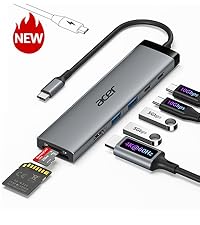
The Acer 7-in-1 USB-C Hub is a sleek, aluminum multi-port adapter designed for professionals on the go. It expands a single USB-C port into 7 essential connections including 4K HDMI output, dual USB 3.1 ports, USB-C data and PD charging ports, plus SD and MicroSD card readers. Supporting up to 100W fast charging and 5Gbps data transfer, it’s compatible across major OS platforms and built to enhance workflow efficiency with reliable power delivery and high-speed connectivity.


| ASIN | B0CF224WX9 |
| Additional Features | 5Gbps Fast Data Transfer, Heat Resistant, PD 100W Fast Charging, Plug and Play |
| Best Sellers Rank | #7 in USB Hubs |
| Brand | Acer |
| Color | Space grey |
| Compatible Devices | Card Readers, Desktops, Laptops, Smartphones, Tablets |
| Customer Reviews | 4.5 out of 5 stars 6,616 Reviews |
| Data Transfer Rate | 5 gigabits_per_second |
| Enclosure Material | Aluminum |
| Hardware Interface | HDMI , MicroSD, USB 3.0, USB Type C |
| Item Dimensions L x W x H | 5.1"L x 1.4"W x 0.7"H |
| Item Weight | 68 g |
| Manufacturer | acer |
| Mfr Part Number | ODK360 |
| Minimum Required Operating System Version | ChromeOS 137, Mac OS 12 Monterey, Windows 11 |
| Model Number | ODK360 |
| Number of Packs | 1 |
| Number of Ports | 7 |
| Operating System | Chrome OS, Linux, Mac OS, Windows |
| Special Feature | 5Gbps Fast Data Transfer, Heat Resistant, PD 100W Fast Charging, Plug and Play |
| Total USB Ports | 7 |
| Total Usb Ports | 7 |
| UPC | 195133227919 |
| Unit Count | 1 Count |
| Warranty Description | 1 Year Manufacturer |
J**R
Beyond Impressed
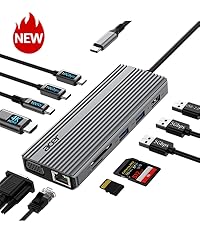
I recently picked up the Acer 7-in-1 USB-C Hub and I have to say, I am beyond impressed with its performance and functionality. As someone who frequently uses a laptop for both work and personal tasks, this little device has completely changed the way I connect my peripherals and external devices. What I Love: Compact Design & Build Quality: Despite packing so many ports into such a small form factor, the Acer USB-C Hub is surprisingly lightweight yet feels sturdy. The sleek aluminum finish not only looks professional but also helps keep things cool during extended use. It’s incredibly portable and fits easily in my bag alongside my laptop. Wide Range of Ports: This hub includes 7 different ports, which is a dream for anyone who needs to expand their connectivity. It includes: HDMI port (4K support) for connecting to external monitors or TVs, USB 3.0 ports (two) for fast data transfer or connecting peripherals like keyboards, mice, or external hard drives, SD and MicroSD card readers (perfect for photographers or videographers), Ethernet port for reliable wired internet connections (a must for stable work-from-home setups), USB-C power delivery port for charging your laptop while using the hub. Whether you're using it for office tasks, media consumption, or creative work, this hub has you covered. Plug & Play: I’m a huge fan of how easy this hub is to use. There’s no need for extra drivers or software. Simply plug it into your USB-C port, and it’s ready to go! My MacBook, Windows laptop, and even my tablet all recognized the device instantly without any issues. Fast and Stable Performance: I’ve tested the data transfer speeds using both USB drives and external hard drives, and the speeds are consistently fast. The HDMI output worked seamlessly, delivering crisp 4K video to my TV without any lag or glitches. The Ethernet connection is a lifesaver when I need a stable internet connection for remote work or video calls. Affordable Price: Considering the versatility and quality, the price of this hub is a steal! Many hubs in this range only offer a handful of ports, but Acer’s 7-in-1 gives you a full suite of connectivity options at a great value. A Couple of Notes: Heat Management: During extended use, the hub can get a little warm, especially if you're using the HDMI output or transferring large files. However, it never got hot enough to be a concern, and it hasn’t impacted performance at all. Compatibility: While it works perfectly with laptops that have a USB-C port with power delivery, make sure your device supports it for full functionality. I haven’t had any issues with my devices, but it’s always a good idea to check your specs. Final Verdict: The Acer 7-in-1 USB-C Hub is an absolute game-changer for anyone looking to maximize their laptop’s connectivity. It’s a perfect solution for professionals, creatives, and anyone who needs to connect multiple devices without the clutter of extra adapters. I highly recommend it to anyone who wants to simplify their tech setup while maintaining top-notch performance! If you're looking for a versatile, high-quality USB-C hub, this is the one to get.
K**R
This hub worked when others did not
I have an Asus Zenbook that's at least 7 years old (ancient by technology standards) and it has a very problematic USB hub. I love my laptop. It functions well except for the hub. I usually get OEM peripherals for my electronics. (I use PC and Android. I'm not a Mac/Apple user.) In the case of the USB hub for my Zenbook the Asus replacement hub is garbage with a 1 star review on Asus website with warnings not to buy because of how fast it stops working. The Asus hub I purchased 3 months ago stopped working after using it 3 or 4 times. That's unacceptable in my opinion. I have tried other brands including Belkin, Anker and 2 others that I do not remember. None of them would deliver power to my laptop despite claiming they would. So I decided to try this hub. I need an external hub for the multiple USB ports because the Asus has no ports on the Zenbook itself, and power delivery (in a perfect world when everything works properly) should also be able to go thru the hub to charge the laptop. On my laptop, there's only one USB-C port to connect either direct power supply or a hub. You can't have both connected at the same time unless the hub allows power transfer to laptop, which the other brand hubs that I tried wouldn't support that power transfer, much to my frustration. This hub is the first hub that I've tried that will actually power my laptop. (I also switched my power supply cable to a Thunderbolt, so the combination of the new cable with this hub works.) I use a wireless mouse with a dongle that needs to be plugged in. I have a digital voice recorder that plugs in directly via USB-A to transfer files to the laptop. I use SD cards in my camera and MP3 player that I need a hub to transfer that media onto the laptop. This hub will allow all of that. Every port works that I have tried on this Acer hub and this hub does the thing that the other hubs failed to do on my laptop. The power transfer was the big issue for me and this Acer hub solved the problem that several others including the OEM, Asus, failed to do. Because of how many months I have been dealing with the power supply problem, hubs not delivering what they promised and this being the only hub that did work, I rate this product at 5 stars. It's less expensive than the Asus hub that stops working immediately after purchasing. It has more ports than the Asus hub with the extra SD card reader that the Asus hub doesn't have. It's a heavier duty outer shell compared to the Asus. The cord is thicker and better protected compared to the Asus, so it reduces the chance for stressing or bending the cord in a way that could break the wires inside or break the connector away from the wires. It's just a better design overall, when compared to the Asus hub. I am extremely satisfied with this Acer hub and I would recommend it since it did the "impossible" task that no other brand could do for me. 5 stars, indeed.
B**C
Works great on my Acer CB314 Series Model N19Q2 Chromebook.
Works on my Acer CB314 Series Model N19Q2 Chromebook. The HDMI connected up with no problem to a 36" curved screen monitor. Instructions are on the Internet on how to turn on the external monitor on the Chromebook. Picture quality is excellent. Note that if your monitor has speaker capability, the Chromebook will auto switch to it. My monitor has the option, but no speakers and I had to repoint the Chromebook to use its speakers. This is not an issue with the Acer USB C Hub. The USB C connector is strong and built well. I use the two additional USB 3.1 ports for an external keyboard and mouse. I haven't used the SD/TF card slots but have no doubt they'll work fine. I plan to purchase a power supply which can also be plugged into the USB C Hub to turn the hub into a complete docking station for my Chromebook. I was surprised to find that when I closed the Chromebook's cover that the external monitor continued to operate. I added an on screen button to shut the Chromebook down so I didn't have to open the Chromebook to shut it off. Adding Linux apps to my Chromebook, and use of the Acer USB C Hub has turned my Chromebook into a very functional computer. Very pleased with the Acer USB C Hub. It works great. UPDATE: The SD/TF slots work great, in both Chrome and in Linux! I have Ultimaker for my 3D printer running in Linux on the Chromebook and am able to create in TinkerCAD, export the .stl to the SD memory card, open Ultimaker and slice the .stl into .gcode. Popping the SD card into the printer, I then print the 3D file. This makes switching computers almost a zero effort. I do almost all my work on my Chromebook instead of on my Windows PC now. An extra power supply is on order and on its way for a true docking station experience with my Chromebook. The only drawback is that a Chromebook isn't as fast as a standard laptop, but with this USB-C adapter, it does pretty much everything I need to do without having to pay for an expensive laptop. It's always difficult to find things that work for Chromebook, this USB hub works.
G**N
Well made
Perfect multipurpose add on. I use it on occasion since my MacBook Air has only two USB C ports and I have two external monitors plugged into those. I simply unplug a monitor, use the hub and plug my monitor back in.
R**A
Very Good but Slightly Flawed
Works quite well. I have two of these and I find myself really enjoying them for using an external monitor for my MacBook. Only complaint I have is overtime I sometimes look connection to my MacBook and I have found that charging using this is inconsistent. But, having a USB and HDMI port on one compact item is great.
F**D
Contains all the auxiliary components
Nice minihub for today's computers that are lacking in most of the modern conveniences such as sc cards, mini sc cards, etc.
J**N
Apple USB Hub Adapter
Not being able to go totally wireless. Had to purchase an adapter to attach my printer to my new computer. The USB adapter helped me while a local store could not. The USB Hub adapter has increased my speed. The Acer adapter bonus is that it will not get hot as the one from the local store. It was so hot I could not used it. Very good in functionality.
A**C
Good hub
Proper hub
A**K
Very Practical and Works Flawlessly
This 7-in-1 USB-C hub is super convenient and works perfectly with my laptop. All the ports function well I’ve tried HDMI, USB, SD card, and everything runs smoothly without lag. It’s compact, easy to carry, and a great solution for expanding connections. Excellent value for money.
G**N
It does what Apple should have done.
This hub is great! If you have a Mac Air or Pro you will be painfully aware of the lack of ports! This is a simple answer. Recommended!
I**.
Buena compra
La verdad es que este hub me ha sorprendido para bien. Es compacto, ligero y el acabado en plateado queda muy elegante junto al portátil. Lo he usado con un MacBook Pro y también con un iPad Pro, y en ambos casos ha funcionado sin problemas. La salida HDMI saca vídeo en 4K sin cortes, los puertos USB 3.1 transfieren rápido y el lector de tarjetas SD me ha venido genial para pasar fotos de la cámara. Además, poder cargar el portátil a la vez con el puerto de carga PD de 100W es un puntazo, porque así no pierdo el único puerto libre. Se nota robusto y no se calienta en exceso aunque lo use varias horas. Para mí, un accesorio muy práctico y casi imprescindible si tienes un portátil con pocos puertos.
K**N
Great product!
Great!
L**A
Consigliato, comodo e semplice
Ottimo hub USB-C 7 in 1, compatto e molto pratico. L’Acer Hub offre diverse porte utili per collegare dispositivi, trasferire dati rapidamente e collegare monitor senza problemi. Facile da usare e perfetto per lavoro e viaggio. Comprato per trasferire in viaggio le foto dalla reflex ad un hd SSD, usando iPhone, senza portare pc ingombranti. Consigliato!
Trustpilot
2 months ago
1 month ago