Desertcart purchases this item on your behalf and handles shipping, customs, and support to South Africa.
🚀 Elevate your desk game with power, speed, and style!
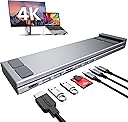
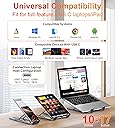
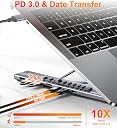
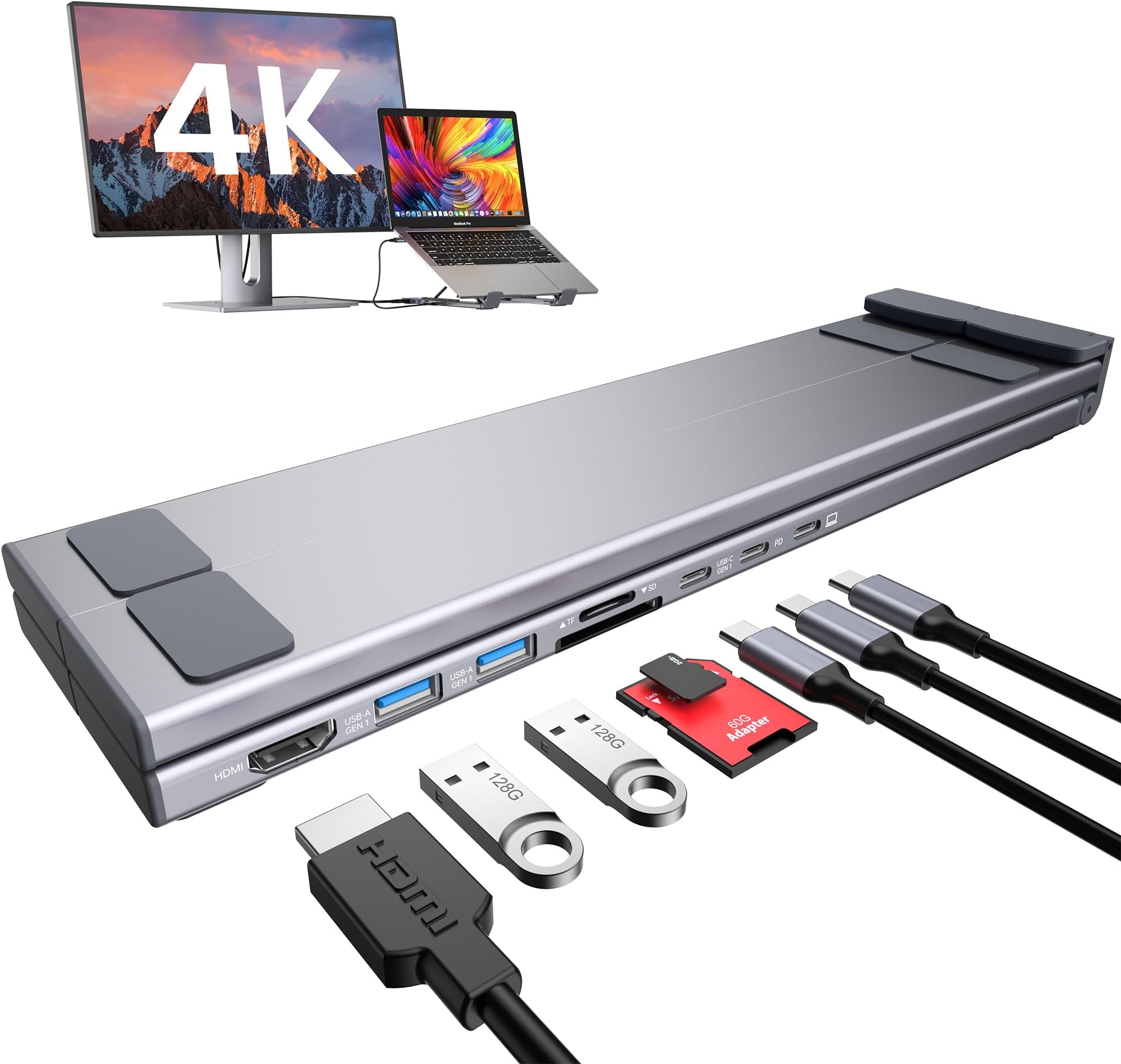
The Mukiya USB C Laptop Docking Station Stand is an 8-in-1 multiport hub and ergonomic laptop stand designed for USB-C laptops from 10 to 17 inches. It features a 4K HDMI port for ultra-high-definition display output, dual USB 3.0 ports with 5Gbps data transfer, and a PD charging port delivering up to 85W to keep your device powered. Crafted from premium aluminum alloy, it offers 9 adjustable height levels for ergonomic comfort and includes SD/TF card slots for versatile data access. Compact and foldable with a travel pouch, it’s ideal for professionals seeking enhanced productivity and mobility.


| ASIN | B0BWTQ1Z7Z |
| Best Sellers Rank | 7,991 in Computers & Accessories ( See Top 100 in Computers & Accessories ) 77 in Docking Stations |
| Brand | Mukiya |
| Brand Name | Mukiya |
| Colour | Grey |
| Compatible Devices | USB-C laptops running macOS or Windows, including MacBook Pro 16 inch 2019/2021, 15 2016/2017/2018/2019, 14 2021, 13 2022/2021/2020/2019/2018/2017/2016, Air (Retina 13-inch) 2022/2020/2019/2018, Air, Pro, Microsoft Surface 7 / 8, HP Spectre x369, Dell XPS 9380/9370/9365/9360/9350/9300/7390 2-in-1/7390, Latitude E7490/E7480/E7470/E7370/13 E7370L/13 7000, Lenovo ThinkPad T series (T470, T480, T490),… |
| Compatible devices | USB-C laptops running macOS or Windows, including MacBook Pro 16 inch 2019/2021, 15 2016/2017/2018/2019, 14 2021, 13 2022/2021/2020/2019/2018/2017/2016, Air (Retina 13-inch) 2022/2020/2019/2018, Air, Pro, Microsoft Surface 7 / 8, HP Spectre x369, Dell XPS 9380/9370/9365/9360/9350/9300/7390 2-in-1/7390, Latitude E7490/E7480/E7470/E7370/13 E7370L/13 7000, Lenovo ThinkPad T series (T470, T480, T490), Asus Ling Yao 3, Zenbook flip ux370u, Acer aspire5 2019, etc., Dell, Lenovo, HP, Surface, Air; from other brands with compatible ports may also be compatible. Compatible devices USB-C laptops running macOS or Windows, including MacBook Pro 16 inch 2019/2021, 15 2016/2017/2018/2019, 14 2021, 13 2022/2021/2020/2019/2018/2017/2016, Air (Retina 13-inch) 2022/2020/2019/2018, Air, Pro, Microsoft Surface 7 / 8, HP Spectre x369, Dell XPS 9380/9370/9365/9360/9350/9300/7390 2-in-1/7390, Latitude E7490/E7480/E7470/E7370/13 E7370L/13 7000, Lenovo ThinkPad T series (T470, T480, T490), Asus Ling Yao 3, Zenbook flip ux370u, Acer aspire5 2019, etc., Dell, Lenovo, HP, Surface, Air; from other brands with compatible ports may also be compatible. See more |
| Customer Reviews | 4.2 out of 5 stars 647 Reviews |
| Hardware Interface | USB 3.2 Gen 2 |
| Hardware interface | USB 3.2 Gen 2 |
| Item Weight | 318 g |
| Manufacturer | Shenzhen Dsenbor Technology Co.,Ltd |
| Manufacturer Part Number | HUB-M57 |
| Minimum Required Operating System Version | Windows 10 |
| Model Number | HUB-M48 |
| Number of Ports | 8 |
| Number of ports | 8 |
| Smart Home Compatibility | Not Smart Home Compatible |
| Total HDMI Port | 1 |
| Total USB Ports | 5 |
| Total USB ports | 5 |
| UPC | 652726562296 |
| Unit Count | 1.0 count |
| Wattage | 85 watts |
L**Y
Ideal stand and charging points in one
So what can you do to make a tilting laptop stand even better. Add in some charging USBC points. Its great frees up the USBC ports on my laptop so I can safely plug in my external HDand also my ArtistPro Drawing board. It connects seamlessly to another monitor too so I have 2 times as much screen space. Highly recommended
S**M
Excellent Product
Excellent well made product. Does what it claims & a real help for the MacBook.
C**L
Good, but room for Improvement
Nice stand and plenty of ports for USB-C and USB-A devices, I kept it but could never get the HDMI to work either with a direct cable or 90 deg elbow. Would benefit from HDMI on both sides.
G**N
Does exactly what’s required
Works great for me … haven’t tried it when travelling yet but I certainly will be. Love the fact you can easily charge your laptop.
C**F
Okay
I tried a few keyboards onwards worked first time but they don't work. I still had to use my USB for keyboard ans headphones defeated the object of the exercise
A**R
Great value, portable and sturdy.
So far this is proving a great buy. Sturdy enough to support my 16" Dell and withbenough in the docking section for my other essentials.
K**I
Not reliable
Worked well for 2 weeks then stopped charging my laptop.
A**M
Great idea, well executed
Really pleased with this so far. It feels really sturdy and I don't have any concerns with it not holding the weight of my laptop. Setting the right height is super easy and both sides are set at the same time unlike my old stand. The docking part of it worked straight out of the box and haven't had any issues with my MacBook Pro. I only wish the plugs were on the other side but that's just me.
H**Z
Compatibilidad
Muy buen artículo, un poquito debil de estructura, una laptop Gamming creo que no la soporta. Pero para mo Dell Latitude sin problema
L**N
Perfect stand
It is as good as advertised
D**N
Génial
Super pratique, s'adapte au pc portable comme à un table même au smartphone.
Y**K
Station USB très pratique
Très utile pour moi informaticien . La documentation fournie est très sommaire. Mais en cherchant sur youtube :"Mukiya Usb c" , on y trouve de très bonnes vidéos explicatives. Très satisfait, ce dec USB c marche très bien avec mes 2 mac book pro . Mon grand écran LG 32 pouce s'y connecte en HDMI et sert d'écran partagé avec mes mac book pro. Pour être plus précis je n'ai pas branché simultanément les 2 mac book pro et mon écran LG sur la station : un mac book + l'écran LG...touts les autres périphériques se connectent aux autres ports sans problème. Très bon achat
D**.
My new laptop docking station
This thing is great. I mainly have been using it as a docking station, but if I go on any trips this will be going with me for sure. I didn't know if I would like to have my laptop tilted up, so I was hesitant on buying one of these for a long time. I am so glad I took the chance. This has little silicone pads on the bottom, also where your laptop sits, and fold-out feet with pads as well. This is very well-built! I think it is mostly aluminum, but it has enough weight to give it a quality feel. I thought it might be just cheap plastic, but I was pleasantly surprised at the premium build quality of it. There are 6 levels of tilt, (7 if you count the flat.) This gives it many options. The X-Wing folding brace allows a solid footing on all laptops. This is just solid, quick to set up, and creates a full desktop experience. The desktop experience. I have to admit that I mostly just set this up and drop my laptop on it. I got used to two monitors and now with one cable, I am all hooked up. The USB-C power is rated at 100w, but I only have a 65w charger. This is what came with my laptop, and it works great. So here is my setup. One USB-C power in the docking station to charge my laptop, one USB-C (included) cable connecting to my laptop, and one USB-C cable out charging my iPhone. And of course my HDMI cable hooked up to my TV (I use a TV as my second monitor.) "But wait there is more!" LOL TV commercial flashbacks... Now I have 2 USB-A ports to use and two different slots for Camera SD cards. My GoPro only has the one type, but it is nice to have both. What is really nice is once set up, I simply drop the laptop down on it and plug in one cable. To sum it up, this is a great buy. Premium build quality, more ports than I need, a great docking station plus travel hub, SD card reader, and tilts up your laptop for an ergonomic desktop experience.
Trustpilot
5 days ago
3 days ago