


๐ Elevate Your Communication Game!
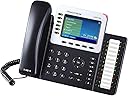
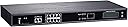
The Grandstream Business Phone System is an 8-line ultimate pack designed for modern professionals, featuring auto attendant, voicemail, and remote phone extensions. With call recording capabilities and a year of free phone service, this system ensures you stay connected and efficient, whether in the office or on the go.
| ASIN | B0789WQCTG |
| Answering System Type | Digital |
| Best Sellers Rank | #938,643 in Office Products ( See Top 100 in Office Products ) #395 in PBX Phones & Systems #1,478 in VoIP Phones |
| Brand | Grandstream |
| Color | Black, White |
| Compatible Devices | Cordless Phones, Fax Machines, VoIP Services, PSTN Networks |
| Conference Call Capability | basic |
| Customer Reviews | 3.7 out of 5 stars 4 Reviews |
| Dialer Type | Single Keypad |
| Enclosure Material | Plastic |
| Manufacturer | Grandstream |
| Material | Plastic |
| Mfr Part Number | GXP2160 (8-PACK) + GXW4216 |
| Multiline Operation | Multi-Line Operation |
| Number of Items | 8 |
| Number of Packs | 8 |
| Power Source | Battery Powered |
| Recording Capacity | 3000 minutes |
| Telephone Type | Cordless |
| UPC | 645189996739 |
| Unit Count | 8 Count |
M**Y
no instruction for a non IT person
there is absolutely no instructions for how to set the system up for my small business. An IT person with plenty of experience wouldn't have any problem doing it but me an average Joe, I am just frustrated. There are no on line videos and I have tried to contact the company since last week for help. I will be sending it back and highly recommend that you don't get this system unless you really know how to set up an office phone system. I have set up 2 previous ones in my office without any problem. This one, Nope. its not going to happen
B**Y
Very easy to setup!
I was looking for a new phone system for my business to use at our new location instead of moving the old system from our old location. This system gave me the option of adding the system to our current phone lines and gave us the option to upgrade later if I decide to change to a VOIP line later. We currently have 4 lines and this system also gives me the option to add 2 additional lines. The connection and setup was very simple. Connect to a Network port in the offices. Make sure the other end is connected to a Switch and then phone panel also connects to the Switch and they are connected. Then plugged in my phone lines from my phone router and it is ready to go. Could not be easier.
Trustpilot
3 weeks ago
1 week ago