🔗 Power Your Productivity with the Ultimate Mobile Adapter!
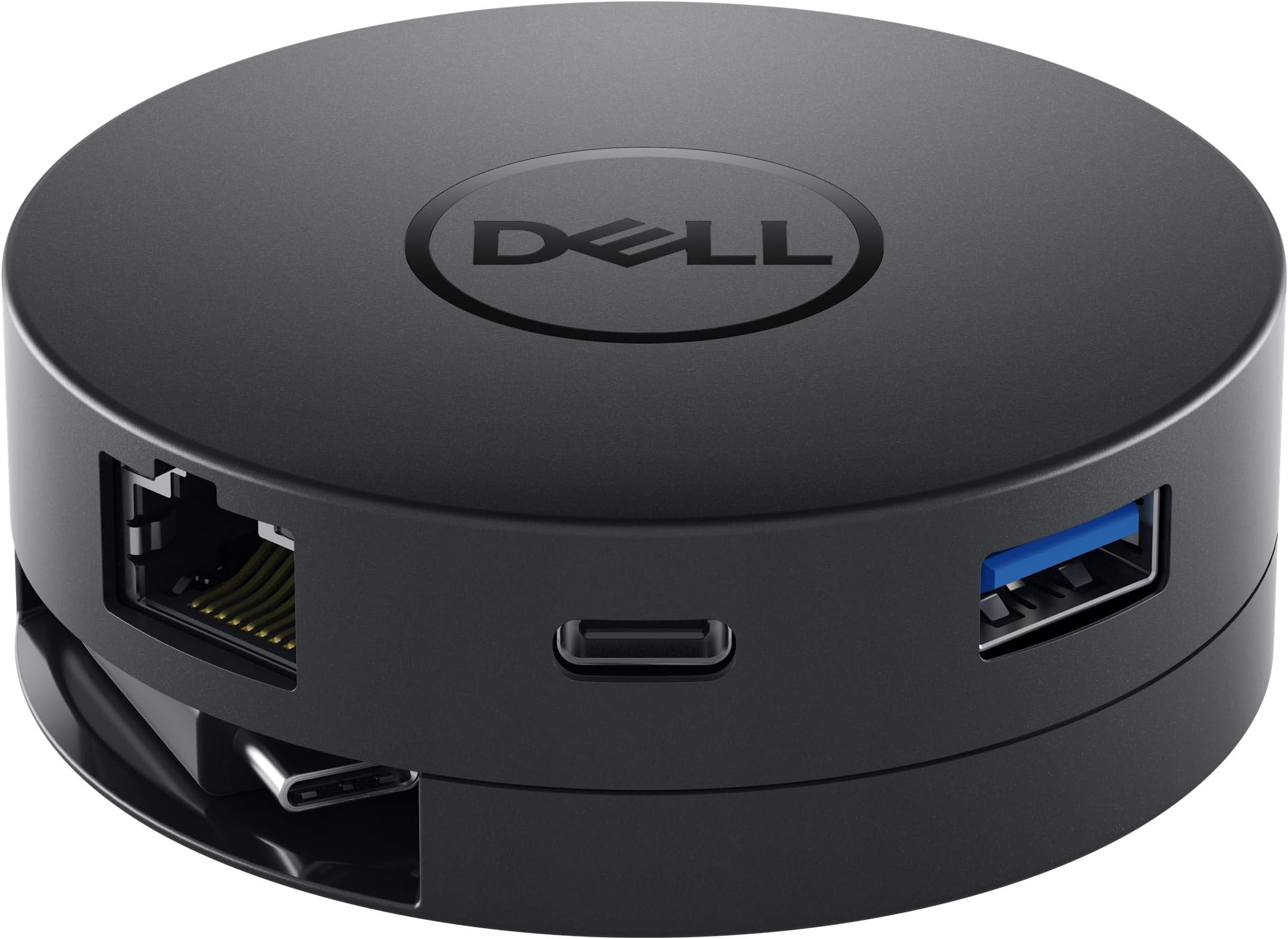
The Dell USB-C Mobile Adapter DA300 is a compact, multi-port hub designed for professionals on the go. It supports 4K@60Hz video output via HDMI or DisplayPort, offers six versatile ports including Ethernet and USB-A/C, and features a unique retractable coaxial cable for enhanced signal integrity and easy storage. Plug-and-play ready with no driver installation required, it’s optimized for Dell systems to deliver reliable, high-speed connectivity and seamless multitasking.


| ASIN | B079MDQDP4 |
| Best Sellers Rank | #1,107 in Audio & Video Connectors & Adapters |
| Brand | Dell |
| Built-In Media | Dell DA300 Mobile Adapter, Setup Guide |
| Color | Black |
| Compatible Devices | Cellular Phones |
| Connector Type | HDMI, USB Type C |
| Customer Reviews | 4.4 4.4 out of 5 stars (1,470) |
| Finish | Hdmi |
| Global Trade Identification Number | 00884116288527 |
| Item Dimensions | 2.75 x 2.75 x 0.96 inches |
| Item Type Name | USB-C Mobile Adapter – DA300 |
| Item Weight | 2.88 ounces |
| Manufacturer | Dell Marketing USA, LP |
| Model Number | DELL-DA300 |
| Number of Items | 1 |
| Number of Ports | 6 |
| Package Quantity | 1 |
| Specific Uses For Product | business, personal |
| UPC | 884116288527 724893621073 |
| Unit Count | 1.0 Count |
| Warranty Description | No |
| Warranty Type | Extended |
N**S
Great Adapter
I purchased this item to connect my laptop to a second monitor. It works perfectly. It connects via USB-C to my laptop and has other ports on it to connect additional peripherals. There is an additional USB-A, USB-C, ethernet port, and then HDMI, Display Port and VGA connections to connect another monitor. The cord winds up inside itself. I am very pleased with this product and would definitely recommend it.
B**A
Solved the Problem I Had!
The HDMI was not functioning on my laptop and I had no way to connect a second display, which I very much needed. I do a fair bit of multi-tasking and Photoshopping on the system, so I was extremely cramped on a 15" laptop display. Using this gizmo not only added a functional display/HDMI port, but also a VGA, another USB, Ethernet, etc...very handy little gadget. My laptop is a Dell Inspiron 7000 series 2n1, so I can testify that this works with a Dell. I'm very happy with this purchase.
J**Z
Compact, lots of ports
This is a nicely made adapter with multiple video ports, as well as a USB-C and USB-A port. The cord retracts into the hockey puck-shaped adapter and it is very easy to throw in a bag and carry around. It is handy if you need to give presentations and are not sure what type of video plug you are going to encounter. No problems at all with the video output or the ethernet interface. The whole thing is plug and play and works immediately on my computer with no fuss. Cons - pricey, no pass-through charging, the displayport output does not support daisy-chaining multiple monitors, and - depending on whether your port is thunderbolt or not - you may only be able to use one of the USB ports at a time.
N**E
Premium Price & Product, but some important features missing. Deal breaker to some.
I bought this adapter for my 2017 MacBook Pro (13-inch, 2 Thunderbolt 3 Ports). I knew right from the get-go it didn't have an SD Card Reader like the Lenovo USB-C Hub, Aluminum Type C Adapter with HDMI Port, Gigabit Ethernet Port, USBC Power Delivery, 2 USB 3.0 Ports, SD Card Reader, for 2016/2017 MacBook Pro and More USB C Devices or sleekness of the HyperDrive USB C Hub, Best Type-C DUO Adapter 50Gbps for MacBook Pro 2017/2016 13" 15", 7in2: USB-C 100W Power Delivery, USBC 5Gbps Data, 4K HDMI, microSD/SD Card Reader, 2xUSB 3.1 Ports by SANHO , but I chose it for 2 reasons. 1. It supports 4k. The Hyperdrive doesn't support this. Well, it DOES support 4K, but only at 30 Hz through it's 1 HDMI port. The Dell USB-C Mobile Adapter has an HDMI, VGA, and DisplayPort, and it supports 4K and 60 Hz through DisplayPort and HDMI, and still has that VGA port available. HOWEVER, it does NOT support duel-monitor setups. If you're buying this for a desktop without a monitor and are expecting to plug in two monitors to it, don't bother. It only supports 1 monitor at a time. 2. It supports VGA. The monitor I currently have is a VGA monitor, but I wanted to be able to upgrade to a 4K Monitor when I want. For now, the VGA works fine. 3. It has basic features, like Gigabit Ethernet, USB, and all the display connections mentioned above. Personally I would've liked them to dump the USB-C Connection on it for a USB-A Connection, and I'll explain why below. I already had a USB-C to USB-A Adapter from Apple to interface with my 2TB Time Machine drive, so I could plug that into the USB-C Port on the Hub for an Extra USB-A port, but it's not ideal. I don't really like daisy chaining adapters if I don't have to. There are some downsides to buying this adapter: 1. The price is high compared to the Lenovo, which seems to have more features than this adapter, however it's worth buying this over some other 1st Party adapters, like the Apple adapters, which only have charging, display, and a single USB. 2. It does NOT support Power Passthrough. The USB-C Port onboard this adapter is only for USB-C Data Transfer, not charging. I haven't tested if it can charge stuff like iPhones or the Pixel/Galaxy Phones, but as far as I know it's for data only. 3. It doesn't have an SD Card Reader. If you want SD Card reader support, you must use a USB-C/A SD Card Reader, or what I do is AirDrop the files from my SD Card from my iMac to my MacBook. You could also use a Network Share Point to transfer them, but it's whatever you decide. 4. This is not really a downside, but it does get slightly warm. I'm not sure if that's just due to it being a USB-C Hub (This is the first one I've owned), but it is warm to the touch. I'm also not sure if it'll get warmer if you plug in a higher resolution display to it (Again, I only own a VGA display, and this is the first hub I've owned as well, so I can't compare it very well). All in all, I put 4 stars instead of 5 because I think Power Passthrough and not having SD Card support or at least an Extra USB-A port is a pretty big deal breaker to some. If I had the 13-inch MacBook with 4 Thunderbolt 3 Ports, then it wouldn't be a problem because I would have an extra two ports, but since one is being taken for my charger and the other for the hub, it's kind of annoying to not have that Power Passthrough, but I traded that off for support of all major display connections. If I had to choose between one of the three products I've mentioned (The Dell Hub, the HyperDrive, or the Lenovo Hub), I would pick the Lenovo Hub ONLY if I had an HDMI Monitor. I can't spend a ton of money on an HDMI monitor right now, so this hub is the best I could do until I upgrade my display. If you have a VGA or DisplayPort monitor, go with this adapter. If you have an HDMI, go with the Lenovo. I wouldn't suggest the HyperDrive because of its lack of 4K 60Hz video (It's a personal preference of mine, but I've been spoiled with the Retina Displays/5K Displays of the MacBook/iMac).
A**R
Excelente producto, calidad y efectivo con antigua conexión y actual como conector tipo C y HDMI.
A**R
Docking Puck
This is a useful tool that goes into the laptop. It is easy carry. It works like a docking station and use it to charge while you use your laptop. It is compatible with most Dell laptops and it has quality to work on your projects and other fun things on your laptop.
B**N
Great price and it does the job.
I like this hub. it looks like a small hockey puck, you twist the bottom and the USB-C cord comes out. It comes with the usual suspects, R45 for internet, HDMI, DisplayPort, USB3 and a VGA port,(yes really, and no, I don't know why either) I have no way to check the VGA because it's not 2005 but the other ports all work fine on my PC as well as my Mac. If I were to nitpick, it would be the USB-C cord should be a bit longer, maybe another USB port instead of the VGA. It's small enough to stick in your carry bag.
A**R
Stopped working after 2 uses
Purchased this for work to use with projector, worked fine first time used, then quit. Unfortunately we didn't discover this until we were beyond the return window.
D**P
Still using it and very versatile. Could use more usb ports.
G**N
Compact, easy to use and affordable. Perfect device for home office dual monitor set up.
C**G
I had the older version that was thinner and square but I lost it. So I got this newer model. I only just got it and it works well. I use it with my Dell xps13 to connect it with a large 4k uhd monitor via the HDMI port, a keyboard and mouse (the mouse plugs into the keyboard) via the USB port and internet via the ethernet port. I like that it has a spare USB-C port which the old one didn't. My laptop, like most only has 1 USB-C port so the fact that you don't lose that when using this device is a bonus(btw, this cannot be used for charging, you can not have power coming from a USB-C cable and pass it through this adaptor). The spare ports I don't use are display port and an old fashion vga port. The USB-C cable retracts by twisting the bottom half, it is about 5 inches or 13 cm long which is much longer than the old one which I prefer as the all the cables are bit more out of the way. Overall good product but I wish it was cheaper. Great to just have to plug in power and one adaptor in the morning.
L**Z
Llego en caja original, sellado y en perfecto estado de empaque. Al abrirlo, fue muy sencillo el utilizarlo y todos los puertos funcionaron a la perfección. Recomiendo este artítulo para aquellas personas que buscan un Docking simple, pequeño y fácil de transportar. Sólo revisen que su equipo cuenta con el puerto USB Type C necesario.
N**I
Perfetto sia con il MacBook Air che con i portatili Dell. Piccolo ma potente, vale tutti i soldi spesi
Trustpilot
5 days ago
2 weeks ago