🎥 Elevate your space with NOMVDIC L500 — Big Screen Magic, Tiny Package!
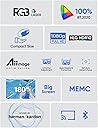
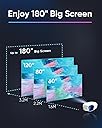
The NOMVDIC L500 is a portable 1080P triple laser projector featuring 500 lumens brightness, 100% BT.2020 color gamut for vivid cinema-quality colors, and a massive 180-inch projection capability. It includes advanced MEMC technology for smooth motion, auto focus, and keystone correction for easy setup. With built-in WiFi, Bluetooth, and support for streaming dongles including native Netflix, it’s designed for on-the-go professionals and home entertainment enthusiasts seeking a compact yet powerful projector.


| ASIN | B0C77PZM52 |
| Antenna Location | Home Cinema |
| Average Life Span | 50000 Hours |
| Best Sellers Rank | 102,385 in Electronics & Photo ( See Top 100 in Electronics & Photo ) 1,100 in Projectors |
| Box Contents | Power adaptor, Remote control, Harman Kardon 7W cube speaker |
| Brand | NOMVDIC |
| Brand Name | NOMVDIC |
| Brightness | 2500 Lumen |
| Colour | Black |
| Compatible Devices | Television, Laptop, Smartphone, Gaming Console |
| Connectivity technology | Bluetooth, USB, Wi-Fi |
| Contrast Ratio | 3000000:1 |
| Control Method | Remote |
| Controller Type | Button Control |
| Customer Reviews | 3.8 out of 5 stars 56 Reviews |
| Display Type | Laser |
| Display resolution | 1920 x 1080 |
| Display resolution maximum | 1920 x 1080 |
| Form Factor | Portable |
| Hardware Connectivity | Bluetooth |
| Item Dimensions L x W x H | 16.5L x 20.8W x 9.2H centimetres |
| Lamp Wattage | 51.3 Watts |
| Manufacturer | NOMVDIC |
| Manufacturer Part Number | L500 |
| Maximum Display Resolution | 1920 x 1080 |
| Maximum Image Size | 180 Inches |
| Maximum Throw Distance | 4.78 Metres |
| Minimum Throw Distance | 1.06 Metres |
| Model Name | L500 |
| Model Number | L500 |
| Mounting Type | Floor Mount, Tabletop Mount |
| Native Resolution | 1920 x 1080 |
| Network Connectivity Technology | Bluetooth, USB, Wi-Fi |
| Number of Items | 1 |
| Number of Packs | 1 |
| Picture Quality Enhancement Technology | MEMC, HDR/HLG support |
| Product Features | Built-In Wi-Fi, USB Connectivity |
| Projector Maximum White Brightness | 500 ANSI Lumens |
| Recommended uses for product | Home Cinema |
| UPC | 850038492083 |
| Unit Count | 1.0 count |
| Vertical Keystone Correction | 40 Inches |
| Video Encoding | H.264, H.265, MPEG-4 |
| Wattage | 51.3 watts |
M**D
Excellent for the right price
At the price is paid compared to the initial crowdfunding price, this was. bargain. Yes I had issues with the initial one I purchased where the lasers would not initialise and therefore no picture but Amazon replaced once I raised the issue. The 2nd projector has been working great, image quality is excellent although not as bright as I would have hoped based on the specs. Colours and adjustability allow for fine tuning of the image. Auto alignment was hit and miss and so I opted to use the manual adjustments and turn off the auto focus and alignment at start up so it keeps the screen size and angles I have set. Sound quality is decent for only a 7w speaker but watching movies is loud and clear. Easy to set up with a good short throw ratio. Currently using a fire stick max and where apps support HDR and hlg, the projector has picked these up and can definitely see the difference in image quality. Would recommend if can pick up at a low price but as the company no longer exists there won't be much support moving forward.
S**N
For the money it was terrible
I thought I'd go for high spec and pay more but not always the best option. As the software was terrible, wouldn't connect to my network, apps would load or werent even available in play store as advertised, contrast ratio and brightness also poor, I sent it back and bought something else.
V**A
It's a nice item
It's okay, but a slightly heavy item with many cables. Its autofocus works correct, but it's corners correction can be wrong periodically.
S**D
Great little projector – bright, compact and perfect for movie nights
The picture is surprisingly bright. Even in a well-lit room it’s watchable, but it really shines in a dark space where the image becomes vivid and punchy. There is a bit of laser speckle on the image. You’ll notice it if you go looking for it, but once you’re watching a film it’s easy to forget it’s there. Colours are very saturated, especially reds. You can tweak the settings to tone it down, but the options are limited so it’s never quite perfect. The projector runs nice and cool and the fan is very quiet — once you start watching you barely hear it. This is the third projector I’ve owned for home movie nights and honestly, it’s the best so far. A few downsides: the built-in Android system doesn’t have all the usual apps, so I’d recommend using a streaming stick like a Fire Stick or Roku. The built-in sound is fine for YouTube or quick clips, but not great for movies. There’s no AUX port, so a Bluetooth speaker is the way to go. It’s also really compact, which makes it great for travel or camping. Easy to pack and perfect for entertainment on the go. I've added an image which has been slightly altered by my phone. It doesn't really do the image justice.
E**D
Nice image but has design flaws
Will not remember projector orientation setting answer from nomvdic - Following consultation with our Technical Team, we have determined that the current issue cannot be resolved through a software update. However, you can mitigate this issue by adjusting the sequence of HDMI connections. Specifically, the issue pertains to the inability to save projection orientation if the projector is powered on after connecting the HDMI signal.
P**X
Fan noise is is terrible, the worst ever
The projector is fine in terms of image quality however the fan noise is very loud and it breaks immersion, you need to listen to the audio with noise cancelling headphones, it's too loud if only there was an update that can reduce the fan curve, it has no business being that loud, I've tested many projectors and this one is by far the loudest. I wanted to get the P1000 but I hear that one is even louder, sound from fan is terrible and can't be controlled, I have no idea how to navigate that issue. It's a shame because it is actually a very good image. Fan noise is despicable, it's like 60db
F**D
Phase flaws
These 3laser projectors are incredible so many colours but the software has issues not terrible but annoying.
S**0
Great compact RGB laser projector
Unique design, very compact. Surprisingly bright considering how small this unit is. Really enjoying how accurate the colours are. I'm using movie setting and reducing saturation to 40. Auto focus feature works really well.
W**N
buen producto
excelente proyector lo recomiendo.
ラ**2
ライバル製品(Nebula3Laser)と比較すると
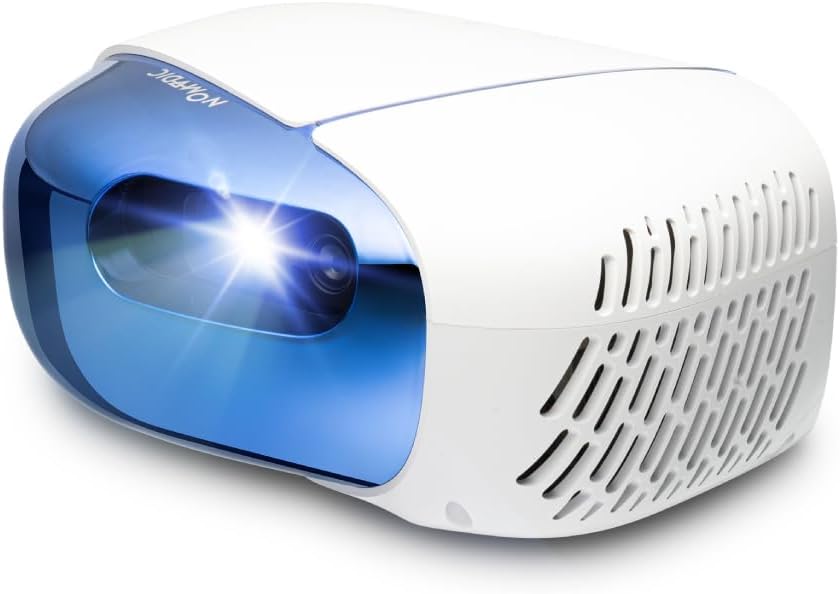
Nomvdic(ノメディック) L500の長所は、 ① 投影画面が「非常に」美しい。有機ELの4Kテレビに近い色の再現力。同じレーザーでも他の単色レーザー製品とは別次元。Nebura3 Laser(以下「ネビュラ3L」と略す)と比較すると、「3色RGBレーザー(L500)」と「単色光源レーザー(ネビュラ3L)」の違いがハッキリとわかる。 L500は、特に赤の発色が素晴らしい。VSF(ビクトリア・シークレット・ファッションショー)などを見たら、違いは顕著。 YouTubeでNomvdic社のL500を検索すると、L500の「3色RGBレーザーの発色」を褒めている場合が多いが、私も完全に同意できる。 ② 8TBなどのNTSCフォーマットのHDD, SSDなどの動画ファイルがUSBから直接読める。MP4, MKV、ISOファイルもすべてである。例えば家族成長の記録のBlu-RayディスクなどのISOファイルが直接HDDから読める。KODI, VLCなどで再生可能。 ③ デザインが近未来的。カッコいい。素人にはプロジェクターには見えない。 ④ パソコンにデスクトップ画面をモニターに投影可能なUSB-C端子があれば、L500付属ケーブルを用いて、パソコンの動画をL500で投影が可能。これはプレゼンテーションで非常に便利。L500には 両端USB-Cの画像伝送ケーブル (1m)が付属している。ケーブルチェッカーで調べたところ、e-マーカー付であった。(ただし、L500をこのケーブルで給電するとケーブル出力不足で落ちるので、対応出力60W以下と思われる。) ⑤ 地味ではあるが、リモコンに触ると、ボタンが光る。これは暗いところでは本当に便利。押し間違いがなくなります。 ⑥ (別にPD充電器を購入すれば、)PD電源供給が可能。差し込み部分が、DC19Vの5.5mm×2.5mmであり、東芝用のPDトリガープラグがそのまま流用可能。例えば、PDトリガープラグを使えば、PD充電器を使って電源供給が可能となり、大きなACアダプタを持ち運びせずに済む。 ⑦ (別にLANアダプタを購入すれば、)有線LANでインターネット接続が可能。例えばAnkerのハブ(商品名は最後に記載)に、USB-C→USB変換アダプタをつけて、USBにつなぐと、有線LANでインターネットにアクセスできる。コレを使えば、安定した動画視聴が可能となる。 ⑧ (別にモバイルバッテリーを購入すれば)バッテリー-駆動が可能。ただし、PDバッテリーは、最低100W出力が必要、そうすれば、2時間程度のモバイルバッテリープロジェクターとなる。 ただし、下記に注意する必要がある。 A) モバイルバッテリーの最大出力は最低100Wが必要。65W出力のモバイルバッテリーでは、途中で出力不足になり、プロジェクタ自体が落ちてしまう。 B) モバイルバッテリーの充電の種類にも注意が必要。バッテリーで有名なAnkerの高級機種モバイルバッテリー製品はパススルー『充電』ではなく、パススルー『給電』なので、「バッテリーが減ってきたから、PD充電を平行しながら使おう」とすると、PD充電器をPDバッテリーに接続したとたんに、電圧ネゴシエーションのため、プロジェクタへの給電がストップし、プロジェクタが即座に落ちる。これを防ぐには、USB-Cの電圧ネゴシエーションを行わない、パススルー『充電』の製品を選ぶ必要がある。 ■微妙なところは、 ① OSにバグあり、(iPhone15 Pro (iOS17.3))を、ミラーリングできない。(箱記載には「できる」とあるが、間違い。) (注)本体のファームウエアをVer1.3から1.5にアップデートすると、無線のミラーリングは できるようになる。しかし有線ミラーリングは相変わらずできない。 ② デザインにこだわりすぎて、 ACアダプタ、USB, USB-C, HDMIの差し込み口がわかりにくい。プロジェクタを使う暗がりでは、差し込めないため、都度部屋を明るくして、確認しないといけない。スクリーンに向けるときに、L500をどのように向けたら垂直になるかわかりにくい。 ③ ACアダプタが大きく重すぎる。持ち運びには不便。 ④ 投影倍率調整に難があり、Zoomが0.9倍、0.8倍などのときは、ピントが合わないときがある。1.0倍に戻せばピントは合う。すなわち、置き場所に苦労する。 ⑤ 時々Wi-Fi外れてしまい、Wi-Fiを選択しても、無線の探索画面が出てこないことがある。そのようなときは、日本語を英語に変換して立ち上げなおせば、戻ることがあるが、ひと手間かかる。 ⑥ 天井への投影は想定していないようで、天井ではきちんとピントを合わない。(あえて言うならば、真上だけは天井でもピントが合うが)天井に斜めに投影するとピントまず合わない。 ⑦ アプリストアはあるが、Nomvdic社の認めたソフトが30本程度しか入っていない。アンドロイドの汎用ソフトをなんでもインストールできない。Nebula3Lはなんでもインストールできる。(例:中国で使おうとしても、OpenVPNやWire GuardなどのVPNソフトがインストールできない)。 ⑧ 使えるアプリにも不満が少々。例えば、YouTubeアプリは、開始時に表紙を加工した疑似YouTubeアプリを利用して立ち上げるが、立ち上げるたびにソフトの更新を求められる。何度も更新したが、アプリ立ち上げのたびに、やはり聞かれる。また、Kodiが便利なのでよく使うが、新バージョンKodi v20.3 (Nexus)がアプリストアにないため、導入できない。 ⑨ 計測すると消費電力が48W~53W程度なのに、65WのPD充電器が使えない。想像であるが突発電流があるようだ。それゆえ、PD化するにしても、高価な100WのPD充電器が必須。 ⑩ すべての電源ケーブルはe-マーカー対応が必須(最低100W対応)※60W程度のe-マーカーなしの旧式のケーブルでは落ちる。 ネビュラ3Lの良いところは、 ① 縦横のフォーカスが早い。 ② アプリがグーグルストアで自由に選べる。 ③ Zoomが0.5~1.0倍に無制限に変更できる。 ④ (別にLANアダプタを購入すれば、)有線インターネットができる。 一方、ネビュラ3Lの微妙なところは、 ①USB-C端子にHDDやSSDをつなげて、ISO, MKV, MP4などの動画ファイルを直結して読みこむことができない。しかしながら、WiFi経由でサーバー上のISO, MKV, MP4は読み込め再生可能である。このことから判断すると、機器(もしくはOS上)に直結した動画ファイルについては、読み込み禁止の規制がかかっているもよう。※ネビュラ2ではこのような規制はなく、どんな動画ファイルでも直結したHDDで読み込めた。 ■総評 L500の色の鮮やかさは素人が見てもはっきりとわかる。「こんなきれいに投影できるプロジェクタは見たことがない」と思えるほど。アメリカの西海岸の技術者の心意気、ベンチャー企業の勢いを感じる製品。OSの成熟度はあと一歩であるが、それを補って余りあるほどの美しい投影画像が得られる。安い中華製とは一味違う。 ネビュラ3LとL500を比較すると、ネビュラ3Lのほうが使い勝手が良い。リモコンの切れも良いし、反応もよい。アプリも自由。しかし、画像の綺麗さを選ぶなら文句なしにL500である。 何がそんなに違うかは、やはり黒の表現だと思う。単色レーザーなら、黒い部分も、薄く白浮きするのだが、L500の黒は完全に光なく発色していない。 これは液晶テレビだと黒い部分も白浮きするが、有機ELテレビだと、黒い部分が完全に沈んだ黒になるのに似ている。L500はRGB3色レーザーなので、有機ELテレビの表現に近い。 建物に当てるレーザーマッピングに近い。色目がものすごくクッキリとしている。(掲載写真参照)。 「Anker Nebula 3 Laserを購入して後悔した。」 「私はきれいな色で再生できるプロジェクタがやっぱり欲しい」 「Anker Nebula 3 Laserが最高。でも他にいいのはある?」 と思っているあなた。 両方を使ってみた私の経験を記載しました。 お役に立てれば幸いです。 ---------以下、参考商品名----------- ■PDトリガーケーブル CableccタイプC USB-Cメス入力、DC 5.5 * 2.5mm電源PD充電ケーブル、ラップトップ18-20Vに適合 ※これで、PD充電器で本機に給電できます。 ■モバイルバッテリー(避けた方がよい) Anker 737 Power Bank (PowerCore 24000)など。 ※パススルー『給電』のバッテリーのため。 ■モバイルバッテリー(使ってよい) Alfox 140W 27000mAhモバイルバッテリー、2USB-C出力、スマートデジタルディスプレイ、MacBook Pro、Dell、Steam、iPhone 15/14/13シリーズ、Galaxy S23 などに対応するモバイルバッテリー ※パススルー『充電』のバッテリーのため。 ■有線LANハブ Anker PowerExpand 6-in-1 イーサネット ハブ PD 65W USB-Cポート 4K HDMIポート 1Gbpsイーサネットポート USB3.0ポート搭載 MacBook Pro, MacBook Air, iPad Pro用 ※これを買えば有線LAN化できます。 ■PD充電器 Anker Prime Wall Charger (100W, 3 ports, GaN) (ブラック) ※本機は電源にシビアであるため、安定したAnker製品をおすすめ。 ■USB、USB-C接続アダプタ XAOSUN USB Type C(メス) to USB 3.0(オス) 変換アダプタ- 【2個セット】USB3.1 10Gbps 高速データ伝送 Sony Xperia/iphone/iPad/MacBook/Surface 変換アダプタ 急速充電 小型 軽量 高耐久 合金製 ラップトップ、PC、充電器等対応 ※USB-CをUSBに変換 ■ピッタリ格納バッグ ETSUMI プレミアムII カメラバッグM 3.8L グレー E-3493 ※本機をきれいに収納可能。 ---すべてAmazon..co.jpで購入できるものばかりです。
R**S
正規品は素晴らしい商品ですよ
正規の価格で購入した者ですが、性能、画質、音質、付属品全て問題無く、2026年の他社最新モデルと比較しても遜色ない素晴らしい商品ですよ。 20,000円で購入して、不具合や付属品に関する不備に対するクレームを書き込んだり動画で貶したりしている方がいますが、中古品や偽物を掴まされているのではなきですか? 正規品で愉しんている者からすると、とても不快ですね。
S**I
Very bad product
Bed sharpness
Trustpilot
3 weeks ago
1 month ago