Desertcart purchases this item on your behalf and handles shipping, customs, and support to South Africa.
๐จ๏ธ Elevate your home office game with HP Deskjet 2820 โ where speed meets stunning color!
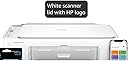
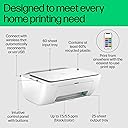
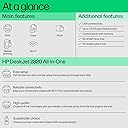
The HP Deskjet 2820 is a compact, WiFi-enabled inkjet printer designed for home use, offering fast black-and-white printing at 7.5 ppm and vibrant color prints at 1200 x 1200 dpi. This all-in-one device supports print, scan, and copy functions, connects seamlessly via USB or wireless, and includes a 1-year on-site warranty for peace of mind.


| ASIN | B0CJ7GLV97 |
| Additional Printer Functions | All In One |
| B&W Pages per Minute | 7.5 ppm |
| Best Sellers Rank | #12,975 in Computers & Accessories ( See Top 100 in Computers & Accessories ) #40 in Inkjet Printers |
| Box Contents | Inkjet Printer ,(Black ,Color Ink Cartridge ,Power Cord ,USB Cable ,Manual) |
| Brand | HP |
| Brand Name | HP |
| Color Pages per Minute | 5.15 ppm |
| Colour | White |
| Compatible Devices | Smartphones |
| Connectivity Technology | USB, Wi-Fi |
| Control Method | App |
| Controller Type | Ring |
| Customer Reviews | 3.3 out of 5 stars 936 Reviews |
| Dual-sided printing | No |
| Duplex | No |
| Hardware Interface | USB |
| Importer Contact Information | HP India Sales Private Limited, No. 24, Kothari Arena, Hosur Main Road, Adugodi, Bangalore, Karnataka, India, 560030 |
| Ink Color | Black, Cyan, Magenta, Yellow |
| Item Dimensions D x W x H | 19.1D x 47.5W x 35.4H Centimeters |
| Item Type Name | Inkjet Printer |
| Item Weight | 3.42 Kilograms |
| Manufacturer | HP, JABIL WEIHAI |
| Manufacturer Contact Information | JABIL WEIHAI |
| Max PrintResolution Color | 1200 x 1200 |
| Max PrintSpeed BlackWhite | 1200 dpi |
| Maximum Copy Resolution Black and White | 1200 dpi |
| Maximum Copy Resolution Color | 1200 x 1200 |
| Maximum Copy Speed Black and White | 7.5 ppm |
| Maximum Media Size | A4 |
| Maximum Sheet Capacity | 60 |
| Model Name | HP Inkjet |
| Model Number | 588L3D |
| Model Series | Deskjet |
| Network Connectivity Technology | USB, Wi-Fi |
| Number Of Trays | 2 |
| Other Special Features of the Product | Network-Ready |
| Output sheet capacity | 25 |
| Packer Contact Information | Cal-Comp Optical Electronics YUEYANG Co., LtdNo.8, Xinjinbao Road,Yueyang Chenglingji CBZ,Hunan Province, 414000, China |
| Paper Size | 216 x 297 Millimeters |
| Printer Output Type | Colour |
| Printer Type | Inkjet |
| Printing Media Type | Envelopes, Paper (plain) |
| Printing Technology | Inkjet |
| Resolution | 1200 x 1200 |
| Scanner Type | Flatbed |
| Special Feature | Network-Ready |
| Specific Uses For Product | Home |
| Total USB Ports | 1 |
| UPC | 196548478798 |
| Unit Count | 8.0 Count |
| Warranty Description | 1 Year |
A**J
Excellent Printer, but Ink Cartridges Are Quite Expensive โญโญโญโญโญ
I have been using the HP DeskJet 2820 Wi-Fi Colour Printer, and overall my experience has been very good. ๐๐จ๏ธ The printer is easy to use, works well with Wi-Fi, and the print quality is good for regular home and office use. Colour and black-and-white printing both work well, and overall the printer has performed reliably for me. What I liked: โ Very good overall performance โ Good print quality โ Wi-Fi connectivity is convenient โ Easy to use for regular printing โ Good option for home use โ Compact and practical โ Cartridges can be refilled, which can reduce the running cost if you know the proper refilling technique The main drawback: โ ๏ธ The colour cartridge runs out quite quickly, especially if you do regular colour printing. The replacement colour cartridge is also quite expensive. ๐ The black cartridge is expensive as well, although the cost can be reduced by refilling it yourself. The problem is that not everyone knows the correct technique for refilling the cartridges, so beginners may find the running cost expensive. Overall: โญโญโญโญโญ If I don't consider the cartridge cost, I would definitely give this printer 5/5 stars. The printer itself is excellent and has given me a very good experience. ๐ My recommendation: If you need a reliable Wi-Fi colour printer for home use and are okay with the cartridge costโor know how to refill the cartridges properlyโthis is a very good choice. ๐จ๏ธ๐ เคฎเฅเค HP DeskJet 2820 Wi-Fi Colour Printer เคเคธเฅเคคเฅเคฎเคพเคฒ เคเคฐ เคฐเคนเคพ เคนเฅเค เคเคฐ เคฎเฅเคฐเคพ เคเคตเคฐเคเคฒ เค เคจเฅเคญเคต เคเคพเคซเฅ เค เคเฅเคเคพ เคฐเคนเคพ เคนเฅเฅค ๐๐จ๏ธ เคชเฅเคฐเคฟเคเคเคฐ เคเคธเฅเคคเฅเคฎเคพเคฒ เคเคฐเคจเฅ เคฎเฅเค เคเคธเคพเคจ เคนเฅ, Wi-Fi เคเคจเฅเคเฅเคเคฟเคตเคฟเคเฅ เค เคเฅเคเฅ เคนเฅ เคเคฐ เคธเคพเคฎเคพเคจเฅเคฏ เคเคฐเฅเคฒเฅ เคฏเคพ เคเคซเคฟเคธ เคเฅ เคเคพเคฎ เคเฅ เคฒเคฟเค เคเคธเคเฅ เคชเฅเคฐเคฟเคเค เคเฅเคตเคพเคฒเคฟเคเฅ เคญเฅ เค เคเฅเคเฅ เคนเฅเฅค เคเคฒเคฐ เคเคฐ เคฌเฅเคฒเฅเค เคเคเคก เคตเฅเคนเคพเคเค เคฆเฅเคจเฅเค เคชเฅเคฐเคฟเคเค เค เคเฅเคเฅ เคเคคเฅ เคนเฅเคเฅค เคฎเฅเคเฅ เคเคธเคฎเฅเค เคเฅ เคเฅเคเฅเค เค เคเฅเคเฅ เคฒเคเฅเค: โ เคเคตเคฐเคเคฒ เคชเคฐเคซเฅเคฐเฅเคฎเฅเคเคธ เคฌเคนเฅเคค เค เคเฅเคเฅ โ เคชเฅเคฐเคฟเคเค เคเฅเคตเคพเคฒเคฟเคเฅ เค เคเฅเคเฅ โ Wi-Fi เคเคจเฅเคเฅเคเคฟเคตเคฟเคเฅ เคเคพเคซเฅ เคธเฅเคตเคฟเคงเคพเคเคจเค โ เคเคธเฅเคคเฅเคฎเคพเคฒ เคเคฐเคจเคพ เคเคธเคพเคจ โ เคเคฐ เคเฅ เคฒเคฟเค เค เคเฅเคเคพ เคชเฅเคฐเคฟเคเคเคฐ โ เคเฅเคฎเฅเคชเฅเคเฅเค เคเคฐ เคเคชเคฏเฅเคเฅ โ เคเคพเคฐเฅเคเฅเคฐเคฟเค เคเฅ เคฐเคฟเคซเคฟเคฒ เคเคฟเคฏเคพ เคเคพ เคธเคเคคเคพ เคนเฅ, เคเคฟเคธเคธเฅ เคธเคนเฅ เคคเคเคจเฅเค เคชเคคเคพ เคนเฅเคจเฅ เคชเคฐ เคชเฅเคฐเคฟเคเคเคฟเคเค เคเคพ เคเคฐเฅเค เคเคฎ เคเคฟเคฏเคพ เคเคพ เคธเคเคคเคพ เคนเฅ เคธเคฌเคธเฅ เคฌเคกเคผเฅ เคเคฎเฅ: โ ๏ธ เคเคธเคเคพ เคเคฒเคฐ เคเคพเคฐเฅเคเฅเคฐเคฟเค เคฌเคนเฅเคค เคเคฒเฅเคฆเฅ เคเคคเฅเคฎ เคนเฅ เคเคพเคคเคพ เคนเฅ, เคเคพเคธเคเคฐ เค เคเคฐ เคเคช เคจเคฟเคฏเคฎเคฟเคค เคฐเฅเคช เคธเฅ เคเคฒเคฐ เคชเฅเคฐเคฟเคเค เคจเคฟเคเคพเคฒเคคเฅ เคนเฅเคเฅค เคเคธเคเฅ เค เคฒเคพเคตเคพ เคจเคฏเคพ เคเคฒเคฐ เคเคพเคฐเฅเคเฅเคฐเคฟเค เคเคพเคซเฅ เคฎเคนเคเคเคพ เคนเฅเฅค ๐ เคฌเฅเคฒเฅเค เคเคพเคฐเฅเคเฅเคฐเคฟเค เคญเฅ เคฎเคนเคเคเคพ เคนเฅ, เคนเคพเคฒเคพเคเคเคฟ เคเคธเฅ เคเฅเคฆ เคฐเคฟเคซเคฟเคฒ เคเคฐเคเฅ เคเคฐเฅเค เคเฅเค เคเคฎ เคเคฟเคฏเคพ เคเคพ เคธเคเคคเคพ เคนเฅเฅค เคฒเฅเคเคฟเคจ เคธเคฎเคธเฅเคฏเคพ เคฏเคน เคนเฅ เคเคฟ เคนเคฐ เคเคฟเคธเฅ เคเฅ เคเคพเคฐเฅเคเฅเคฐเคฟเค เคเฅ เคธเคนเฅ เคคเคฐเฅเคเฅ เคธเฅ เคฐเคฟเคซเคฟเคฒ เคเคฐเคจเฅ เคเฅ เคคเคเคจเฅเค เคชเคคเคพ เคจเคนเฅเค เคนเฅเคคเฅ, เคเคธเคฒเคฟเค เคเคฟเคจ เคฒเฅเคเฅเค เคเฅ เคฐเคฟเคซเคฟเคฒ เคเคฐเคจเคพ เคจเคนเฅเค เคเคคเคพ, เคเคจเคเฅ เคฒเคฟเค เคเคธเคเคพ เคฐเคจเคฟเคเค เคเฅเคธเฅเค เคฅเฅเคกเคผเคพ เคเฅเคฏเคพเคฆเคพ เคชเคกเคผ เคธเคเคคเคพ เคนเฅเฅค เคเฅเคฒ เคฎเคฟเคฒเคพเคเคฐ: โญโญโญโญโญ เค เคเคฐ เคเคพเคฐเฅเคเฅเคฐเคฟเค เคเฅ เคเฅเคฎเคค เคเฅ เค เคฒเค เคฐเค เคฆเฅเค, เคคเฅ เคฎเฅเค เคเคธ เคชเฅเคฐเคฟเคเคเคฐ เคเฅ 5 เคฎเฅเค เคธเฅ 5 เคธเฅเคเคพเคฐ เคฆเฅเคเคเคพเฅค เคชเฅเคฐเคฟเคเคเคฐ เคเฅ เคคเฅเคฐ เคชเคฐ เคฏเคน เคฌเคนเฅเคค เค เคเฅเคเคพ เคนเฅ เคเคฐ เคฎเฅเคฐเคพ เคตเฅเคฏเคเฅเคคเคฟเคเคค เค เคจเฅเคญเคต เคญเฅ เคเคพเคซเฅ เค เคเฅเคเคพ เคฐเคนเคพ เคนเฅเฅค ๐ เคฎเฅเคฐเฅ เคธเคฒเคพเคน: เค เคเคฐ เคเคชเคเฅ เคเคฐ เคเฅ เคฒเคฟเค เคเค เค เคเฅเคเคพ เคเคฐ เคญเคฐเฅเคธเฅเคฎเคเคฆ Wi-Fi colour printer เคเคพเคนเคฟเค เคเคฐ เคเคช เคเคพเคฐเฅเคเฅเคฐเคฟเค เคเฅ เคเฅเคฎเคค เคเฅ เคฎเฅเคจเฅเค เคเคฐ เคธเคเคคเฅ เคนเฅเค เคฏเคพ เคเคธเฅ เคธเคนเฅ เคคเคฐเฅเคเฅ เคธเฅ เคฐเคฟเคซเคฟเคฒ เคเคฐเคจเคพ เคเคพเคจเคคเฅ เคนเฅเค, เคคเฅ เคฏเคน เคเค เคฌเคนเฅเคค เค เคเฅเคเคพ เคตเคฟเคเคฒเฅเคช เคนเฅเฅค ๐จ๏ธ๐
Z**N
AVOID DO NOT BUY
This HP WiFI Deskjet 2800 printer is one of the WORST printer I have purchased. From the 1st day I have had issues installing the printer to PRINT and SCAN via USB or WiFi. At times it works and most other times it will not work and need to constantly have internet connection even when using USB cable to PRINT and SCAN. Now I am receiving message SCAN not available and I have spent several hours trying to fix the issue with no luck. HP wants you to be connected to the internet as they want to keep track of and maybe upload your print and scan docs to HP servers and the use of ink cartridges. Folks do not buy this HP printer you will regret it as I am now and I paid Rs. 6k. Also the cost of cartridge is too high and your printer will stop working if ink is low. AVOID AVOID do not buy.
M**A
Good
Pocket friendly..Good for small house work purpose.. cost of print high..Sometimes connection disturbing..But can be cured easily.
G**V
Compatibility issues are there
Still value for money
V**N
Defective scanner, Amazon denied replacement despite valid return window
The scanner fails approximately 90-95% of the time (roughly 1 successful scan in 15-25 attempts) via the HP Smart app. The unit is not usable for its advertised scan function. The bigger challenge is working with Amazon or seller for a replacement or refund, its a nightmare, and Amazon is losing its reputation, Issue 1 โ Self-service replace option is broken: Clicking "Replace" on the order does not let me select a defect reason or process a replacement. It only directs me to contact HP support for troubleshooting or Amazon customer support โ both of which I have already done, with no resolution. and Issue 2 Chat support refused a valid defect claim: I contacted chat support and clearly reported the scan failure. Despite this, agents (Dushyant, Sara, and Pragyan) repeatedly declined to process a return or replacement, at points citing conflicting policy information โ one agent stated the item was only eligible for a "10 Day Service Centre Replacement," which directly contradicts the "Eligible till 7 August 2026" replacement window shown on the order page itself.
A**,
Good printing. Ink cartridges have very little ink. Very uneconomical printer.
The ink-cartridges installed in the new printer are SET-UP INK CARTIRIDGES. So, new set of ink-cartridge has to be purchased separately for using the printer. I faced a paper-jam initially. This was corrected by the HP Customer Support on informing them. However, frequent problems are there when printing multiple pages. To conclude, the ink-cartridges needed have very little ink, making it an EXPENSIVE printer. This HP Deskjet 2820 is not recommended. It definitely depreciates the reputation of HP Deskjet printers.
A**A
perfect home printer
Good to use at cheapest price
V**N
Beware of the high cartridge costs
Printer works fine but the cartridge cost are extremely expensive for the number of pages they produce. In just one year, I have spent more on replacement cartridges than the original cost of the printer itself. I would not recommend it to anyone looking for an economical printing solution. Unfortunately this printer has not delivered value for money. Complete Wastage
Trustpilot
3 weeks ago
1 month ago