Desertcart purchases this item on your behalf and handles shipping, customs, and support to South Africa.
๐ Print smarter, faster, greener โ your officeโs new productivity powerhouse!
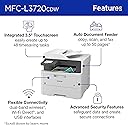
The Brother MFC-L3720CDW is a wireless color laser all-in-one printer designed for small offices and professionals who demand speed, quality, and connectivity. Delivering up to 19 ppm with sharp 2400 x 600 dpi resolution, it features a 250-sheet tray, automatic duplexing, and a 50-sheet auto document feeder. Advanced dual-band Wi-Fi, Wi-Fi Direct, and USB 2.0 connectivity support seamless multi-device printing. The 3.5โ touchscreen offers customizable shortcuts and cloud integration, while ENERGY STARยฎ compliance ensures eco-conscious operation. Backed by a 1-year warranty and Brotherโs Refresh subscription trial, itโs a reliable, efficient solution for high-volume, professional printing needs.


| ASIN | B0CFCZWPFD |
| Additional Printer Functions | All In One |
| B&W Pages per Minute | 19 pages_per_minute |
| Best Sellers Rank | #3,695 in Office Products ( See Top 100 in Office Products ) #8 in Laser Computer Printers |
| Brand | Brother |
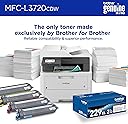
| Built-In Media | Toner Cartridges |
| Color | White |
| Color Depth | 24 bpp |
| Color Pages per Minute | 19 pages_per_minute |
| Compatible Cartridge | TN229BK; TN229M; TN229C; TN229Y; TN229XLBK; TN229XLM; TN229XLC; TN229XLY; TN229XXLBK; TN229XXLM; TN229XXLC; TN229XXLY; DR229CL |
| Compatible Devices | Laptops, PC, Smartphones, Tablets |
| Connectivity Technology | USB, Wi-Fi |
| Control Method | App, Touch, Voice |
| Controller Type | Android |
| Customer Reviews | 4.1 out of 5 stars 1,009 Reviews |
| Duplex | Automatic |
| Global Trade Identification Number | 00012502670230 |
| Hardware Interface | USB 2.0 |
| Initial Page Print Time | Less than 15 seconds |
| Ink Color | Black, Cyan, Magenta, Yellow |
| Item Dimensions D x W x H | 16.1"D x 17.5"W x 15.8"H |
| Item Type Name | Multifunction Printer |
| Item Weight | 44 pounds |
| Manufacturer | Brother |
| Maximum Copies Per Run | 99 |
| Maximum Copy Resolution Black and White | 600 x 600 dpi |
| Maximum Copy Resolution Color | 600 x 600 dpi |
| Maximum Copy Speed Black and White | 19 pages_per_minute |
| Maximum Media Size | 8.5 x 14 inch |
| Maximum Print Resolution Black and White | 2400 x 600 dpi dots_per_inch |
| Maximum Sheet Capacity | 250 |
| Maximum print Resolution Color | 2400 x 600 dpi dots_per_inch |
| Model Name | MFCL3720CDW |
| Model Number | MFCL3720CDW |
| Model Series | L37 |
| Number of Trays | 1 |
| Other Special Features of the Product | Auto-Duplex, Network-Ready |
| Output sheet capacity | 150 |
| Paper Size | 8.5 x 11, 8.5 x 14, 4 x 6 inches |
| Power Consumption | 500 watts |
| Print media | Card stock, Envelopes, Glossy photo paper, Labels, Paper (plain) |
| Printer Connectivity Type | USB, Wi-Fi |
| Printer Output Type | Color |
| Printer Type | Laser |
| Printing Technology | Laser |
| Resolution | 300 x 300 |
| Scanner Type | Flatbed, Sheetfed |
| Series Number | 37 |
| Special Feature | Auto-Duplex , Network-Ready |
| Specific Uses For Product | Home, Office |
| Total USB 2.0 Ports | 1 |
| Total Usb Ports | 1 |
| UPC | 012502670230 |
| Unit Count | 1 Count |
| Warranty Description | 1-year limited |
| Warranty Type | Limited |
S**Y
Wonderful printer! I would buy again
Outstanding quality and incredible efficiencyโ800+ pages and still going strong! I purchased the Brother MFC-L3720CDW for our busy home printing setup, and it has exceeded every expectation. The print quality is fantasticโcolors come out vibrant and crisp, and text is super sharp on every page. What impresses me most, though, is the efficiency. I have printed over 800 pages so far, and it handles heavy output effortlessly without burning through toner. Unlike traditional inkjets that constantly need cartridge replacements or dry out, this wireless color laser printer is a reliable workhorse that delivers professional-looking prints every time. The wireless connectivity was easy to set up across our devices, making it seamless to send print jobs right from our phones or computers. If you need a dependable, high-quality color printer that handles high-volume printing without constantly needing ink or toner changes, I cannot recommend this Brother model enough. I havenโt gotten any paper jams. Ink consumption is amazing!
J**N
Big bang for your buck!
Best purchase Iโve made with printers so much so I got one for my work office and one for my dadโs home office. They work amazing, quick, easy to use and the wireless function is perfect! For my job those are very important details and this hits a home run on each oneโs huge value for the money, features are simple but so effective, color prints look amazing. Both home and office printers are perfect. Specially the scanning portion! Quick clean and clear.
S**E
Terrible print quality in less than 1 year, terrible support, terrible warranty
I bought this printer on July 16, 2024 today's date is 3/6/2025 - Within the past 3 days the printer has started printing vertical bands on my pages. I have followed the troubleshooting steps outlined to clean the Corona wires and printed a print chart referenced in the documentation which shows a band on all colors in the print chart. Today I contacted Customer Service who made me do the exact same steps print other pages such as the print test page from the printer settings and a text document which did not show the band. I reprinted the print chart page which still showed the issue however the support rep tried to deem the issue resolved since the band did not show in the other pages I printed. I re-explained the issue still shows in the print chart and shows for all colors which resulted in being told the drums need to be replaced. I was advised the drums are out of the 90day warranty. The get a replacement the cost is 162.49 and states they apprx support up to 20,000 pages. I have not printed nearly that much, I've never even had to replace the toner at this point. This is not right. I've asked to escalate and was told I'd have to receive a call back. Before this issue occurred I was very happy with the printer but this does not leave a good feeling for me and will refrain from making any future purchases for a Brother printer and products.
J**S
amazing printer loved it!!
I've been using this printer for both work and home, and it's been great. The print quality is really sharp, especially for color documents, and everything prints pretty quickly. Setup was easier than I expected, and connecting it to Wi-Fi only took a few minutes. I also like having the scanner and copier built in, and the automatic duplex printing saves a lot of paper. It feels solid, has a nice-sized paper tray, and has been reliable so far. Overall, I'm really happy with it.
F**1
Initial issues around software/firmware appear to have been solved by most recent upgrade.
Purchased to replace liquid fill Epson that died after less than 3 years. This didn't start out great as wireless link didn't work well (printer would turn off on its own and not restart without pressing manual turn on switch) plus had to reload program twice. When wife tied into printer wirelessly, my program died; when I reloaded, her link worked except that print out was meaningless garbage. Latest complete software/firmware upgrade appears to solve these problems (so far). Printer is good and cartridges should last a long time at our rate of printing. So 4 stars because of software/firmware problems that appear to have been solved but will want some more use time before final judgement. Also, we got this via online purchase. Writeup does not mention that printer comes with ink cartridges (it does) so you don't have to buy any more (at least for awhile).
N**A
Great product, but bad customer experience
โ ๏ธ CAUTION โ READ THIS BEFORE ORDERING THIS PRINTER I really like this printer, BUT I want to share my experience so other buyers donโt go through the same frustration. I ordered this printer and was excited when it arrived the next day. When we tried to set it up, the printer displayed a message saying โNo Toner.โ We were confused and assumed that toner cartridges were not included, so we ordered a complete toner cartridge set separately, which cost us another $350. The toner arrived the next day. When we tried to install it, the printer then displayed another message: โInstall Drum.โ At that point, we realized something was seriously wrong. I started a return and sent both the printer and the toner set back. Before ordering another one, we carefully checked the Amazon product specifications and confirmed that the printer is supposed to come with toner cartridges already installed. So I ordered the printer again. The second printer arrived the next day, and sure enough โ the toner cartridges were already installed, exactly as the product description stated. The printer worked as expected. LESSON LEARNED My assumption is that the first printer may have been a previously returned unit where someone removed the toner cartridges and then returned the printer. Somehow, that returned unit was apparently sent to me as if it were a new product. I donโt know exactly what happened, but the customer is the one who ends up paying the price in terms of time, frustration, unnecessary expense, and having to make a trip to UPS to return everything. So, if you order this printer from Amazon, BE CAREFUL. If possible, make it very clear to Amazon that you want a new, unopened product โ NOT a previously returned unit. Iโm not sure exactly how Amazon handles this request, but itโs worth confirming before placing your order. The printer itself is great. My issue was with the condition of the first unit I received, not the printer. Hopefully this helps someone avoid the same headache I went through.
V**C
Works Great In My Home Office
Love it. Works great wirelessly for my home office. Iโve been extremely impressed with the Brother MFC-L3720CDW. Setup was quick and straightforward, and the wireless connection has been reliable from day one. Print quality is sharp, colors come out vibrant, and documents print fast without constant delays or paper jams. The scanner works great, especially for multi-page documents, and the touchscreen interface is simple to navigate. I also appreciate how quiet the printer is compared to others Iโve owned. It handles everyday printing for both home and business use very efficiently. Another big plus is the toner efficiency. The cartridges seem to last much longer than inkjet printers, which saves money over time. Overall, this printer feels well-built, dependable, and professional. Highly recommend for anyone looking for a solid all-in-one color laser printer.
S**D
Unbelievably good
Normally I don't write reviews, but I bought the Brother MFCL3720 printer and my experience has been great. We have a multi-OS home office setup. My wife uses Windows, I have a Linux desktop and Linux laptop, we have Android phones and when my son or daughter visit they have iPhones and Macs. We have tested the apple products yet, but I needed something that would work well with all of these. Delivery: exactly on time, delivered right to our front door, the box was clean and free of "crunches" or any evidence of mishandling. Unboxing: lots of good packing and shock-absorption in the box, the printer is a bit heavy for one person to lift, although the delivery woman managed it. We got it unpacked and just followed the 7/8 step "quick setup" sheet. We removed internal tape and packing material, re-installed the toner cartridges, put some paper in and plugged it in. Setup: super simple, the automatic connection to the network didn't work for me (perhaps due to my eero wifi router) but manually selecting the network ssid and entering the password was easy and well-explained in the setup sheet. Once that was done it connected right away to the network. Windows: relatively easy, used the "add printer" capability accessed through the control panel; it took a while to download the driver and go through setup, but once completed it connected right away and printed no problem. Android: scanned the QR code from the printer LCD screen and downloaded the Brother mobile connect app from the Play Store. This went fine. I tried opening a photo within Google Photos and print. I did have to select the Brother printer but it produced a nice large color photo. Linux (laptop and desktop): this worked astonishingly well, either because of the capability of Linux, or of the Brother printer support, or both. I opened the Settings..Printers menu and the printer was already there! I didn't have to install anything, it just found or downloaded the appropriate driver and worked to print immediately. Very impressive. Features: duplex (two sided) printing worked immediately as an option in the "print" dialog of applications. I have scanned a few pages using the very useful "VueScan" utility available from Hamrick and again it just immediately worked flawlessly, no fussing. The entire setup and testing took 25-30 minutes. Based on the first day of ownership at least, I give it my highest recommendation and look forward to years of use.
G**T
Excellent colour laser printer.
An excellent basic colour laser printer and copier. Easy to set up without complicated settings. Comes with ink cartridges which allow for many printings before the full cartridge needs to be purchased. Cartridges are expensive, but laser printing is so crisp and clear. And the ink does not smudge when printed! A great buy.
M**A
ุนุงูู ุงูุฌูุฏุฉ
ุฌูุฏ ูู ู ุชุงุฒ ุฌุฏุง
B**B
Essential accessory for Travels
Wonderful travel utility. I wonder how I lived without it this long.
M**T
Great so far
I purchased this printer to replace two old tired monochrome laser printers built by "another company". I have sporadic printing needs, including colour, and have found that ink jets tend to have problems when they aren't used regularly. My work computers run Ubuntu Linux and getting the printer up and running with them was simple, including both printing and scanning. The Brother drivers that are automatically loaded in Ubuntu 24.04 (latest version) work without a hitch. No problems with the wifi connection either. I really appreciate the printer managing its firmware updates on its own, so that I don't have to hunt them down - the control panel just indicates when an update is ready to install. The print quality seems great. I haven't tried printing on glossy paper, but certainly the plain paper quality is more than fine. The sheet feeder on the document scanner works without a hitch. In sum, I'm super happy to have made the decision to acquire this printer. Highly recommended, and I would buy another.
S**S
Awesome
So far I really like it.. Haven't needed to print anything much lately but I like having it.. it was a great price on sale and its essential to have at least one of the three printers color..laser is a bonus and money saver
Trustpilot
2 weeks ago
2 days ago