✨ Unlock your creative genius with Glowforge Aura – where ideas become iconic! 🔥
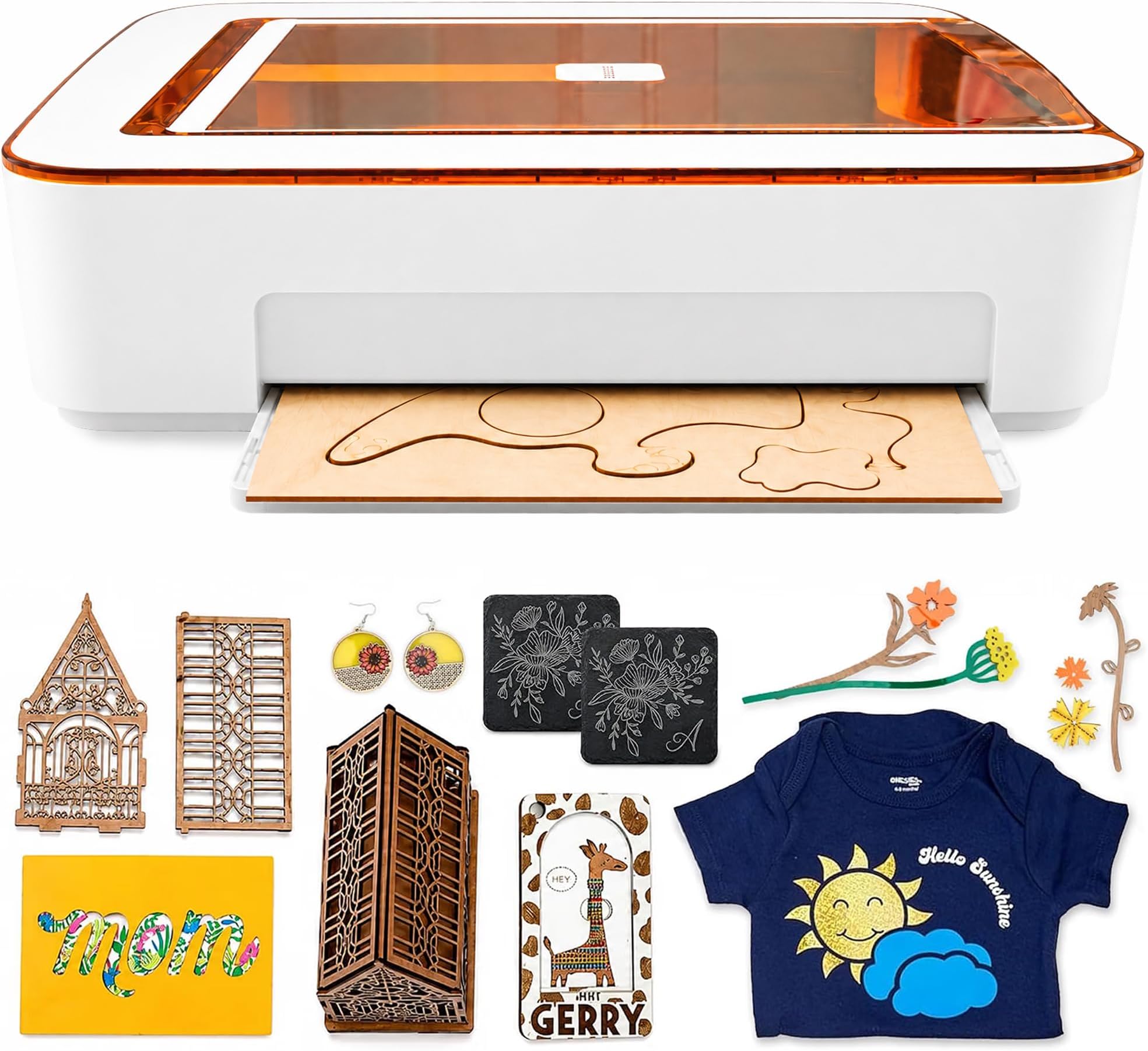
Glowforge Aura Craft Laser Cutter is a compact, 6-watt blue solid-state laser machine designed for precise cutting, engraving, and scoring across hundreds of materials including wood, leather, acrylic, and even chocolate. Featuring Wi-Fi connectivity, an onboard camera for live previews, and intuitive app control compatible with laptops, tablets, and smartphones, it empowers both beginners and pros to create personalized gifts, decor, and more with effortless automation and access to millions of design options.


| ASIN | B0CBQRCVJX |
| Active Surface Area | 451 Quadratzoll |
| Active surface area | 451 Quadratzoll |
| Brand | Glowforge |
| Brand Name | Glowforge |
| Color | white |
| Colour | white |
| Compatible Devices | Laptop, Personal Computer, Smartphone |
| Customer Reviews | 3.5 out of 5 stars 158 Reviews |
| Included Components | [POSSIBLE] Additional components for crafting |
| Item Dimensions D x W x H | 52.1D x 55.9W x 12.7H centimeters |
| Manufacturer | Glowforge |
| Material | Aluminum |
| Material Type | Aluminum |
| Model | GF-ASM-00470 |
| Number of Items | 1 |
| Number of Packs | 1 |
| Operation Mode | Automatic |
| Operation mode | Automatic |
| Part Number | GF-ASM-00470 |
| Print media | Unknown |
| Product dimensions | 52.1D x 55.9W x 12.7H centimeters |
| UPC | 811961034412 |
| Unit Count | 1.0 Count |
A**C
Crafting elevated!
Full disclosure: I was a beta tester, so I’ve been able to use this machine before others. There’s some really important information that’s missing from the listing, so read carefully and make sure you’re buying the right product for what you need. First - don’t be mistaken, this isn’t the laser that made Glowforge famous. Aura is less powerful, cheaper, smaller, lighter, and a lot more orange but the Aura has completely transformed my crafting! Setting up the Glowforge Aura was an absolute breeze (you just need wifi). The step-by-step instructions were incredibly easy to follow. Within minutes, I had it up and running. There’s just one button. When it lights up, you push it. One of the most important features: It’s safe. Glowforge is the only laser I know that has a 3rd party testing certificate. With a 6 month old baby, this was extremely important to me. One of the standout features of the Glowforge Aura is the Glowforge Proofgrade materials. These materials are specifically designed to work seamlessly with the laser cutter, ensuring consistent and high-quality results. The variety of materials available is impressive, from wood and acrylic to leather. I tried to save a bit of money and use other materials and although they work great, it takes so much more time and effort. I ended up buying the Proofgrade materials and now I won’t go back! They are so much easier and high quality. The Glowforge Aura can cut through a wide range of materials with precision. Whether you're making intricate pieces, personalized gifts, or more, this laser cutter can handle it. I was amazed at how easily it cut through wood, leaving clean edges and intricate designs with minimal effort on my part. The Glowforge software is a joy to use. It's intuitive and user-friendly, making the design process a breeze. You can also import your own designs or choose from a library of pre-made designs, making it easy for both beginners and experienced designers. I used the Aura air filter with it and the automatic on/off is so great. No extra buttons to push or think about - just attach and go. I have also used it without the filter, which in that case needs to be vented out a window. How it actually works: I created a wood an acrylic sign for my niece’s birthday party that turned out PERFECT. It looked like something you would spend hundreds on. It did take some trial and error to get there though. I first tried to use off-brand white acrylic, adjusting the settings on the machine manually but then learned that this laser does not cut white and clear acrylic because of the type of laser it is. I ended up buying the Proofgrade wood and painting it - saved me so much time and wasted much less material. It did cut easily through green acrylic to make accents for the sign. I also quickly engraved a piece of pink acrylic for a last minute additional sign. The Glowforge Aura has truly taken my crafting hobby to the next level. If you love crafting, this laser cutter is a game-changer that will have you creating stunning projects and inspiring others to do the same. I think Glowforge Aura is the best bang for the buck in its category. If you’re trying to produce a product to make money, upgrade to something bigger. If you’re crafting or making stuff at home - Aura is the best pick for safety, ease of use, and just being a lot of fun to operate.
M**P
Great marketing / GARBAGE Product; do NOT buy!
I was so excited to buy this glow forge aura, I’ve been wanting one since 5 years ago but the pro was so expensive and when they came out with the more affordable aura, I went for it!! I should’ve done my due research:( the aura was amazingly slow. We made the test box they recommended and it took 5 min for it to cut typewriter paper, my son used it to cut leather and it took 5+ hours for a simple design. I tested what I wanted to etch for a cutting board on cardboard first and it took 3 hours to complete. When I did it on my cutting board it took 9.5 hours to etch, and the etching was uneven, and it left some letters incomplete!! I checked the lens to see if it needed cleaning, but the lens was still good. I tried to re-etch it again, but it wouldn’t etch it where it originally etched, so my good cutting board is ruined. Who has 9.5 hours of doing nothing to sit and watch the aura do its thing?!? You have to stay with it to make sure it doesn’t catch fire, plus you have to smell its fumes, it’s winter, the garage doors are open for air circulation and I was freezing. Eventually I went inside the house and checked it every 15-30 minutes. Totally disappointed when I checked it after 3 hours and it missed some parts of the letters. NO owner’s manual was provided (only a quick installation guide); everything about the glowforge aurora is trial and error, the company wants each user to ‘subscribe’ instead of allowing a household-account. This product is produced too quickly without any troubleshooting guide/owner’s manual; owners have to search on-line for any assistance/reviews from other owners. Note the partially-completed letters, inconsistent embossing, scorch marks…overall Cletus with his branding irons and soldering pen would have done a better job than glowforge. HUGELY DISAPPOINTED! If you want to buy a laser printer, maybe go with the glowforge pro, I read it’s faster and you can do more things with it, why waste your money and time for a slow inefficient machine. I ultimately decided to get the xTool D20, I read it was better, faster, similar in cost with the aura, better customer service and I did some actual research instead of blindly buying like I did. Also the YouTube and articles of aura vs. xTool was helpful too. I hope the xTool is better, it not, I’ll write a review on whether it is good or bad on that as well
N**Y
Works great out of box for this experienced laser user!
I bought this product a couple of months ago and wanted to put it through it's paces before writing a review. I have several years experience with laser cutters/engravers, and was upgrading from an older machine to something a bit newer/quicker, and perhaps a little more user friendly. I was immediately impressed by how well this laser worked right out of the box. Had everything set up and printed my first test project within a half hour. It's pretty slick, I think for a first-time laser purchase this thing is pretty much ideal. There are plenty of pre-made projects you can hop into straight away, and even more if you purchase the membership or are in the trial period. The membership wasn't for me in the long run, but it was great way to start off, and for people who don't want to get into the weeds with creating designs and cuts in other pieces of software and importing them into the Glowforge interface, I think it would be well worth the money. Like many users I tend to use GIMP & Inkscape to create my projects, but pretty much any graphics program such as photoshop should work, so long as you can export image files and SVG graphics. So don't let the membership aspect sway you away from this laser; if you feel like you have to pay a monthly fee to use it, you absolutely do not. I read some reviews talking about the speed of this laser, with some people expressing disappointment with it's speed. That all depends on your perspective. It's important to note that this is a diode laser, not a CO2. If you are wanting to go into large scale production you'll need to invest a lot more money on an expensive CO2 setup, but for the hobbyist or even a small Etsy store I think this laser will do the trick. Compared to my old diode laser, the Glowforge prints at least 6 times faster. Jobs that would take 3 hours to engrave can be done in less than 20 minutes, and the quality is just as good, maybe even a bit better. Cutting speeds are similarly faster. So for me, this thing has been a godsend. The software took a bit of getting used to, but again I was moving from an entirely different platform. I can safely say that compared to my earlier experiences with lasers the overall learning curve was much, much quicker. I was really impressed with the pre-sets. On my old unit I would waste an hour or more running test prints and grids to get satisfactory results, so I was a really amazed by how often my first print would turn out great without having to tweak any of the settings. The auto calibration and camera really work well on this unit. Initially I was a bit dismayed by the fact it had presets because I was so used to fine-tuning laser power and speed manually, but found that all of these functions are there if you really want to get that exact effect you're looking for. I'm pretty old-school, I like to back up my photographs to hard drives at my house and not store them on the cloud, so at first I wasn't wild about the platform being cloud based. But that's the way the world is moving, and I certainly haven't had any issues with this aspect, and in fact have fully embraced it. You can either buy Glowforge certified materials which will be automatically detected, but I have had excellent results by purchasing other non-certified materials as well. Just make sure to buy them from a decent supplier. For more advanced users, you can cut/engrave other materials as well (as long as they are diode laser compatible), but obviously you'll need to experiment a bit to get the settings rights. The Glowforge forum is a great place to go for advice or to see who has already done something similar so you'll have a good starting point. For me this is where a lot of the fun really comes in. In summary I'd say this is a great diode laser for both the novice and the experienced. The footprint is small, and it's a tidy device that looks great sitting in your craft room (or living room table).
R**O
Honest Review
So this is my honest review . This thing is ready to go .You take it out of the box , you put the laser magnetic on top of where the laser magic will go it literally is a magnet easy to go , you plug it in , you set it with the wifi, you go to the app and start designing . That part perfect . Now here is the part that really bugged me because i was planning on engraving journals. After I did soooo much research you have to be careful with the leather you choose . make sure it is not vynil. I used it for soft leather and put it in the lowest power yet the fastest speed and it did a decent job but not the quality that I was expecting to sell them . Now the part that really turned me off was this one . When I created the design for the Journal cover on both sides . It took 5 hours 1/2 guys . Imagine if I can actually do this for a living and I get 20 orders a day ? people would be cancelling like there is no tomorrow . I would only be able to do one a day. Granted I tried coasters you guys not my original Journal cover . 5 hours 1/2 in blew my mind so much that I did some soul searching and my soul said nah return it . So the machine is being returned . I am still giving it 5 stars because I did love it . Its practical, ready to use , and when it was finally done the work was beautiful . The time it took is what really threw me off . If this machine would of cost me $500 I would of stayed with it but for a $1000 me waiting forever for the product to be done ? I feel I would just be giving my hard earned money away.
T**N
Not worth it
I was excited to order this machine for fun crafts. The excitement went away all within 30 minutes of opening the box. There is no owner's manual, only a quick installation guide. There are hardly any cutting tips online, so I had to do trial and error while cutting. I did one sample cut and it worked fine. After that, the machine kept cutting off mid-cut, which caused me to lose so many acrylic products that aren't cheap. Also, even with the filter that you have to buy separately it. does not catch all of the fumes, so that separate cost is also pointless. The machine overheats, so expect your projects to go fr.om 50 minutes to 2 hours for one small cut. Their software is easy to use if you have a premium account, which is about $240 a year. I am not happy at all with this product.
Trustpilot
5 days ago
1 week ago