


Buy anything from 5,000+ international stores. One checkout price. No surprise fees. Join 2M+ shoppers on Desertcart.
Desertcart purchases this item on your behalf and handles shipping, customs, and support to South Africa.
⌨️📡 Elevate your control game—remote mastery in the palm of your hand!
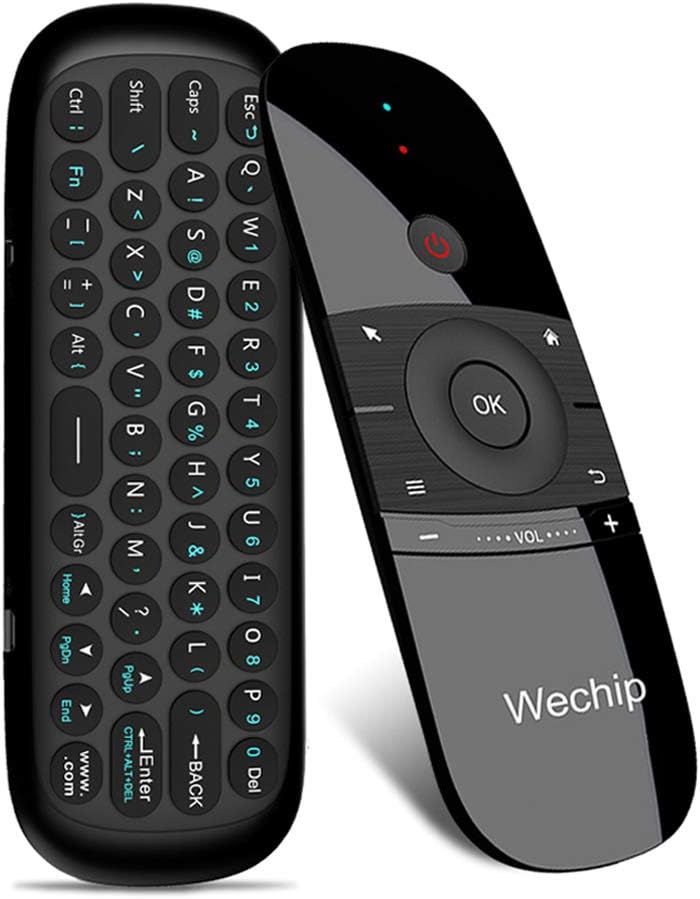
The WeChip W1 Air Mouse Remote Control combines a compact 45-key wireless keyboard with a 4-axis motion sensor, delivering precise cursor control and versatile input for Android TV boxes, PCs, projectors, and more. Featuring a robust 2.4GHz RF connection with up to 10 meters range and smart auto sleep functionality, it offers seamless, cross-platform compatibility and power-efficient operation for the modern multitasker.


| ASIN | B0787Z1C2G |
| Additional Features | Remote |
| Battery Type | Lithium |
| Best Sellers Rank | #50,008 in Electronics ( See Top 100 in Electronics ) #2,812 in Remote Controls (Electronics) |
| Brand | WeChip |
| Button Quantity | 45 |
| Color | Deep Grey |
| Compatible Devices | Television |
| Connectivity Technology | Wireless |
| Controller Type | Android App |
| Customer Reviews | 3.9 out of 5 stars 6,225 Reviews |
| Item Dimensions L x W x H | 0.36"L x 1"W x 0.36"H |
| Item Weight | 3.04 ounces |
| Manufacturer | wechip |
| Max Number of Supported Devices | 1 |
| Maximum Number of Supported Devices | 1 |
| Maximum Range | 10 Meters |
| Mfr Part Number | ZXW |
| Model Name | WeChip W1 |
| Model Number | WeChip W1 |
| Number of Batteries | 1 Lithium Polymer batteries required. |
| Special Feature | Remote |
| UPC | 732173936977 732173937257 |
| Unit Count | 1 Count |
| Warranty Description | 2year |
R**S
Good quality and a great price.
Nice item. Very functional and easy to use. Good battery life.
S**S
Great form factor, with some flaws
Out of all the options I've looked into for a compact HTPC remote, this one strikes the best balance of usability, familiarity, compact form factor, and price. There are a few things that leave me feeling this could be improved a bit more though: - The Home button is the only way to bring up the start menu as well as the taskbar when an app is fullscreen (e.g. Steam Big Picture). This button is programmed to bring up your default browser, meaning every time you want to navigate to another window in this situation you're launching browser windows you may not want. This could be fixed by just making the Home button function like a Windows key instead. Another nice to have would just be adding a button that simulates alt-tab to allow switching windows without the taskbar. - Speaking of the Windows key, there's no Windows key on the keypad side of the remote either. This is such a core key on Windows and Linux and should have been included somewhere. - No backlight on the buttons if you want to use it in the dark - The air mouse is precise in the middle of the screen but starts to be more difficult to aim into the corners. I find myself having to go in and out of mouse mode to recenter the pointer in relation to your hand. - I don't like that the Fn button on the keypad stays on. It should turn off after pressing the first key so you return to normal typing.
N**E
Perfect for Media PC + Use FLIRC receiver to Wake/Suspend the PC!
After receiving the remote I quickly discovered it didn't have the ability to wake a suspended PC. So a quick google search later I found the FLIRC USB IR receiver and it works perfect with Wechip to Wake/Suspend the PC. Just install the FLIRC GUI app, select Media Keys controller, bind 'Wake/Suspend' button to power button on the Wechip remote and done. Also, make sure the USB port you are using allows 'USB Wake Support'. Only 2/10 of my USB ports were supported. I can't comment on battery life or other quirky bugs/features yet, but it is functioning exactly how I wanted it to for the sake of being able to wake/suspend the PC and point and click Play. 4/14/2020 - Since buying this I ordered two more, another for home and one for work. I service line PCs with no keyboard or mouse, so this thing saves me time for quick fixes as long as I don't need to do much typing. The air-mouse and wake-up (+FLIRC) function is mostly I what I needed it for so I don't use the keyboard much. It is okay but can be tedious to use beyond some simple input. Besides that, I haven't had any issues. I feel like it holds a charge for a month or more depending on usage. Also, don't overlook the Learn IR function! You can train your Wechip's power button with your TV remote's power button and then turn the PC & TV on/off simultaneously! 6/17/21 - It has been two years of using this mouse daily and still have not had any issues. Battery is holding up great as I don't even remember the last time I charged it and all buttons still work. Would still recommend! 5/6/22 - Another year of literal daily use in our living room and it's still holding up exceptionally well. Battery life is great and we really don't charge it all that often. It's also been chewed on, drooled on, and thrown around by my now 2 year old and still working fine. The volume down button lost a little travel but still works. Will continue to recommend. 11/17/22 - I have finally gave in and had to replace this remote - with another of the same model! It was still technically working but the volume up/down buttons were so worn that there was no more click or button travel making it tricky to turn down the volume. All other buttons still work as normal. Battery life was slightly worse but it still held charge for weeks at a time. Other than that, this thing lasted 3+ years of daily use and I will continue to recommend it.
T**E
SHIELD TV and this remote are not quite the match I wanted them to be.
NOT a perfect match for Shield TV. But good enough not to keep till I come across something better. PRO’S 1. The keyboard works great. Netflix, Hulu, YouTube, Prime, Viki, etc. If a text box needs filling the keyboard can fill it. It also uses the gyroscope sensors to know when it should activate and is tuned quite well. Basically, the control side remains active at all angles including vertical. But once it is tilted past that to where the keyboard sides facing more up than the control side it becomes active and the control side disables. 2. More responsive than the standard control. Doesn’t suffer drop out like the standard one does. (The main reason I even looked for a replacement) 3. The air mouse works well, though on a Shield TV there’s not much use for it. CON’S 1. Power button does nothing for the shield. Would have been nice if it put it to sleep or something. I think another reviewer mentioned it’s only for IR learned components. 2. Volume buttons are poorly placed and designed. Little to no “feel” of placement and the size only makes it that much more combersome. 3. The buttons don’t map exactly like the OEM one does so on some apps on some functions the OK and BACK buttons don’t do what you think or, such as the case with the VRV app, don’t do anything at all. 4. It needs the dongle and won’t pair natively with Bluetooth so you lose one USB port. 5. No mic for doing voice search. So I still need my OEM remote nearby but this one can get most jobs done and even if I’m just keeping it around for text entry ability it’s still smaller than a keaboard and mouse.
J**B
Not so good. Problem with air mouse, no Play/Pause button.
Purchased for my Nvidia box. There are 3 problems with this remote that I found out after 1 day of using it. 1. The air mouse it has a very slow long movement. So going from one side screen to another it takes a big movement of the hand. 2. There is no Play/ Pause button so it takes extra step to do that process. 3. The function characters on this remote are so dark that you need a lot of light to see the character that you want to press. Other then that I don't have to say too much at this time. The other remote that I have is good but it kills my AAA 2 batteries in less then two weeks, that's why I need it to replace the remote. Will do update.
M**Z
What a great remote for Nvidia Shield TV
Bought this as a replacement of the Nvidia Shield TV stick remote that became unreliable after several updates to the Shield. Although I was skeptical of the Wechip remote, I knew returning would be easy so there was nothing to lose, and have been using this remote now for several months. Very surprised at how good this remote is for the Shield. It does require a USB slot for the dongle, but setup is super easy. I was originally torn between the voice control model and this model with the keyboard, and am very happy with the keyboard which comes in useful so many times. My only knock is the keyboard is not backlit, but is otherwise easy to use by flipping over the remote to activate the keys. This is genius so you never have to worry about typing accidentally while using the remote. Pairing keys to my TV remote was super easy. My only other design knock is the volume controls which are really narrow. I suppose this means you won't accidentally hit them. But at the same time, so narrow you do accidentally hit the keys above them sometimes. Eventually you do get used to it, but could definitely be improved. This remote is rechargable, so no batteries to scramble for when it's weak. Just plug in to any micro USB charger until full, and it'll last a long time. In the months we've had this remote, I think I've charged only once. To wrap this up, this is seriously about the favorite remote we've ever had. My wife immediately got used to it and preferred it over the Nvidia remote ever since.
L**.
🎮 Surprisingly Handy for My Living Room Setup! 🖥️⌨️
I bought this WeChip W1 air mouse remote mainly to control my Android TV box, but I quickly found out it does so much more! My elderly father always struggles with typing on smart TVs or navigating small on-screen buttons. One weekend, I set this up for him — literally just plugged in the USB dongle, and it worked instantly. No drivers, no Bluetooth pairing nightmares. He was shocked when he started typing “YouTube” using the full keyboard on the back! The air mouse feature is intuitive — just a flick of the wrist moves the cursor. It’s great for controlling the TV from the sofa without pointing it directly at the screen. And when I want to search or enter passwords, I flip it over and type like a mini wireless keyboard. Super convenient. 💡 A few notes: • The keyboard is not backlit, but the layout is very readable. • It’s rechargeable, which saves me money on batteries. • Not compatible with Samsung or LG TVs directly, but works perfectly through Android TV boxes or PCs. This little device replaced three remotes on our coffee table. A great purchase! ✅ Easy setup ✅ Full keyboard ✅ Accurate air mouse ✅ Rechargeable
J**R
I can only get half the buttons to map
I really wanted this to work better. We're trying to get rid of our cable, and part of the path to that is finding a good all-in-one remote for our Samsung TV, Vizio soundbar and (stretch goal) PS5. This has the functionality to control all of them. The reality is more complicated. The controller itself is pretty good quality. The buttons are snappy and responsive, although some of them are a bit unclearly labeled. The instruction book is...OK. After a few readings I had a decent idea what was expected of me. I started going through the process of mapping the buttons to the equivalent buttons on the TV remote, but only about half of them seemed to take. After repeated attempts, the directional buttons worked, but they had worked before I started. The home and back buttons worked, but volume didn't (I tried mapping to both the Samsung remote that successfully ran my Vizio soundbar, and to the soundbar remote, but no joy either way). Worst of all, the OK button doesn't work. So I can open menus and navigate them, but I can't select anything. I did manage to get into the internet browser on my TV to play with the air mouse functionality, and that works...ok. It works by either waving the remote or by just changing the direction the remote is pointing. That makes it really easy to overshoot your goal, or to wander in an entirely different direction when you think you're done moving. Also, you have to click a button before you move the mouse, then click it again to say you're done before you can hit OK to select the thing that you moved to. Oh, by the way, the OK button works in the browser for some reason, even though it doesn't anywhere else. Go figure. Overall, I might keep this around if there's something specific I want to do in the browser, because it's still a better option than using directional buttons on the Samsung remote. But otherwise, this doesn't meet my needs.
A**D
Good as a media remote, not that much in other fields
Works well as a media remote with a player that has remappable keybinds such as mpv You could use Microsoft's Powertoys to remap one of the buttons to a modifier like the Control key or the Shift key, but you can't use shortcuts as the remote side can only register one key at a time The keyboard side can only register two keys at once, so you can't use some of the more complex shortcuts such as Ctrl+Shift+T The mouse is not accurate and sometimes goes in the wrong direction, turning the mouse control off and on again on the remote fixes it for a bit then it goes back after some moving The keyboard is decent but it could take a while to get used to, especially since you need to trigger the Fn key to type numbers
B**1
Working well with toshiba android tv
Working well with my toshiba android tv and it's easy to use.
C**N
Superó mis expectativas
Lo utilizo con la MiBox 3 y funciona de maravilla. Solo tuve que conectar el receptor USB que se incluye y funcionó sin más al 100%. La opción de puntero es muy práctica y escribir con el teclado facilita muchísimo utilizar el navegador.
A**W
Perfect accessory for Android TV box
I got tired of using the stock remote included with my android box, I have mini keyboard for my second android box, so thought I'd try an air mouse with keyboard for the other android box. Found this on Amazon, read description, looks more sleek than a mini keyboard and hopefully will work the same, so ordered it. It arrived well packaged, complete dongle, cable and instructions. I charged it up, plugged it into android box and it worked perfectly right away. The mouse function is great, it senses your movement (don't have to point at screen), no problems whatsoever using the mouse. The Keyboard works well once you get use to how to activate it. Basically flip it around to use keyboard and then flip back to use mouse. All keys seem to work fine, easy to press and registers the keystroke quite easily. I can even use it on my laptop if the need ever arises. Overall, very happy with this air mouse/keyboard combo, it is the perfect accessory to have for an Android TV box.
ع**ي
سى جدا
سئ جدا باظ بعد شهر
Trustpilot
2 months ago
3 days ago