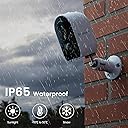
🔒 Elevate your home security game with smart, wireless, weatherproof clarity!
GALAYOU’s 2K battery-powered WiFi security camera delivers professional-grade 3MP video with color night vision, smart PIR motion detection, and a built-in siren. Its IP65 waterproof design and wireless setup offer flexible indoor/outdoor installation. Compatible with 2.4GHz WiFi, it supports multi-user cloud and SD card storage, making it a versatile, easy-to-use solution for modern home and business surveillance.


| ASIN | B0C2CM4WLT |
| Alert Type | Motion Only |
| Antenna Location | Indoor/Outdoor |
| Best Sellers Rank | #805 in Bullet Surveillance Cameras |
| Brand | GALAYOU |
| Color | White |
| Compatible Devices | Alexa, app |
| Connectivity Protocol | Wi-Fi |
| Connectivity Technology | Wireless |
| Controller Type | Amazon Alexa |
| Customer Reviews | 4.1 out of 5 stars 1,240 Reviews |
| Indoor Outdoor Usage | Outdoor |
| Indoor/Outdoor Usage | Outdoor |
| Item Dimensions | 2.4 x 2.04 x 3.43 inches |
| Manufacturer | GALAYOU |
| Model Name | R2 Pro |
| Model Number | R2 Pro |
| Mount Type | Wall Mount |
| Night Vision | Night Color |
| Number of Channels | 4 |
| Number of Items | 1 |
| Other Special Features of the Product | Easy to Install |
| Photo Sensor Resolution | 3 mp |
| Power Source | Battery Powered |
| Recommended Uses For Product | Indoor/Outdoor |
| Room Type | Classroom, Kitchen, Living Room, Office |
| Special Feature | Easy to Install |
| Specific Uses For Product | Outside; Professional |
| Unit Count | 1 Count |
| Video Capture Format | MPEG-4 |
| Video Capture Resolution | 2k |
| Waterproof Rating | IP65 |
| Wattage | 5 watts |
| Wireless Technology | Wi-Fi |
| Zoom Type | Optical Zoom |
B**Z
These are great cameras and work great!
I was however a bit surprised that they were so small - I was expecting something bigger since they were battery operated. I was so anxious to give them a try that I didn't charge the first one before installation and learned the batteries are mostly charged upon delivery which was great. I am now charging the rest of them before I install any others. Installation was a piece of cake but I was initially worried that I couldn't add the camera to the Wansview app that I was already using. I had just installed a different Wansview camera so I was familiar with the process - the problem was that I was looking to add a Wansview camera and not a Galayou camera (different tabs in the app for each type of camera) and the fact that I missed that in the instructions. In the app, when you add a device, there are tabs for Wansview, Galayou, and Cinnado - I was initially only looking at Wansview cameras to add. Once I selected Galayou, the R2 camera was easy to pair with the app as expected. As for operation, it works as expected. I have a Wansview W2 in my living room so I initially put the R2 right next to it to compare the video. I don't notice any difference in quality. I later put the camera outside and placed it on a tree branch just to see how well it works outside. Its been pretty gloomy outside today from rain and right now it is pretty dark but the camera video is in color and is as bright and clear as it was earlier - see video and photo. At some point I want to integrate the camera into my Synology Surveillance Station. Although this camera is not specifically included in the Synolology compatibility list, neither was my Wansview W2 but I did get it to work. Synology does support generic IP cameras so I would expect it to support this one as well. I just need to purchase additional camera licenses for the surveillance system but I may end up just using a MicroSD card with the Wansview app instead to save the license costs. I had to ask support for help with the SD card since the camera wouldn't recognize it. It is a 64GB MicroSD and Windows would only format it ExFAT or NTFS and the camera needs it to be FAT32 so after I used a partition utility to format it FAT32 it worked perfectly! The only odd thing that occurred about a week into testing is that all three of my installed R2 cameras stopped working at the exact same time (see screenshot). I may have had an issue with my WiFi network but my other cameras continued to work just fine. Once I charged and reset them all is good again and has been ever since. Lastly - I can't speak about the battery life since I just installed it. My only complaint is that there is no indication when charging that the battery has reached full charge. Wansview helped out by upgrading my firmware to a special version that hasn't been released yet to help with the battery life - we'll see. Anyway, I know there are solar chargers that slow charge the battery and I may give that a try if I am not happy with the battery life... So, if you're looking for a good inexpensive camera, consider this one for both good performance and easy installation.
E**C
Great camera system
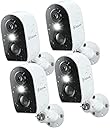
You’re not going to get a better camera for the price. I have had them for about month and half now I had a problem with one camera not charging after about a month that being said they will send a email in a few days to a week after you receive the camera asking how you like the camera do not delete that email you will want that person if anything goes wrong I emailed the company never got a response emailed Leah the rep that sent me the email she responded with in a day and no questions asked or send us the old one or show us proof replaced the camera had a new one with in the week to me that was superb and great customer service thank you Leah. Now the cameras there a great price point they do not recorded 24/7 but with motion so far the motion is on point you can set how long you want it to record after the motion has been triggered and if you want the spot light to turn on with motion . The picture is pretty good for it being such a cheap buy if your looking for 4k pictures it’s not gonna happen with this camera but it’s definitely pretty clear I would definitely buy from this company again . Instructions were very clear literally download there app and scan and go on your phone if you can’t figure it out I really don’t think any technology is good for you had all 4 of them scanned ready in under 3 or 4 minutes you will spend more time waiting on them to initially connect to the WiFi then figuring out how to connect them. They take a type c charging cable that comes with them I currently have them on a solar panel charging system so if you wanna purchase separately, a couple of solar panels, make sure that they are type C that’s about all I can think of for now. So ending with this great buy for the price point would definitely buy again , picture is pretty good for the price point , keep the email they send you after your purchase that is the only way your be able to get a problem fixed
C**O
Great system for the money... but with some limitations.
I already had a camera system installed in my home, but I wanted something with a battery backup as power outages in my area are a bit common during the winter months. After reading several good reviews about the Galayou R2 cameras, I took the plunge. I needed 9 cameras to replace the system I already had in place, so ordered three four-packs. Right out of the box, the build quality of these cameras is impressive. The materials look and feel high-grade and the design is aesthetically pleasing, which is important considering that I purchased these to go in and around the house, so, I wanted something that looked good. The setup of the first camera was a bit challenging. For some reason, the camera did not want to connect to my Wi-Fi. After several attempts without doing anything differently, it finally connected. Each subsequent camera setup went fine. Installation around the house was easy and quick with the provided hardware and drilling template. Now after a few weeks in use, I can speak to their functionality. Observations: * I will start with my biggest complaint... NO LOCAL CONTINUOUS RECORDING OPTION. I understand that these cameras are designed around the battery, so they only record when they detect motion to conserve battery life. However, I was hoping that local continuous recording to the micro SD card would be available when plugged in. This is NOT the case. Maybe if its motion detection were MUCH better than it is, I would be able to overlook the lack of a local continuous recording option. However, with the motion sensing being so weak, it almost makes continuous recording a necessity. Hopefully, the manufacturer will provide a local continuous recording option in future firmware updates. Note: There is a continuous recording option available through the manufacturer's cloud service. The problem with this option is that 1: it records in a 7-day loop, which for my applications would be fine, but others may find it too limiting, and 2: (my biggest issue with this cloud service) it is ridiculously expensive at $12.99 a month for ONE camera! I have nine cameras in use and could potentially have twelve. This service would cost me a small fortune each month, making this option a non-option for me and perhaps for many others. * Speaking of its motion sensing, it is very average... possibly below average. With a motion sensor that is much larger than my previous cameras, I expected superior motion sensing, but it is actually about the same or worse. In most cases, the sensor triggers the camera to start recording way too late and only captures the person as they're exiting the frame rather than sensing them the moment they enter the frame. Even with the sensor's sensibility turned up to maximum. Considering that this camera only records when it detects motion, that is a BIG negative. I've found that most cameras are too sensitive and would be triggered by a passing bug. However, the sensing capabilities of this camera are quite the opposite. Having local continuous recording would remedy this issue. * The picture quality in normal lighting (daylight and household) is excellent. The image is sharp and clear. Although it can be a bit contrasty depending on the scene, these cameras still render very good detail. * Picture quality using its night vision is good, but I've seen just as good or better with other cameras. This camera has eight IR diodes that provide the infrared light it uses for night vision. I expected that with that many diodes, the night vision would be far superior to my previous cameras, but found that it was the same as my previous cameras that had only one diode. * The two-way talking is excellent! My previous cameras also had this option, but the quality of the sound both ways was horrible and, in the end, kind of useless since what was being said was nearly impossible to make out. These, on the other hand, are great! The sound coming through the camera is loud and clear and the microphone also picks up voices very well. * The additional white LED light is great! This was another selling point for me. Since power outages are common in my area during the winter months, I figured it wouldn't be bad to have a light source I can count on around the house during a night-time power outage. I wasn't expecting a tremendous amount of light, just enough to make things out in a dark room. Well, the light these cameras give off does the job. They give off more or less the same amount of light as a cell phone flashlight, which is enough to see well enough in a room to not bump into things. The light also works great outdoors providing extra light when you need it. Not to mention that whether indoors or out, turning the light on when live viewing makes the scene full-color to allow for better observation. * I will say that I was a bit disappointed that, although each camera came with its, albeit, short (two-foot) charging cable, no chargers were supplied. This was a bit of a downer for me as I was planning on having these continuously connected to power and only using the internal battery as a backup when the electricity inevitably would go out. The good thing is that these cameras were replacing my previous cameras, so I figured I would try to use the cables and power adapters I already had installed. The only problem was that these cameras have USB-C connections and the cables from my previous cameras were all micro USB. I decided to buy some micro USB to USB-C connection adapters in the hopes that this cheaper solution would work rather than spending much more money on new 10 to 15-foot USB-C cables. The gamble paid off as the adapters worked beautifully. But still, power adapters should be supplied by the manufacturer. * Finally, the app. These cameras use the WansView Cloud app. I've used other apps with other camera systems and I find this one to be more or less the same in functionality. It covers all the basic functions and allows you to see all your cameras at once if needed. However, I did find that it often takes long for the app to connect to the cameras (not a Wi-fi issue) and the interface can be a little clunky compared to others. It also doesn't allow you to place the camera panels in the order that you want them and instead lists them randomly. But overall, it does what it's designed for. In the end, I wouldn't say that I'm 100% satisfied with these cameras, but I am impressed with the build quality and many of the nice features that come standard. I forgot to mention the included alarm feature that can be used to scare off critters or intruders... a nice little feature to have. Live viewing is also great, allowing you to record directly on your phone if needed. I think these cameras are a very good option for someone looking to set up a multicamera security system in their home or business but don't want to run cables or spend too much.
R**Y
Unbelievable WIFI Range
WiFi range is incredible. You will be amazed. If you have a mesh system, this camera should work anywhere on your property. So easy to get up and running. Even though the cameras came charged to almost 100%, I still topped them off. The picture quality is excellent as well as the motion detection. The the infrared night vision technology is the absolute best in the business. Even though the battery life is exceptional, you are still going to have to recharge it manually. For me, it’s not that much of a problem because Ilike to bring my cameras in once in a while so I can clean them up and give them a healthy 100% charge. If the charging isn’t convenient, I just take my PowerBrick and charge the battery up with that. And lastly, I love how you can just set it anywhere. It has a very stable design.
B**S
This wifi camera has amazing technology!
I was immediately impressed with the R2 wifi camera’s small size and light weight. Not only can it be installed almost anywhere but it should be relatively inconspicuous. The image quality is impressive. During daylight the colors are vibrant. At night the IR image is black and white but very clear. Battery life was the one item I was most curious about. However, I was amazed that after two weeks the charge level only decreased by about 10% as indicated on the app (see below). I expect these cameras will only need to be charged once a month at the most if they’re not being continuously monitored. If you’re somewhat tech-savy the R2 is easy to initialize and connect to your wifi network. Although the printed instructions that come with the camera are somewhat lacking, there are online videos that will walk you through the process. Another amazing capability is the R2’s ability to detect a remote wifi signal. The attached photos are from an R2 camera installed near a bird feeder that’s at least 75 feet from the modem (1st two images). I was surprised that the camera still functioned well at this distance. The Wansview Cloud phone app that’s free to download provides extensive status (wifi signal strength and battery charge level) and adjustments (motion alert on/off, motion detection range and sensitivity, and night vision (auto-infrared or full color), and more. However, I found it odd that these status and control features are not provided on the PC versions of these apps. On a PC you can only view the camera image. I played around with the motion detection settings but kept getting false alarms so I just disabled motion detection using the app. However, it’s not a feature I highly valued so I wasn’t too concerned. I expect that almost all wifi cameras will have some motion detection limitations even if carefully adjusted. Something to keep in mind when installing these cameras is that you’ll need to periodically remove them to charge the battery. When re-installing the camera on the adjustable mounting bracket that’s provided it’s almost impossible not to disturb the direction the camera is pointed. So, you’ll need to access your phone while doing this to ensure the camera is pointed in the correct direction (refer to 3rd image). This can be somewhat tricky if you’re up on a ladder.
B**I
Great Battery Life
This little camera packs a big punch. I have had it installed at my front door for over a week and the battery is still at 100%. I love the size and ease of installation. They send everything you need for indoor or outdoor installation, even a notification sticker to post on your door or window. There are so many options for settings. There is a even a power save mode that would be good to use if you are on vacation. The image is bright and clear. I chose to use only the infared mode for night but it does have an a light option that will give you full color images at night. It is constructed of high quality materials. Mine has been thru a rain storm and still works great. I would really recommend this camera. It is an excellent deal for the price.
N**A
Decent but can’t have two devices (two people viewing/receiving notifications) logged in at once.
I love the quality of the video. Sound quality is not too good. What I really dislike about these cameras is that only one device can be logged into it at a time. If another device logs in, it automatically kicks the other device off. So for example, if I’m logged in, receiving notification to my cell, then my husband logs in to check the cameras, I am automatically logged out without knowing and won’t receive any notifications until I check the cameras and realize that I’ve been logged out due to another user being logged on. Then if I log back in, it automatically kicks him off and he will no longer receive any notifications. If this issue alone was fixed I’d give it 5 stars as this to me is a big downfall for the camera system.
L**.
Amazing Value and Convenience - I recommend them.
I was hesitant at first but gave them a try. I wanted to test the battery life and WiFi range. These little cameras surprised me! PROS: I installed this set almost a month ago, and the battery life is still showing over 85% on three of them and 79% on the most used. This is amazing. The image is sharp both in daylight and nighttime. I have all four in the outside, and one has been heavily rained on already, no issues. Three using the WiFi from my main router way inside the house, and a fourth using a WiFi extender as I have it set far out in the yard. They all work well with a "GOOD" signal (no need for max or excellent). Setup was easy. The app is very friendly. The alerts come in with very short delay. you can see up to four cameras at once, but seems you can have more than one screen, so I will test out when I install the next four. CONS: the motion detection seems random. Sometimes the same camera gets activated by motion that is like 60 feet away (a car going down the road), but other times it will not trigger with me moving just 30 feet in front of it. This is my only slight disappointment, but no reason to rate them badly. OVERALL; Great value. I felt so good about them I purchased a second set! I also had to reach out to the support via email, and had a response within 24 hours, very professional and helpful!
Trustpilot
1 month ago
3 weeks ago