

Desertcart purchases this item on your behalf and handles shipping, customs, and support to South Africa.
📼 Turn nostalgia into now — digitize your past with ease!
The VIXLW VHS to Digital Converter is a compact USB 3.0 capture card that converts analog video sources like VHS, VCR, Hi8, and Mini DV tapes into high-definition 1080p digital files. Compatible with both Mac and Windows, it supports RCA and S-Video inputs and offers plug-and-play convenience without external power. Perfect for preserving and sharing your vintage videos with customizable video settings and broad format support.


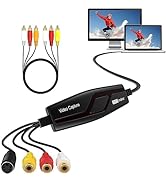

| Asin | B0C5R8CTKT |
| Best Sellers Rank | #28 in Internal TV Tuner & Video Capture Cards |
| Brand | VIXLW |
| Built In Media | Installation Guide |
| Compatible Devices | Television |
| Customer Reviews | 4.3 4.3 out of 5 stars (571) 4.3 out of 5 stars |
| Hardware Interface | USB 3.0 |
| Item Dimensions | 4.37 x 1.38 x 0.51 inches |
| Item Weight | 2.4 ounces |
| Manufacturer | VIXLW |
| Mfr Part Number | ZYLFN |
| Model Number | BR117 |
| Number Of Items | 1 |
| Platform | PlayStation |
| Unit Count | 1 Count |
| Upc | 797424518517 |
| Video Capture Resolution | 1080p |
| Warranty Description | 2 |
User
Good for VHS to MP3
This worked great for me to convert VHS to MP4. The video quality was as expected. Installation/hookup was easy. It’s very compact. Obviously you will need to download and use a third party for software. I had to tweak some of the suggested settings to get the end result I wanted. Be sure to create some test videos before going forward with your project.
User
Great inexpensive way to convert your old tapes to digital
My parents have a lot of VHS home movies that are now converted to digital thanks to these cables. The audio and video quality is a fine reproduction of the taped video - can’t expect greatness from 30 year old tapes but still decent. I honestly was not expecting much as these cables were very inexpensive but was pleasantly surprised. Connection is easy. The software I used had a small learning curve but worked great with these cables.
User
NOT WORKING WITH MACBOOK PRO RUNNING TAHOE--see REVISION***
This device is not working for me on my macbook pro running TAHOE OS. It sees the driver in the SYSTEM REPORT however it does not allow me to switch from my QUICKTIME camera to this device by pressing "V" as specified in the instructions. I spoke with APPLE TECH support and they tried to help me through the steps and could not get it to activate. They thought maybe it is not compatible with the new software. At any rate it is NOT WORKING WITH MACBOOK PRO RUNNING TAHOE. or perhaps it is defective. I hope the company reaches out to me and explains what to do. Otherwise it is going back and this review will not be changed.***REVISED--since my first review i found a great solution!! it does work great with the OBS third party software rather than the MAC's QUICKTIME. I recommend downloading the software. although that software is a little tricky to set up initially. i was lucky to have a friend walk me through it! maybe there is a youtube video explaining it. i raised the review to a 4 star
User
Very easy to set up and works flawlessly!
Plugged this in to my macbook and within a few seconds the drivers were automatically downloaded and installed and ready to go. I read instructions and was recording within about 5 min. This works amazing, I recorded about 40 hours of old 8mm and vhs video and now have it digitally recorded. Couldn't be more happy!
User
works great
A little skeptical at first because of the cost effective price, but this little gizmo works great. I just wanted to put my old VHS-C videos to digital/DVD. I have so far completed the early 1990's and still working on the rest of the years. The device is super easy to use with just connecting it to the VCR and then to the computer. I have a desktop that has a CD/DVD drive, thus I capture digitally and keep on a flashdrive as well as make a DVD for the older folks (like my mom). I downloaded the OBS software (free). I have windows 11(don't know if that matters). It is time consuming but I have the time. Flaws are sound is not too loud, so I record with my speakers on high, and the words don't match the lips (slightly). I am ok with that because truth be told haven't watched these old videos in years. I am so glad to have these digitized and at my fingertips now. Downloads as an MKV file, but you can convert to MPG pretty easily. Hope this helps
User
Not Detected by MacOS Tahoe
Changes aspect ratio but otherwise it works with MacOS Tahoe.
User
Works as advertised
I was a little worried about choosing one of the least expensive of these devices, but I only had one Hi-8 camcorder tape to transfer to my PC and didn’t want to invest in the top of the line.Happily, it plugged in and worked immediately. I used the RCA cables to connect my camcorder and the free OBS program to create the digital file. If you run into trouble setting all the options, chat gpt will walk you through the simple steps one by one.It rendered in the original 4:3 aspect ratio with excellent sound. Probably won’t need this device again, but buying it was cheaper than sending my tape to a transfer service and I didn’t have to trust the mail not to lose it.
User
Very inexpensive for the performance level
If you want to convert some old VHS tapes to digital format this little converter will work fine. I did not try to convert commercial copy protected tapes, just old family tapes. You will need to risk your own very reasonable investment if you want to try commercial tapes. Yes, you do need a working video tape player to connect this to. It has USB 2 for the computer connection and standard RCA video/audio connectors or an S-video connector for the VCR. I used the RCA connectors. I used the free OBS Studio on my laptop for the capture program and it was easy to link to the converter. Yes, you will be limited by the fidelity of the video source and it is easy to forget just how bad analog video tapes really were. That is not the fault of the converter. I saved the files in the .mp4 format which is almost universal. If you still have a computer with a DVD writer you could also make DVD's.
User
Funzionate ma Presa scart difettosa
Funziona perfettamente, ma la presa scart in dotazione è un po' difettosa. Quando si tira fuori dal video registratore, bisogna tenerla bel salda, altrimenti la lamella si stacca e rimane collegata al videoregistratore e bisogna staccarla con una pinza
User
Günstig und Gut
Tut genau das was es soll, einfach super praktisch
User
Simple et efficace
Il fonctiinne très bien et n'est pas mal cablé comme un article que j'avais commamdé avant celui ci.J'utilise OBS qui est un logiciel de capture vidéo gratuit et fait très bien l'affaire.Aucune difficulté à le faire fonctionner, windows 11 le reconnaît comme un périphérique de capture vidéo, pas de driver à télécharger.Inconvénient on voit sur les films que l'on était beaucoup plus jeune que maintenant mais ça l'outil n'y est pour rien :)
User
Easy to setup
Works great, easy to use for transferring video off my camcorder to laptop
User
Concise & accurate instructions
I am very impressed. This worked perfectly. The step by step instructions made it very easy. I have converted about 30 hrs. so far. There are lots of options to create the size of files of your choice. I downloaded Potplayer to use this...easy.
Trustpilot
1 month ago
3 weeks ago