Buy anything from 5,000+ international stores. One checkout price. No surprise fees. Join 2M+ shoppers on Desertcart.
Desertcart purchases this item on your behalf and handles shipping, customs, and support to South Africa.
🚀 Elevate your desk game — triple displays, turbo charging, total control!
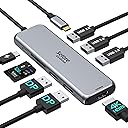
The Selore 9-in-1 USB-C Docking Station is a versatile multiport adapter designed for professionals seeking to maximize productivity. Featuring dual DisplayPort and HDMI outputs, it supports up to three external monitors (with some OS limitations), 3 USB 3.0 ports for fast 5Gbps data transfer, SD and Micro SD card slots, and 100W Power Delivery charging. Compatible with a wide range of USB-C and Thunderbolt 3 devices, this sleek aluminum hub consolidates essential connections into one portable device, ideal for MacBook, Dell XPS, HP, Lenovo, and Microsoft Surface users.


| ASIN | B0BTCZ9NJB |
| Additional Features | Fast Charging, Fast Data Transfer, Portable |
| Best Sellers Rank | #8,825 in Electronics ( See Top 100 in Electronics ) #139 in Laptop Docking Stations |
| Brand | Selore&S-Global |
| Color | Silver |
| Compatible Devices | Works well with laptops with USB-C ports support DP alt-mode or Thunderbolts 3/4, such as MacBook Pro 13"2017 2018 2020/15" 2018 2019/16" 2019;MacBook Air 13"2020 Apple M1; iPad Pro 11"(2nd); HP EliteBook 745 G5/EliteBook 840 G6 /ENVY x360 13; Surface Pro 7/Surface Book 2; DELL XPS 13 9300/Inspiron 7400; ASUS ROG Strix G512L; HUAWEI MateBook 14; Lenovo Yoga 13s 2021; ASUS C423N(Intel(R) Pentium(R)… |
| Customer Reviews | 4.2 4.2 out of 5 stars (3,261) |
| Data Transfer Rate | 5 Gigabits Per Second |
| Enclosure Material | Aluminum |
| Hardware Interface | DisplayPort, HDMI, USB 2.0, USB Type C |
| Item Dimensions L x W x H | 4.4"L x 2"W x 0.6"H |
| Item Weight | 90 Grams |
| Manufacturer | Selore&S-Global |
| Mfr Part Number | SEUC0512 |
| Minimum Required Operating System Version | Android 13.0, Mac OS 13 Ventura, Windows 11 |
| Model Number | SEUC0512 |
| Number of Ports | 9 |
| Operating System | MacOS Big Sur 11.0,Catalina 10.15 or later, Windows 10,8.1,8,7 or later,Android, Chrome OS |
| Total Usb Ports | 3 |
| UPC | 753532568950 |
| Warranty Description | 18 Months Warranty |
A**R
Easy set up, but durability an issue.
**Edit 12/4/2023** Seller was kind enough to reach out and replace the product. The previous one has continued to function well with the exception of that one hdmi port and now that I have a fully working product. Adjusting my rating accordingly. I ordered this product July 5, 2022. Worked great right out of the box and set up was super simple. I'm able to extend my work laptop onto some peripherals to make working on it much easier. However, on November 30, 2022, one HDMI port stopped working. It started out yesterday where my monitor would randomly go black for a few seconds before coming back on. Today it simply stopped generating output. I tested the monitor and cable both on my personal computer and it works fine. I've also switched the two hdmi inputs around and my 2nd monitor immediately went black. Leaving the only conclusion that the HDMI plug in port is the issue. My set up only requires 2 monitors so I could switch my set up to use the DP port and the one functional HDMI port, but the fact the other crapped out after less than 6 months of use is really disappointing.
A**S
5 months after buying….
I bought this in November 2022, it is now April 2023 and it no longer works. It worked fine until earlier this week it started only working in a certain position and today it made my screen go static and flicker so I officially laid it to rest in my trash can. I use my computer for 8 hours a day Monday through Friday (wfh life) and wanted a nice HDMI adapter for my Mac that could replace my older kind of dinky one. I switched back to the “dinky” one that I have had for 2 years today. Update: company saw my review and reached out to me to issue a full refund. That is incredible customers service and I will definitely buy from them again.
C**7
Solid choice and performance
Have used over a year. Easily charges Thinkpad, while running keyboard, webcam, mouse, and two external monitors. There are times when the webcam does not work unless I restart the laptop after using in a different location. A minor issue.
T**M
Works perfectly with Lenovo Thinkpad X1 Yoga Gen 6
I wanted to attach two external monitors to my notebook for home office reasons. I only wanted to use two external monitors, not my notebook screen. One external screen as main screen, second as "extended" screen. Works perfectly. My notebook has one HDMI slot, where I connected my first external monitor so far. My second external monitor has also HDMI. Bought this little device advertised here, plugged the second HDMI cable in the little device and then connected the devise to my notebook in the USB C slot. It immediately recognized the second screen, as extended display, resolution was also great. Nothing I had to do, I was surprised. Next I unplugged also my first monitor with HDMI from my notebook, and also plugged into the second HDMI slot of the little device. Connected the little device with its USB C slot to my notebook. Same result, works perfectly. Next I connected my printer and external webcam also to the device. All works perfectly. I continue to use my notebooks keypad (I prefer that keyboard, simply put the notebooks screen quite flat, underneath the external monitors, so it does not disturb the view). So I have not tried attaching an external keypad or mouse to the device. But given that all other devices worked, I am sure that would also work. Result - I have USB C cable to connect to my notebook, and everything works and is set up. I have also disconnected and connected again. Everything works. I intended to buy a 200 USD docking station from Lenovo, which was not available, so I said lets try this one. I certainly do not regret my choice. It does not have a power supply, so I do need to connect my notebook to power, so 2 cables instead of one, if I had bought the Lenovo version. Also I was worried about the notebook getting too hot. This is not an issue (I have AC my room, so my room is not extremely hot). Only thing I do not like is that the USB C cable is a bit short, so all the other cables going to the little device are a little too close. And that cable cannot be replaced (it it attached fix to the little device). I assume I could buy an extension cable, but for the moment I do not really care. So it worked perfectly for me, the device is small - and so much cheaper than these Lenovo solutions. I cannot guarantee it works for everyone. But for me, it was beyond expectations.
C**E
Super sad face
Well, I wanted to love this. Bought in mid-Feb and now it's the first week of March and it no longer consistently detects and displays on my two monitors. Worked fabulously right out of the box the first day. The size is compact/slim, and the construction is very sturdy. I don't need lots of ports, just the pass-through power, a dongle for wireless keyboard/mouse combo, and the two DP's for my monitors. I love that it is just one connection to my laptop using the USB-C thunderbolt port. I have not experienced it losing connection during the day after starting work as others have noted, it's just that I often undock in the evenings and have my laptop with me on the couch and when I plugged it back in yesterday, it wouldn't connect to my monitors. I did several reboots, tried wiggling the plug, unplugging and plugging back in the DP cables, etc. I know the docking station isn't "dead" as it still provides pass-through power and it's currently allowing me to type using the dongle. My previous setup was a StarTech USB-A hub with just two DP's and an ethernet port. I pulled it back out of my desk drawer and moved my two monitor DP cables back to it, plugged it into a USB-A port on my laptop, and my monitors were detected right away. This is not idea, of course, as now I have the new docking station just providing power and dongle-ness and the old StarTech providing monitor connectivity. So incredibly disappointed.
X**E
Loving the product. Cant give it much load but money well spent. Excellent for a light usage. Running 1 monitor, one Mic, one camera and keyboard/mouse on it. Works perfectly. Thanks! Came to Dubai all the way from USA. Cheers! Good quality. : )
B**T
The 9 in 1 USB C Triple Display Docking Station is an excellent hub for anyone needing a powerful multi-monitor setup. It connects seamlessly, supporting dual and even triple displays without lag, making multitasking smooth and efficient. The design looks sleek and professional, with a solid build that feels durable. The multiple ports — including HDMI, USB, and Ethernet — make it incredibly versatile, handling everything from external drives to stable internet connections with ease. Overall, this docking station works perfectly, looks good, and delivers the same performance quality as original branded docks. Highly recommended for professionals and home users who want a reliable, all-in-one solution for expanding their workspace.
K**K
This is best described as a kludge. It's dependent upon an app that barely runs and constantly crashes under the latest Mac OS. The app starts, and both displays work—then the mouse freezes, or typing will not display until you unplug and replug the USB C cable. It's being returned.
K**E
Der Hub funktioniert sehr gut, ist schön klein und leicht. Design ist zudem schön schlicht. Preis und Leistung stimmen!
M**E
Tested on 3 extended monitors on my Win10 laptop. Of course laptop display will go blank but I have got 3 other 24 inch displays n they worked well. Just that the product sort of heated up quite badly though it managed to pull thru a 16hrs test use. Generally, I am happy with the product and its way cheaper than a decent docking station
Trustpilot
5 days ago
2 weeks ago