Desertcart purchases this item on your behalf and handles shipping, customs, and support to South Africa.
🚀 Mini PC, Major Impact: Power, speed, and style in a pocket-sized powerhouse!
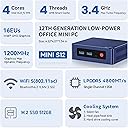
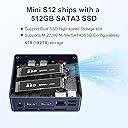
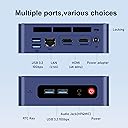
The Beelink EQ Mini PC Mini S12 is a compact, energy-efficient desktop powered by Intel's 12th Gen Alder Lake-N95 processor (up to 3.4GHz). It features 16GB DDR4 RAM, a 500GB M.2 SSD (expandable to 2TB), and dual HDMI ports supporting 4K@60Hz dual displays. Designed for professionals and creatives, it offers robust connectivity with 1000M LAN, Wi-Fi 5, Bluetooth 5.0, and four USB 3.2 Gen2 ports, all housed in a sleek, fan-cooled chassis ideal for office, home, or server use.


| ASIN | B0C339KVH9 |
| Additional Features | Mini pc |
| Aspect Ratio | 16:9 |
| Best Sellers Rank | #10,736 in Computers & Accessories ( See Top 100 in Computers & Accessories ) #390 in Mini Computers |
| Brand | Beelink |
| Built-In Media | 1 x HDMI Cables, 1 x MINI S12 N95 Mini PC, 1 x Power Adapter (US Standard), 1 x User Manual, 1 x Vesa Mount with Screws |
| CPU Model | Intel N95 |
| CPU Model Number | N95 |
| CPU Model Speed Maximum | 3.4 GHz |
| CPU Speed | 1.5 GHz |
| Cache Memory Installed Size | 6 MB |
| Cache Size | 6 MB |
| Color | Navy Blue |
| Compatible Devices | Projector, Monitor, NAS, Headphone, Printer, NAS, Router |
| Connectivity Technology | Ethernet, Wi-Fi |
| Cooling Method | Fan |
| Customer Reviews | 4.4 out of 5 stars 314 Reviews |
| Display Resolution Maximum | 3840x2160 |
| Display Type | LCD |
| Graphics Card Description | Integrated |
| Graphics Card Interface | Integrated |
| Graphics Coprocessor | Intel Graphics 16EUs 1.2GHz |
| Graphics Description | Integrated |
| Graphics Ram Type | Shared |
| Hard Disk Description | SSD |
| Hard Disk Interface | PCIE x 2 |
| Hardware Interface | HDMI, USB 3.2 Gen 2 |
| Human-Interface Input | Keyboard, Mouse |
| Keyboard Description | Standard desktop keyboard included |
| Keyboard Layout | QWERTZ |
| Language | English |
| Manufacturer | Shenzhen AZW Technology Co., Ltd. |
| Memory Slots Available | 3 |
| Memory Speed | 3200 MHz |
| Memory Storage Capacity | 512 GB |
| Model Name | N95 |
| Model Number | EQ |
| Model Year | 2024 |
| Native Resolution | 4k |
| Number of Component Outputs | 2 |
| Operating System | OS |
| Personal Computer Design Type | Mini PC |
| Power Consumption | 6 watts |
| Processor Brand | Intel |
| Processor Count | 4 |
| Processor Series | Intel N95 |
| Processor Socket | NA2 |
| Processor Speed | 1.5 GHz |
| RAM Memory Installed | 12 GB |
| RAM Memory Technology | LPDDR5 |
| RAM Type | DDR5 RAM |
| Ram Memory Maximum Size | 12 GB |
| Resolution | 4K |
| Security Features | Firewall functionality, Secure file transfers |
| Speaker Type | Monitor |
| Specific Uses For Product | Business, Office Meeting, Education, Everyday Use, Home, School, Digital Billboard, HTPC, Photo/Video Editing, Casual Gaming |
| Style Name | Minimalist |
| Total Expansion Slots Quantity | 2 |
| Total Number of HDMI Ports | 2 |
| Total Usb Ports | 4 |
| UPC | 810131891473 |
| Unit Count | 1 Count |
| Video Output | 2*HDMI |
| Video Output Interface | HDMI |
| Video Processor | Intel |
| Warranty Description | 1 Year Warranty |
| Wireless Compability | 802.11ax |
| Wireless Network Technology | Wi-Fi |
| Wireless Technology | Bluetooth, Wi-Fi |
J**F
Tiny Box, Big Bite — This Thing Eats Threats for Breakfast
I’m seriously impressed with this Beelink EQ14 Mini PC. Right now, it’s running my Arista NG / Untangle firewall setup like a champ — IPS, NAT, ACLs, all of it. It chews through traffic without hesitation and stays cool, quiet, and steady the whole time. Before that, it was my OPNsense box, and it handled that job just as effortlessly. It eats threats — nom, nom, nom — without breaking a sweat. Before becoming my edge protection (basically a digital condom with a PhD in security), this little Beelink was my mini office desktop, and it rocked it on the interwebs. Multiple browser tabs, streaming, remote sessions — it didn’t care. Smooth as butter the whole time. The Intel N150 chip and dual 2.5G LAN ports make it perfect for serious networking, and it still sips power like a pro. It’s compact, quiet, and efficient — the kind of setup you forget is even running until you realize how much it’s doing behind the scenes. Just keep expectations realistic — this isn’t a gaming rig. You’re not going to be running the latest AAA titles or cranking out high-end graphics. But for firewall duty, office tasks, streaming, and day-to-day computing, it absolutely shines. If you’re looking for a small, power-efficient beast that can handle both firewall and desktop duty, this little box punches way above its weight class.
S**N
Fantastic for a router
I bought this as I needed a router capable of 2.5Gbps for future internet speed upgrades and I did not want to spend $300+ dollars on a "gaming wifi router", or even more on a business solution. I presently have Gigabit fiber internet but it does provide a little overhead so I wanted to be able to make use of the extra speeds, but I didn't want to raw dog the internet so a router was needed. My fiber box only provides 2 IPs and no way of accessing the admin portal, making a router a necessity before branching out my network. I installed OPNsense on this machine after activating Windows on the included NVME, and replacing it with a spare NVME I had laying around. OPNsense installed like a charm on this little machine and both 2.5Gbps were recognized. I haven't noticed any issues with usability and it does a fantastic job of maintaining sub-70 degree temps. It's almost entirely quiet, so much so that I sometimes feel the need to check and make sure it's still running. From the brief time I spent fooling around inside Windows 11 on it, everything was snappy and usable. I imagine this would make a great mini PC for almost anyone. I can see it being a super useful streaming box for media, or for streaming Steam games in-network. Pros: 1. Dual 2.5Gbps ethernet ports for setting it up as a router 2. Quiet 3. Portable, if you need it 4. Dual HDMI 5. Even has a Type-C port 6. 2.5" SATA hookup for extra storage, should you need it Cons: 1. Getting to the internal NVME and RAM slots is a little difficult as the screw locations require thinner screwdrivers 2. The SATA connector attachment and ribbon cable seem like they could break easily when attempting to change/upgrade the RAM and/or NVME 3. Only 1 stick of RAM on the 16GB version, so you'd get better performance in Windows with dual channel. Overall, I like this thing and I may end up getting another one to fiddle around with for virtualization or for Steam game streaming to my living room.
J**E
Outstanding powerful mini PC with low power draw
I installed Debian 12 Bookworm on this mini pc along with Docker to run Home Assistant and to make this a mini NAS. Debian 12 fully supports all the hardware with no tweaking or manual work. The amazing thing is that with the 8TDP watts of draw from the processor, the power consumption on this little mini-box is on par with a Raspberry PI 4. With the Raspberry PI4 shortages, this mini-pc is a great alternative and is a substantially faster. The 2.5ghz ethernet really works well and has full VLAN support. It also works fine on a gigabit lan if you have not upgraded to 2.5 yet. With 2 ethernet adapters, this would also make a great pfSense or OpnSense router. The N100 has full AES-NI support and is plenty fast for router duty. Hardware wise, I installed dual Samsung 980 NVME SSDs and raided them in ZFS for security. There is only one SODIMM ram slot, but it runs 16gb with no issues. The board also has a SATA port and location for another SSD if you want to add a little more storage. In summary, this little system is extremely quiet, runs cool, and is a blazing fast with quad efficiency cores. I highly recommend it.
D**Z
Amazing quality and features, WIn11 Pro license
Note: Beelink has recycled this listing! I reviewed the EQ12 with the N100 CPU but now the listing changed to EQ14 with N150. After buying more mini-pcs I would recommend AMD 7735HS for a budget or 7840HS over the intel N100/N150. The AMD for a hundred bucks more is 5x faster both CPU and 3D video. The intels don't have enough PCI lanes so the SSD is slow as well. OLD N100 review It has a real Windows 11 PRO license. It picks it up from the bios. Windows has no bloatware at all preloaded. I didn't find any spyware on it. (2) intel 2.5GBPS ethernet ports It included a short and a longer HDMI to run 2 monitors. The single USB-C is full feature with video for the 3rd display. A metal bracket so on some monitors you might be able to hang it from the ISO bracket if it fits. This is speedy and flawless. The graphics are decent for office apps (it has intel UHD 24 execution units and all kinds of hardware decoding for AV1, VP9 H265 etc for video conferencing or playing movies. The 512GB hard drive is no-name but worked fine. But at least it is NVMe (some of these mini pcs use sata). If you want to get picky, I am having problems with the 2 front USB ports not working with any USB memory sticks or hard drives (but work for HID keyboards/mice only.) And the NVMe SSD is only using 1 PCIE channel so it maxes out about 860MB/sec. But that's sill better than SATA. There is also a secret sata port on the bottom for a 2.5" drive. The RAM is DDR5 and they said "4800MHz" but they mean 4800MT/s. The ram in mine was Crucial DDR5-5600. The WIFI 6 is a bit of a bummer, it is intel AX101 which maxes out at 600MBPS. this card can only use 1 antenna/1 stream at a time and picks the strongest one, but the box actually has 2 antennas in it. Then antennas are glued on the card so it is a bit of a mess to change and you need almost a microscope to plug the cables back in. I swapped the card out for an intel AX201 and am now getting full AX2400 speeds with the 2 antennas now. The BIOS settings also don't have secure boot enabled by default (probably to make things easier for people wanting to install linux) so if it could use some bios settings. And this bios has every possible setting on the planet exposed, but the CPU you can't overclock anyway. You can raise the power limit from 6W up to 20W and the cooling on this can handle it.
Y**U
Versatile, powerful, quiet, and space efficient
I’m so impressed with this product that I’ve already bought three of them. The main reason I chose it over other Beelink products is its internal PSU, which makes the device and its wires incredibly space-efficient. It operates exceptionally cool and quietly, with barely noticeable fan noise. It comes with a lean Windows 11 Pro that has been debloated, which I highly appreciate. It’s perfect for productivity, media consumption, and light gaming. However, I didn’t purchase this device thrice solely for Windows 11. I’ve installed headless Ubuntu servers on two of them: one as the primary server and the other as a backup. These servers run PiHole, NUT (Network UPS Tool), Plex media, and syslog service. The third one serves as a lab environment, where I test and learn about different Linux operating systems, TrueNAS, Proxmox, and Docker containers, before deploying the same configurations in my production environment / home network. I’ve heard people use this product as a hardware firewall, but I haven’t had the chance to try it out yet. I’ll definitely give it a try someday. Overall, Beelink EQ14 is a highly versatile product that supports a wide range of operating systems and services. It’s incredibly powerful and has made me very happy with my purchase decision.
N**O
Absolutely perfect for a Proxmox/OPNsense router.
I'm rebuilding my grandma's home and am, in addition, making it smart. She had a great Asus router I'd gotten for her, a high end one (for consumers, at least), but it was having trouble with the number of devices the home now had. I'm sick of consumer routers withholding features their hardware could technically support in order to encourage you to buy a better model, or the fact that some things are just considered "enterprise" features for no reason. Additionally, the days of the "all in one" wireless router are almost at an end, with people transitioning to a base station + access point model. Upon receiving this, I installed Proxmox and OPNsense. It's currently also running Wireguard (I prefer the standalone installation to the OPNsense pugin), and my home has a few other Proxmox boxes running various software (pihole, home assistant, etc) that this is clustered with. There is still *plenty* of headroom to run additional VMs/CTs on this little guy. I've had no problems at all, it appears to be easily upgradeable in terms of RAM and SSDs, it has the proper support for complete PCIE device passthrough, I couldn't be happier. As somebody that's done things like this on Pis for as long as I can remember... just get one of these. It's like having ten Pis in one. Run Proxmox, Docker, whatever you like, and you can do everything you'd do across a box full of Pis on one host. I have had zero issues with uptime, thermals, performance, noise, anything. If you're looking at this because you're looking for a custom built router (and with two NICs, there's not much else you'd want to use this for) it's 100% what you want. Go for it.
A**R
You will need a Microsoft account to activate. (1 star is for Microsoft)
I bought one of these a few months ago; started up with windows fine. I liked it so much I bought another. Went to activate it today, and as part of the installation I let it check the network for updates. And now, when proceeding with the activation, it will NOT give you the option of just a local login. You MUST have a windows account. This is a change from the last one I bought. There are some recent posts on the internet that there are still some ways to get around this; but you need the installation media to do it. I'm probably going to return this. I'll try to find a way to live with Windows 10 on one of my clunkers, and plead with software companies to make Linux versions.
G**G
Great for OPNSense, but replace the SSD.
**UPDATE** January 10th, 2026 - Reducing this to 3 stars due to a defective storage drive. While running OpnSense on this, I frequently ran into issues with local log retrieval. I opted to store logs on the built-in SSD instead of shipping them, knowing that 500GB was hilariously excessive for my needs. I thought the log retrieval issue was a quirk in the OpnSense build I was running, and eventually opted to upgrade to the latest version. After I upgraded to 25.7, my updates to the latest build were failing. Diagnostics showed repeated UFS errors (bad magic number, cylinder checkhash failed, etc.) and I/O errors even after multiple filesystem repairs. These findings combined with the early log retrieval issues certainly point to a failing SSD. I will need to replace the storage drive with something else, which will cost around 60 dollars. I would recommend for anyone purchasing the BeeLink Mini PC's to immediately switch the internal SSD with one from a more reputable brand, even if your local storage needs are low. *********** I purchased this while shopping and researching for a home OpnSense firewall build. Reasons I chose this Mini PC: Compact - Not trying to have an old Optiplex sitting on my TV stand 2.5 Gbps Ports - Absolutely perfect for this application. Better than 1Gbps, but not too much for the hardware to handle. Intel Celeron N100 - Low power, but still considered "high performance" by ZenArmor 500GB NvME - Great for system performance and plenty of space for log storage 16 GB DDR4 - Plenty of overhead for ZenArmor, IDS, IPS, etc. For the uninitiated, OpnSense is an open source, powerful and feature-rich firewall software that allows great visibility and control for your home network. It is free to download and install, and beats the snot out of any consumer wireless router. It can run on a variety of hardware, including old PCs. This Mini PC is perfectly spec'd for OpnSense. For the initiated: My home network is very small: 2 PCs, 2 smart TVs, a robot vacuum and 5 mobile devices. My internet connection is roughly 400mbps down and 10mbps up. I run QoS, ZenArmor and five VLANs. I run OpnSense "bare metal" because I am uninterested in dealing with latency and routing issues brought on by virtualization. I use two TP-Link 8 port Gigabit smart switches and an OpnSense router for wireless VLANs to achieve a multiple SSID network configuration with segmentation. I will admit I was a little bummed that the PC was light grey rather than dark grey like I imagined. I was impressed with the OEM Windows 11 installation, but I immediately wiped it out by installing OPNsense, which went perfectly fine. CPU usage is very low, even during speed tests while running QoS and ZenArmor. I have not installed WireGuard yet but I am certain it will perform just fine. My old HP T620 Thin Client had CPU spikes to 100% pretty consistently and didn't seem to handle local log storage or IDS/IPS very well. It was also much bulkier, and had a 1Gbps NIC. Overall, I am very impressed with this Mini PC's performance. I can't recommend this enough for OpnSense or virtualization projects.
M**A
A melhor opção com n150 e dual 2.5gb lan para firewall
Excelente. Estou usando com proxmox para virtualizar o pfsense. Eu havia comprado um firewall appliance da china e so tive problemas. Esse funciona muito bem, esquenta bem menos. Recomendo
B**A
Beelink EQ14 Mini PC - Not worth the price
Description says 16GB RAM and N150 processor, but the received device is of 12GB RAM and N95 processor. Returned. The device is a junk and better go for ThinkCenter or OptiPlex.
Trustpilot
2 days ago
1 month ago