⌨️ Unlock your productivity superpowers with Expertkeys EK-58!
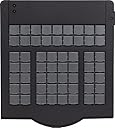
The Expertkeys EK-58 is a 58-key USB keypad designed for professionals seeking to streamline complex keyboard commands. Featuring fully programmable mechanical keys with non-volatile flash memory, it offers plug-and-play compatibility with Windows PCs and supports custom labeling via removable transparent keycaps. Ideal for photo editors, programmers, gamers, and digital audio workstation users, it enhances workflow efficiency by consolidating macros and shortcuts into a single, easy-to-use device.
| ASIN | B00JR496QO |
| Antenna Location | Gaming, Personal, Photo Editing, Programming |
| Box Contents | USB Cable |
| Brand | Expertkeys |
| Brand Name | Expertkeys |
| Button Quantity | 58 |
| Compatible Devices | PC |
| Compatible Operating System Family | Windows |
| Compatible devices | PC |
| Connectivity Technology | usb-a, USB |
| Connectivity technology | usb-a , USB |
| Customer Reviews | 3.7 out of 5 stars 55 Reviews |
| Enclosure Material | Plastic |
| Hand Orientation | Ambidextrous |
| Item Dimensions L x W x H | 23L x 4.2H centimetres |
| Keyboard Description | Wireless |
| Keyboard Layout | QWERTY |
| Keyboard description | Wireless |
| Manufacturer | Expertkeys |
| Manufacturer Part Number | EK-58 Photoshop Edition |
| Model Number | EK-58 Photoshop Edition |
| Number of Keys | 58 |
| Power Source | USB Powered |
| Product Features | Removable |
| Recommended uses for product | Gaming, Personal, Photo Editing, Programming |
| Special feature | Removable |
| Style Name | Modern |
| Switch Type | Mechanical |
| UPC | 700587547935 700587547904 |
A**S
Perfect for Cubase.
It’s my pleasure to be the first to review the Expertkeys EK-58. I bought it to control key commands in Cubase 9.5. I took a chance as I couldn’t find much info on using it to control a DAW but noticed that Cubase was listed as compatible in their advert. Your PC recognises the EK-58 as a standard qwerty keyboard so there is no need to have to set it up as a midi controller within your DAW. Using the software provided, it’s so simple to set up all the shortcuts you require, well, up to 58 on the first layer and 58 on the second layer. The keycaps flip open so you are able to print out your own icons/labels so you can see them clearly and don’t have to try to memorise them or stick adhesive labels on keys. I now have a shortcut for EVERY important feature in Cubase. It’s a game changer. Combined with 2 Griffin Powermates to control scrolling through tracks, track volumes and scrub, my set up is perfect for me and I cannot imagine needing to change anything in the future. My workflow is faster than its ever been and is a joy. Expertkeys EK-58 gets 5 stars from me. The build quality is superb too. Has some weight to it. Also, contacted their customer support about buying extra keycaps and they replied same day and posted them from Germany for €1 each. Doesn’t get any better than that. Wish I had bought an EK-58 years ago for Cubase.
C**H
A Little Disappointing
On the plus side, when this works, it's a wonderful time-saver. Sadly, it doesn't alway do what it's supposed to. Frequently - in fact, USUALLY, combination keys don't work. Or they may work for a while then fail. In Cubase Alt-N usually (but not always) comes out as N. And there are many others. Had it not been for the fact that it SOMETIMES worked, I would have assumed an error on my part. UPDATE: reduced to one star. Key combinations still frequently (though not always) fail. Now the thing is frequently (thoough not always) not recognised by any of my computers. It's a paper-weight. In all honestly, were it not for the fact that I've had this a while (and disposed of the packaging) I think I would have sent it back. I had spent ages setting up a system that should have worked for me, only to find that the device so often failed.
L**I
Ottimo
Fa esattamente quanto promesso. se posso permettermi un suggerimento, ne farei una versione con una forma quadrata e piana, più sottile.
D**N
EK-58 von Expertkeys: Von mir in kleinem Homecockpit mit FSX genutzt
Ich habe mir das Expertkeys EK-58 für Flugsimulation und ein kleines Homecockpit in Verbindung mit dem FSX gekauft. Inspiriert durch ein Homecockpit-Forum habe ich recherchiert und mich schließlich für dieses Amazon-Angebot von Expertkeys entschieden. Die Lieferung erfolgte zügig am bei der Bestellung anvisierten Tag. Die Verbindung mit dem FSX ist vollkommen problemlos: Die Tasten auf dem Keyboard sind frei programmierbar, und der FSX setzt alles problemlos um. Etwas problematischer war jedoch die Anbindung an die PMDG 737 weil Tastenkombinationen mit Strg/ Shift/ Alt nicht zuverlässig erkannt werden. Nach vielen Tests bin ich jedoch mittlerweile davon überzeugt, dass das Problem bei der PMDG selbst und nicht an dem EK-58-Keyboard liegt, da -wie bereits geschrieben -die Zusammenarbeit mit dem "nativen" FSX überhaupt keine Probleme macht (auch mit den Kombinationstasten Strg/ Alt/ Shift/ usw. überhaupt keine Probleme). Eine weitere Möglichkeit die ich in Betracht gezogen habe ist, dass mein PC leistungsmäßig mit dem FSX + PMDG + rechenintensiven Addon-Szenerien + diversen Hardware-Panels einfach an der Belastungsgrenze steht. Andere "übliche Verdächtige" zur Lösung des Problems wie Wechsel des USB-Ports/ Hubs, Tastaturtreiber und vieles mehr wurden systematisch ausgeschlossen. Ich habe diesbezüglich den Verkäufer kontaktiert und war vom Kundensupport positiv überrascht: Nachdem ich am ersten Tag vormittags niemand erreicht habe, rief man prompt und unverlangt um die Mittagszeit zurück und war wirklich und nachhaltig um Lösungsmöglichkeiten bemüht. Über mehrere Tage hinweg hatte ich täglich telefonisch (sehr netten und freundlichen) Kontakt mit Expertkeys. Meine Empfehlung für Kaufinteressenten ist, sich bereits im Vorfeld Gedanken über die auszulagernden Funktionen und das zugehörige Keymapping zu machen. Wenn man bereits vorher einen Plan hat, geht die Programmierung des Keyboards nach sehr kurzer Einarbeitungszeit in die Programmierungssoftware schnell von der Hand und man vermeidet Doppelzuweisungen FSX/ Addon-Flieger. Im Rahmen meiner oben beschriebenen Probleme habe ich zu Testzwecken das Keyboard mittlerweile mehrfach umprogrammiert. Für eine vollständige Umprogramierung aller Funktionen (bei mir insgesamt ca. 65 Funktionen auf 2 Tastatur-"Layern" benötige ich rund 15 Minuten inklusive Funktionstest). Voraus gesetzt natürlich, man weiss bereits vorher wie es werden soll und programmiert nur den bereits geschriebenen Plan herunter. Mein persönliches Fazit nach einer Woche Testbetrieb: ======================================== Auch wenn ich noch nicht alle Funktionen der PMDG 737 wie ursprünglich gewünscht auf das Keyboard auslagern konnte, möchte ich das Keyboard nicht mehr missen (das gilt trotz aller noch bestehenden Probleme auch ganz besonders für den Betrieb mit der PMDG). Es fühlt sich einfach wesentlich realistischer an z.B. Efis-Modes, Autobreaks, Sitzhöhenverstellung und vieles mehr über einen Knopfdruck zu regeln, als die Maus über den Bildschirm zu schubsen. Grundsätzlich kann man im nativen FSX ALLE Funktionen auf das Keyboard auslagern. Innerhalb der PMDG sind alle Funktionen die in der CDU (PMDG-Setup->Options) einem Tastenbefehl zugeordnet werden können möglich. Über spezielle Zusatzsoftware die via LUA auf die PMDG-internen Scripte zugreifen (z.B. LINDA) sollte noch wesentlich mehr möglich sein. Allerdings habe ich hiermit (noch) keine Erfahrung. Zusammenfassend: Ich fliege nicht mehr ohne !
L**S
Bon produit , mais reste cher
Très bon produit, je l'utilise comme clavier hotkeys pour mon trading. Il faut s'habituer aux touches qui sont légèrement molles mais pas trop non plus.
F**A
¿Mejor equipo para atajos de teclado?
Hacia tiempo que buscaba un equipo donde grabar los atajos de teclado mas habituales para facilitar la edicion de video con Davinci Resolve. Se puede configurar con un software que trae pero que tiene varios fallos, el principal es que cuando grabas la configuracion y la recuperas, se cambia el dibujo y disposicion de las teclas en pantalla por lo que es mas dificil reconfigurarlo, el software asi es dificil de usar para reconfigurar. Como se puede cambiar entre 2 configuraciones, se puede usar con 2 programas diferentes o con uno aprovechando el doble de teclas, pero para mi seria mejor que se incluyera un software que permitiera usarlo en multitud de programas cambiando el layer a cada programa (tal y como hacen otros miniteclados configurables). Por ultimo, tengo que mencionar que hace ruido y no hablo del ruido de las teclas al pulsar que como son mecanicas es un ruido normal, no, hablo de un zumbido extraño muy agudo, de hecho, de alta frecuencia que no todos escuchan pero que yo y 2 de mis compañeros de oficina escuchan, y es muy molesto por lo que me obliga a desconectarlo fisicamente del puerto usb cada vez que no lo uso. Aunque una vez consigues programarlo funciona, yo no lo volveria a comprar ni te lo recomiendo. Parece que hay opciones mejores y sin ninguno de esos fallos por precios similares o mas bajos
M**L
sehr gute Zusatztastatur
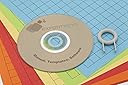
Die Tastatur macht das, was sie soll. Der mitgelieferte Vordruck zum Bedrucken der Tasteneinlagen ist etwas gewöhnungsbedürftig. Hier habe ich mir etwas eigenes gebastelt. Der Gebrauch der Klammer zum entfernen der Tastenabdeckung ist etwas knifflig. Nach einigen Versuchen hat man es aber schnell raus, wie man die Klammer richtig ansetzen muss. Eine Bitte in eigener Sache wäre zum Thema (Daten)Schutz. Es wäre sehr wünschenswert, wenn man die Tastatur mit einem Stück Software bestückt, welche beim Einstecken erst ein Kennwort abfordert bevor man sie benutzen kann. Denn sollte die Tastatur mal verloren gehen oder gestohlen werden, guckt man blöd aus der Wäsche...alle auf die Tasten programmierte Daten sind dann schnell im Zugriff Dritter! Ich denke das sollte zu machen sein. Ansonsten kann ich die Tastatur vom Gebrauch her nur empfehlen.
Trustpilot
1 day ago
1 month ago