


āØļøā” Power your productivity and play with wireless precision!
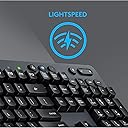
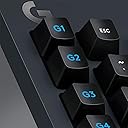
The Logitech G613 Lightspeed Wireless Mechanical Gaming Keyboard combines ultra-fast 1 ms Lightspeed wireless technology with durable Romer-G mechanical switches rated for 70 million clicks. Featuring dual 2.4 GHz and Bluetooth connectivity, 6 programmable macro keys, and an impressive 18-month battery life, itās designed for professionals and gamers seeking high performance without compromise. Its robust build and quiet tactile feedback make it ideal for both intense gaming and efficient multitasking.
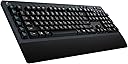



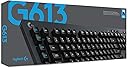


| ASIN | B07796MBJ7 |
| Batteries | 1 Lithium Polymer batteries required. (included) |
| Best Sellers Rank | #43,780 in Video Games ( See Top 100 in Video Games ) #250 in Mac Gaming Keyboards #718 in GEM Box Microconsole #2,120 in PC Gaming Keyboards |
| Brand | Logitech G |
| Color | black |
| Customer Reviews | 4.2 4.2 out of 5 stars (6,091) |
| Date First Available | November 9, 2017 |
| Hardware Platform | Laptop, Smartphone |
| Is Discontinued By Manufacturer | No |
| Item Dimensions LxWxH | 18.82 x 8.5 x 1.33 inches |
| Item Weight | 3.1 pounds |
| Item model number | 920-008386 |
| Language | English |
| Manufacturer | Logitech |
| Number of Processors | 1 |
| Operating System | Chrome OS, Windows 7, Windows 8 |
| Power Source | Battery Powered |
| Product Dimensions | 18.82 x 8.5 x 1.33 inches |
| Series | G613 Wireless Mechanical Gaming Keyboard |
M**)
Just... Wow!
I was on the hunt for a good wireless keyboard that i could with my laptop in the livingroom. I have a setup with a monitor that i can lift up from between the couch and the table and position to my front left so i can use the computer for work and play at home, or to just browse the internet while watching TV. Finding a good keyboard that can do everything was hard! I also have 4 kids that like to destroy things so i needed something tough. Everything i found was $200+, except for this 79 dollar beauty. So the first thing is that i paid $79 for this keyboard 8 months ago, at this price i would expect that its not going to have all the features and functionality of a $200 keyboard, there has to be sacrifices. Its also important to note that Logitech's website says the MSRP for this is $149.99, I wouldn't pay that much for this keyboard. Pros first: 1) The keys are nice and springy, definitely not for everyone. People that are used to certain kinds of cherry switches may dislike these. For myself, i think they are good... This keyboard does well for gaming, for typing, and for everything i've used it for... I can type 150+ WPM with my normal every day typing speed landing anywhere between 100 and 120 WPM. The keyboard on my gaming desktop is the Corsair K95 (with 18 G keys) and uses the Cherry MX Brown switches. I think i like using these a little bit more. 2) Its mechanical! This means key presses will be more consistent due to higher quality parts (talking about actuation distance, pressure to actuate, etc...) and its going to last longer. Its like getting more for your money! 3) There's a bunch of G keys that allow you to record custom macros for games where you may need it. 4) Volume and media controls that can be pressed without having to press a Fn key. 5) Bluetooth AND Lightspeed technology! Of course, use Lightspeed, only use bluetooth if you have to. Lightspeed gets you 1ms response times, essentially matching the speed of corded keyboards! 6) Its built tough! The keyboard has already been flung off my lap, sat on, kicked 3 feet, and jumped on multiple times by a 35lb toddler. Cons: 1) The volume up and down should be a roller not buttons. 2) While the mechanical keys work well (they are Romer G Tactile), they can sometimes sound like little bells with some of the extra noises they make when quickly removing your finger from a key after pressing it. Every time i hear it, i feel like it might be super cheap and break, but it just hasnt yet (which is great!). 3) The wrist rest does not come off. This can be a deal breaker for some people! For me, i like this and it gives me something to easily hold on to when moving it around. I prefer this for my current setup but most setups will not like this. 4) Lights for Caps, Scroll Lock, and Num Lock. There's no Num Lock and Scroll Lock lights, its caused me a bit of confusion a few times and i still havent gotten used to it but i realize quickly each time when something goes wrong that i just need to hit the button again to fix the issue (like num lock). When it comes to the Caps Lock button, there's a square shaped light at the top for this and a battery light next to it. I can never remember that the other light is a battery light so when i toggle caps, i see one light on and the other off and im not really sure which is which so i find myself toggling caps lock multiple times often just to get the light right. If this was the only keyboard i used, i probably wouldnt have this issue. The labels below these lights are incredibly hard to see too, they are black text on a dark gray background, terrible contrast. 5) No lights! Lights on a gaming keyboard should not be optional. They should always have them! In this case, because this is a cheaper keyboard, i would only expect white lights... However, back to that $150 price tag that Logitech originally wanted, you can find other gaming keyboards of comparable quality and more features at that price point. This is a big no-no on this keyboard in my opinion! I didnt reduce stars still because backlighting on a keyboard is rarely a necessity. The light from a monitor will almost always light up the keyboard just fine, but with some setups, the keyboard is in a drawer which is blocking the light when pulled out. Final Verdict: I still give this keyboard 5 out of 5 stars because its a great deal at this price point. A good gaming keyboard with these features is hard to beat at $80. I wouldn't pay more than $99.99 for this keyboard. Once you pass the $100 mark, there's plenty of other keyboards that can exceed this one.
B**T
Wow, this is the keyboard for CIOs! Your keyboard search is over.
Background: I have a degree in applied math and I work as the head of an IT/Security department. Even better, the company that I work for builds military and industrial computer systems so I also help in the engineering department. I am a gaming enthusiast who has probably seen 90% Linus' YouTube videos. **I do not own a single computer game though** even though I have a full spec'd out gaming PC, that is because I use the GPU for neural nets/ AI training. THE KEYBOARD: The quality is superb, having WiFi and Bluetooth is great. If you have all Bluetooth peripherals then you have to hit the power button on your PC to wake it up which may be inconvenient, but with this keyboard on WiFi you can just tap a key. I have this paired with the Microsoft Precision Bluetooth mouse (I also LOVE this mouse). There is little to no flex and the macro keys are great. I have them programmed to COPY, PASTE, GO TO OFFICE 365 ADMIN PORTAL, CMD, TASK MANAGER, and LOCK. The switches are great and feel like Cherry Brown switches. The wrist rest is soft and, while not detachable, it meets my standards of comfort. The gaming mode turns off the Windows key and a few others which would be nice for gamers. The response time is uncompromising when comparing to a wired keyboard. Cons: It takes a little breaking in before the slight springing reverberation in the keys goes away. I would prefer the media keys (volume, pause, etc.) to be silent instead of being a loud click while trying to find the right volume for audio. I would have loved USB pass-through. THE KEYBOARD IS NOT BACKLIT. I don't care because I have an over-desk bendy lamp thing, but others might care. That also means no RGB. I like no RGB because I like my setup to look clean, industrial, and mature. For the price, this keyboard is incredible. For a pro-sumer user it is 10/10 and for a gamer it is closer to 7/10.
P**Y
Good seller, fast post, items as described, arrived within specified time frame, tks guys.
K**.
Very good quality, low latency. Doesn't have RGB which is a plus for me.
S**N
One year update: Still a great keyboard. A couple of keycaps have had the lettering wear off which is odd but not a huge deal, and I *rarely* get a double key press (I mean once every few days) - but still a 5/5 experience for me for sure. I'll come back and update this review in a year's time or sooner if I run into the dreaded double typing issues, but I'm risking it in the mean time as it's just such a great keyboard. The Romer-G keys are fantastic - I'm not sure why people describe these as mushy, or what they're coming from, but coming from my recent keyboards (clicky Outremu blue switches, and Gateron Pro Yellow) they feel just as good, if different. A fairly light key press makes typing for hours a pain-free experience, and for gaming of course w/ it's lightspeed connection it's among the fastest wireless keyboards you can buy. My ONLY issue is it's just a wee bit long, I could have done without the macro keys to save an inch width wise, but once I figure out how to utilize them properly I'm sure the trade off will be worth it. As with the Romer-G keys, people gripe about the wrist rest being too big and not detachable. This is a huge win in my book for couch gaming. 1. the wrist rest works well keeping your hands in a comfortable position (especially in a recliner with your feet up) and 2. the wrist rest doesn't rattle or accidentally detach. For the price at just over $100 CAD, it's a fantastic buy.
C**Z
Excelente opción y versatilidad
D**L
I wanted a wireless mechanical keyboard that was a full keyset, and had a separate off keymap set of keys which can be used that aren't just remapped number or F keys (all of which are in use). The G keys on this can be mapped to F13-F24 which allows for off-map keyboard functionality that doesn't require special hooks to work in programs like discord, and DO NOT INTERFERE with any standard typing/coding. Pros ----- * Very long battery life. (as a heavy user, i need to change batteries once every 4-6 months) * Has an on/off switch on the side - great for when AFK in a house with cats that like to lay on keyboards, and battery life. * Can connect to multiple devices, and retains communication with those devices. (works on my Mac, PC, Television, and even my iPhone) * Logitech software allows for customizing the keys G1-G6, which can extend to G12 via use of a hotkey/toggle. * WIRELESS. This is so important especially when you don't want wires running across your living room floor, but want to have use of a proper keyboard (tactile response, pressure, curves, height, pressure required to push, etc). * Very quiet for a mechanical keyboard. Cons ------ * I would have prefered a traditional Cherry MX (choice of color for type) for the switches, however this can be overlooked as the logitech variation isn't terrible. * Would be nice if the dongle could be shared with other devices like the MX Master mouse. * Having a backlight which could be turned on/off with another button (like the power button) or with power features like lighting up on first keypress would be nice additions. Additional ------ Can't say enough about the logitech software for managing the keyboard map especially the G keys. Most keyboards advertise as having separate keys however when you actually use them, they are just remapped F1-F12 keys, or number keys - so fake. For example the Steelseries pro, was the next closest to having real keys but they are not supported in anything and to use them you need to write a USB filter based on technical information they will not supply. VERY HAPPY WITH THIS KEYBOARD, AS A CODER, --- would buy another in a heartbeat.
Trustpilot
1 week ago
1 month ago