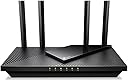
Desertcart purchases this item on your behalf and handles shipping, customs, and support to South Africa.
🚀 Elevate your home network to pro-level speed and security — because buffering is so last decade!
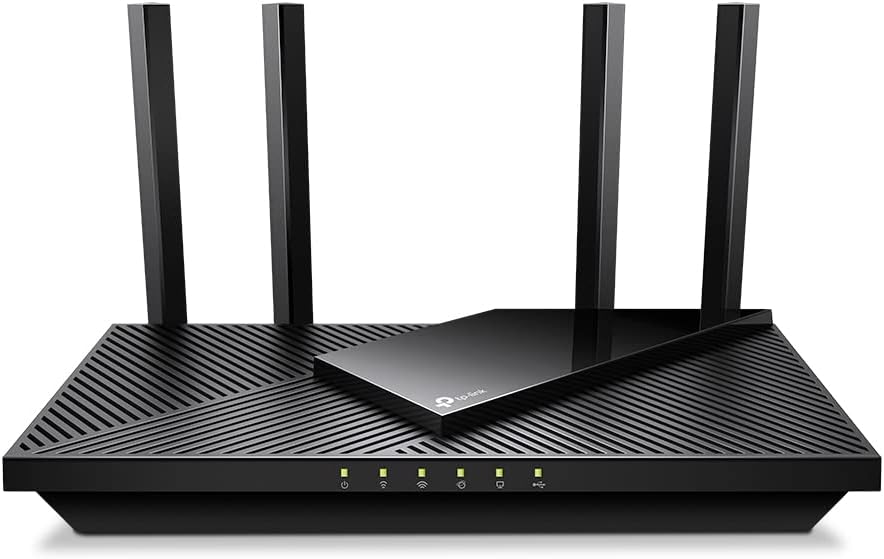
The TP-Link Archer AX55 Pro AX3000 WiFi 6 Router delivers ultra-fast dual-band wireless speeds up to 3 Gbps, powered by 4 high-performance antennas and Beamforming for expansive coverage. Equipped with dual 2.5 Gbps multi-gigabit Ethernet ports, MU-MIMO, OFDMA, and WPA3 security, it supports seamless streaming, gaming, and smart home integration. Enhanced by TP-Link HomeShield for advanced network protection and voice control compatibility, this router is designed for the modern connected home and professional-grade performance.


| ASIN | B0BTD7V93F |
| Antenna Location | Gaming, Home |
| Antenna Type | Fixed |
| Best Sellers Rank | #311 in Computers & Accessories ( See Top 100 in Computers & Accessories ) #38 in Computer Routers |
| Brand | TP-Link |
| Built-In Media | Power Adapter, Quick Installation Guide, RJ45 Ethernet Cable, Wi-Fi Router Archer AX55 Pro |
| Color | black |
| Compatible Devices | Personal Computer |
| Connectivity Protocol | Wi-Fi, IPv4, IPv6 |
| Connectivity Technology | Ethernet, USB, Wi-Fi |
| Control Method | App |
| Controller Type | App Control |
| Coverage | Strong and reliable WiFi coverage throughout a house |
| Customer Reviews | 4.4 out of 5 stars 1,665 Reviews |
| Data Transfer Rate | 2976 Megabits Per Second |
| Frequency | 5 |
| Frequency Band Class | Dual-Band |
| Global Trade Identification Number | 00840030706806 |
| Has Internet Connectivity | Yes |
| Has Security Updates | Yes |
| Is Modem Compatible | Yes |
| Item Dimensions L x W x H | 10.28"L x 5.3"W x 1.62"H |
| Item Type Name | WiFi 6 Router |
| Item Weight | 1.2 Pounds |
| LAN Port Bandwidth | 10/100/1000 Mbps |
| Manufacturer | TP-Link |
| Maximum Upstream Data Transfer Rate | 2.5 Gigabits Per Second |
| Mfr Part Number | Archer AX55 Pro |
| Model Name | Archer AX55 Pro |
| Model Number | Archer AX55 Pro |
| Number of Antennas | 4 |
| Number of Ports | 5 |
| Operating System | Networking Operating System |
| Other Special Features of the Product | WPS |
| Router Firewall Security Level | basic |
| Router Network Type | Wireless Router with Wired Connectivity |
| Security Protocol | WPA, WPA2, WPA3 |
| Smart Home Compatibility | Smart Home Compatible |
| Special Feature | WPS |
| UPC | 840030706806 |
| Unit Count | 1.0 Count |
| Voltage | 12 Volts |
| Warranty Description | 2 year manufacturer |
| Wi-Fi Generation | WiFi 6 |
| Wireless Communication Standard | 802.11ac, 802.11ax, 802.11b, 802.11g, 802.11n |
| Wireless Compability | 802.11ac, 802.11ax, 802.11b, 802.11g, 802.11n |
G**Y
Amazing User Interface
I bought this router because I wanted to content filter my families internet with OpenDNS. This router actually has its own support features like that (they might have a subscription fee? idk) called Parental Controls. None of us here are children, we just don't want pornography, gambling, gore, or malware bothering us anymore. Content filtering wasn't the only goal we had though, we also needed a stable interface for controlling port-forwarding, device IPs, NAT type for gaming, and also an easy way to attach storage for network use (it's very easy, just plug in a USB external hard-drive). The main reason I bought this was for the interface. I've been using Xfinity's modems for a long time (they're very finicky, ugly, poor functionality, and poor user control). I wanted something that hands over the reigns to the User and allows me to use all of my networking and IT skills freely. TP-Link's router interface is honestly gorgeous. I like the colors, everything is set up in a way that makes the most sense, there are tons of features and all information is very easily accessed. I have used other routers in the past (mostly Netgear), and I must say, I feel like this is a big step up. I chose TP-Link over Asus by recommendation of an IT friend, and after seeing the beautiful interface and comparing it to google images of Asus, I decided very easily to go with TP-Links more professional looking, easy going, non-bloated simple interface. There are also apps you can use with your phone for managing the router, TP-Link Tether is fantastic. A lot of the options I have available through the router are also available on this app, even when I'm not at home. This means I can help my family if someone wants to host a server and I'm not home, or somebody needs to transfer files but they can't remember a device ID or IP. Amazing router tbh, their 6000 model is probably even better. WiFi 6 works very well as well, I have had no connection issues since getting this router (weeks ago?) and I would highly recommend it over competing brands on account of the control, accessibility, and style of the user interface. The router itself doesn't look bad either!
J**R
This updated our LAN to WiFi6 support and more. Updated from Asus N300
I recently purchased this TP-Link AX3000 WiFi 6 Router (Archer AX55 Pro) to upgrade our LAN even though our Asus N300 has been working just fine with no drama for many years and still does. I can recommend both sold here on Amazon. The TP-Link Archer AX55 Pro takes things to the next level for WiFi 6 and the router' s many features and settings. I venture to say the Asus N300 will still do fine for most homes streaming and networking needs. It is easier to set up than the AX55 Pro. On to the AX55 Pro - - - So this is just my initial comments and set up so far. Will update if needed. Setup to the TP-Link Archer AX55 Pro is simple using the recommended app, but I chose to use the cable connected method to a spare laptop which provides easier access to detailed settings. It went ok, but advise to go slow and careful to assure what you want to enable and disable. Disable OFDMA if you want the best speeds. I was then able to get speeds off the wired ports usually higher than what Spectrum provides. Good on them. Going wireless . . It upped the speed to even our Roku devices 95 to 110 Mbps. Laptops fared generally better as well but a bit lower. All the dozen or more client devices benefited to one degree or another depending on their capabilities. So for now, the AX55 Pro is a go. It does take more time to power up or re-start. Also, unsure of whether it will pick up ok after an outage of main power or ISP loss? Seemed a like I may need to reset and then restart both modem and AX55 Pro if mains power goes out based on my initial setup, but it could just be me fussing with things. Previously, I was using the Asus N300 WiFi Router (RT-N12_D1) for several years and it served well and still would serve my purposes for 2 heavily used home laptops, a couple of tablets, 3 Roku, 2 internet radios total of about a dozen or so devices plus cell phone use while home. The Asus :https://www.amazon.com/Wireless-N300-Technology-streaming-performing-RT-N12/dp/B00DWFPDNO works very well, never dropped signal in our 1700 sq ft single story home (plus lower level), always recovered after any outages with no drama of having to reset it or Spectrum supplied modem. It is great if your needs are as mentioned above, simple to use, access setup on line for any changes, no muss and no fuss.
M**.
Some setup specifics, works great for good price
Works great now that I got it set up. At first it wasn't connecting properly but it was no fault of the device. I had to work around the Tether app and also I didn't see /realize there was a tiny black button to turn on "wifi." Francis Gail from their customer service helped me get it straightened out. Has been going strong for a few weeks now, no issues, good speed, happy with the product , service and price.
H**Y
It works like a dream!
I decided to replace my old D-Link router to upgrade the speed. I've always had trouble streaming my TV programs reliably. The Samsung TV's self diagnostics would indicate that it was a Xfinity problem. The WiFi would also drop out from time-to-time, and I assumed it was a coverage problem in my house. These problems all disappeared with this TP-Link AX3000 WiFi 6 Router! Signal strength increased and streaming movies now works reliably. The installation was a breeze. One snag in setting it up was that you have to enter the MAC address, listed on the label on the back of the router. When it asks you to enter the MAC address, it displays a default Mac address. This default happened to be one digit off from the address I copied from the back of the router. I assumed I made a mistake in copying the address, so I selected the default Mac address. Nothing worked. Everything worked fine once I entered the proper MAC address from the label. After about 6 weeks, the WiFi stopped working! Fortunately the wired access to the internet still worked. I contacted their technical support through a "chat line," and they resolved the problem. I didn't have to wait long in the queue, and the support person was very knowledgeable. For this reason, I'm giving it only four stars. I added a high speed multi-gigabit cable modem: https://www.amazon.com/MOTOROLA-MB8611-Ethernet-Approved-Comcast/dp/B08DDFKXKC/ref=rvi_sccl_1/140-6050066-5419919?pd_rd_w=IEdej&content-id=amzn1.sym.f5690a4d-f2bb-45d9-9d1b-736fee412437&pf_rd_p=f5690a4d-f2bb-45d9-9d1b-736fee412437&pf_rd_r=7KY3AB9MCKMKJAZZVSKD&pd_rd_wg=rGDhL&pd_rd_r=e31d60a9-a165-43cb-8d74-455efefc02e0&pd_rd_i=B08DDFKXKC&th=1 and connected it to the 2.5 Gbps input to the router using a Cat8 Ethernet patch cable. The WiFi speed is amazing!
M**.
Perfect for everyday needs
This router has been a great upgrade for our home network. Setup was straightforward and the connection has been very stable since installing it. WiFi speeds are fast throughout the house, and it handles multiple devices streaming, working, and gaming at the same time without any issues. Coverage has been solid with no major dead spots, and the performance has been consistent day to day. I like that it offers modern WiFi 6 features without being overly complicated to manage. Overall, it’s a reliable, well-performing router that works great for typical household use and daily internet needs.
G**E
Worst Router I've EVER Owned!
I have quite a few (about 20) household plugs Echo dots, PCs and other smart home components etc in my household that require internet. I do live alone, so much of that isn't being used all at once. However, I do need it to stay connected in order to work properly. This was a problem for a while when I first hooked up this router. My Netgear router finally bit the dust so I bought the TPlink AX3000. I couldn't afford a super expensive router but $150 isn't what I'd call cheap either. Especially for a Grandma. My Netgear wasn't able to utilize my Internet speeds fully, so I had hoped that this new router would be faster. It most definitely is that, according to Internet speed tests run on my main PC (wired). So, no problems there. Here's the problem... Or should I say a bunch of problems - clients were constantly being dropped. One Echo Dot in my kitchen might work but the one in my bedroom would lose connection or vice versa. I couldn't turn on a light because a plug would drop. Things were dropping out all over the house off and on all day long. I have security cameras and one of them just wouldn't stay connected for more than 5 minutes and then would disconnect. The only way to get it to connect again was to delete it and reinstall it It was driving me NUTS!! So if course, I started Googling and like another reviewer said, found out there were many people having the same unpleasant experience with this exact router model. I solved it by Googling the problem and followed the instructions on how to set up each and every client (Echo Dot, Plug etc) one by one with their own client IP reservation. It was SUCH a pain. It did fix the problem however. I can only assume that the people who left all these great Amazon reviews have had different experiences than I did. I'm still pretty miffed that it was sold as a basic "plug and play" router when that's not the experience I had with it at all. I have had it for some time now and what decided me to finally write a review is the fact that even now, when I open up my laptop after it's been off or asleep, it tries to find an internet connection but it can't connect for an extended time. It's April 2025 and I'm OVER dealing with this piece of junk. Despite spending hours researching and tweaking this thing so it even WORKS my Internet speeds are no where near what they should be wirelessly. The only speed that's fast is my wired desktop. Don't buy this piece of garbage.
E**8
Good performance, Great Wpa3
I bought this to take advantage of the VPN router capabilities which work flawlessly once you set them up. The dual band functionality keeps my smart home devices on one frequency while my gaming gear stays on the faster band. Looking at the setup guide and the two apps available helped me get the cables managed correctly in my cabinet. I appreciate the added security of WPA3 encryption which keeps my data locked down tight. It is a solid performer even if the initial interface setup was slightly confusing.
J**M
Awesome!
Easy to setup, took 12 minutes from box to completion. Love the options. I split the 2.4 and 5ghz connections for gaming and kids TVs and what not. Super convenient. I had an Eero Mesh system from my ISP and it was garbage. This router is fast and double the signal range. It’s affordable. If your running anything sub 3gig speeds, this thing is the one
T**6
10/10
ممتاز خذه وانت مطمن
G**S
Steady , no observed connection timeouts 3m now
Steady , good performance , supports multiple VPN providers , including ProtonVPN
V**F
Good
One
I**D
تجربه راوتر
الراوتر ممتاز واداءه جدا مناسب للاجهزه متعدده وتقنياته ممتازه
C**J
Good
Really Good Router Good Price as well
Trustpilot
1 day ago
2 weeks ago