Buy anything from 5,000+ international stores. One checkout price. No surprise fees. Join 2M+ shoppers on Desertcart.
Desertcart purchases this item on your behalf and handles shipping, customs, and support to South Africa.
🖨️ Print smarter, save bigger, and stay connected effortlessly!
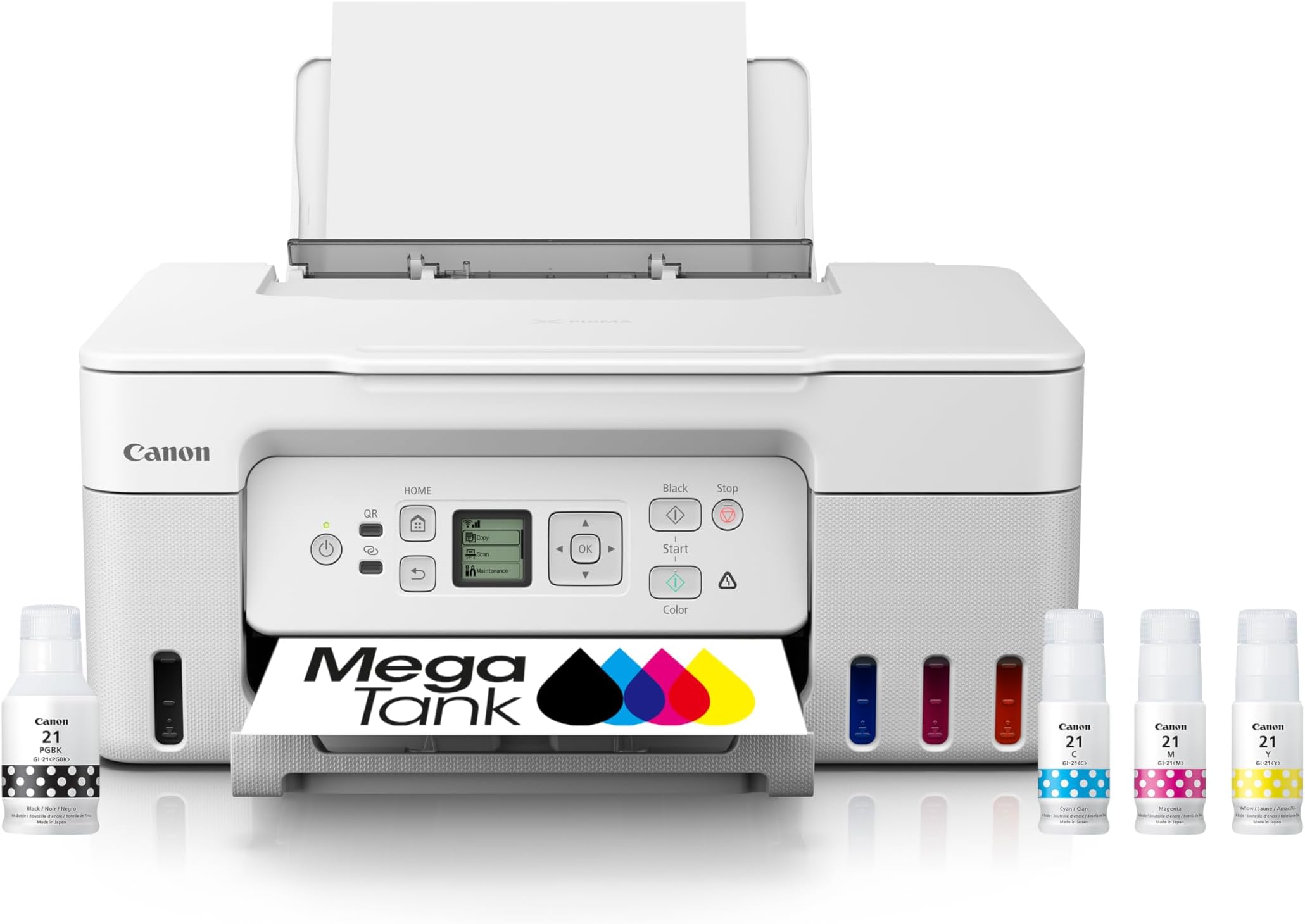
The Canon MegaTank G3270 is a wireless all-in-one inkjet printer designed for home and office use, offering high-volume printing with up to 7,700 color pages per ink refill. Featuring a refillable MegaTank system, a 1.35” LCD display, and Energy Star certification, it delivers cost-effective, eco-friendly printing, scanning, and copying with seamless wireless connectivity and app control.


| ASIN | B0BSMPHC93 |
| Additional Printer Functions | All In One |
| B&W Pages per Minute | 11.0 |
| Best Sellers Rank | #1,252 in Office Products ( See Top 100 in Office Products ) #955 in Computer Printer Ink & Toner |
| Brand | Canon |
| Built-In Media | PIXMA MegaTank G3270 Wireless All-in-One Printer, Set of Ink Bottles (GI-21: PGBK, C, M, Y), Print Heads, Documentation, Power Cord |
| Color | White |
| Color Pages per Minute | 6.0 |
| Compatible Cartridge | PG-245, CL-246 |
| Compatible Devices | PC, Smartphones |
| Control Method | App |
| Controller Type | iOS |
| Customer Reviews | 4.1 4.1 out of 5 stars (767) |
| Display Type | LCD |
| Dual-sided printing | No |
| Duplex | Simplex |
| EU Spare Part Availability Duration | 2 Years |
| Hardware Interface | Ethernet |
| Ink Color | Black, Cyan, Magenta, Yellow |
| Item Dimensions D x W x H | 21.9"D x 16.4"W x 10.6"H |
| Item Type Name | Inkjet Printer |
| Item Weight | 13.2 Pounds |
| Manufacturer | Canon |
| Maximum Copy Resolution Black and White | 600 dots_per_inch |
| Maximum Copy Resolution Color | 4800 x 1200 dots_per_inch |
| Maximum Media Size | 8.5 x 14 inch |
| Maximum Print Resolution Black and White | 600 x 600 Dots Per Inch |
| Maximum Sheet Capacity | 100 |
| Maximum print Resolution Color | 4800x1200 Dots Per Inch |
| Model Name | PIXMA G3270 WH |
| Model Number | 5805C022 |
| Model Series | PIXMA |
| Number of Ethernet Ports | 1 |
| Number of Trays | 1 |
| Other Special Features of the Product | Borderless Printing, Display Screen, Energy Star, Epeat Qualified, Network-Ready, Refillable Ink Tank |
| Output sheet capacity | 100 |
| Paper Size | 3.5” x 3.5” (Square), 4” x 6”, 5” x 5” (Square), 5” x 7”, 7” x 10”, 8” x 10”, Letter (8.5” x 11”), A4, A5, A6, B5, Legal (8.5” x 14”), U.S. #10 Envelopes, Card Size (91 mm x 55 mm), Custom size (width 2.1–8.5 in, length 3.5–47.2 in) |
| Power Consumption | 16 Watts |
| Print media | Envelopes, Labels, Paper (plain) |
| Printer Connectivity Type | USB, Wi-Fi |
| Printer Output Type | Color |
| Printer Type | Inkjet |
| Resolution | 600 x 600 |
| Scanner Type | Flatbed |
| Specific Uses For Product | Home, Office |
| Total Usb Ports | 1 |
| UPC | 013803351538 |
| Unit Count | 1.0 Count |
| Warranty Description | 1 year |
| Warranty Type | Limited |
| Wattage | 16 watts |
V**R
Good product! I recommend it.
I read many of the reviews. It was super simple to set up. I'm using the Wi-Fi and it seems to work great for my needs. The Epson I had for a few years broke. I researched and picked up this Canon. Seems to be fine. I do recommend this product.
N**E
Great Little Printer - fantastic printing, clear and sharp.
Pros: Easy setup, 1, 2, 3, follow the instruction, No problem. WiFi with the tiny screen took a second to connect. This is a great little printer. Good quality prints, sharp and clear, good color, Ink lasts a long time. Cons: The printer feels cheap, the quality of the plastic all around feels thin and fragile. I have a Canon Pixma 7120 that feels like a tank, glossy plastic cover, felt strong, still going after 8 years or more of good printing. The little tiny LCD screen, really Canon, its hardly visible. What happened to the giant (in comparison) LCD screen like the one on the P7120??? Only reason I'm replacing it is Windows 11 - printer is not 100% compatible. It will print but I can't scan and I need that feature. Back to the G3270 - Love this little printer, I'm careful opening and working around the covers so nothing will break. Double sided printing is possible but you have to reload the sheets into the try and print the second side. It does not print double sided sheets automatically like the P7120, bummer. Takes up more space, although a smaller footprint because of the rear paper tray. The paper stands tall so you need room above the printer to load the paper. I raised the shelf to 14" above the printer to accomodate the paper tray. It's easiler to load the paper but it takes up space. Beautiful pages of black and white text, color printing is wonderful, really improved over the P7120. Mega Tanks are awesome, easy fill and they remain full after literally 100's of pages of printing. I've been through three reams of paper and still going strong. I'm talking about double sided pages of full text, powerpoint presentations with notes and various signs in color. GREAT. I looked a the big brother the G3290 (with the larger screen) couldn't find one online or at a local store?? Yeah, they are available now after I bought the G3270 WHAT?
J**N
Print quality is good and I like the ink tank concept
I bought this printer because while my laser will print in color the photo quality is lacking and the color from it hasn't been the best (it's about a 15 year old printer!). I sometimes make photo test prints and fliers for my business which often include photos so needed something with decent photo quality and color and this printer has worked well for that despite being a more budget model. It prints fairly fast but it's also pretty loud while doing it (and not just loud but harsh mechanical / moving parts kind of sounds). There is a silent mode which makes a very noticeable difference in how loud it is when printing at the cost of some printing speed. For me losing a little printing speed is worth it for quieter printing so I've set silent mode to be on all the time. As I mentioned, I like the ink tank concept and this is actually my second megatank printer. The first one I had I let sit for too long without using (a couple of times) and many of the nozzles got clogged. After a lot of cleaning cycles I was able to get most of the nozzles working again but then the maintenance cartridge was full and the printer wouldn't let me print without sending it in to Canon for repair. Letting it sit for too long is my fault but the older printers didn't have a user replaceable maintenance cartridge, so once the printer thinks that is full it's useless until you send it in for repair. Considering the cost of shipping a big bulky printer (I don't know what the repair cost with Canon would have been) I ended up recycling my first megatank printer and went back to using my laser printer for awhile. Now the newer printers have user replaceable maintenance cartridges which is great, and I've made it a habit to do a test print at least every other week to avoid having clogged nozzles again. So hopefully I won't need to replace the maintenance cartridge anytime soon but when that time comes it's nice to know that I can do it myself without much cost or hassle.
C**R
Excellent choice for small cost
This review is weighed by its cost and performance. I had short term need for a scanner not a high volume printer and ended up impressed by all aspects. Okay the scanner software is clunky but works and is free. Printing quality is very good even compared to machines far more expensive. Haven't attempted faxing but with scanning direct pdf I likely never will need to. Yeah the screen is very small but clear enough for 77 year old eyes. If your needs are limited or wallet is strained one can't go wrong with this all-in-one printer.
Trustpilot
2 months ago
1 week ago