Desertcart purchases this item on your behalf and handles shipping, customs, and support to South Africa.
๐จ๏ธ Print More, Spend Less, Stress Zero!
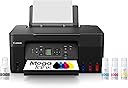
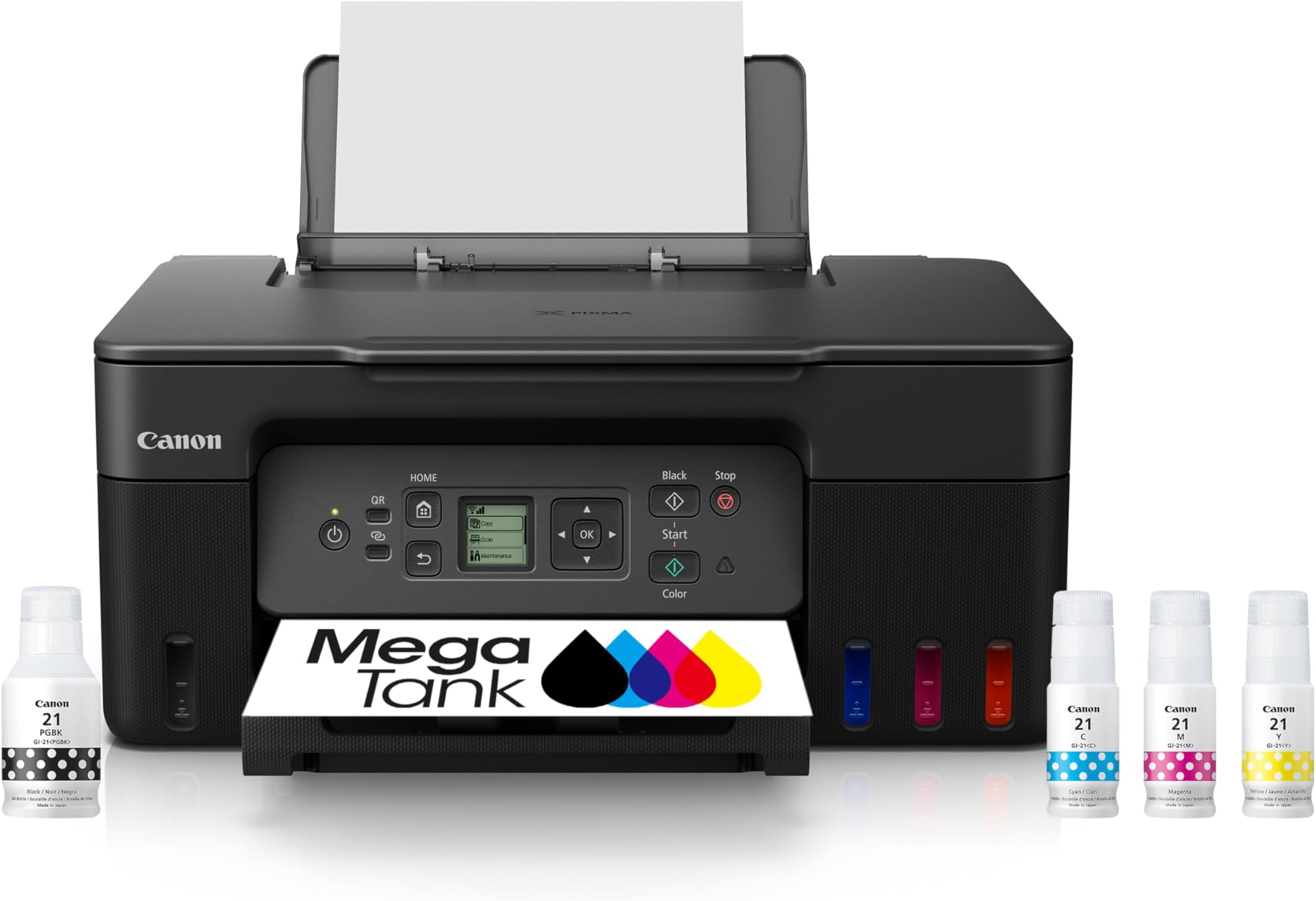
The Canon MegaTank G3270 is a wireless all-in-one inkjet printer designed for home and home office use. It delivers up to 7,700 color pages or 6,000 black-and-white pages from a single ink set, included for up to 2 years. Featuring a high-resolution 4800 x 1200 dpi print output, a 1.35โ LCD display, and easy app-based setup, it offers cost-effective, high-quality printing, scanning, and copying with energy-efficient performance.


| ASIN | B0BSMSYM9N |
| Additional Printer Functions | Copy, Scan |
| B&W Pages per Minute | 11 |
| Best Sellers Rank | #2,351 in Office Products ( See Top 100 in Office Products ) #6 in Ink Tank Printers |
| Brand | Canon |
| Built-In Media | PIXMA MegaTank G3270 Wireless All-in-One Printer, Set of Ink Bottles (GI-21: PGBK, C, M, Y), Print Heads, Documentation, Power Cord |
| Color | Black |
| Color Depth | 16 bits |
| Color Pages per Minute | 6 |
| Compatible Devices | Smartphones, Tablets |
| Connectivity Technology | USB, Wi-Fi |
| Control Method | App |
| Controller Type | iOS |
| Customer Reviews | 4.1 out of 5 stars 5,017 Reviews |
| Display Type | LCD |
| Duplex | simplex |
| EU Spare Part Availability Duration | 5 years |
| Global Trade Identification Number | 00013803351507 |
| Hardware Interface | USB |
| Ink Color | Black |
| Item Dimensions D x W x H | 21.9"D x 16.4"W x 10.6"H |
| Item Type Name | Inkjet Printer |
| Item Weight | 13.2 pounds |
| Manufacturer | Canon |
| Maximum Copies Per Run | 99 |
| Maximum Copy Resolution Black and White | 4800 x 1200 |
| Maximum Copy Resolution Color | 4800 x 1200 |
| Maximum Copy Speed Black and White | 11 pages_per_minute |
| Maximum Media Size | 8.5 x 14 inch |
| Maximum Print Resolution Black and White | 4800 x 1200 dots_per_inch |
| Maximum Sheet Capacity | 100 |
| Maximum print Resolution Color | 4800 x 1200 dots_per_inch |
| Model Name | PIXMA G3270 BK |
| Model Number | 5805C002 |
| Model Series | PIXMA G3270 |
| Number of Trays | 1 |
| Other Special Features of the Product | Borderless Printing, Display Screen, Energy Star, Epeat Qualified, Network-Ready |
| Output sheet capacity | 100 |
| Paper Size | 3.5โ x 3.5โ (Square), 4โ x 6โ, 5โ x 5โ (Square), 5โ x 7โ, 7โ x 10โ, 8โ x 10โ, Letter (8.5โ x 11โ), A4, A5, A6, B5, Legal (8.5โ x 14โ), U.S. #10 Envelopes, Card Size (91 mm x 55 mm), Custom size (width 2.1โ8.5 in, length 3.5โ47.2 in) |
| Power Consumption | 16 watts |
| Print media | Card stock, Envelopes, Glossy photo paper, High-resolution paper, Paper (plain) |
| Printer Connectivity Type | USB, Wi-Fi |
| Printer Output Type | Color |
| Printer Type | Inkjet |
| Printing Technology | Inkjet |
| Resolution | 600 x 1200 |
| Scanner Type | Flatbed |
| Special Feature | Borderless Printing , Display Screen, Energy Star, Epeat Qualified, Network-Ready |
| Specific Uses For Product | home, home office |
| Total USB 2.0 Ports | 1 |
| Total Usb Ports | 1 |
| UPC | 013803351507 |
| Unit Count | 1 Count |
| Warranty Description | 1 year |
| Warranty Type | Limited |
| Wattage | 16 watts |
A**5
Much easier to setup using the Windows app!
Since 1995 I've used many printers starting off with a Canon bubble jet. Since then I've used Brother, Canon, Lexmark and Epson. Admittedly for print quality Epson's sub lim dye is the best printing you're going to get. Their ink also lasts longer in regards to photo-life. As far as cost and availability of their ink at stores though is another question. Cost-wise they're all pretty much on par with each other for all brands these days. You can improve the print quality on Canon printers but you'll have to fool with the settings to get there which I don't mind doing. You'll also use a little more ink but that's the cost of quality. The Windows App made setting this printer very easy and kudo's to Microsoft and Canon for that. This is my first tank printer which I'm looking forward to using but you have to keep in mind that if you don't use the printer at least some what regularly, the ink to the printhead WILL dry out if you leave it idle for too long. Keep that in mind for EVERY printer unless you're using a laser jet. After adding the ink and updating the software I printed out my test page, simply scanned it and the printer itself set the print alignment to it's best settings. Super easy! Print outs aren't the fastest which is fine I'm not looking for speed to be honest. Print quality is very good on standard settings but I'll probably set it for best print quality later. Canon printers inherently have a sequence of sounds that hasn't changed in 28 years lol. Same for most other brands too. Not annoying but not silent either so don't expect that. It's no louder than the other brands. Canon has always done good black and white printing well before the other printer brands and their color quality has improved significantly as well. Having tanked ink versus having to buy cartridges is VERY cost effective! You essentially pay double for the printer but save long-term in the amount of printing (the REAL cost). We used to have a Cartridge World store that would sell refurbed ink tanks that worked 100% of the time but that location closed recently and sadly. If you have one near you I highly recommend them! I had recently bought an Epson XP4200 AOI printer but finding the cartridges took some time and forget locating them in your local store unless you get lucky, then came the cost. The XL cartridges range $30-$50 which is about what I paid for the printer new. Even off brand ones aren't that cheap. Having a tankless printer saves me time in finding ink and saves me a ton of money over having to buy overly expensive cartridges. Many of the 3rd party ones don't always work either so it's iffy in regards to cost savings. If at some point I have to do the printhead bath to clean them I don't mind, it's well worth it for not having to buy outrageously expensive cartridges. I'm done with them! I definitely recommend this printer even if you're only doing average home use. Just remember to use it every week even if just once. Update: I'm almost 2 years into using this now and I'm still using the original ink that came with it! How's that for REAL cost savings? Over that same time frame for ALL my other printers I would have bought at least 6-8 ink cartridges MINIMUM! At an avg. cost of $33 each that works out to $264 in just ink and then add in the cost of the avg. printer and your now at over $300 easily. In savings alone, I've almost doubled my money! The printer and ALL of it's functions still work 100% of the time and I've probably printed way more than double what I would normally have done. In black ink I'm still over 50% full too! This undoubtedly IS the way to go without question. Yes, it is an upfront investment of sorts but it pays for itself very quickly.
M**E
I would strongly suggest buying this printer. My best printer in 35 years !!
I love it after 5 months of pretty continous use. I just leave the printer on all the time, so it can clean when it needs to. The printer is very easy to use, Prints very clean, especially on black and white printings (with no jams at all). The ink is lasting a long time so far. My old Epson ink jet printer would have gone through at least 2 cartridges by now.
S**T
Solid performance, great savings vs cost of ink cartridges
I've had this printer for over a year and a half and have printed over 150 greeting cards plus labels, numerous flyers and all other correspondence with it. It's the best printer I've had. I'm on only my first ink tank refill - It's paid for itself in ink savings already. It scans well and is very easy to set up and use. If it ever fails, I'll buy one like it again.
C**A
So disappointed:(
Terribly inefficient connection, unreliable color accuracy, and confusing support from Canon (or lack thereof) I thought I had found the perfect budget printer for starting my art business.. the glowing reviews online and the promise of longlasting inks compared to other companies. Suffice to say, after hours of frustration, bouts of rage and wasted paper, I am extremely disappointed. I think the ONLY net positive about this printer is the fact that the inks look like they will outlast any of the cartridges from other printers like Epson, while also being so much cheaper to refill. Which is WHY I am so angry and disappointed at this piece of junk. Unfortunately, I'm going to have to go back to Epson, which I DID NOT WANT! And here's why: 1. Excruciatingly slow and inefficient wifi: This printer's ability to connect to wifi and stay connected is ABYSMAL, it constantly goes offline between prints, it struggles to reconnect and you will spend up to 30+ minutes waiting for a single sheet to print while having the dreaded "Unable to Locate Printer" screen loading forever and ever. As a small business owner with deadlines, the constant connectivity issue is impossible to sustain. To top it off, it doesn't come with any ethernet port, and you're forced to buy a special printer/usb cable just so you can reliably use this printer. I don't want to have to pay an additional cost for something that should have been included with this printer, just to fix a problem that shouldn't even exist! I never had this issue with my Epson, or any other device! It makes no sense! 3. But this was the dealbreaker: DULL, WASHED OUT COLORS AND INCONSISTENT RESULTS ACROSS ALL SETTINGS AND PAPERS!! I have tried every single iCC that canon offers (which by the way, are not available in photoshop for some weird reason, despite all the epson paper settings being there without me having to do anything. I've installed the driver on my mac and even had to ask chatgbt for help to no avail) and different papers. My blacks are printing gray on cardstock, then brown on another paper, no matter what I did, it never prints black correctly!! I printed another design with the same exact paper on Epson, and compared that with Canon. The Epson print looks vibrant and matches the colors on my monitor perfectly, while the Canon print is COMPLETELY WASHED OUT AND DULL by comparison. Same exact settings, same exact print, tried all the other settings, NO IMPROVEMENT! There was like 1 print that came out where the blacks were close to accurate, yet with the same exact paper and settings it has never happened again! I've wasted so much paper for nothing!! 4. Lack of a physical manual or a link to an actual guide, you are forced to download their app and go through several hoops to find a visual setup procedure. There are no videos or troubleshooting steps I could find from the website. The printer automatically comes with a useless feature that tells you there is no paper loaded when there is, and you're forced to figure out how to turn it off on your own. Navigating the settings on the printer's tiny screen is equally confusing. Now, I can suffer through this thing's abysmal wifi by paying extra for that cable, I can suffer through the lack of a physical manual and useless/confusing setup guides from Canon's app, but the color inaccuracies and lack of steps to fixing them are a huge no for me. The only reason I returned my Epson was because it smears any paper with gloss in it, and there is no fixing that. The massive HEADACHE and mental turnoil I've suffered from having to DIY my way out of every endless caveat with canon's pixma g3270 is simply not worth it. I'm returning this thing ASAP
M**H
TROUBLESHOOTING TIPS
Disclaimer: I bought the 'Backlit LCD screen' model, so my review only applies to said printer. I've had my printer for about a month now and feel like I have a good low-down for all of y'all thinking about getting this one. The BIGGEST issue I've had with this printer is the exact same one everyone else here in the reviews have had issues with- color printing. This printer so conveniently has absolutely no color settings that one can tinker with: not through the "Canon PRINT" app OR the "Canon Easy-PhotoPrint Editor" app, not through paired laptop settings, and especially not within the settings of the printer itself. The ONLY way I have been able to print with well-saturated colors on standard letter paper is by changing the print settings from "letter paper" to "photo paper" just before I send my documents to be printed. The "Letter paper" print setting works wonderfully for black-and-white word documents, but thats all its useful for. Use "photo paper" settings for any and all prints you need in color. If you try to use "letter paper" settings for color, the result is incredibly unsaturated and upsetting. This printer does have incredible color output and resolution when you use the right settings. While you CAN set this printer up very easily without wifi, it is a pain to connect to. IT DOES NOT HAVE BLUETOOTH CAPABILITY. There are only 2 ways to connect to this printer without in-home wifi. The first is to connect to the printer through the printer's wifi band, but this means your device will not otherwise be able to connect to the internet while paired with the printer. If you need to print directly from files online, you will not be able to do so without connecting the printer and your device to an outside wifi network. The second option is to connect with a USB-B cable. This printer has NO STANDARD USB PORTS. It only has a USB-B port, and a USB-B cable is not a common household wire type. To get the most convenient connection to this printer, in-home wifi is a must. If you need to print double-sided documents, you must manually re-insert every page so that it may print on the back. With that long list of cons, I do have positives. The borderless printing works very well for photographs. The colors printed on photo paper are brilliant and very saturated, even without any manual editing of the photos. It prints just a tad bit slower than other printers, but it is not mind-numbingly slow. It is easily tolerable. This printer DOES have a scanner, so copies are a breeze. The initial set up of the whole printer was incredibly easy and rather quick; I was surprised I didn't have to fight with it at all! Best of all, the ink for this printer is relatively cheap and it lasts for a LONG time! No costly maintenance, and NO SUBSCRIPTIONS NEEDED to continue using your printer. โ ๏ธREAD YOUR MANUAL!!!โ ๏ธ Because this is a tank printer, you should enable 'moving mode' whenever you have to relocate the printer. I recommend doing so, even if its just from room to room. This precaution will keep your ink from destroying your printer. To sum it up, its got its issues, but its a great printer when you can work around them. I was pretty positive I was going to return this printer while I was troubleshooting it, but I got it figured out and I'm content. Hopefully this review will save someone else some grief when they get this printer.
Z**R
Zero regrets!
Not gonna lie, I was iffy to buy this after some reviews. BUT. I 100% recommend! I homeschool my 5 kids and I have to print off their curriculums. I have printed OVER 6000 pages and I still havent used all the ink! The color of the images is unreal, like a real textbook. I had an Epson, was $79 to buy but the ink ran out quick, especially if you had to do an ink clean cycle. The ink was more expensive than what this printer cost. And I still didn't get anywhere close to the pages or clarity that this one gives. Set up is simple. You take off the orange stickers, plug it in, and it walks you through how to install the cartridges and ink. Then to wifi. Takes maybe 10 mins. 100% recommend....oh and when you need ink replacements, it's $20 for 4 bottles for another 6000+ pages!
W**R
Worth the price!
Took a while to connect to our PCs but once connected the printer works great and so glad that we donโt have to worry about cartridges running out so quickly!
A**R
It's great.
WOW!!! I am amazed at this printer, and I hate dealing with electronics! It WORKS incredibly well. The set up was simple with pictures to walk me through the baby steps! I liked the idea of saving money on the liquid ink refills but also worried that ink would spill everywhere. No spills. The ink bottle designer must have copied a toddler no spill sippy cup! I had to consult youtube to figure out how to connect to WIFI, but even that process was simple. The printer works SUPER QUICK and prints looks SUPER SHARP. BUY IT!
A**Y
Solution to a problem!
Sick of wasting money on ink for cheap inkjet printers. They're not a bargain. This unit will allow you to clean the print heads regularly without blowing ANOTHER cartridge! Pretty much solves the cost problems of inkjet printers.
Trustpilot
1 month ago
2 weeks ago