


Desertcart purchases this item on your behalf and handles shipping, customs, and support to South Africa.
💧 Stay dry, stay smart — the ultimate water watchdog for your home!
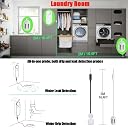
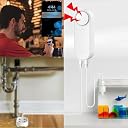
The Tuehakny WiFi Water Leak & Water Level Detector features a unique dual-probe design with 16.4ft detection lines, delivering simultaneous left/right water monitoring. It connects via 2.4G WiFi to send instant app alerts anywhere, complemented by a powerful 100 dB adjustable alarm for on-site warnings. Powered by 2 AAA batteries, it offers easy installation and versatile use across multiple water-sensitive areas, with smart automation capabilities to elevate your home protection.




| ASIN | B0BRXSF8NY |
| Audible Noise | 100 db |
| Battery Description | AAA |
| Best Sellers Rank | #427,890 in Tools & Home Improvement ( See Top 100 in Tools & Home Improvement ) #288 in Water Detectors & Alarms |
| Brand | Tuehakny |
| Built-In Media | Detector |
| Color | white |
| Compatible Devices | Smartphone |
| Control Method | App, Touch |
| Customer Reviews | 3.9 out of 5 stars 524 Reviews |
| Item Dimensions L x W x H | 1.26"L x 0.78"W x 3.5"H |
| Item Type Name | Detector |
| Manufacturer | Tuehakny |
| Maximum Range | 5 meters |
| Mfr Part Number | L31 |
| Model Number | L31 |
| Mounting Type | Wall Mount |
| Number of Batteries | 2 AAA batteries required. (included) |
| Number of Items | 1 |
| Power Source | Battery Powered |
| Product Dimensions | 1.26"L x 0.78"W x 3.5"H |
| Sensor Technology | Contact Sensor |
L**N
Great little device!
First let me start by saying this review is long but I am trying to address some problems other reviewers have had and I am trying to get more information out about this water leak / water level device. I was trying to find something exactly like this device with two floats but I couldn't so this was my best bet and after really digging into it, I found that it works great for my needs. Let's go! Note: These instructions and information are for Android devices. A. You do NOT have to pay to receive Push Notifications from this device using the Smart Life app or the Tuya Smart app. (I use push notifications and thats what the instructions below are for) B. You DO have to pay to receive a Phone call or a Text message. (I do Not pay for this.) If you already have Smart Life or the Tuya Smart app, that's great because you dont have to download an additional app. I have checked and this device goes into a sleep mode so it will disconnect from your WiFi to save power. BUT, it still polls (checks) the two sensors for any changes and when it finds a change it will reconnect to the WiFi and then your app(Smart Life or Tuya Smart) will send the notification. (Make sure your notifications are turned on for the app your using) Something I noticed; when I was receiving an alert for High Water Alarm, I was also receiving a Low Water Normal. So at first I was a bit confused but I soon realized what was happening. IF THE DEVICE GOES TO SLEEP MODE AND EITHER ONE OF THE SENSORS WAKES THE DEVICE UP, YOU WILL RECEIVE AN ALERT FOR THE STATE OF EACH SENSOR. So if my High Water Sensor wakes the device up because water is surrounding it, then I will receive a High Water Notification AND I will receive a Low Water Normal Notification because my low water float is in the UP position. Usually when I get the low water Notification, I head out immediately and fill up the tank. I will get the Low Water Level Normal and shortly after I will get the High Water Level Notification. During this time frame the device is usually still connected to the WiFi so I would not get both Notifications, just the High Water Notification. NOTE: You will not receive the additional notification if you don't set it up in Scenes. Thanks to the reviewer letting us know this device can be flashed. Most people do not want to attempt to flash a device for fear of bricking it (ruining the device). For those of us who can flash a new or better firmware, go for it! But I wanted to at least tell people that this little device can really be quite functional as it is. If you are worried about this device using to much bandwidth, be at ease. This device used a whole whopping download of 97.6kb and uploaded 36.4kb over one week. Let me tell you, this little guy is not trying to "phone home" in any way at all. However, the more alerts you get, the more bandwidth it will use. This device is very cheap and extremely simple to use without either app. Yes, you do need to keep it close to the area that you are using it in because the lines are short, but for most people, this isn't a problem. If you need more line, there are 3.5mm jack extensions just about every where. [Just a side note: Because this device is so cheap, don't expect to get the results of a $300 leak detector. Expect to get the results of the device you paid for. It works as described although it can be difficult to set up by some who may not want to spend the time to set it up properly or do just a little bit of homework to figure it out. I'm sure an expensive leak detector is not just plug and play either.] The device itself is not water proof but the sensors are able to handle being in water. So if you plan on putting this outside, you need to find a way to keep the device away from any sort of water, snow, etc. Ok, I hope these instructions and pictures will help with setting up push notifications with this device. Yes, it can be a little overwhelming but after the first one, It's a little easier and you will see that it is not that bad. Even for someone who is not techy. These instructions will show you how to get a push notification for each different device with a name that you choose for yourself. I am using the float sensor for alerting me of a Low Water Level in my Irrigation Water Tank and the Leak detector for a High Water Notification in my Irrigation Water Tank. I have 4 Scenes set up in Smart Life for the Water Leak / Water Level device. There are two Scenes for the Float Sensor. One for a (Low Water Level) and another that tells me the Float is back to (Normal). There are two Scenes for the Water Leak Sensor. One for a High Water Alarm (water touching the sensor) and another scene that tells me the Leak Sensor is back to Normal (no water touching the sensor). Mine are in a barrel. The float sensor is attached to the inside of the barrel, approximately 6-8 inches from the bottom. When the water drops below the float sensor, I will receive a notification from Smart Life telling me my Tank is low on water. When I add water back to the tank and the float rises up, I will get another notification telling me the float sensor is back to normal. The Leak detector is attached to the inside of the Barrel near the top. When I'm filling the tank up and the water touches the Leak Sensor, I will receive a notification telling me High Water Level (the tank is full), so at that point, I turn the water off. When I start using the water in the tank and the water drops below the Leak Sensor, I will receive another notification telling me the Leak Detector is back to normal. This way I can easily tell if my pump is working. I get separate alerts (not related to the leak detector) telling me my pump is on/off. If I don't get the alert from the Leak Detector telling me it's back to normal, I will know my pump is not working properly and the water level is not dropping. My Float Sensor is plugged into the right jack and my Water Leak Sensor is plugged into the left jack. For example: for the float, Let's say you are using the float to tell you a water level in a barrel. You will set up a scene in Smart Life to send you a notification when the water drops down and the float sensor goes to its bottom position. You can also set up another Scene in Smart Life to notify you when the float goes back up, its called (Normal) in the settings. See picture with the Red and Green underlines. When the device detects an ALARM on one of the sensors the device sounds the alarm and then the app will send you a push notification. When the sensors return to their NORMAL position and you have the app Scenes set up to send you a (Normal) push notification, you will receive the notification. One other thing, this device does not have a (low battery) alert in the APP. However, according to the description, the device will beep every minute when the batteries get low. I hope this hasn't confused you more. I had my wife follow my instructions and she said they worked great. Hopefully they do the same for you! For a timframe reference: These instructions worked in the Smart Life app as of 3 June 2023 Note: If you want to simply receive the devices default notifications from the app all you need to do is connect the device to your WiFi per the instructions that came with the device and that's it. You do not need to follow the instructions below. The instructions below are made so you can receive a notification with a NAME that you choose yourself. Also, the default notifications do not send a notification when your float or leak detector go back to their normal position. At the end of the instructions below, there is a note describing how to create a scene to send you a notification when the float or leak sensor returns to their normal position. INSTRUCTIONS TO TURN OFF THE DEFAULT NOTIFICATIONS: A. So you don't receive the default notifications along with your Scene notification, open Smart Life or Tuya Smart app and click on your Water level/Leak detector. B. It will bring you to the information screen for the device. See Picture with the blue arrow pointing at the word (Set). Now Click (Set) C. Turn OFF the two alerts. See picture with the 2 blue arrows pointing to the bubbles to turn off. INSTRUCTIONS TO SET UP SCENES TO CREATE YOUR PERSONAL NOTIFICATIONS: 1. Open Smart Life or Tuya Smart (I believe they are identical for these instructions) 2. Click 'scene' at the bottom 3. Click the '+' plus sign at the top right 4. Click 'When device status changes'. See Picture with green circle around (When Device Status Changes). 5. Find your water leak / water level device and click on it. Mine is called (Irrigation Water Tank). See Picture with a red line under (Irrigation Water Tank) 6. Then click on (Sensor Alarm State (Right)) 7. Then click on (Sensor Alarm (Right)) This will be when the sensor is detecting an ALARM. 8. This will bring you to the picture that is marked with (Step 1) 9. Click on the little (pen) to the right of the name. See the picture with the green circle around the (pen) 10. This will open a page for you to change the name and to set a specific Effective Period to be alerted. I left my Effective Period on (All Day). See picture with the (Name) in (red) and (Your Choice) in (yellow-ish). Remove the preloaded name and insert the name you want and pick an Effective Period if you want. When your done Click (Ok) at the top right. 11. You will now be back to the screen that looks like the picture that has Step 1 but it will now have the name you picked at the top. 12. Now click on the (+) plus sign to the right of (Then). This is where you will choose a task. See Picture with the (Blue Arrow pointing at the blue plus sign) 13. Click on (Send Notification). See picture with the green circle around Send Notification 14. Now click on Message Center. The picture with the green circle around (Message Center). This is for push notifications only. They come from the Smart Life or Tuya Smart app, which ever one you use. 15. Now click (Next) at the top right. This will bring you back to the main screen for this scene. 16. Now click (Save) at the bottom. Picture with Last Step in yellow-ish 17. Now click on (Yes) when it is asking to start using it. Picture with the green circle around Yes. 18. This will take you back to your Scenes. Follow the above steps again to set up other alarms for your Water Leak / Water Level device. Just choose left/right and/or Alarm/Normal. You do not need to set up an additional scene for the sensor returning to its NORMAL state but for some people it would be nice to know it did return. Note: Your additional Scenes will change in steps 6, 7 and 10. This is if you want to receive an Alarm alert or a normal alert for either the float or the leak sensor. If I missed something, I apologize. Hopefully this will help others who want/need notifications from this device.
G**M
Cost affective
I use it to let me know the sump pump Has failed and the sump pump well is filling up. App is simple to set up and sends a text message. Works well for my needs.
H**P
Excellent product and supporting phone appl.
These sensors worked fantastic, as does the app that goes with it. If you are looking for a sensor that will alert when a certain water level is reached this is it. Most sensors just detect a water leak. I needed one that was like a probe that could me mounted to the inside of a container to alert me when the container was almost full. This was the only one I found that could do the job. 2 years ago I started the hobby of charcuterie meat making (Capicola, Lonza, Bresaola, Pepperoni, Sopresotta, etc.). This requires the use of a dry aging cabinet (similar to a refrigeration but it controls the humidity inside) which draws moisture out of the meat slowly. Excess moisture then drips into a condensation container at the back of the dry aging cabinet. The problem was sometimes this container would overflow, and you never knew it till you saw the back of the machine dripping water on the floor. This device solved the problem for me. Every time the water level reaches to height where I placed the probe (about a half inch from the top), a loud alarm goes off at the electrical outlet where the wifi beacon is plugged in and also on your phone. It's quite loud and will startle you when it first goes off. If you are not home when the alarm goes off, you can disable it remotely from the app on your phone and re-enable it from the app as well when you want to re-arm it. I'm also not a huge "techie" and I found it was to set up and use.
A**N
Once again, failure
This is the second of this type alarm I have purchased. We have a sink in our medical office that is critical to be full before every patient, which means if overlooked, it can overflow, creating a huge headache and cleanup mess. This one made it a little longer than the previous (outside the return window). This one, same as previous, eventually "cries wolf" too much to be reliable. By such, I mean that it randomly goes off without warning, and without reason, i.e., no water contact. The alarm just sounds and never stops, even unplugging the cord doesn't stop it. Batteries have been replaced numerous times to no avail. Not sure what I will buy next, but it will not be these.
M**H
Hoping to never know if they were worth the money but rest assured I am protected
These were easy to install and a great price for 3. They have a pretty long distance to the monitor which was what we needed in 3 areas of the house. Alarm is adjustable and loud enough. Hoping to never find out if they work but did do a test trail and it was great. Would buy again or recommend. Price was great.
J**.
seems to work...
It does make a big noise - I tested it out and it really objected by raising the alarm - which is what it is supposed to do. Still trying to work out the best implementation, but it works.
G**F
Good product
Works well. Very loud alarm to alert of water.
B**M
Had higher hopes
Sadly this product didn’t work as I hoped. I intended to use it in my hot tub to be alerted when the water level fell too low but the sensor floats instead of staying vertical. It also only triggers the notification on my phone if I’m standing next to it - just going in the house sounds the alarm when pulled out of the water but no notification. I no longer have the box so can’t return but can’t use this.
D**E
sec
cave est seche
A**R
No funciona correcto
No lo recomiendo! Yo necesitaba sólo 1, pero compré 3 para asegurarse, pues están conectados los 3, he cargado el acuario con el agua hasta que se salió por fuera y los sensores estaban abajo de agua con ni gun aviso, ni llamada que compre a parte para más avisos... cuando los saque del agua - se han empezado funcionar como locos, mientras yo estaba sacando el agua con fregona y manta por todo el piso... como es así que ninguno de los 3 no ha reaccionado y desoues de sacar del agua como se ha ido molestar con sus alarmas e lladas, cuando ya no haría falta sino al revés-molestar que he tenido que apagarlos hasta que se seque todo... puedes poner 10 y 2 veces de 3 puedes quedarse mojado, no es fiable nada.. una pena, yo me excitaba Asunción cable, pero no funciona correcto, no puedes saber si sale el agua o no, incluso si lo metes en el vaso con el agua - no siempre funciona
S**C
Muy eficaz
Funciona perfectamente y pillas duran mucho
M**R
Verkäufer ist kulant und kundenorientiert
Der Sensor funktioniert für Wassermangel besser, wenn man an den Schwimmer ein zusätzl. Gewicht anbringt, wie z.B. eine Unterlegscheibe. ich habe nicht herausgefunden, wie man über die Tuya App die Meldung des Sensors (Wasserstand) erkennen kann. Es besteht die Möglichkeit, ein kostenpflichtiges Abo abzuschließen. Der Verkäufer hat sich kulant und kundenorientiert gezeigt, obgleich die Rücksendefrist abgelaufen war, daher gebe ich gerne fünf Sterne.
C**N
Facil de instalar y funciona bien
Lo tengo en el bidon de agua del aire acondicionado para que me avise cuando se llena, y me llega un mensaje al mobil muy practico y facil de usar.
Trustpilot
4 days ago
3 weeks ago