Desertcart purchases this item on your behalf and handles shipping, customs, and support to South Africa.
๐ Power your Ryzen build with ASUS Prime B650M-A AX II โ where speed meets style and future-ready tech.
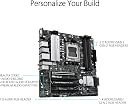
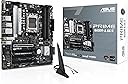
The ASUS Prime B650M-A AX II is a micro-ATX motherboard designed for AMD Ryzen 7000 series processors, featuring DDR5 6400+ memory support, PCIe 5.0 M.2 slots, Wi-Fi 6, and 2.5Gb Ethernet. It offers robust cooling solutions, extensive connectivity options including USB 3.2 Gen 2 Type-C, and customizable Aura Sync RGB lighting, making it an ideal choice for professionals and enthusiasts seeking high performance and future-proofing in a compact form factor.
| Asin | B0BSP52VJC |
| Available Memory Slots | 4 |
| Best Sellers Rank | 92,191 in Computers & Accessories (See Top 100 in Computers & Accessories) 741 in Motherboards |
| Brand Name | ASUS |
| Chipset Family | AMD B650 |
| Chipset Type | AMD B650 |
| Compatible Devices | Personal Computer |
| Compatible Processors | AMD Ryzen 7000 series |
| Cpu Model | Ryzen 7 |
| Customer Reviews | 4.1 4.1 out of 5 stars (94) 4.1 out of 5 stars |
| Graphics Card Interface | PCI Express |
| Item Type Name | computer motherbaord |
| Item Weight | 1.32 kg |
| Main Power Connector Type | 24-Pin |
| Manufacturer | ASUS |
| Manufacturer Part Number | PRIME B650M-A AX II |
| Memory Clock Speed | 6400 MHz |
| Memory Storage Capacity | 128 GB |
| Model Name | PRIME B650M-A AX II |
| Model Number | PRIME B650M-A AX II |
| Number Of Ethernet Ports | 1 |
| Number Of Items | 1 |
| Number Of Ports | 18 |
| Platform | Windows |
| Processor Socket | Socket AM5 |
| Ram Memory Maximum Size | 128 GB |
| Ram Memory Technology | DDR5 |
| S Pdif Connector Type | Optical |
| System Bus Standard Supported | SATA 3 |
| Total Hdmi Port | 1 |
| Total Pcie Ports | 1 |
| Total Sata Ports | 8 |
| Total Usb Ports | 3 |
| Upc | 197105020481 |
| Usb 2 0 | 2 |
User
Networking card didn't work then the video output failed.
As I have said in the headline, it didn't work and I sent it back. I found it hard work initially registering it on the ASUS website so I could get technical support. Without registration ASUS make it impossible to get technical support. I ended up complaining on the ASUS YouTube channel but the registration problems then fixed themselves. ASUS tech support were asking me questions I had already given them information about. Then the video stopped working. To me it was clearly a motherboard failure. I had seen quite a few warnings about ASUS quality not being what it once was but I have always bought ASUS. With the failings in the motherboard together with the underwhelming technical support I decided to send it back. It is going to take some convincing for me to buy ASUS again.
User
Micro ATX with lots of SATA ports
This was an upgrade from a previous ASUS PRIME micro-ATX board that served me well for almost a decade. It's still pretty much the only game in town for a decent quantity of SATA ports in the mATX form factor. The I/O shield is cheap and flimsy, but most are, so I won't dock a star for that. Built-in WiFi and Bluetooth are a nice addition over my old model. Build quality is great as expected. No complaints.
User
Good
Good
User
Finally got it set up and installed after multiple failures
I first having truouble getting it to post so flash the BIOS newest update. Got it posted finally but couldn't install Win 11 due to continuous crashes during intallations b/c the memory issue. So I returned to BIOS setting lowered the memory frequency of my Corsair DDR5 5600 to 4600 MHz (Auto frequency by default could only go up to 4800 MHz). Win 11 was successfully installed. Returned to BIOS again, changed to DOCP 1 setting which DRAM's VDD and VDDQ voltage now is 1.25V. The frequency is at 5600 MHz stable with idle CPU temperature around 41-45 C.I like the 8 SATA and VGA port in this mATX board and couldn't find other brand with similar layout.
User
The worst support you can ever recieve, and an even worse product.
I engaged ASUS support when their board fried my chip + Motherboard, and they had the worst support I have ever recieved.They told me to ship the board back, at my own cost, 80$. Then because it had a tiny superficial plastic damage on the board, unrelated to the electrical issues. (Damaged while disassembling) they would not RMA and quoted 200$ for "repair". When I has asked only to repair the electrical issue, they said they don't repair, and their policy states i have to pay the money to get a replacement board.They have designed thousands of reasons not to provide support and will provide a bad product and even worse support.I'll never buy ASUS again.
User
Good MB - BUT ==> every time when PSU gets plugged in, the MB starts up automatically
The MB has "a faulty power connectors on it," (every time when PSU gets plugged in, the MB starts up automatically). It was confirmed by ASUS chat tech support rep and the fact that ASUS company accepted my return with full refund back to my account. But: I want to say that my 2nd MB (exactly the same as the returned one, but purchased from Amazon.com) has the same problem! Both of them were produced in Vietnam with 1 month difference - the returned one in 2024-07, and a new one in 2024-06. There is something wrong with ASUS production line over there. However, I really like this MB with all its advanced features. I managed to deal with this annoying nuisance problem: I think there is always a certain tiny amount of charge left in the MB circuit even after I shut down the OS and turn off completely my PSU. How did I manage to deal with it? I do the following every time BEFORE I switch my PSU on - I push and hold my PC's "Start" button. I believe it kinda discharges the MB completely. And then I turn ON my PSU. As a result, after that my PC works like a charm, as it is supposed to be, ie. pushing the start button and then the OS starts up. I hope my info helps any person to deal with this, I repeat, annoying problem.
Trustpilot
4 days ago
1 day ago