


🚀 Elevate your home network to pro-level speed and security—because buffering is so last decade.
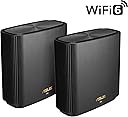
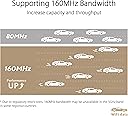
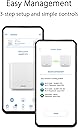
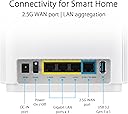
The ASUS ZenWiFi XT9 AX7800 is a premium tri-band WiFi 6 mesh system designed to deliver ultra-fast wireless speeds up to 7800 Mbps and expansive coverage up to 5700 sq ft, ideal for large homes with 6+ rooms. Featuring ASUS RangeBoost Plus for enhanced signal range, lifetime free AiProtection Pro security powered by Trend Micro, and easy management via the ASUS Router app, it ensures a seamless, secure, and user-friendly networking experience. With 2.5 Gbps WAN port and LAN aggregation, it also supports ultra-fast wired connections, making it perfect for smart homes, gaming, and streaming.






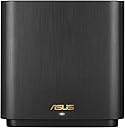
| ASIN | B0BD8WQHT3 |
| Antenna Location | Gaming |
| Antenna Type | Fixed |
| Best Sellers Rank | #4,040 in Computers ( See Top 100 in Computers ) #317 in Routers |
| Brand | ASUS |
| Built-In Media | XT9(B-2-PK), RJ45 Ethernet Cable, Power Adapter, Quick Start Guide, Warranty Card |
| Color | Black |
| Compatible Devices | Laptop, Personal Computer, Smart Television, Tablet |
| Compatible devices | Laptop, Personal Computer, Smart Television, Tablet |
| Connectivity Protocol | Wi-Fi 6 |
| Connectivity Range | 5700 Square Feet |
| Connectivity Technology | Wi-Fi |
| Control Method | App |
| Controller Type | App Control |
| Coverage | Wide Coverage |
| Customer Reviews | 4.2 out of 5 stars 160 Reviews |
| Data Transfer Rate | 7.8 Gigabits Per Second |
| Frequency | 5 GHz |
| Frequency Band Class | Tri-Band |
| Frequency band class | Tri-Band |
| Has Internet Connectivity | Yes |
| Has Security Updates | Yes |
| Is Modem Compatible | No |
| Item Dimensions L x W x H | 42.8L x 14.8W x 24.6H centimeters |
| Item Type Name | wifi system |
| Item Weight | 1.48 Kilograms |
| LAN Port Bandwidth | 10/100 megabits per second |
| Manufacturer | AsusTek Computer Inc |
| Maximum Upstream Data Transfer Rate | 1000 Megabits Per Second |
| Mfr Part Number | 90IG0740-MO3B30 |
| Model Name | 90IG0740-MO3B30 |
| Model Number | 90IG0740-MO3B30 |
| Model name | 90IG0740-MO3B30 |
| Number of Antennas | 1 |
| Number of Ports | 2 |
| Operating System | RouterOS |
| Other Special Features of the Product | Internet Security |
| RAM Memory Installed | 8 GB |
| Router Firewall Security Level | Advanced |
| Router Network Type | wireless |
| Security Protocol | WPS |
| Special features | Internet Security |
| Unit Count | 1 Count |
| Warranty Description | 3 Years Manufacturer Warranty |
| Wi-Fi Generation | Wi-Fi 6 |
| Wireless Compability | 2.4 GHz Radio Frequency, 5 GHz Radio Frequency, 802.11ax |
| Wireless communication standard | 2.4 GHz Radio Frequency , 5 GHz Radio Frequency , 802.11ax |
U**R
Trash
These things refuse to do as they are told, had one completely brick and is not responding to rescue mode or reset button or anything. All the others seem to insist on joining a mesh network without explicitly being told to do so. Nightmare to manage and deal with. Do not buy
J**T
plug
Didn't come with Australian plug
M**B
تجربة 6 أشهر
تعليقي بعد تجربة 6 أشهر: الجهاز مخصص لتوزيع إشارة الإنترنت في جميع أرجاء المنزل، يعني جربته لفترة طويلة، لذلك حكمي مبني على تجربة فعلية وعميقة. - الأداء ممتاز في تقوية الإشارة وتوزيعها بشكل متوازن داخل البيت. - إذا كان المنزل يحتوي على عدة أدوار، الأفضل توصيل الجهاز بسلك (Ethernet) بدلًا من الاعتماد على الواي فاي، للحصول على السرعة الكاملة. - عند توزيع الأجهزة، يجب أن تكون في خطوط متوازية بحيث يلتقط كل جهاز الإشارة من الآخر بشكل مباشر (مثلاً: في الغرفة المجاورة للموزع الرئيسي ، أو في الدور العلوي/السفلي بشكل موازي للموزع الرئيسي). - يُفضل أن تكون الأجهزة متقاربة قدر الإمكان، مع عدد قليل من الجدران بينهم. وجود جدار واحد لا يؤثر كثيرًا، لكن أكثر من جدار يضعف السرعة. - أنا شخصيًا اشتريت 4 أجهزة ووزعتها بهذه الطريقة فقط الجهاز الموزع الرئيسي شبكته بكيبل في المودم وبقية الاجهزه تاخذ الاشاره من الرئيسي عن طريق واي فاي، والنتيجة أن السرعة أصبحت كاملة في جميع أنحاء المنزل. - ملاحظة: تقريبًا كل شهر تحتاج الأجهزة إلى إعادة تشغيل لأنها تعلق وتضعف الإشارة، لكن إعادة التشغيل مره واحده في الشهر بسيطة ولا تُعتبر مشكلة مزعجة.
V**R
Well worth it if you’re looking for a wireguard vpn config (and not only)
Wanted a mesh that supports WireGuard setup for VPN, i tried XD5 with 3 points before this (2-floor house) but that one had some strange issues, like switching itself off so I returned it. Looked at this one, and was worried this might have issues with meshing from different floors and I can say I am pleasantly surprised, all works very well. Now, Asus’s phone app is quite rubbish but for simple setup it does the trick. If you want to do more medium to advanced settings to it, the classic way of accessing a router (ie via IP address) works a treat! You could do it via the app as well, and I tried with the XD5 but I wanted yo throw the phone out the window. All in all very happy with this one
F**O
ottimo consigliato
Ottimo, avevo problemi con wi fi , ora risolto.
K**.
15 metre ötede çekim gücü %2 ye düştü
15 metre mesafede bir duvarın içinden geçtikten sonra çekim gücü rezalet
Trustpilot
1 month ago
1 month ago