

Desertcart purchases this item on your behalf and handles shipping, customs, and support to South Africa.
🔥 Power, Speed & Stability — Game Like a Pro with ASUS TUF Z790! 🎮
The ASUS TUF Gaming Z790-Plus WiFi motherboard is engineered for Intel 12th to 14th Gen processors, featuring PCIe 5.0, DDR5 support, and four M.2 NVMe slots. Built with military-grade components and a robust 16+1 DrMOS power design, it delivers exceptional durability and stable performance. Comprehensive cooling solutions and ultra-fast networking with WiFi 6 and 2.5Gb LAN ensure a lag-free, cool gaming experience. Equipped with Thunderbolt 4 and multiple USB Type-C ports, it offers cutting-edge connectivity for professional gamers and power users.
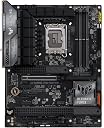


| Asin | B0BQD58D96 |
| Best Sellers Rank | #4 in Computer Motherboards |
| Brand | ASUS |
| Chipset Family | Intel Z |
| Chipset Type | Intel Z790 |
| Compatible Devices | Personal Computer |
| Compatible Processors | 14th, 13th, 12th Gen |
| Cpu Model | Core i9 |
| Customer Reviews | 4.5 4.5 out of 5 stars (1,394) 4.5 out of 5 stars |
| Global Trade Identification Number | 04711387014509 |
| Graphics Card Interface | PCI Express |
| Item Dimensions L X W X H | 10.7"L x 2.75"W x 14"H |
| Item Type Name | Computer motherboard |
| Item Weight | 1320 g |
| Main Power Connector Type | ATX |
| Manufacturer | ASUS |
| Memory Clock Speed | 7200 MHz |
| Memory Slots Available | 4 |
| Memory Storage Capacity | 192 GB |
| Mfr Part Number | TUF GAMING Z790-PLUS WIFI |
| Model Name | TUF GAMING Z790-PLUS WIFI |
| Model Number | TUF GAMING Z790-PLUS WIFI |
| Number Of Ethernet Ports | 12 |
| Number Of Items | 1 |
| Number Of Packs | 1 |
| Number Of Ports | 4 |
| Platform | Windows |
| Processor Socket | LGA 1700 |
| Ram Memory Maximum Size | 256 GB |
| Ram Memory Technology | DDR5 |
| S Pdif Connector Type | Optical |
| System Bus Standard Supported | SATA 3 |
| Total Number Of Hdmi Ports | 1 |
| Total Pcie Ports | 5 |
| Total Sata Ports | 4 |
| Total Usb Ports | 12 |
| Unit Count | 1 Count |
| Upc | 197105014503 |
| Usb 2 0 | 2 |
| Warranty Description | 3 Years |
User
Absolutely Amazing!! HUGE deal when Buying Used
Cut the cost in half buying through Amazon's Used option. Inside a generic brown box, it was carefully and safely packaged for shipping. It arrived in two days! The board works flawless with all of the features that I was looking for and expected at half of the price if buying it new. There are a lot of people that ship items back without ever even using them, and I highly recommend this option and this motherboard. If someone were to choose to buy this at it's current new price, this model is still a great choice. I'm just not sure for the full price that I personally would have went this route, because other models with the same options are available. It is a fantastic board, looks great with it's sleek all black military tough vibes going on. It has a very subtle RGB lighting effect on the top right corner. The setup is very simple and easy, but I've been putting computer builds together for over 25 years. Also my Lian Li Dynamic XL RGB case I've installed this board into is quite massive and would make almost any build super easy to assemble. So the ease of assembly really depends on not just skill but the case it is being installed in as well. This is a full sized board, and not a small mATX. My experience with the bios of this board and all of the features are as expected. I've definitely favored Asus for years now. This board has had no issues with my 13600k processor, or my two sticks of DDR5 6000 memory. I've easily enabled the xmp memory profile, and overclocking features to test and they all work as they should with my 13600k P-Cores hit an astonishing 5.7Ghz. After the test I've set the board back to it's default settings. Then adjusted the thermal limit and CPU voltage, setting limits, as well as making other various adjustments to ensure a very long lifespan. It is not required, but my preference. I very highly recommend this board, and am really glad that I chose to buy it used in good condition through Amazon. While I can definitely understand that this decision on such an important component for a computer seems like a very high risk, for me it was definitely worth it, costing me only half when comparing the price of new. Overall I'm left with no regrets and big savings on a high quality, top shelf, stellar product.
User
Best value Z790 board for Intel 12th-14th Gen — highly recommend
Built a new Z790 system around this board with an i9-14900K, 64GB DDR5-6000, and an RTX 5070, and it has been rock solid for several months now. A few things worth knowing for anyone considering this board:The 16+1 DrMOS power delivery handles the 14900K without any thermal throttling even under extended Cinebench loads, which is not a given at this price point. All four M.2 slots are usable simultaneously without disabling any SATA ports, which matters if you're running multiple NVMe drives.WiFi 6 and the 2.5Gb LAN both work out of the box in Windows without hunting down drivers. The Thunderbolt 4 / USB4 header on the front panel is a genuine differentiator — most boards in this price range skip it. BIOS is clean and intuitive; AI Overclocking got my DDR5 kit to its rated XMP profile on the first boot.Minor caveats worth mentioning: the M.2 covers use a screwless retention system that takes a little getting used to the first time — but honestly once you figure it out it takes about 10 seconds and you'll never think about it again. The SATA ports are angled, which can be a slight cable management challenge in mid towers, though it's really not a big deal and a short right-angle SATA cable sorts it out immediately.Overall this is one of the best value Z790 ATX boards available. Solid VRM, full-featured connectivity, and ASUS's well-regarded BIOS. Highly recommend for Intel 12th-14th Gen builds.
User
So far so good!
When Microsoft announced that Windows 10 was no longer going to be supported, I knew I was going to have to update to a new PC. I was running on an old 3rd gen Intel processor which couldn't support Windows 11 and some games required new processes that my CPU couldn't do. So, I decided it was time to build my second PC.The building process was fine and it was a decent size for the chassis I bought. It looks pretty cool too. The only real issue I had was that there were no drivers installed, so I had no networking. This meant I had to bypass a step in the Windows installation process to get to the desktop. Then, using an external hard drive and a laptop, I got all the drivers and everything was fine.I have heard stories of people needing a Bios update to use a 14th gen processor, but the one I got apparently already had the update, because it booted with CPU just fine. As I said, the only issue was with the lack of drivers, but that wasn't a particularly difficult problem once I realized that was an issue (though it would be for someone who doesn't have a spare laptop or something).Overall, this new build has been night and day compared to my old PC. It does boot very quickly, especially with a good M.2 SSD. Runs every game I've played very well. It sells for $250 on the Asus website, but I got it off Amazon for $200, and it was certainly good for the price.9/10, IGN, would play again.
User
Asus motherboard good and bad.
This Asus motherboard functioned fine after build and startup. I sent the previous back though a sealed box, upon start the boards high pitched would case a reboot. I returned it back to Amazon, I believe faulty VRM's due to the high-pitched whine when rebooting.
User
Excellent motherboard. Great quality and performance.
Excellent motherboard. Good quality and well built. Didn’t have any problems with installation and it has worked flawlessly. I like the fact that it supports DDR5 memory. It doesn’t support the new gen 5 NVME standard, but that’s OK with me. The Gen 5 NVME shares resources with your gpu. So that’s a hard pass for me. I like the fact to , that it supports so many CPUs, that I can upgrade in the future very easily. The bios update was very straightforward and easy.. I also like the fact that the PCIE for the GPU has a locking mechanism and a button release. It has four slots for NVME drives, so there’s plenty of room for additional storage. Overall I’m well pleased with the quality and performance of this motherboard.
User
Great board, bad Intel network support
ASUS did a great overall build with this board.Issues: NIC and RAM---This is an overall great board, with the notable exception of the 2.5 gig Intel i225/i226 network chipset, which a lot of manufacturers are putting in Intel-CPU (especially Z790) boards. The i225/i226 chipset DOESN'T PLAY NICE with any Verizon hardware. Something to do with IPv6 support; Verizon's routers won't see the NIC, and the NIC won't register any connection. A simple $20 Realtek PCIe or even USB network card solves the problem immediately, but you need to know that going in.My only other complaint is the one-sided memory DIMM clasps. I find that it's much harder to install RAM when one side of the mounting slot is rigid/fixed, instead of having folding tabs on both sides.Features: Everything else on this board was solid out-of-the-box!---During the bios boot process, the mobo persists a VGA signal so that the monitor STAYS ON during a reboot. This is such a nice feature because it lets me know it hasn't hung! When performing a long reboot, e.g. to enable XMP or change some overclock settings, the logo sticks around so the user knows the system's still "doing something". Nice.Speaking of XMP, I was able to get a full 128 gb of DDR5 RAM working at the advertised 4800 MHz clock speeds with no issues. The CPU is also clocked correctly, and the power scaling of the processor itself, and the system as a whole, is very smooth. System sleeps and wakes with no issues, and low-power states don't seem to mess with other "nice-to-haves" like LEDs or other peripherals.Plenty of options for LEDs, not as much for SATA drives. The M2 mounting points are robust and the heat spreaders seem like they're nice hefty aluminum to dissipate the heat.Takeaway:All in all, this board was NOT A HEADACHE to get running at full capacity, and that's more than I can say for most motherboards I've installed in the last decade. Do recommend.
User
First-class products
I bought this second-hand, and it worked perfectly on the first try—I’m really happy. It feels no different from a brand-new one, and I’m very satisfied. As for how it holds up in the long run, I’ll let time tell.
User
Go MSI ... Asus is a headache
I have been building systems with Asus motherboards since the 90's. This is, without a doubt, the WORST mobo that I have ever had to work with. I started my build at 9 a.m. on a Saturday. It took me until 3 a.m. on Sunday morning to finally get it to work, 18 straight hours later! This mobo will display nothing, nada, zip until you play musical chairs with the memory DIMMS. You will have no idea if it's a memory problem, a mobo problem, a cpu problem, a graphics card problem because your computer will do nothing, not even beep. Once you are lucky enough to find which memory slots to use you will finally have a display and get into bios. That's where the real headache begins. If you try to tweak anything, the mobo crashes. When you finally figure out how to get the bios to install the OS, in my case Win11, it simply will not boot. It will go to restart and hang on the F1 screen. Oh you can change this, change that, change everything in the bios but you will not be able to boot to Windows. Finally, through the magic of 18 hours of curse words and frustration you might be lucky enough to boot to the OS. But you're not done. Because your next few hours of restarts will beep and flash and hang up but not boot. Finally, after enabling/disabling every bios feature over, and over, and over you will get a stable bootup to your machine. Forget about overclocking. You will be forced to use the "safe" lower fequency for your RAM if you want it to boot up. I have DDR5 5600 memory. I can only run it at 3200 for stability. Maybe there's a frequency doubling parameter that I'm missing somewhere. It should not be this difficult to install a mobo in 2023. I will never buy another Asus mobo, which is hard to say after relying on them for almost 30 years. Next time and in the future after that it will be MSI only.
User
Ddr5
اشتريت مذربورد من ASUS من هذا المتجر وكانت تجربة ممتازة جداً. التغليف كان ممتاز ومحمي بشكل احترافي، والمنتج وصل بحالة جديدة ومختوم. الشحن كان سريع والتواصل رائع.المذربورد تعمل بكفاءة عالية بدون أي مشاكل، والمتجر كان صادق في الوصف والمواصفات.أنصح بالتعامل معهم وبكل تأكيد سأشتري منهم مرة أخرى.
User
Entrega rapida
Entrega rápida e placa muito boa
User
OK, ale...
MOBO działa bezbłędnie, jednak:1) pierwsze uruchomienie działało tylko na jednej kości DIMM, w tej konfiguracji aktualizacja BIOS i dopiero wtedy jest możliwe dołożenie drugiej kości. W innym przypadku płyta po prostu nie startowała.2) BIOS jest... nieprzewidywalny. Przykładowo dopiero włączenie CSM pozwoliło mi na uruchomienie karty RAID, rzecz w tym, że ta karta jest w 100% zgodna z uEFI (i w tym trybie działała na poprzedniej płycie bezbłędnie).MOBO jest dobre, działa bezbłędnie z Windows 10 i systemami Linuxa ale powyższe błędy nie powinny mieć miejsca przy produkcie z półki średnia-wyższa.Na marginesie: czytając negatywne recenzje tej płyty, po raz kolejny utwierdzam się w poglądzie, że osoby bez wiedzy komputerowej nie powinny samodzielnie budować komputera.
User
Solid Product
I installed this about 3 weeks ago and it was pretty smooth sailing. There are lots of plastic film covers on various parts to keep it from scratching during install/shipping. Remember to peel them off as you are installing.It has some LED lights that can be turned on or off in the BIOS. Speaking of BIOS, Asus motherboards always have nice, clear and easy to use BIOS software. This one is no different.One feature that I likes (but also hated) was that the screws in the M.2 SSD heatsinks were attached to the heatsink. It makes it easier for those with bigger hands to get the screw in place. In the other hand, it also made it difficult to line the screw up with the hole. I feel like there could be a happy medium there.Finding the Windows drivers was pretty simple, but on first boot, you are prompted to install the Asus Armoury Crate software. It let's you control/view the fan speeds, LED lights, see the temperatures, install latest drivers and more. It's actually a really slick idea, but the software itself is awful. It takes up a lot of memory and it crashes all the time. I suggest installing it to get the fastest drivers, then uninstall it right away. NOTE: You will need to use Asus' Armoury Crate Uninstaller tool available on their website to completely rid yourself of it.So far, I haven't had any issues with the motherboard itself. Hopefully it stays that way for a long time.
User
Awesome motherboard
Awesome. Mobo, has all the required ports and so many thing you can add to this motherboard
Trustpilot
2 months ago
2 weeks ago