

Desertcart purchases this item on your behalf and handles shipping, customs, and support to South Africa.
📡 See the unseen, measure the future — TinySA Ultra+ puts pro-grade spectrum analysis in your palm!
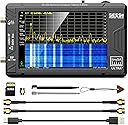
The SeeSii TinySA Ultra+ ZS406 is a cutting-edge handheld spectrum analyzer featuring a 4.0-inch touchscreen and an ultra-wide frequency range from 100kHz to 5.4GHz. Equipped with a built-in 32GB microSD card for direct data recording, dual functionality as a signal generator, and PC connectivity via USB, it offers professional-grade measurement and analysis in a compact, portable design. Enhanced with ESD protection, excellent phase noise performance, and a long-lasting 5000mAh battery with fast Type-C charging, this device is engineered for precision, durability, and convenience in diverse RF testing environments.


| ASIN | B0BBGK9QJB |
| Best Sellers Rank | #23,326 in Industrial & Scientific ( See Top 100 in Industrial & Scientific ) #3 in Spectrum Analyzers |
| Brand | Seesii |
| Brand Name | Seesii |
| Color | Black |
| Compatible Devices | PC |
| Customer Reviews | 4.5 out of 5 stars 262 Reviews |
| Included Components | Tinysa ULTRA+,SMA cables,SMA connector,Antenna,32GB card,Touchscreen pen |
| Item Dimensions | 6.69 x 4.72 x 2.56 inches |
| Item Weight | 265 g |
| Item dimensions L x W x H | 6.69 x 4.72 x 2.56 inches |
| Manufacturer | Seesii |
| Model | SEESII- TinySA ULTRA+ |
| Number of Items | 1 |
| Number of Packs | 1 |
| Part Number | TinySA ULTRA |
| Power Source | Battery Powered |
| Style | TinySA ULTRA+ |
| Style Name | TinySA ULTRA+ |
| Unit Count | 1 Count |
| Warranty Description | 3 Year Manufacturer |
R**O
Excellent value and well equipped.
I never though a fully functional and accurate spectrum analyzer could be this affordable to an end user. It does everything I need it to and signal generator works great as well. Interface is straightforward. It also comes with plenty of accessories/adapters.
M**D
A very handy tool for my fieldwork.
If you're working with RF, this is a very handy tool to have. We all use the SA at some time or another (well, EEs working with RF anyway, right). I'm not going to tell you it will replace a $30k-$50k piece of equipment (nor would I expect anyone to believe me if I did). However, for a pocket-sized piece of test equipment, it is quite handy. My only qualm would be with my own abilities. My fingers are simply large enough to make some of the navigation a bit cumbersome. It will do quite a few of the analyses we rely on and with decent accuracy out in the field. The battery even lasts pretty well. I e gone several days between charges (obviously, not constant use).
D**.
Good quality for the intended usage in detecting competing wireless mic freq
This was purchased to discover competing frequencies in a venue for using wireless microphones. When providing PA services, the wireless Microphones need to have no competition in terms of frequency use. You don't want a baby monitor to override your singer's voice... This spectrum analyzer does the work to discover what else is using the frequencies that might interfere with your PA services. Good quality, small, but useful. Fits in the equipment cases and provides a nice viewable screen for visual identification of frequency spikes. Select a a different antenna for more reliable detection.
C**H
Inexpensive Electronics Test Tool
I have used $40,000 Spectrum analyzers and the TinySA is not one of those. It is not as precise but sure a lot cheaper. But, as long as you don't need high precision, it is great. For setting FM deviation or AM modulation, you can get spot on. I had a need to see the relative RF levels on some of my projects and this unit does that quite well. Highly recommended.
S**N
Great upgrade to the TinySA
This is a great upgrade to the original TinySA. The bigger screen is much better for use, the case is way more professional and durable. Operation is improved in nearly every way. A lot of built in measurements have been included with the Ultra version. This one does appear to be a "Real one" and not a clone. I was able to burn the newest firmware in it and it seems to work fine. Inside the build quality is very nice with good soldering, etc. There seems to be good programming support with some easy to use Python code and a decent TinySA application (that you can also use to update the firmware). Overall - for the cost, I certainly would buy this again. Edit - I just completed a Measurement Level Calibration Verification against my calibrated 4 GHz Signal Generator. The TinySA Ultra meets specifications (quoted as +/- 2dB). My test setup has a measurement uncertainty of +/-0.5 dB not including mismatch error to the TinySA, so it did really well! (See attached figure).
J**E
Surprisingly good SA features in a tiny box
I bought this to keep in my laptop bag for quick frequency scans at broadcast sites. I am surprised it works so well! In one instance, I used it to investigate interference to the LTE cellular band (720MHz), and was able to not only identify the source, but also confirm corrective actions were successful. I upgraded the software to allow for use past 1GHz and was able to clearly view an L-band signal out of a satellite LNB (~1100MHz). The screen is small and navigating the menus is a little awkward at times using the included pencil, but it's fine in most cases. And remember this is not a $15k analyzer, so the VBW, RBW and sweep times are not going to compete with one that is priced 1000x more. But for something that is small enough to fit in your hand, runs on batteries (for quite a while, honestly), and does a good enough job for most simple tasks, you can't beat it. Don't forget to buy a few SMA adapters, too.
G**Y
I wish I'd had this for the last 20 years
When I think of spectrum analyzers, I think of the $10k tool that I have to fight my co-workers to borrow. It's the one work tool I thought I'd never be able to just get my own that I could keep at my desk. I bought this assuming it would be kind of lame, but hoping it would at least let me see when my transmitter is on and the center frequency. It turned out to be a great tool. It's got a zero span mode, channel measurement with peak detect, a decent PC program it links to with USB etc... I love this thing! I'm an embedded software guy and not super technical with spectrum analyzers so I can't give you a full comparison of it VS our Rhode & Schwarz. It seems slower on screen refresh and I don't think it has as many options available for RBW and VBW, but it worked very well for the tasks I put it to and it's *easily* worth the price tag.
V**M
Dislike the screen, some software issues, lack of a feature, but works.
I'm honestly unsure on this device. I kind of want to return it. It wasn't quite the quality I expected. Particularly in the screen. It uses a pressure screen rather than a touch screen which makes it extremely hard to tap things. Even with the pen. I did the drawing pad just to test and boy it was just awful, drawing lines to areas I wasn't even touching, thinking it was still connected when I let go and touched somewhere else, skipping entire segments as if I let go when I didn't. Its no wonder I keep tapping the wrong menu items all the time and it keeps glitching when I try to tap things. Its extremely hard to drag the marker around when I need to. I was also kind of annoyed I had to go and buy an antenna just to use its full range. I kind of expected it to come with one for the non-discount price but, I guess whatever. As per the software parts, I tried connecting with my PC and turns out, you can't access the SD card through USB, which kinda sucks. It also seems that the tools they recommend on their website don't work. They connect to the device, but they won't actually do anything other than that, no graph no waterfall no scanning nothing. They just sit there. I had hoped to use a tool to import the presets I already put into the device and I just couldn't get the tool to even do anything whatsoever once it established connection. (WinSpectrumIII) More on the software, there seems to be no option to stop it from clearing the waterfall every time you open and close a menu. Which makes using the internal screenshot tool useless because every screenshot clears the waterfall before it takes the screenshot. I was up on the roof pointing this thing in different directions and using screenshots because it was too bright to see the screen fully so I could examine indoors. Five minutes between each to let the waterfall fill with long scan time. I'll attach the results here and you can see what I mean... (P.S. Might be nice if you could change battery from voltage to percentage) I don't know a ton about radio stuff, I used Google's AI Gemini to help me set the device up and find the network signals I needed to. Its kinda nice that Google's AI knows a lot about it and was extremely helpful. The guide on the other hand being online only, wasn't so much. In fact its got some pictures on it that require a password to access, which was like, wtf? Its kind of annoying there also wasn't a basic guide that came with the device to explain anything and that they hide the Ultra mode behind a code thats only available online. Tell me, what do you do if you get one of these devices and your site is down for whatever reason? Maybe even permanently? The users are just screwed in that case? Include a warning when unlocking, rather than locking it with a password. The user should have to click "I understand and have read your warning" before using it. I really hate online only lock outs. I understand your reasoning for wanting people to first use the guide to understand what they're getting into but the danger in that is that one day, the access may disappear. Which is also why the guide shouldn't be online only too. Its just good that the AI I spoke of knew a lot about it already and could help me with 100% of what I needed. I did have -some- trouble with it, trying to do what the AI suggested where it would say things like Reduced Linearity when I disabled LNA and increased the ATT to max 30dB, no matter what I did there it seemed like it just couldn't get rid of that red message even when I got further from the source. Again I am no radio expert, I was just testing on Wifi first so I could learn how to control it before I tried using it to find T-Mobile's towers and stuff. I'm sure there's an expert's opinion on this particular thing and I'm sure I may have just been doing things wrong on this particular part. Who knows though. My review here merely reflects the software issues I had (screenshot, waterfall reset, PC control, No SD access) and the bad screen type as well as the guide and lockout. Frankly, I'm wondering about returning it. I have to decide over the next week or so. It is handy, I'll say that for sure. Not something I'd use often but it was helpful to a point but the biggest thing is this screen, boy is it hard to control when you tap the wrong thing all the time.
ニ**ー
拡張周波数の切替等使い勝手良し
基本的な能力は正規スペアナに遜色無し。簡易と言いながら本格的に使えています。
R**S
Maravilloso
Un buen grupo de buenas caracteristicas de medicion muy utiles en el trabajo de campo. Tan pequenho que lo puedes tener en la palma de tu mano y con todo lo necesario para realizar mediciones basicas e intermedias de calidad
Trustpilot
2 weeks ago
1 month ago