


Desertcart purchases this item on your behalf and handles shipping, customs, and support to South Africa.
๐ Clone smarter, not harder โ the ultimate SSD upgrade sidekick!
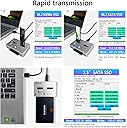
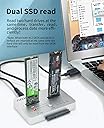
The AOKO M.2 Duplicator is a versatile, tool-free docking station designed for professionals upgrading or backing up their storage. Supporting bidirectional offline cloning between NVMe and SATA SSDs/HDDs, it handles multiple drive sizes and types simultaneously. Featuring USB 3.1 Gen2 for rapid data transfer and an all-aluminum heat-dissipating body, it ensures efficient, reliable cloning without a PC. Ideal for seamless data recovery, system upgrades, and hassle-free drive migration.


| ASIN | B0B41NDY3H |
| Best Sellers Rank | #52 in Hard Drive Docking Stations |
| Brand | AOKO |
| Color | NVMe to SATA SSD/HDD Mutual Clone |
| Compatible Devices | Desktop, Gaming Console, Laptop |
| Customer Reviews | 4.1 out of 5 stars 72 Reviews |
| Hardware Interface | USB Type C |
| Input Voltage | 12 volts_of_direct_current |
| Item Weight | 0.32 kg |
| Manufacturer | AOKO |
| Mfr Part Number | M.2 Duplicator +SATA Adapter |
| Model Number | M.2 Duplicator +SATA Adapter |
| Number of Ports | 1 |
| Total USB Ports | 1 |
| Total Usb Ports | 1 |
| UPC | 752844230609 |
| Unit Count | 1 Count |
G**O
Great Cloning Device.
It worked perfectly. The previous cloning device didn't work because my SSD was a SATA drive. This one worked flawlessly. Now my computer has 4TB of Samsung's latest SSD and it's incredibly fast. I don't understand the bad reviews. My new hard drive a partition of two storage on the same drive.
B**D
Excellent
Works great and is very fast -- less than an hour to clone a 256GB SATA SSD (with very little space left) to a 512GB NVMe. A couple of tips you might find helpful: - If you're cloning to a larger drive, be sure to turn Bitlocker off first. Unless the drive is completely decrypted, you won't be able to extend your old volume to include the extra space now available in your new drive. [Note: Your target drive must be the same size or larger than your source drive. You cannot clone to a smaller size drive.] - To extend your existing volume to include the extra space of your larger drive, use a freeware product like Partition Mini-tool. - To clone NVMe to NVMe, you must first clone to a SATA drive (no larger than your target NVMe), then clone that SATA drive to your target NVMe.
G**N
Good but disappointing at the same time.
The product seems well constructed. It takes a bit to get it to recognize two drives. I used it once to clone from an NVMe to a Sata 2.5" drive successfully. However, I was very disappointed to find out I could not clone from NVMe to NVMe. For what it does, so far its worked.
A**R
Not worth checking out.
I thought I would try it out, read reviews on it not working. Decided that I'll try it for myself. It didn't work, could not clone anything, just did a left and right blink pattern. 25% and 50% would blink. Then 75% and 100% would blink. No explanations on what this blink code means, probably a dead unit. Doesn't matter if you have bitlocker or not, will not clone. This is a pass for me.
P**N
10-hour backup time.
I use 4tb NVME and SATA 4tb SSD HDD. Back up drive time are 10 to 12 hours. Everyone worked purchase 4 will order 2 more. I use it to data backup my laptops.
D**N
It does not get any easier!!!
for building a new computer or updating drives in current one you all need this badly!! it is metal compact and eaxtemely easy to use.
D**A
Awesome product at an amazing price.
Used it today to recover an NVE drive and cloned it to a SATA SSD. 1TB in about 1 hour. Amazing offline cloning!
S**X
25 & 50% alternate blinking with 75 & 100% means TARGET device smaller than SOURCE device
One customer stated theirs did not work - "left and right blink pattern. 25% and 50% would blink. Then 75% and 100% would blink" - this indicates the TARGET device is smaller than the SOURCE. This just happened to me so I attached a larger drive and clone worked, (slow NVMe to Sata SSD but worked.
Trustpilot
1 week ago
1 month ago