Desertcart purchases this item on your behalf and handles shipping, customs, and support to South Africa.
๐ฅ Elevate Your Storytelling with Pro-Level 4K Precision
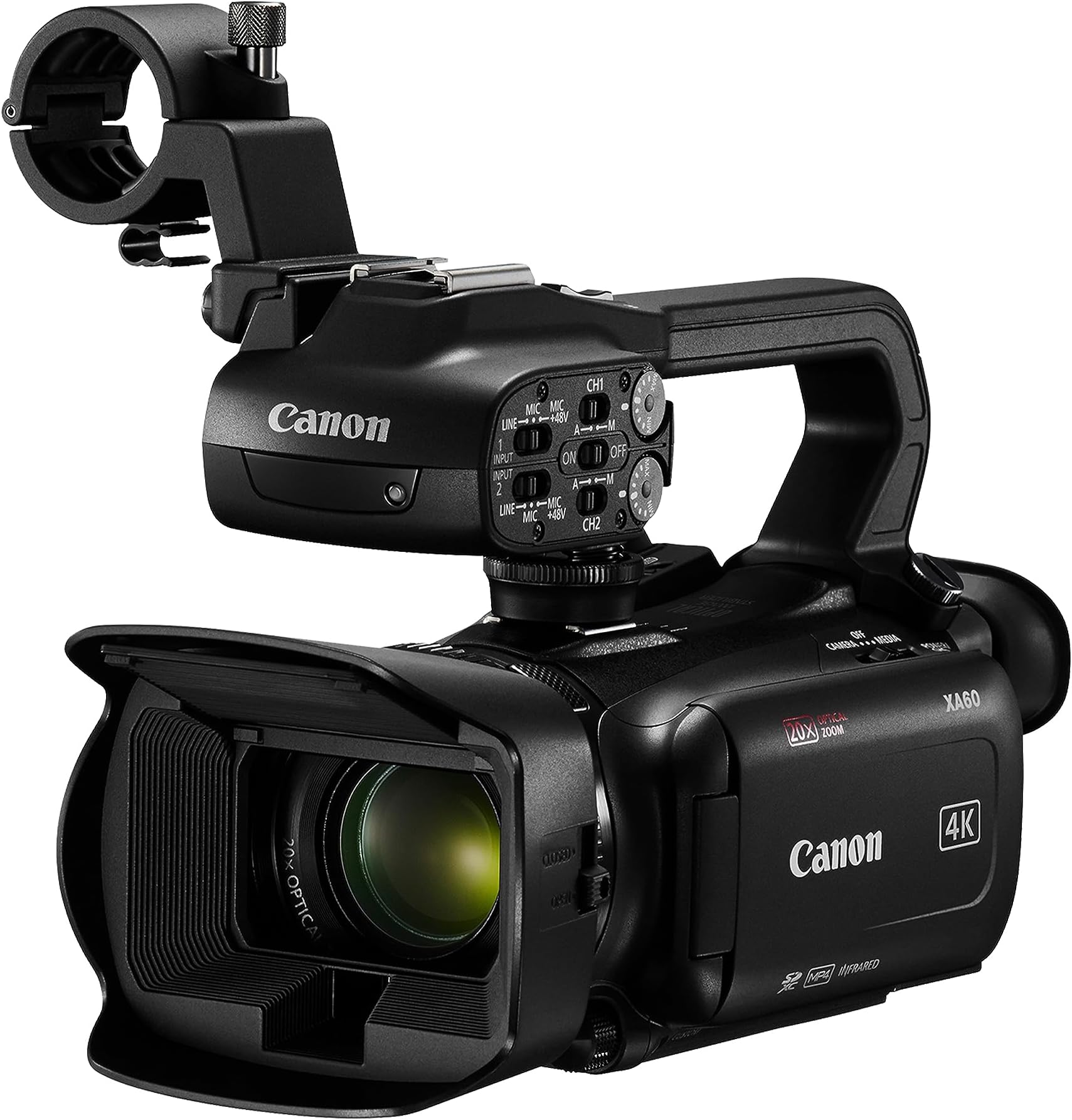
The Canon XA60 Professional UHD 4K Camcorder Lens Kit is a compact powerhouse designed for millennial pros who demand stunning 4K UHD video quality, versatile connectivity, and rock-steady footage. Featuring a 1/2.3" CMOS sensor, DIGIC DV6 processor, 20x optical zoom, and dual SD card slots, it supports flexible recording formats and professional audio inputs. With live streaming capabilities via USB-C and a user-friendly touchscreen plus OLED EVF, this camcorder is built to keep you ahead in content creation and live broadcasting.


| ASIN | B0BCN6325Y |
| Battery Average Life | 4 hours |
| Best Sellers Rank | #103,191 in Electronics ( See Top 100 in Electronics ) #264 in Camcorders |
| Brand | Canon |
| Built-In Media | Handle Unit, Lens Cap, Lens Hood with Lens Barrier, Microphone Holder, XA60 Body |
| Camcorder Type | Video Camera |
| Color | Black |
| Compatible Devices | Computer, TV, Smartphone (with USB-C or HDMI adapter), Tablet (with USB-C or HDMI adapter) |
| Connectivity Technology | HDMI, USB |
| Customer Reviews | 4.1 out of 5 stars 53 Reviews |
| Display Resolution Maximum | UHD |
| Effective Still Resolution | 24 pixels |
| Effective Video Resolution | 3840 pixels |
| File Format | MP4 |
| Flash Memory Speed Class | C90 |
| Flash Memory Type | SDXC |
| Flash Memory UHS Speed Class | 3 |
| Flash Memory Video Speed Class | V90 |
| Focus Type | Auto Focus |
| Form Factor | Compact |
| Global Trade Identification Number | 00013803350104 |
| Image Aspect Ratio | 16:9 |
| Image stabilization | digital,optical |
| Item Dimensions D x W x H | 7.2"D x 3.3"W x 4.3"H |
| Item Weight | 1.6 pounds |
| Lens Type | Zoom |
| Manufacturer | Canon USA |
| Maximum Aperture | 2.8 f_stop |
| Maximum Focal Length | 62.7 centimeters |
| Minimum Focal Length | 30.5 |
| Model Name | xa60,xa60 pro |
| Model Number | 5733C002 |
| Number of Batteries | 1 Lithium Ion batteries required. (included) |
| Optical Zoom | 20 x |
| Photo Sensor Size | 1/2.3-inch |
| Photo Sensor Technology | CMOS |
| Screen Size | 3.5 inches |
| Sensor Type | CMOS |
| Shooting Modes | Face Detection |
| Special Feature | Time Lapse |
| Style Name | Canon XA60 |
| Supported Audio Format | PCM |
| Supported Image Format | JPEG |
| UPC | 013803350104 |
| Unit Count | 1 Count |
| Video Capture Format | MP4 |
| Video Capture Resolution | 4K |
| Video Resolution | 4K |
| Warranty Description | 1 year manufacturer |
| Water Resistance Level | Not Water Resistant |
| Wireless Compability | Infrared |
| Zoom | Optical |
J**R
A phenomenal Camera!
A phenomenal Camera! But I'm a biased Canon fan, I love my DSLR's (all Canon) my printers (all Canon), my small camcorder, and now my Pro grade camcorder. This Camcorder takes beautiful footage, and the infrared mode works better than expected. Pair it with two 256Gb cards and film for over 7 hours in 4K!
A**.
An excellent 4K Camcorder
An excellent 4K camcorder for the money. This small and light camera captures excellent quality images. Canon makes the best video cameras, so stick with this brand. Also, they have excellent customer service.
B**S
Great video with okay sound capture for video with external mics
Great video and perfect sound for spoken words. The onboard mic is inadequate for musical performances (the main reason I bought it). But that can be remedied by connecting two condenser mics into the XLR ports that are available. Still not perfect sound, but better.
E**S
Great camera
Great camera. I've fed audio to line in from audio sound mix board and works great. Duel memory card slots. Works great. Auto switches to second card. You have to change setting to record on both A and B cards. Auto switch.
A**S
Video Quality
Video quality is terrible , I donโt understand why so many people are giving it a good review. This is the worst camera Iโve ever had . My Sony a 6400 has better video than this camera . No raw recording, focus is garbage , terrible on low light . No matter which settings I choose video was always grainy .
C**L
So far, so great
Got a chance to use it last week and it didnโt disappoint. The battery that comes with it ran out after and hour plus of use so I ordered a Canon battery thatโs supposed to last longer. Beautiful 4K video.
R**Y
Not glossy or shiny, but arrived on time. Not working.
Update 1. So I just opened the box. First thing I look for is appearance. The Canon AX60 is not glossy, shiny as I had expected of a $2000 camera. It looks very dull of some plastic so I have given two stars. As I move forward to put it together and progress to do a test recording I will further update my review which may improve the stars or make it worst depending on what I find. Update 2. 7/26/2026. I have followed the quick start guide to record my first clip. Unfortunately, the instruction misses one critical step. That is to instruct to turn the camera power on. Without power on how can one record a clip? This is extremely disappointing as a new user will never be able to do first recording. I had already downloaded the full manual from Canon website and luckily went ahead a little bit reading it, so knew to turn the power on. I am not taking away any stars yet, though. The dioptic adjustment lever is not a lever and tricky to find . You have to pull out the view finder, push it upward to make it look upwards at 70 degree angle, the dioptic switch can be seen at the bottom of the view finder. I got a prompt response from canon on a question about the .24inch hole on camera fitting 1/4 inch screws fitting on a tripod. 8/9/2026 I found the User Guide very confusing and not matching the camcorder screens. I do know the at the beginning of the user manual it is said that the manual may not match exactly as the screen at times because some extra things will be omitted in the manual when showing screen shot so to only keep relevant things to the task at hand. But that is fine, i am not talking about that. For example, when not using a switch or button it is shown in grey while the ones that are being used are shown in bold. The switches Camera or Media are used to turn on the camera and are either/or button. But it is often shown as grey for both. The switches Auto or Manual is either/or buttons, they cannot be shown both in bold, but often they both are shown in bold. I was able to see the menu P, Tv, Av, M, Special features. But i could not bring this menu again no matter what i did. I changed the mode from Auto to Manual, changed many other setting, but never could come to that menu again. Even when i followed the User Manual. It is a professional camcorder but i am not i do realize that. But it does not have to be rocket science. So, no the I wish Canon had made some flowchart to show the menu structure and also for the button operations. As much as I love Canon, and trust in Canon as I have canon printers too, I wanted to keep this camcorder. But I made the right decision to return this canon camcorder for the reasons i have already mentioned.
J**N
Great Camcorder
Best camcorder ever! works perfectly and the controls are easy to understand. The video is picture perfect. The audio processing is great!
T**Y
Awesome Seller!!
Fast delivery, everything in the box as it should be, and the camera is awesome. Glad it took the time to check the other sellers and found this one which saved some money but also was in Canada so I got it quicker.
S**.
Excellent camera
An amazing piece of engineering. All features work as advertised. Easy to familiarize with. Excellent color and sound reproduction. Highly recommended.
Trustpilot
5 days ago
1 day ago