Desertcart purchases this item on your behalf and handles shipping, customs, and support to South Africa.
⚡ Elevate your home network to pro-level speed and coverage—because buffering is so last decade.
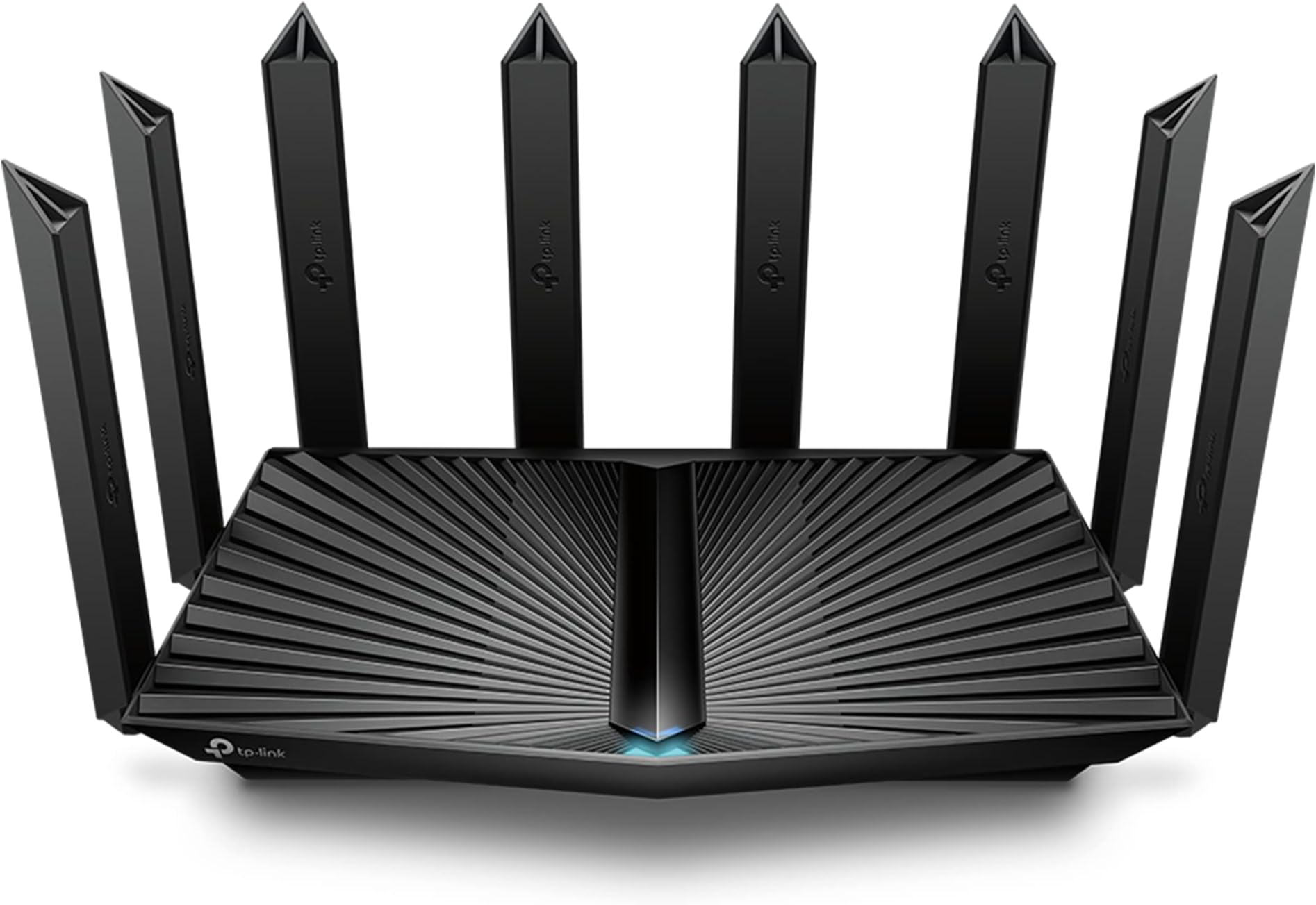
The TP-Link Archer AX80 is a Wi-Fi 6 dual-band router delivering up to 4804 Mbps on 5 GHz and 1148 Mbps on 2.4 GHz, equipped with eight high-gain antennas and Beamforming for extensive coverage. It features a 2.5 Gbps Multi-Gigabit Ethernet port for ultra-fast wired connections, supports MU-MIMO and OFDMA for efficient multi-device performance, and integrates advanced security with TP-Link HomeShield. Compatible with Alexa and OneMesh, it offers seamless smart home control and whole-home Wi-Fi expansion, making it ideal for modern, device-heavy households.


| ASIN | B0BMWHQH1M |
| Antenna Location | Home |
| Antenna Type | Fixed |
| Best Sellers Rank | #305 in Computers & Accessories ( See Top 100 in Computers & Accessories ) #27 in Computer Routers |
| Brand | TP-Link |
| Built-In Media | Power Adapter, Quick Installation Guide, RJ45 Ethernet Cable, Wi-Fi Router Archer AX80 |
| Color | Black |
| Compatible Devices | Personal Computer |
| Connectivity Protocol | Wi-Fi, Ethernet, USB |
| Connectivity Technology | Ethernet, USB, Wi-Fi |
| Control Method | App |
| Controller Type | App Control |
| Coverage | 3+ Bedroom Houses |
| Customer Reviews | 4.4 out of 5 stars 834 Reviews |
| Data Transfer Rate | 4804 megabits_per_second |
| Frequency | 5 GHz |
| Frequency Band Class | Dual-Band |
| Item Dimensions L x W x H | 10.9"L x 7.2"W x 2.3"H |
| Item Type Name | WiFi Router |
| Item Weight | 2 pounds |
| LAN Port Bandwidth | 10/100/1000 Mbps |
| Manufacturer | TP-Link |
| Maximum Upstream Data Transfer Rate | 4804 megabits_per_second |
| Mfr Part Number | Archer AX80 |
| Model Name | Archer AX80 |
| Model Number | Archer AX80 |
| Number of Antennas | 8 |
| Number of Items | 1 |
| Number of Ports | 5 |
| Operating System | Archer Firmware |
| Other Special Features of the Product | Access Point Mode, QoS |
| RAM Memory Installed | 512 MB |
| Router Firewall Security Level | Standard |
| Router Network Type | Dual-Band |
| Security Protocol | WPA/WPA2-Enterprise (802.1x), WPA2, WPA3 |
| Special Feature | Access Point Mode, QoS |
| UPC | 840030707957 |
| Unit Count | 1 Count |
| Warranty Description | 2 year manufacturer |
| Wi-Fi Generation | Wi-Fi 6 |
| Wireless Communication Standard | 802.11ac, 802.11ax, 802.11b, 802.11g, 802.11n |
| Wireless Compability | 802.11ac, 802.11ax, 802.11b, 802.11g, 802.11n |
D**N
Powerful, feature rich router
This router was delivered in a very large carton with heavy padding inside to protect the large but not so hefty device. This is the third TP-Link router I have purchased in the last seven years, so I am used to their quality and performance, which is first rate. It replaces an Archer30 box, so setting it up to take over the already expansive network of devices in my home was a breeze. I used the web interface on my PC because I am used to it, and the user interface is pretty straightforward and expansive. Having a speed test button on the Network App tab is an especially nice touch too. The first task I had to execute after getting it in place was to upgrade the firmware, which was easy and quick due to the very resourceful (pun intended) TP-Link support page. I decided on the replacement because the connected device count in my home has been steadily growing recently, and I felt I needed more capacity and future proofing. The ability to create a separate IoT network is one of the things that helped me decide to upgrade to this level. I initially tried setting device priority using the QoS feature, but that seemed to cause a few dropouts, so I turned it off and haven't gotten any since. When I first checked the speed on my main PC which is in the same room as the router, the download speed jumped to the 390 - 330 range (on my 300 Mbps Spectrum internet) and settled down to a final read of 355Mbps. The upload speed peaked at 12 Mbps. Speeds generated on devices farthest away from the device stayed in the 270+ Mbps/9+ Mbps (download/upload) range, which is very good. One of the main duties I have expected from my routers over the years is to be able to serve USB connected drives on the local network so I can access them from other network devices. This router recognized my four USB SSD drives connected through a Sabrent DC powered hub plugged into the router's USB port nicely - once I realized the hub needed DC power to the hub to handle the load. I have used other routers over the years and have found TP-Link routers to be the most reliable and feature rich ones. Highly recommended UPDATE: I feel the need to mention this because it may save someone some frustration. Speaking about those four external USB drives attached to the router, I recently replaced one of the older drives with a larger one, thinking that I could just hot swap the drives with no problem. Actually, it was only after I rebooted the router by unplugging it and plugging it back in that it would recognize any of them again. Once that was done, the drives reappeared in the list of USB drives attached, and the network drives were available to be shared. A word to the wise: select a suitable time to add or replace a drive so you can perform the reboot without inconveniencing your network users.
J**.
Great
Works great. Great coverage and speed from what I can tell.
N**C
Awesome.
This thing is a beast, no mesh needed, we have concrete everywhere. 1g down plan. The furthest point away I get 800mbps on wifi. A great value.
J**P
Easy but does take some additional work
Easy setup via the Tether app. However, even with naming the 2 and 4G bands the same as the router it replaced (and using the same password), it still took a couple of hours of getting HomeKit devices to respond. It finally all worked out, but the process should have been a bit more seamless.
H**R
Great router. Very fast.
Purchased new router from Amazon. Recvd router in perfect condition. The QUICK SETUP Guide is clear and precise with photos as guide. I followed the SETUP Guide precisely.... It's very simple. I could not get the router to broadcast internet wifi signal even though the router informed me I had inbound wifi to the router. So I started again from beginning.... Still no broadcasted wifi. I attempted to contact support. THERE IS NO SUPPORT. no phone number just written chat. Chat dropped twice by support member which infuriated me. So I walked away from the installation and started again a 3rd time an hour later. This is a plug N play basic set up..... 3rd time it worked after completing the same process. Also the app (required to download) is a little squirrley. After 2.25 hours I completed installation that should have been 15 minutes at most. Be patient with the install. Another thing is once completely installed and you attempt to connect to the new wifi signal REBOOT your DEVICES (phone, TVs, computer, laptop, etc). I have 4 big screen tvs, 2 laptops. 5 tablets.... None would connect without rebooting each device. (this could be a normal procedure I don't know). The great thing is the wifi signal strength and speed is fantastic. Speed is 148mbps to 151mbps consistently everywhere in my home. Follow the instructions on where to place the router. I placed my router 8 feet up on top of an large hutch. I think that helps the signal strength.
M**L
Great Router with Amazing Range
Great router with amazing range. I used to have a TP Link Archer (5400 perhaps) that finally died after a few years. In all the routers I've had since then, including the top of the line TP Link, are solid but the range just wasn't there. Certain rooms had dead zones and it was impossible to get reliable signal in the backyard or at the gym there. I used multiple mesh repeaters and that helped. However, I decided to give this router a try and performance has been flawless and we're covering every room of the house and the yard without need for any additional repeaters or mesh components. It's not the latest, greatest, but actually better than the newer and more expensive models.
A**R
Don’t buy used!
I spent 3 days trying to make this product work. It would work good for my television and other wireless needs. The problem was with my Apple IPhone’s and IPad. The router kept dropping the Wi-Fi on all of them. When I did get the Wi-Fi to work on them the Apple apps would not work. I used Google, YouTube and the manufactures sites and tried ALL of the suggestions to change security on the router and the Apple products to no avail. After many reboots the problem never got better.
M**W
Better range and performance than my nighthawk
I recently upgraded to to this router and I couldn't be more pleased. What drew my attention was this router boasts Wi-Fi 6 technology and a quad-core processor with 512MB of memory. From my own daily use, it became evident this router significantly outperformed my previous Nighthawk X4S R7800 / AC2600 router. One of the most notable improvements is the router's range. The AX6000 has a much longer reach than my former Nighthawk X4S. I used to operate two Nighthawk X4S routers in a bridge configuration to cover my entire home. However, the TP-Link AX6000 effortlessly handles the job, delivering better range and performance than my previous Nighthawk configuration. Currently, I have 11 devices connected to my router, including smartphones, iPads, two MacBook computers, printers, and Ring cameras, and impressively, the AX6000 manages all these devices flawlessly. There are no connectivity issues, even with multiple devices running simultaneously. Moreover, the ease of setup and the reliability of the connection have been fantastic. So far, the router has been a reliable workhorse, handling heavy traffic without any hiccups. Time will tell how well holds up, but so far I'm very impressed.
L**I
Works well, easy to install
I bought this in Australia, and what arrived does not match the product in the pictures. I did some searching online and from everything I can find, it's the same router on the inside. I think the seller should put an image of the version they are selling though to avoid confusion. With that out of the way, I got this to replace my telstra router to help handle all my connected devices better, and to get wifi signal out to the back of our property for cctv. I found i could use them both by connecting the telstra router directly to the main NBN box and switching the wifi off, then using this router connected via a data cable to service the back of our property with wifi. I watched YouTube to work out how to connect them together - I didn't need to in the end as it automatically sets itself up as a secondary router, so it doesn't clash with the main one. I've been running my internet with this set up for a few weeks now, and I haven't had any issues
W**Z
Excelente roteador
Excelente roteador. Fica a dica para quem comprar, ele ativa configurações padrões que ficam no mesmo nível de outros modelos como o tplink c80 (já fiz muito uso desse). Depois de estudar vários pontos, deve ser ativado banda smart, o qual integra e entrega um maior tráfego para dispositivos novos, mas ao mesmo tempo deixar o TWT desativado. Resumindo: ativar: OFDMA/MU-MIMO, Smart Connect, Rede IoT (para lampadas, sonoffs, tomadas inteligentes, etc) desativar: TWT outro aspecto, usar a entrada da internet (saída do conversor de fibra) na porta 2.5Ghz, mesmo não tendo uma internet acima de 1gb, a rede fica mais estável, fiz vários testes para chegar a essa conclusão. Explicando um pouco, aqui eu tenho vários equipamentos cabeados, wifi (como tv 8k, 4k), e muitas lampadas inteligentes, cameras e sonoff. Depois com o tempo irei gravar um vídeo para o meu canal no YT, mostrando como fazer. Canal: Tu quer saber mais
M**A
Muito bom, recomendo.
Fácil de instalar, já está funcionando, podem comprar, recomendo.
D**O
Melhor roteador que posso recomendar.
Um dos melhores produtos que já comprei até hoje. Atendeu a todas as minhas expectativas com excelência. E ainda me surpreendeu. Roteador nota 10. É o melhor roteador que posso recomendar hoje. 👏🏻👏🏻👏🏻👏🏻👏🏻👏🏻👏🏻👏🏻
J**.
Melhor equipamento pelo preço oferecido, mudou minha rede da água para o vinho
Extremamente simples de configurar, recomendo fortemente seguir as instruções no site americano wiisfi [.] com para aproveitar o seu roteador ao máximo. Habilite o WPA3 no Wi-Fi, mesmo para visitantes, essa tecnologia de segurança atualmente não pode ser quebrada por ferramentas de hacking de Wi-Fi, simples assim.
Trustpilot
1 month ago
2 weeks ago