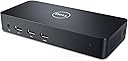


🔗 Connect, Create, Conquer!
The Dell D3100 Docking Station is a powerful connectivity hub designed for professionals, featuring Ultra HD 4K display support, multiple USB ports, and fast data transfer speeds, all in a sleek, portable design.


| ASIN | B00O0M46KO |
| Best Sellers Rank | 1,538 in Computers & Accessories ( See Top 100 in Computers & Accessories ) 12 in Docking Stations |
| Box Contents | Dock |
| Brand | Dell |
| Brand Name | Dell |
| Colour | Black |
| Compatible Devices | Chromebook 11 3180, 11 3189 2-in-1, 13 3380, Inspiron 13 7347, 13 7348, 14 3442, 14 3443, 14 3451, 14 3459, 14 5447, 14 5458, 15 3541, 15 3542, 15 3543, 15 3551, 15 5545, 15 5547, 15 5558, 15 5559, 15 5568 2-in-1, 15 5548, 15 7547, 15 7548, 15 7558, 15 7559, 17 5748, 17 5749, 17 5758, 17 5759, 17 7778 2-in-1, 5459 AIO, Latitude 12 Rugged Extreme 7214, 14 Rugged 5404, 3160, 3180, 3189, 3340, 3380, … |
| Compatible devices | Chromebook 11 3180, 11 3189 2-in-1, 13 3380, Inspiron 13 7347, 13 7348, 14 3442, 14 3443, 14 3451, 14 3459, 14 5447, 14 5458, 15 3541, 15 3542, 15 3543, 15 3551, 15 5545, 15 5547, 15 5558, 15 5559, 15 5568 2-in-1, 15 5548, 15 7547, 15 7548, 15 7558, 15 7559, 17 5748, 17 5749, 17 5758, 17 5759, 17 7778 2-in-1, 5459 AIO, Latitude 12 Rugged Extreme 7214, 14 Rugged 5404, 3160, 3180, 3189, 3340, 3380, 3450, 3460, 3470, 3480, 3550, 3560, 3570, 3580, 5280, 5414, 5480, 5580, 7275, 7350, 7414, E5250, E5270, E5450, E5470, E5550, E5570, E6440, E6540, E7250, E7270, E7450, E7470, Precision M3800; Vostro 14 3449, 15 3558, 15 3559, XPS 12 9250, 9343, 9350, 9550 Compatible devices Chromebook 11 3180, 11 3189 2-in-1, 13 3380, Inspiron 13 7347, 13 7348, 14 3442, 14 3443, 14 3451, 14 3459, 14 5447, 14 5458, 15 3541, 15 3542, 15 3543, 15 3551, 15 5545, 15 5547, 15 5558, 15 5559, 15 5568 2-in-1, 15 5548, 15 7547, 15 7548, 15 7558, 15 7559, 17 5748, 17 5749, 17 5758, 17 5759, 17 7778 2-in-1, 5459 AIO, Latitude 12 Rugged Extreme 7214, 14 Rugged 5404, 3160, 3180, 3189, 3340, 3380, 3450, 3460, 3470, 3480, 3550, 3560, 3570, 3580, 5280, 5414, 5480, 5580, 7275, 7350, 7414, E5250, E5270, E5450, E5470, E5550, E5570, E6440, E6540, E7250, E7270, E7450, E7470, Precision M3800; Vostro 14 3449, 15 3558, 15 3559, XPS 12 9250, 9343, 9350, 9550 See more |
| Customer Reviews | 4.3 out of 5 stars 10,777 Reviews |
| Global Trade Identification Number | 05397063644230 |
| Hardware Interface | USB |
| Hardware interface | USB |
| Item Dimensions L x W x H | 52.6L x 38.1W x 28.5H centimetres |
| Item Type Name | 1 |
| Item Weight | 0.63 Pounds |
| Manufacturer | Dell |
| Manufacturer Part Number | D3100 |
| Model Number | D3100 |
| Number of Ports | 6 |
| Product dimensions | 52.6L x 38.1W x 28.5H centimetres |
| Smart Home Compatibility | Not Smart Home Compatible |
| Total USB Ports | 7 |
| Total USB ports | 7 |
| Unit Count | 1.00 Count |
| Wattage | 4.5 |
K**D
A new experience with Windows, a device that works flawlessly first time!
This box does amazing things! With my Surface Laptop using Windows 10 it converts it into a desktop with 4 monitors all running at fairly high resolutions. See picture of the finished set up, though the Dell docking station is the little white LED light rather tucked behind the laptop, out of sight and soon out of mind. Monitor 0 is the one on the laptop, Monitors 1 to 3 are driven by the Dell effortlessly, the mouse moves smoothly from screen to screen. I've not tried gaming. It is light and you'll need to clamp the unit down if the wires are not to take over control - see pictures of installed unit. Setup of the Docking station, if you follow the instructions EXACTLY, is a breeze. It seems that this is in fact mostly due to the excellent hardware and driver software provided by Displaylink but Dell get credit for clear instructions and a neat package. Maybe it is time to return to Dell after 10 years or more away from them; they used to be the best once. It could be improved if the USB 3 cable supplied, which is a very strange one that goes to a keyhole shaped port on the back of the unit, has a very stiff cable which is a problem with a light laptop. A flexible, perhaps flat cable would be much better and, even better, one that has the USB at 90deg to the cable so that it does not need much side room would be good. That said, the USB plugs in firmly and well and the real miracle is that it works - so much data is transmitted seamlessly. I have now, within an hour of starting work got 4 monitors each showing different information and gigabit ethernet: 0. 2736x1824 1. 1050x1680 2. 1920x1200 3 1080x1920 Gigabit ethernet connection. Better still, on one of the monitors I have got a separate 3 way switch (not part of the Dell) so that I can connect a different PC to that monitor. When I press the button this switch disconnects a monitor from the Dell. The Dell/Windows 10 detects the change and I have a 3 monitor system. Click it again and it goes back to being a 4 monitor system. This is not quite flawless. Every now and then, one of the monitors will not be correctly synched. Turning the Dell on and Off once (pull out the power cable so keep it in reach) fixes this, so it is not very bad as it happens infrequently (one to work on though Dell/Displaylink/Microsoft ! ). What's not to like? Well the Dell User Guide says that the Displaylink software will be loaded with the Drivers and will provide you with some extra functionality that resizes the image on each monitor. Well it doesn't, at least on my Windows 10 system. No software is evident anywhere and I really do need to resize one of my displays. At full monitor resolution all the borders of the display are lost...moving windows then becomes very difficult. I have connected a USB mouse to the unit but it is not recognised. I've tried various ports to no avail. No mouse. Not all of the USB ports on the USB hub are powered. This is strange because the transformer is a 65watt one and the unit runs only a little bit warmer than room temperature so it is not using much power. So, it is rather annoying that you can't connect and get power on all 5 USB ports if you should need to. It is also likely to lead to confusion about which one is good for power and some discharged devices from time to time so it is not very user friendly. Given my expectations of what Windows would do for me, this gets a 5. Someone meaner might have made it a 4 because of the flaws above but, heck, this is an enormous improvement on past Windows kit.
M**A
Amazing. Turned out better than I expected.
First off - unfortunately it is poorly advertised (and marketed on the box) as a 'dock', which isn't true. In the traditional sense that you don't 'dock' the laptop into it and it therefore doesn't provide power to your laptop. I knew this from the off so it didn't come as a surprise. It is purely a gadget into which you plug your devices and displays allowing you to connect to everything via a single USB cable into your laptop. That said, it works great. I was apprehensive at some of the reviews but honestly, it's flawless so far. Before I continue, my laptop: It's a Dell Ultrabook with 8GB RAM with a Corei5 CPU. I read somewhere (I'm sure it was on the Dell site) that it recommends a Core i7. That seemed a little odd to me and thankfully that isn't the case. Setup: Download the Windows 10 drivers from the DisplayLink website. The ones Dell provide on their site didn't allow connected monitors to work in Windows 10. If you do install them by mistake however, Windows 10 should show a pop-up that you need to update the drivers. Once I'd run the DisplayLink driver installer and rebooted, everything came to life. I have 2 23" 1080p monitors connected. You need to go into display settings and use the box that lets you drag the monitor positions around. Once you have that set up, you're away. I also have a stereo amplifier plugged into the device and my audio is now much better as my laptop output jack was playing up previously. People mentioned display lag: For me there is none at all. I'm pleasantly surprised at how flawless it all is. I use a Lenovo X1 Carbon at work (expensive ultrabook) with a Lenovo device which does a similar job to this D3100 and I get lots of display lag on that. Tip: Turn off the Windows 10 screen 'snap' system. It's buried in settings under System > Multi-tasking > Snap (or search snap in the start menu). Otherwise every time you drag a window onto one of your external monitors, the window will try to snap into place at the bottom of the external screen. FY: I haven't tried the displayport connection or 4k and I'm not using the wired ethernet port so I can't comment on the performance of those. I have 2 1080p monitors connected via HDMI, a stereo amp via 3.5mm jack, a mouse and an external hard drive and all work perfectly. No screen lack or dodgy connections. I'm over the moon that I went ahead. I used to have a gaming PC connected up and sadly it's now so old and my laptop is much faster. This device has at least made my laptop a good device to use at my desk.
K**K
Once tried you never go back
Much more useful than first thought. I use my laptop mainly as a desktop for college work, and the ability to detach from keyboard, mouse, and screen by one cable is very handy, I have routed the cables much more nicely than having them trail all over the laptop and desk. I have also had to work from home at times and attaching the docking station to my works laptop (also Dell) saves a lot of time and rerouting of all peripheral cables. I did as the instructions said (and on the advice of other reviewers) and made sure the drivers were updated before installing, and have had no issues with the docking station. It would be nice to switch the laptop on without opening the lid, and it is a little pricey, but other than that I think it is worth the time saved on taking out multiple cables constantly. EDIT 02/06/2020 - I wrote the above review back on Nov 2017. The docking station is still going strong, and has proven invaluable now I work and study at home constantly during the COVD-19 pandemic. Switching between the work and home laptops is simple with just switching over the USB cable from one to the other.
A**T
Works on all versions of Windows tested
D3100 Docking Station: This device was bought after a cheaper USB-C version failed to work. I wanted a docking station which would include USB ports, audio and screen extending onto 3 external screens. This product uses DisplayLink which worked out of the box on Win10, but required a driver install (available from Dell's website) for Windows 7. The front 3 ports are USB 3, with 2 rear USB 2 (e.g. for Keyboard / Webcam). There is a front headphone socket and rear headphone/mic socket. I don't have any need for the ethernet connection in this instance. The device is great, and allows my to use my desk setup of monitors, keyboard, mouse, webcam with any computer I attach (e.g. laptop / desktop etc). Because it doesn't require DP Alt Mode, it works on older USB machines. Highly recommended. I bought a refurbished model, which was near new, but would have paid the full price if that wasn't available. The ease of setup makes it worth it.
B**E
Excellent office organiser
So pleased with this. I have been struggling with attaching 2 screens to my laptop for my home office since working from home. Sometimes they would work, other times not. It was getting rather frustrating! Finally decided to invest a bit of money. The item I wanted was a little out of my price range, so I thought I would give this one a go and I’m very pleased with it. It was so easy to set up, straight out of the box. I was worried that I’d have to fiddle around with installing a driver or something and I’m really not tech minded, however, it was really as simple as plugging in (to the mains and laptop) and attaching the screens, mouse and keyboard and away I went. Couldn’t be more pleased. It sits nicely at the side of my desk and doesn’t take up too much room. I might have liked it to have the option to stand up, so the space used was even less, but I can live with that. When it’s been on all day it does feel a little warm to the touch, but so far that doesn’t seem to be an issue. One thing to note is that the speakers now go through the docking station - took me a while to work out why I couldn’t hear when in my zoom meeting, until I thought to plug some headphones into the dock and hey presto, back in the game!
A**D
Monitors Flicking and delay in signal for USB connected devices
For some reason after a couple of months using it, the 2 monitors connected started flicking with one of them losing signal then after a minute the monitor gains signal again and so on, Also the Bluetooth USB receiver for my Logitec mouse and keyborad started showing delays in the signal and the mouse started to be not responsive, this error doesn't happen if I connected the USB Receiver directly to my laptop, Shame it did looked like a good piece of kit and I really liked it at the beginning but now it is completely disconnected as it causes a lot of issues whne I am working and keep disturbing the monitor setup. It is too expensive to show these issues
J**E
Months of frustration resolved by this piece of kit.
First, some background.. I have a high performance Dell 7510, Xeon processor, 64GB ram, 4k screen with M.2 SSD's it is the bomb.. It also has 1x HDMI and 1x mini Display port. Despite all this, when connecting my 2 x 4k wide screen monitors directly from the laptops HDMI and Display Port I can never ever get the colours on both looking right. HDM and Display Port will give different colours and contrast, you need to have both HDMI or display port. I even got an adapter to go Display port to HDMI so they was both connected via HDMI. But this was also no good. I spent months frustrated with poor image quality, colours and ghosting on the text. (yes all my drivers was up to date) I plunged for the USB 3.0 HD Triple Video adapter. (I refuse to call it a docking station as you do not dock the laptop on it) This small piece of kit is simply amazing, Before plugging in the adapter via USB, first visit displaylink.com and download the latest driver for your OS. I then plugged in the the adapter and plugged both my monitors, 1 with HDM and one with Display Port. Oh know!... I still have crap looking screens... But Wait.. this adapter has 2 HDMI ports so why not try going directly from HDMI to HDMI.. I connected both monitors via HDMI, the max output gave me 1920x1080 on one monitor and a max of 2560×1440 on another. You can only output 2560 on one monitor. This was fine for my needs, I use the higher resolution for photo editing and the other screen for emails and docs etc.. What was so perfect was the fact (despite different screen resolutions) I finally had 2 perfect matching screens both showing the same colour and contrast / brightness with no ghosting what so ever! If my laptop had 2 HDMI ports then I would not have needed this so if you are in the same position or similar then do not hesitate to try this. To sum up, The HDMI ports are full HDMI, there is no midi HDMI. The Display port is also a full display port not a mini display port. The extra USB 3 ports come in hand as does the network port. Get it.. It just works..
J**R
A decent dock with some glaring issues
I purchased this so I could quickly hook up my Dell XPS 15 to my monitors and peripherals without having to plug in a ton of usb cables into the laptop itself. I am powering two 25" Dell monitors through this, and the first thing I noticed was that there is a fair bit of screen tearing going on. The response is definitely not as smooth and seamless as with native HDMI coming from the laptop, which was disappointing. Although not as frequent as the screen tearing, there is also some artifacting going on in certain applications. It gives the feel that the visual presentation is being "emulated" rather than a true, native output. Another gripe is that my monitors (running at 2560 x 1440) can only run at a maximum of 50hz using the dock. For me, this is not hugely important but I can still notice the difference and it is somewhat annoying, particularly when watching 60hz content, as this can judder unnaturally. Apart from this, it does a decent job at handling all the USB peripherals I plug into it, as well as audio and network, none of which I've had any problems with. If the screens were able to run at 60hz without any noticable judder or tearing, I would recommend this product hands down.
A**.
Can use as hub and multiple display upto 4 max
This product very useful Look is neat clean sharp compact n cool Very simple to use n install Utility - u can remove wire clutter from ur laptop -extra usb ports -most important use is can connect 4 displays Superb product but costwise is expensive
O**N
Sehr gute Universal Docking-Station
Ich habe mir diese Dock bestellt da ich es mit meinem Tablet (Acer Iconia W700) auch als Desktop-Rechner nutzen wollte. Dafür brauchte ich natürlich mehr USB-Anschlüsse (Maus + Tastatur, Webcam, DVD-RW-Laufwerk, USB-Stick...). Zudem hatte ich auch keine Lust jedes mal HDMI-Kabel, 3,5-Klinkenstecker, USB-Hub und Netzstecker an und ab zu stöpseln. Daher habe ich nach einiger Recherche das Dell D3100 bestellt. Zum Dock selbst: - Gut verarbeitet - Kompakt - Anschlüsse sind gut verteilt und in ausreichender Zahl vorhanden - von Lüftergeräuschen oder großer Hitzeentwicklung ist nichts zu merken - etwas schade ist das es keinen An-/Aus-Schalter hat (ich lasse es über eine schaltbare Mehrfachsteckdose laufen, daher ist mir dieser Punkt relativ egal - wäre nur noch besser gewesen) Zur Funktion: - Aufbau, Verkabelung, usw. - alles sehr einfach - Treiberinstallation sollte vor dem ersten Einstecken erfolgen (ich habe mir den Aktuellen von der DisplayLink-Seite geholt) - Audio, USB-Geräte, LAN - alles läuft super Monitor: - Auflösung bei mir Full-HD - per DVI und per HDMI läuft einwandfrei - ich habe den Monitor über ein HDMI-Kabel angeschlossen - ob und wie es mit zwei Monitoren HD oder 4K aussieht kann ich nicht sagen, da ich dies noch nicht probiert habe Von Verzögerungen beim Bild oder verschlechterter Qualität habe ich nichts gemerkt, auch nicht bei HD-Filmen. Spiele von der Xbox One auf das Tablet und somit über die Dock auf den Monitor läuft auch super. Hin und wieder hatte mein Tablet nach dem Neuverbinden mit der Dock eine Verzögerung bei der Erkennung (seit dem neuesten Treibern auch hier keine Probleme mehr).
I**7
Es un muy buen producto.
Es un producto muy útil. Le conecté dos monitores Ultra wide, mis audífonos, un dispositivo bluetooth, cable ethernet y hasta ahora sin problemas. Lo uso con una laptop acer y no he tenido problemas de compatibilidad.
J**D
Fait le travail, le fait bien, mais nécessite un logiciel pour fonctionner
Super petite station d'accueil répondant à presque tous les besoins d'un utilisateur en télétravail ou d'un utilisateur de PC portable (+ écran). Sa compatibilité élevé reste un vrai plus du fait de son fonctionnement par USB 3. Attention toutefois, il est nécessaire d'installer un logiciel Dell pour gérer les écrans externes ce qui peut être limitant dans le cas d'ordinateur de travail (appartement à une entreprise). Si c'est le cas, demander avant de l'acheter au service informatique si il est possible d'installer le logiciel en question (voir sur le site de Dell). Pas de recharge par la station d'accueil, pas de thunderbolt.
A**L
Dell Docking station
Was looking for a docking station for my laptop so i could connect to all my drives after my main computer failed, found this one at a fair price and worked great, easy to install, connected my 2 24 inches monitors without any issues, connected to my external drives easily. So far the only thing negative with it is every now and then the monitors goes blank for a blink of a second and come back. Might be from my laptop, but i have seen many review about this model that mentioned this. In my case , it happened once every few weeks so it doesnt really affect my productivity or the quality of the image. Like i said , its only a blink, a fraction of a second. So its all good so far
Trustpilot
1 day ago
1 month ago