Desertcart purchases this item on your behalf and handles shipping, customs, and support to South Africa.
๐ Elevate your security game with 4K precision and smart tracking โ because your peace of mind deserves the best.
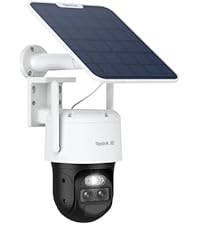
The REOLINK 4K 8MP Dual-Lens PTZ Wired WiFi Outdoor Security Camera delivers professional-grade surveillance with 360ยฐ pan-tilt-zoom functionality, 6X hybrid zoom, and AI-powered smart alerts for people, vehicles, and pets. Featuring full-color night vision and flexible storage options, this wired camera ensures continuous power and reliable dual-band WiFi connectivity, making it an essential upgrade for modern outdoor security.


| ASIN | B0B4SB2CRD |
| Alert Type | Motion Only |
| Antenna Location | Outdoor Security |
| Best Sellers Rank | #68 in Dome Surveillance Cameras |
| Brand | REOLINK |
| Built-In Media | 1m Network Cable*1, 4.5m Power Extension Cable*1, Camera*1, Instruction Manual, Power Adapter |
| Color | White |
| Compatible Devices | Reolink Home Hub, Reolink Home Hub Pro, Reolink PoE NVR, Reolink WiFi NVR |
| Connectivity Protocol | RTSP, Wi-Fi |
| Connectivity Technology | Wired |
| Control Method | App |
| Controller Type | Amazon Alexa |
| Customer Reviews | 4.3 out of 5 stars 1,527 Reviews |
| Effective Still Resolution | 8 mp |
| Enclosure Material | Metal |
| Flash Memory Supported Size Maximum | 512 GB |
| Flash Memory Type | Micro SDHC |
| Focus Type | Auto Focus |
| Form Factor | Dome |
| Frame Rate | 20 frames_per_second |
| Indoor Outdoor Usage | Outdoor |
| Indoor/Outdoor Usage | Outdoor |
| Installation Type | Screw In |
| Item Dimensions | 10.63 x 8.07 x 7.48 inches |
| Item Type Name | High-tech Stylish Dual-Len Camera |
| Item Weight | 1.4 kg |
| Light Source | Infrared |
| Manufacturer | Reolink Digital |
| Memory Storage Capacity | 256 GB |
| Mfr Part Number | ANS26REO13 |
| Model Name | Reolink TrackMix WiFi |
| Model Number | Reolink Trackmix WiFi |
| Model Series | PTZ Series |
| Mount Type | Wall Mount |
| Night Vision | Night Color |
| Night Vision Range | 100 feet |
| Number of Channels | 8 |
| Number of Items | 1 |
| Optical Zoom | 6 x |
| Other Special Features of the Product | 2-Way Audio, Night Vision, PTZ Technology, Time-Lapse, UHD Resolution |
| Photo Sensor Resolution | 8 mp |
| Photo Sensor Technology | CMOS |
| Power Source | Corded Electric |
| Recommended Uses For Product | Outdoor Security |
| Room Type | Garage |
| Shape | Dome |
| Special Feature | 2-Way Audio, Night Vision, PTZ Technology, Time-Lapse, UHD Resolution |
| Specific Uses For Product | Home Surveillance, Outdoor Security, Outside, Professional Surveillance System |
| Unit Count | 1 Count |
| Video Capture Format | MP4 |
| Video Capture Resolution | 4k |
| Video Encoding | H.265 |
| Viewing Angle | 360 degrees |
| Voltage | 12 volts |
| Water Resistance Level | Waterproof |
| Waterproof Rating | IP65 |
| Wattage | 12 watts |
| Wireless Technology | Wi-Fi |
| Zoom Type | Hybrid Zoom |
H**W
If I could only have one security camera then the REOLINK Trackmix WiFi would be it
First of all I had no problems installing the micro SD card because I used a phillips #1 screwdriver. Second of all the tracking works better than expected after experimenting with all the settings and doing a little reading on the REOLINK website. The picture quality is outstanding including the nighttime IR. The color night vision just means you are using the LED spotlight to illuminate the area which I will not be using but itโs a good feature to have regardless. You can turn on the spotlight or sound the alarm manually thru the app or client if you so desire or have everything on auto. The talk feature is horrible, it has an echo and isnโt very loud. If I donโt connect to the camera for a while using iOS sometimes the WiFi will fail but then it tries again automatically and connects in a second. Then if I load the app up again it will connect perfectly. Not sure if this minor glitch can be corrected with future firmware updates or if itโs an iOS problem that will require a future update. Either way itโs not that big of a deal but I figure Iโd use this review to nitpick the small issues I found. The only feature lacking is the ability to setup a schedule for motion, pet, person, vehicle independently. As of now if you want to set a schedule for one then it affects them all. So this means if you donโt want something on then it has to be turned off completely. I know itโs hard to understand thru my words but for example if you want to turn off false alerts from moving tree branches or flying moths at night then you need to turn off motion completely and leave pet, person, vehicle on. Which isnโt really that big of a deal because what else can trigged motion that you would be interested in getting notified by? A UFO would probably be detected with the vehicle smart detection. Or a Sasquatch would be detected by the person or pet smart detection. So I feel like Iโm covered. My problem with other cameras was having to check footage for no reason wasting my time. I do not have that issue with this camera as it does a very good job of only notifying important detections. You can have it automatically send you emails with each detection which provides a 25 second clip. You can also have it provide push notifications, but I find this overkill as the email does a good job at notifying me. For some reason they do not give you the free cloud service with this model which is kind of a bummer. They said they might change that in the future. But you donโt have to pay a monthly fee using the micro SD card or NVR. Iโve corresponded with support only once so far and the response didnโt answer all my questions so I will try again. Even though there are a few minor glitches and issues it seems they are fixable with future firmware and software updates. Hope to see improvements soon. So with that being said I would recommend this camera to anyone who wants to step it up.
Y**Y
Professional quality system
Little expensive products for budget setups but if quality is what your looking for and detail control over system and auto tracking this is the system for you, Little hard setup not clear instructions in box need to download reolink in google play 1st then setup if you have hub and cameras the pair is easy in house before mounting outside i found, but setup has to be reolink wifi then once connected you can switch to your own wifi for further connection with its wifi cameras cause reolink wifi is limited range i found out hard way after i used a ethernet cable to a out of range camera i later found out i could have switched to my own wifi its a slower process than ring dont get discouraged ask claude or gemini or reolink website chat their ai bot knows its stuff helps you if your stuck. on app says hold reset till hear voice its not voice its a chime release and watch app once setup you got multiple choices of setup for autotrack, fastest is pan but loses track, digital zoom first, auto tracks best stays with longer this is not plug and play and forget its more detail more professional after i finally got setup i really like it, the hub pro as far as i know is phone or tablet control and wifi cameras also, for poe with hub pro you have to buy injector or use a 12 volt power supply to camera also for more connection ethernet you will have to buy a switch to add more connections, the hub comes with only 2 ethernet connection #1& #2 but one has to be for router connection to your internet. you be impress with this brand go to reolink. Com to get more detail instructions how to's trouble shooting chat ai bot this is a well though out company hope they stick around i know im expanding
J**N
Solid Camera - Itโs a Buy.
For a background I have owned and returned Arlo 4k. And have 3 Wyze cameras. I prefer this trackmix over those. The image quality of the trackmix is great. The lens with the optical zoom only has a 1080p max but itโs sharp. The settings are more in depth than most cameras and can be a little confusing at first. If your stuck google will be your friend. I have had this camera for about 14 months and have not had any issues outside of the firmware issue with the initial setup. Tech support was extremely responsive and emailed me a zip file with updated firmware to fix my 4k frame rate issue. I have this recording to my Nas for an extra backup and that was also easy to setup and the camera interfaces with the nas software just fine. The camera picks up audio really well and from a distance thatโs further than my other cameras. Just donโt expect miracles. I always recommend this camera to friends and family.
M**6
Updated review. Excellent cam!
I was a little quick on the draw when writing my original review. Even though Im still having issues getting the rtsp working properly I really love this camera! The picture quality is amazing and the tracking is quite excellent. The app is also really great! Lots of features and easy setup. I would give it 5 stars but still trying to get the rtsp working correctly. Almost got it now. But yes very happy with this. Im for sure keeping it. The night vision is excellent and the spot lights are very bright! Very happy with this!
B**K
Unbeatable for the value - NO FEES
So far, unbelievable for the price. The automatic tracking works much better than advertised, the motion tracking Works practically flawlessly (and much further than the advertised 100 ft from the camera). The best part about it, is there's no monthly or yearly fee. I get all of the features of the big name brands, without having to pay a monthly fee just to be able to save the videos. Motion tracking even captures and follows a hummingbird from time to time, but not often because they move so fast. I'm just impressed when it does capture them. It has its limitations, it would be nice if the large image was a wider angle, but I'm not going to complain because I still I'm picking my jaw up off the ground with the quality of the product. Connectivity, video quality, AI tracking, notifications, I'm so used to wyse that I am absolutely blown away at how crisp and clear the video is, especially at 25 frames per second versus the 15 of my previous camera. That makes the whole world of difference. I think my favorite feature is the presets. You can save specific locations, and zoom so you can quickly tap from spot to spot and the camera whips into position quickly, that way you don't have to mess around with the joystick trying to get it just right. My only gripe is the delay, but that is going to be present with any Wi-Fi cameras that aren't poe. So that isn't a limitation of this product, it's a limitation of using Wi-Fi only. I would recommend using PoE if you can, it will make a huge difference for the lag time between camera controls and the camera actually moving. I don't think I'll buy another brand of camera again after having one of these. And to think this is one of their entry models... I almost wish I went with the 16x Zoom model, but I couldn't really afford it. Five stars all around
S**R
Update V: Minus two stars now. . .
Update 5: Looks like the Reolink Trackmix isn't through jacking with me and my friend. She recently had a hard drive fail so she has a new computer and asked me to help her get the Reolink client working on it. I spent an hour trying to figure out why the camera had apparently died only to find that the camera was working. . . poorly. I had downloaded and installed the latest version of the Reolink client and when I went to view the Live View the screen was black. Both of the streams simply would not work. After troubleshooting the camera for a while my friend noticed that the laptop was playing the audio but not the video. I found it strange that only part of the unit would work and after a while I found that the new Reolink client will not display either stream in the higher resolution "Client" mode. It will only work in the lower resolution "Fluent" mode. Even the stored videos on the SD card are now the in the lower resolutions. I thought that perhaps the camera firmware needed tp be updated to work with the latest version of the Reolink Client so I downloaded and installed the latest firmware. Nope, no bueno. For some reason the camera will no longer work in the higher 4K and 1080p resolutions. I guess considering the track record to date I should be happy it works at all. Kind of frustrating to pay this much money for a camera that will not work as it should. Oops, realized after I'd posted this that I guess I should at least describe the behavior to possibly help someone else. On the old Client the resolution settings were Client and Fluent for Hi-res and Lo-res streams respectively. The newest version (as of 4/7/24) the setting says "High" and "low". If you are on High and the screen is black try setting it to Low and see if the stream starts up or not. I found that if you flip from High to Low and back to High you will see the Low resolution image freeze and then after a period of time the screen will go black. I guess we're stuck with Low resolution pending Reolink figuring out why the Client no longer supports High resolution. Update 4: And yet another reason to avoid this camera. In spite of all the problems to date we've continued to try to use the camera since some videos are better than no videos. Unfortunately the TrackMix doesn't seem to agree. My friend was gone for an extended period of time only to return to find that the camera had stopped recording 2 days after she had left. No videos at all on the SD card. This is NOT a problem with the network and NOT a problem with the laptop used to view the videos. The videos are supposed to be stored on the SD card in the camera. Evidently the camera locked up for some reason and quit recording. My friend has rebooted the camera and it appears to be working but we really don't know how long it will work. I really want to like this camera since the "pet detection" is a very useful feature to have and I've yet to find a similar capability elsewhere. BTW, there is an "autoboot" capability built into the camera to have it reset itself periodically. Evidently the lockup of the camera prevented this from working so that the camera could reset itself and continue to record. Update 3: I've been jumping through hoops trying to get the camera to work properly and following all the instructions and suggestions Reolink has provided to date. One of the things they wanted was remote access to the camera and my friend does not want strangers in her network so I ordered a second camera to set up access for Reolink to work with me to try to figure out some of the issues since they refuse to swap out a possibly bad camera with a replacement until we've exhausted what they want to try. The new camera came in DOA. Simply would not power up. Since I'm an engineer I have access to relevant tools and found that the small power pack/wall wart that is supposed to supply 12 volts to the camera was dead. Fearing that the camera was at fault and had damaged the power pack I sent it back for a replacement. Replacement unit came in and today I spent 2 hours trying to get it to work wirelessly but it simply will not work. I upgraded firmware, tried two completely different wifi routers, factory reset the settings in the camera, set wifi SSID and password to something stupidly simple to make sure that there were no issues with the setup. Nothing worked. The camera will work if you plug it into the router with an ethernet cable but I bought the TrackMix WIFI to USE the wifi. I guess I'm lucky the first camera functioned at all. I really wish Amazon allowed zero stars so the customers could really reflect how poorly certain products work. I'm giving a virtual zero stars since Amazon won't let me do it in reality. Update 2: We've continued to have issues with the camera not recording properly, missing recordings, triggering for no reason, etc. Basically none of the problems I've listed to date have been addressed by Reolink support. In addition to the problems we've been encountering we've just encountered another one. During playback videos will just stop. You have to click somewhere on the timeine to force the camera to load a different recording or hit the 1x, 2x, 4x, etc playback speed icons to wake the camera up to continue to play the video. Reolinks response when I brought this to their attention was to blame the laptop an/or the network so basically they have no clue why their camera stops streaming and it is somehow our fault and we have to live with the camera not functioning properly. This is disappointing and due to all the problems we've been having with the camera and now the lack of help from Reolink I can no longer recommend the camera. Updated review: I was pretty pleased with this camera at first but after dealing with multiple issues with it I'm disappointed now. There are numerous issues that have shown up with the camera and the Relolink client that needs to be addressed by Reolink. I originally bought this to add a PTZ (Pan-Tilt-Zoom) camera to my house to try to catch teenagers who seem to wander by and try the door handle of my vehicle. I loaned it to a friend to see if we could deal with a raccoon problems she's encountered hence my original positive review. As time has moved on things have not gone as well as I'd like. My friend and I had an issue with camera and reached out to Reolink. They were responsive and suggested that I try the latest firmware update to deal with the camera not recording properly. The firmware update did nothing to address the problem. If anything, it may have made things worse. We still have the problem that it is missing recordings. Multiple times now (twice in one night) a recording will show cat food and water containers in place and the next video shows them strewn about the porch. It did not catch how the raccoons got up on the table and tore up the containers. I'm sure it isn't a distance issue since the camera will trigger when the raccoons are 20 feet past the table walking next to the wall. The table is about 25 feet from the camera and the raccoons are pretty large so I have no clue why it records some times and doesn't others. There's no pattern to when it won't record. It's not a particular time of day as it has happened various times between 10 PM and 6AM. Another problem we're having is recordings for no reason. It seems the camera will trip and record for a bit but there is absolutely notning in the video to indicate WHY it started recording. It's frustrating wading through videos as it is only to find you watched a video for no reason. We're also seeing what I believe is dropped key frames. The whole image goes gray and the only thing you can see is a cat, raccoon, skunk or possum moving as that is the part of the scene that is being updated. After a period of time the rest of the image reappears which is when I think a new key frame comes along. If those weren't enough, I encountered a problem when I went to show the camera to my brother was interested in buying one. I was demonstrating how the camera tracks and then went to playback to show him the video from within the Reolink client. The client shows the that the video is available but if you click on the play icon a little spinning icon sits in the middle of the video scene and does nothing. The video never plays. When I tried to download the video a red "FAILED" box appears. My brother decided that if you couldn't get to the videos then he saw no reason to buy one. I really want to like this camera but something this expensive shouldn't have this many problems. Hopefully Reolink can get this straightened out for me and soon. Until that time I've had to drop my review rating since I can't really recommend something that only sometimes works and has as many issues as this camera does. Original review: Based on some Youtube reviews I decided to give this camera a try. The fact it has two video streams, one wide angle and the other 'zoomed" and the thing can "track" were pretty big for me. We're having problems with the local critters getting into the food we leave out for the cats and needed to see how the local wildlife managed to get to the feeders even high on a table. The camera caught the two videos attached. We will need to come up with a better method the keep the raccoons (there are are least 3 of them) from being able to climb the table. The table is on bricks to try to get the edge of the table out of reach but you can see how that worked. I was having problems getting to the high resolution 4K wide angle (CLIENT mode) videos and the 1080p (CLIENT mode) zoomed videos and nothing I did would download the videos at other than 856x512 (FLUENT mode) resolution. Jeanine in customer support put up with complaints and kept working with me to get the client straightened out. She even sent screen shots of step by steps instructions that finally got me pass the case of cranial rectumitis I had. Note: pay attention the the little tiny triangle on the far left of the camera in the client page and don't do what I did by using a small screened laptop that can let you miss it. That little triangle is important. Anyway, the 4K and 1080p videos are amazing. The "pet tracking" that is supposed to be in Beta on the camera worked pretty well. I videoed, cats, raccoons, skunks and possums that came wandering up. I've included a video of the two streams (Amazon only allows one video per review). First half is the "wide angle" view and the second part where the camera zoomed and tracked automatically. I resized the 4K video to 1080p so both could be put in the same file. Now that all the kinks are worked out I plan on getting a couple more for better coverage of the house.
S**E
Works perfectly
Another fantastic camera from Reolink. Great video quality and the WiFi is perfect. The auto tracking works really good and is my favorite feature. In my opinion, this is Reolinkโs best Wi-Fi camera. The app is one of the reasons this is such a great system. Itโs been working flawlessly for me and allows you to completely control every aspect of each camera. A+ from me.
S**E
Awesome
Been using reolink for years, always work, and never have problems! Of course very good prices.
M**L
Recommended cctv
Perfect CCTV camera. Once connected to your wifi you can access the camera from anywhere. The app is easy to install and play back footage. Records sound, has motion detection and can detect whether the object is a vehicle, person or animal. Takes a micro sd card to store footage and holds approx 10 days with a 250gig card.
A**I
Can turn it in dual view .
this one is good camera . Another good work from Reolink .
ู**ุช
ุฌูุฏุฉ ุนุงููุฉ
ูุงู ูุฑุง ุงุญูุงู ู
L**Y
Rock solid construction very clean video, has Ethernet!!
REOLINK 4K Dual Lens Outdoor Security Camera, TrackMix WiFi Plug-in PTZ Camera with Auto Tracking, 6X Hybrid Zoom, 2.4/5GHz Wi-Fi 6, No Monthly Fee, AI Person/Vehicle Detection, Color Night Vision This is a true outdoor hardened camera. It's the new generation of Reolink outdoor cams. This one's way way way more beefier than earlier "outdoor" cameras. In the past , I had Reolink ptz cams that was rated for outdoor installations but the housing was cheap plastics and you can tell after one season , grueling winter and continually exposed to sun, the plastics got really suspect and the mount sagged. This new gen really shines. It's a metal mount. Mostly metal housing...bthe SD card door is sealed properly and needs to be screwed on with a metal cover. Antennas are dual diversity . It weighs a lot more too. Very beefy. Bravo. Form a camera point of view it has a fixed lens that follows the pan. And a zoom lens that articulates up and down and zooms in and out. Very high res. Can see the zoomed in video with a concurrent wider angle perspective context. Very cool. As with all other reolinks, it has tracking features , night cam, spotlight , two way audio, notification, scheduling , various detection thresholds, etc. also works with Reolink home hub. This camera also has an Ethernet port. You can wire it rather than WiFi. But you still can setup wifi and have it configured just as a backup . The connectors for eth and power are weather sealed. Very good stuff here. I hard wired etb cable and it's so rock solidddddd. If you need one cam for your front view, this is the one. Very versatile and reliable.
A**R
Very good video quality; easily integrated with Reolink Home Hub
This Reolink 4K wired Wifi PTZ Trackmix security camera comes with a comprehensive list of features and performance specifications, and overall it performs pretty much to spec. For video quality, the daytime 4K video is very crisp and clear, while night time video is good-to-very good quality, especially with spotlight on, and ok video quality with IR illumination. Audio quality does sound a bit thin, and is dependent on where you mount the camera and where you stand with respect to it, with decent quality within around 8ft of the camera. Also, there's only a slight lag with the audio, something like less than 1 second. The Reolink app used to control and view this camera is well refined, with a full suite of controls and features from dual-view streaming, to manual PTZ control and setting up custom detection zones & alerts. The sensitivity level set for detection zones and alerts works generally well, but not always reliable, as I've experienced missed events about 10% to 20% of the time. When I cranked up the sensitivity too much, it tends to over detect as well, so I found it difficult to find a proper balanced setting. This camera can be easily integrated into the Reolink Home Hub. The camera's WiFi connectivity is generally stable, with 2 or 3 disconnects per week - however, the camera does eventually auto-reconnect after 3 to 4 minutes. Even though I have the camera connected to a Reolink Home Hub for recording events, but the camera is connected to my WiFi router (extender), rather than to the Home Hub's onboard WiFi SSID. This is because the camera is farther away from the Home Hub than my WiFi router (extender). This setup works fine for recording frequent events, and there's no discernible difference in lag time when controlling the PTZ from the mobile app between these two different WiFi connection paths.
Trustpilot
2 weeks ago
2 weeks ago