Buy anything from 5,000+ international stores. One checkout price. No surprise fees. Join 2M+ shoppers on Desertcart.
Desertcart purchases this item on your behalf and handles shipping, customs, and support to South Africa.
🌍 Travel smart, connect securely, and own your network freedom.
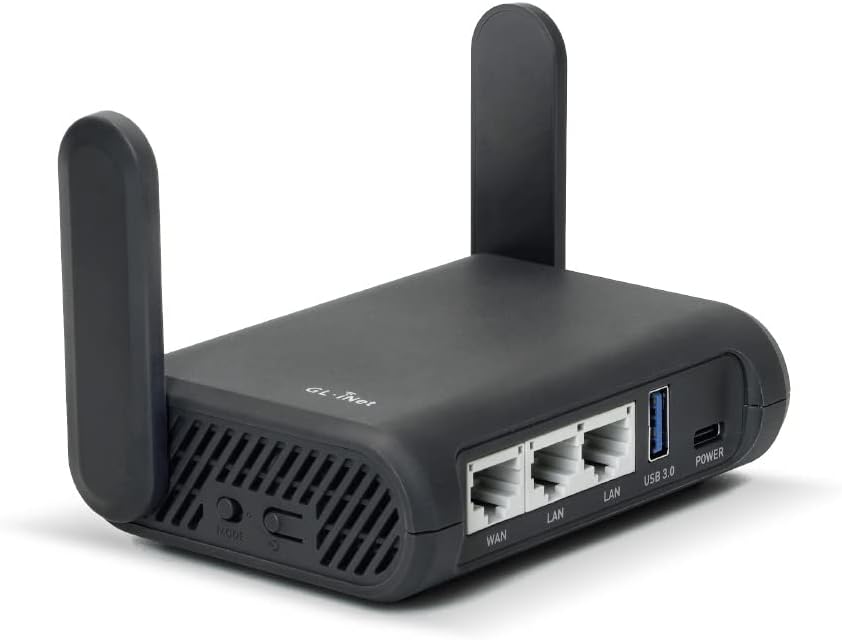
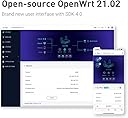
The GL.iNet GL-A1300 Slate Plus is a compact, dual-band WiFi 5 router delivering up to 1300 Mbps combined speed. It features pre-installed OpenVPN and WireGuard VPN clients with a kill switch for enhanced security, runs on the open-source OpenWrt 21.02 OS for full customization, and supports USB-based network storage. Designed for professionals on the move, it offers easy setup, remote management via GoodCloud, and versatile use as a travel router, range extender, or access point.


| ASIN | B0B4ZSR2PX |
| Antenna Location | Home |
| Antenna Type | Fixed |
| Best Sellers Rank | 14,649 in Computers & Accessories ( See Top 100 in Computers & Accessories ) 114 in Routers |
| Box Contents | Ethernet Cable, Power Adapter (UK Plugs), Router (with 2 years warranty), User Manual |
| Brand | GL.iNet |
| Brand Name | GL.iNet |
| Colour | Black |
| Compatible Devices | Wi-Fi enabled devices |
| Compatible devices | Wi-Fi enabled devices |
| Connectivity Protocol | Wi-Fi, Ethernet |
| Connectivity Technology | Ethernet, Wi-Fi |
| Control Method | App |
| Controller Type | Switch |
| Country of Origin | China |
| Coverage | Standard indoor coverage |
| Customer Reviews | 4.5 out of 5 stars 1,460 Reviews |
| Data Transfer Rate | 1300 Megabits Per Second |
| Frequency | 5 GHz |
| Frequency Band Class | Dual-Band |
| Frequency band class | Dual-Band |
| Has Internet Connectivity | Yes |
| Has Security Updates | Yes |
| Is Modem Compatible | No |
| Item Dimensions L x W x H | 8.4L x 3.3W x 11.8H centimetres |
| Item Weight | 429 Grams |
| LAN Port Bandwidth | 1000 Mbps |
| Manufacturer | GL-Technologies |
| Manufacturer Part Number | GL-A1300 |
| Maximum Upstream Data Transfer Rate | 867 Megabits Per Second |
| Model Name | GL-A1300 |
| Model Number | GL-A1300 |
| Model name | GL-A1300 |
| Number of Antennas | 2 |
| Number of Ports | 3 |
| Operating System | OpenWrt 21.02 |
| Other Special Features of the Product | Access Point Mode |
| Product Warranty | 1 year warranty |
| RAM Memory Installed | 256 MB |
| Router Network Type | wireless |
| Security Protocol | WPA2 or WPA3 |
| Smart Home Compatibility | Not Smart Home Compatible |
| Special feature | Access Point Mode |
| Unit Count | 1.0 count |
| Voltage | 5 Volts |
| Wi-Fi Generation | Wi-Fi 5 |
| Wireless Compability | 802.11a, 802.11ac, 802.11b, 802.11g, 802.11n |
| Wireless communication standard | 802.11a, 802.11ac, 802.11b, 802.11g, 802.11n |
M**D
Easy to setup, manage locally or via the web. Great OPENVPN - WIREGUARD VPN router.
This is very easy to set up. Comes configured as a router for easy connection to your existing LAN or ISP router. Simply plug in the cable supplied into the A1300's WAN port and your existing ISP routers LAN and bingo its ready to go. Its WIFI comes on and once connected using the password on the bottom of the device your connected to its own LAN 192.168.8.0/24 Then just use a browser to access 192.168.8.1 and log in and change the password to something you know. The interface is very simple and efficient. Now you might have purchased this as your VPN gateway for say your Amazon Firestick to use streaming securely. Before you can use any VPN you have to set it up. There's two client choices OPENVPN & WIREGAURD. I have tested both with ProtonVPN and they work a treat and are easy to set up. The easiest to set up is WIREGUARD as you just need to obtain a config file from your VPN provider, save it to your laptop and then under the menu on the router VPN WIREGUARDS CLIENTS just add the config file. Its easy point click, add and it verifies the config and adds the VPN profile to a list of wiredgaurd client options so you can have a few UK, US, etc... then select the one you want it to use and click ... START. It then starts the VPN the VPN indicator goes from amber to green and bingo its all working. Anything you plug into the LAN ports or WIFI now goes down the VPN. Now here's where the designers have really excel'd there's an option under the GLOBAL VPN setting to only allow VPN traffic so this is the 'KILL SWITCH' which means if the VPN stops or fails traffic cannot go to the Internet and expose you. Now for a little more good stuff. I got this for my mum and she won't know about VPN's turning them on or off etc.. by a menu. So if for any reason you need to turn off the VPN ... lets say a TV service like BBC detects the VPN and stops playing or won't start. You have two options, swap the VPN exit node & IP or temp turn off the VPN. So back to my mum and how she can easily do this... There's a little programable toggle switch on the side of the A1300 that you can select it to TURN OFF the VPN when you move it :-) Speed wise its good my 100Bmps WIFI gets close to 60Mbps on both 2.4 and 5Ghz using WIREGUARD. Its a little slower on OPENVPN say 38mbps but both very usable for video which needs 3-6Mbps for 1080p. So no its no gaming superfast wifi device. If you need a faster wifi you need to consider the more expensive models. But most VPN services only get 50-100Mbps in the UK in my experience so this is great for my purpose which is ANY device using this devices WIFI network goes down a VPN :-) Stability. Is very good no drops. If you restart it it auto connects the VPN. Manageability options. Easy access locally via 192.168.8.1 and log in. Or set up access via the GL.iNET GOODCLOUD service. Once enabled on the little router under APPLICATIONS 'GOODCLOUD' and you have created yourself an account on the GOODCLOUD web site, just add the device using the credentials the service provides and you can then access the device via the WEB from anywhere :-) https://www.goodcloud.xyz/ Now if you thought things could not get better well they can.. There's an option from https://www.goodcloud.xyz/ login to add your device to a virtual SDWAN site to site network ! So you will need 2 devices. But here's what you can do. Set each device say device 1 up as standard regards its LAN (192.168.8.0/24) default, and your 2nd device at another location as 192.168.9.0/24 so each network is different and add both devices to the site-site service on the web https://www.goodcloud.xyz/ Then any device on either network can communicate via a secure WIREGUARD VPN site - site .. say one device can ping another. Great if you need LAN access across sites. Anyway that's enough for now but I am seriously impressed with this as a former enterprise WAN designer and Security guy. You will not be dissapointed.
G**G
Secure, Family networking.
For me it was the perfect tool. Allowing me to simplify and maintain the establishment of a family VPN which enables simple, secure communications for the entire family whether we are at home or on the move. Made possible by Tailscale support that keeps all the configuration of all devices simple and high level so a non IT expert can create and maitain a service on a par with a corporate set up.
R**H
Exceptional Multi-Functional Device!
I must say, this compact device has exceeded my expectations in every way. Its failover and load balancing functions are incredibly efficient, ensuring uninterrupted connectivity. Configuring the VPN server and client options is a breeze, making it perfect for both beginners and tech-savvy users. The built-in Adguard is a game-changer; it flawlessly blocks all ads except those pesky YouTube and video ads. The mobile app adds convenience to the mix, and the hardware toggle button is a thoughtful touch for easy access. I also love how versatile this device is. I’ve successfully attached my external SSD for NAS purposes, and it works like a charm. With WebDav and SMB support, it covers all the bases. In terms of value for money, this device is an absolute steal. The customer support has been top-notch, and the online documentation is easy to follow, making the whole experience even more satisfying. This is a must-have for anyone looking for a reliable and feature-packed networking solution.
M**D
Recommended , so I bought and did not disappoint.
Works as described. Solid build and simple to get setup. Compact and was a breeze to get setup with my X-32 compact mixi my desk. The only gripe would be that the uk plug faces an awkward way. (Or at least it would be good if the plug was somehow reversible, but it’s not too big of an issue as the device powers off usb-c so it should be easy to power with other glues.
G**G
Very good but you need to know...
I purchased this router to use a work laptop outside the UK. I'm not allowed to install my own software on their laptop so I needed a Uk vpn to access the company servers. Works fine but... Be aware, this takes quite a bit to set up the (Nord) VPN. The inbuilt app will lead you astray. You need to get your Nord VPN credentials from the Nord website and then install their config files. If you just use your normal sign in (email and password) the router won't work in VPN mode. Once sorted it works well. Top tip - the mode switch on the side can be set to conveniently switch VPN on and off.
M**M
Good travel router
Highly recommended, fast and easy to use. Definitely work with netwrok requiring EAP
7**5
Capable and ready to go
I’m an amateur at networking but wanted to improve my home network, lock down wan access for smart devices, segregate guest access (or work laptops) and have a VPN to securely route my traffic both back to my home when out & about, and to the internet. I worked with AI and was suggested this device. Basic setup was easy, advanced setup via luci took some learning but made firewall rules and additional SSID setups a breeze. Haven’t gotten my head around VLAN yet. The WiFi strength is really great, I was worried I should’ve spent the extra and got the wifi6 capable 1800 unit but I’m getting 5-8ms ping between floors, to my AppleTV box via moonlight. Massive step up from ISP issued router. Overall a capable little device, beginner friendly with access to advanced features.
O**R
Provides VPN protection for those devices like smart TVs that don't have it.
MickeyD (17 April 2025) has provided a comprehensive description of how he installed the GL.iNet GL-A1300 (Slate Plus) Wireless VPN Encrypted Travel Router, so I won’t duplicate what he’s already said. I bought this router simply to provide VPN access to devices that don’t have that capability natively — in my case, a Sky box and a smart TV. Installation was fairly straightforward: I connected the WAN port on the Slate to a port on my main router, downloaded a configuration file from the website of my chosen VPN provider (Mullvad, in this case — though there are several others I could have used), then logged into the Slate’s admin panel and installed the file. (Note: I used ChatGPT to guide me through the whole process — so thanks to Chat.) Everything is working perfectly, except for one thing. Amazon Prime doesn’t like you using a VPN while watching its films (it’s fine for other ‘live’ TV programmes, such as This Old House) and won't play them. In that case, I can either switch the VPN off via the Slate control panel, or simply reconnect through my main router. Either way, everything that needs to be protected is now protected.
Trustpilot
3 weeks ago
1 day ago