Desertcart purchases this item on your behalf and handles shipping, customs, and support to South Africa.
๐ Elevate your 3D workflowโwhere precision meets power!
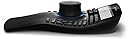
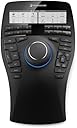
The 3Dconnexion SpaceMouse Enterprise is a wired USB 3D mouse featuring a six-degrees-of-freedom sensor and 31 programmable buttons, including 12 intelligent function keys and a color LCD for real-time key visualization. Designed for professional 3D modeling, engineering, and design, it supports both Linux and Windows systems with an ambidextrous ergonomic build, delivering unmatched control and customization for demanding workflows.
| ASIN | B01F9TR3KG |
| Antenna Location | 3D Modeling, Product Design, Engineering, Architectural Design, R&D |
| Best Sellers Rank | 286,830 in Computers & Accessories ( See Top 100 in Computers & Accessories ) 4,913 in Mice |
| Box Contents | Space Mouse Enterprise |
| Brand | 3Dconnexion |
| Brand Name | 3Dconnexion |
| Button Quantity | 31 |
| Colour | Black |
| Compatible Devices | PC |
| Compatible Operating System Family | Linux, Windows |
| Compatible devices | PC |
| Connectivity Technology | USB |
| Connectivity technology | USB |
| Customer Reviews | 4.6 out of 5 stars 154 Reviews |
| External Testing Certification | CE, FCC, KC, RCM, BSMI, RoHS-EU, RoHS-China, WEEE, BellAndVision |
| Generation | 1st Generation |
| Hand Orientation | Ambidextrous |
| Is Electric | Yes |
| Item Dimensions L x W x H | 24.9L x 15.4W x 5.8H centimetres |
| Item Weight | 2.8 Pounds |
| Keyboard Backlighting Color Support | Single Color |
| Keyboard Description | Wireless |
| Keyboard Layout | QWERTY |
| Keyboard description | Wireless |
| Manufacturer | 3Dconnexion |
| Manufacturer Part Number | SME |
| Model Name | SpaceMouse Enterprise |
| Model Number | 3DX-700056 |
| Number of Items | 1 |
| Number of Keys | 31 |
| Number of Sections | 31 |
| Power Source | Usb |
| Processor Count | 1 |
| Product Features | Programmable Buttons |
| Recommended uses for product | 3D Modeling, Product Design, Engineering, Architectural Design, R&D |
| Series Number | 700056 |
| Special feature | Programmable Buttons |
| Style Name | Modern |
| Switch Type | Linear |
| Theme | 3D modeling |
| Total USB 2.0 Ports | 1 |
| UPC | 821123700567 |
| Unit Count | 1.0 count |
R**A
Was faulty
I received a faulty product. When zooming in or out, after a while it gets caught in the motion. So if you're zooming out it'll keep zooming out indefinitely and there is nothing you can do to stop it except pull out the USB cable. Not sure if this is a common fault as mine was an amazon warehouse purchase and things from there are sometimes not 100% reliable. Was a cool paper weight for a few days and that was about it.
C**R
Excelente
Excelente!!
K**S
ๅฏพๅฟใใฆใใขใใชใจๆฉ็จฎใใใฃใใใจ็ขบ่ชใใฆใใ ใใ
MacBook Pro (15-inch, 2018) macOS Catalina 10.15.3 SketchUp2019ใซใฆไฝฟ็จใ ใใฉใคใใฎใคใณในใใผใซใซใใใคใใพใใใๅไฝใฏใใพใใไฝฟ็จๆใฏไบบใใใใใใจๆใใพใใใ็งใฎใใใช3Dใใฆในๅๅฟ่ ใซใฏๆ ฃใใๅฟ ่ฆใชใฎใฏ่จใใใใใชใไฝฟใใใชใใใไปไบใฏใใชใๆฅฝใซใชใใจๆใใพใใ้ซไพกใชๅๅใงใฏใใใพใใ่ณผๅ ฅใๆฑบๆญใใฆใใใฃใใงใใ
J**E
Makes CAD development a lot easier.
Always wanted one of the puck type pointing devices with many buttons that allowed dedicated CAD station operators to keep the pointer hand off the keyboard and avoid switching back and forth. Now I'm retired but still spend a significant amount of time designing for 3D printing, and I can finally afford one. Merry Christmas to me. No big problem getting it up and running. Plug and play, but I did have to use the default driver, not the specific one called out in the instructions. I'd appreciate yet another row of programmable buttons but having the assignments change not only with the app but the context of the app provides a lot of functionality. Most of the commands needed on a regular basis can be covered by one of the customized buttons. Handy one button selection menu provides access to customization and training any time. Not portable by any means, and tethered by a USB connection, but that is understandable with all the illumination involved on the device. Having a screen to show the current purpose of the dozen primary programmable buttons is great, since they change as noted above. Almost all of the other buttons that default to keyboard special keys can be reprogrammed also if desired, but there is noting to prompt the user of the change. The traditional mouse is still available in all its functionality, so unless the user is entering text, the user can leave the keyboard alone. Note that I have only used this with AutoCAD and MS Office apps. Reminds me of my righthander keyboard from the 70's that was just a plastic hemisphere with enough buttons to allow selecting characters in binary from the ASCII table. No mouse available in those days, but no GUI either.
R**.
Awesome! Finally compatible with ZBrush. Best thing ever!
For years I have been considering buying one Space Mouse to use with 3D Softwares for modeling. The reason I was on a fence was because ZBrush was not compatible with it. This changed recently and, since ZBrush 2021.5.1, it is finally compatible so I ordered mine and I've been using it for a few months now. It is very intuitive and it feels great for sculpting either on ZBrush or Blender. If you can't make up your mind or spend as much with the enterprise model, I recommend any Space Mouse model. What really matters is the knob. I got the enterprise model because I liked the idea of using the buttons 1-12 for my brushes and most used commands and it is totally customizable for any workflow. Just open any program, ZBrush, SketchUp, Blender, Clip Studio, Notepad, whatever, and the 3DConnection software will detect it and the configuration settings defined will be set for the opened application profile. The software comes with a training mode and a mini-game to help to get used to it faster. It took me few hours as I'm used to playing games with different joysticks so the knob feels like some kind of very sensitive D-pad. I found just two things I was expecting to do with it that it doesnโt do. The first thing is that I use a Stylus pen for sculpting. The space mouse knob can rotate the object indefinitely if you want, so I had the idea of rotating the object using the space mouse and at the same time, while it is rotating, holding the pen on top to create a spiral, like what you would do in manual hand and clay sculpting. If you are rotting the object and clicking the pen on top of the model at the same time, the rotation stops immediately because if you are sculpting/pressing the stylus pen, it will not let you rotate at the same time. I'm getting used to it and speeding my workflow little by little. The second thing is, you cannot (at least not easily), customize the knob freely. For instance, you cannot do something like rotating the knob to increase/decrease the brush size by pressing "[" or "]" on Clip Studio or Photoshop, for instance. It is basically defined to be used as View Navigation, like zoom in and out, rotate, move up and down. It would be great to have these features available at some point as well, but no big deal. It is even possible to customize the LCD image buttons for macros (not easily though) by editing the configuration XML (manually) and using base64 images but not in an intuitive way as the current software/driver's user interface does not allow that out of the box. I don't know if Amazon would allow me to write it here how to do it due to the XML tags. But if you dig around a bit you will very likely figure it out as I did. Check it out the picture I took from the button icons I created for my ZBrush macros (and yes, I like keeping the original protection plastic as long as I can to protect the stuff I care about). It is an expensive investment. Totally necessary? NO. But man, It feels great! I'm extremely happy and satisfied with it and I totally recommend it to use it for 3D art. It makes things much more intuitive, especially on ZBrush. I wish there was a wireless enterprise version though. I totally recommend it and I would gladly buy another. I will never live without one (any) Space Mouse ever again.
M**Y
I should've gotten it sooner!
Wow, I love this thing. I have had the wireless small version for years and it worked, but this is sooooo much better. Unlike the wireless one, you don't have to worry about constant disconnections (obviously), or it shifting around because it is larger and your hand will be anchoring it down so it won't be moving all over the place. I have a couple Stream Decks too and a Shuttle Prov2 (I'm big into productivity gadgets), screen tablet & pen, and this is a great addition. I love the 12 buttons with the screens, and the best is the front/right/top/etc. buttons and even better are the 3 View Saving and Recalling buttons. I use this in Blender (I had to make my own plugin for the 3 views to work though, but in all other 3D apps I use the View Saving works flawlessly), 3DCoat, Rhino, Substance Painter, Unreal and I even use it in non 3D apps like vscode for shortcuts and stuff, and even music apps like Reaper, Dorico ...basically everything. The View Saving 3 buttons are the best in 3D though, time saver! 6/5 stars!
Trustpilot
2 months ago
3 weeks ago