Buy anything from 5,000+ international stores. One checkout price. No surprise fees. Join 2M+ shoppers on Desertcart.
Desertcart purchases this item on your behalf and handles shipping, customs, and support to South Africa.
🚀 Upgrade your home network to turbocharged 4G LTE — because buffering is so last decade!
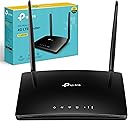
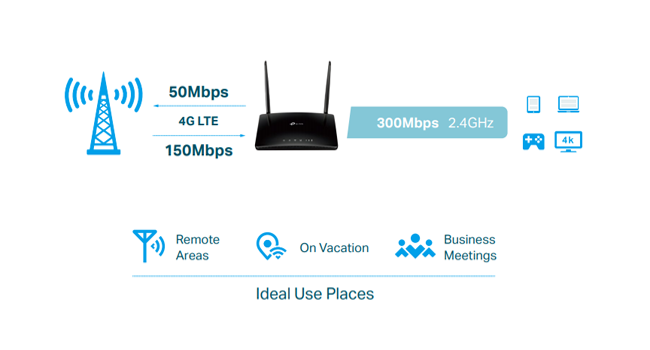
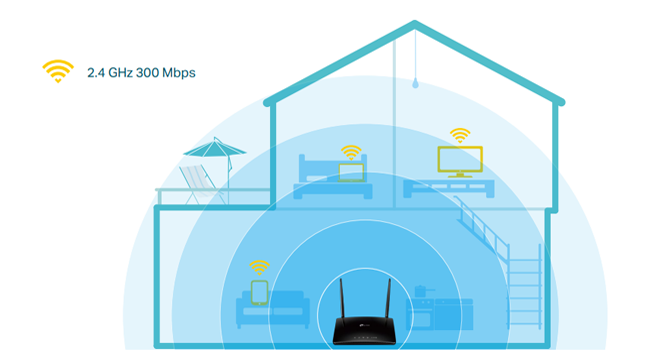
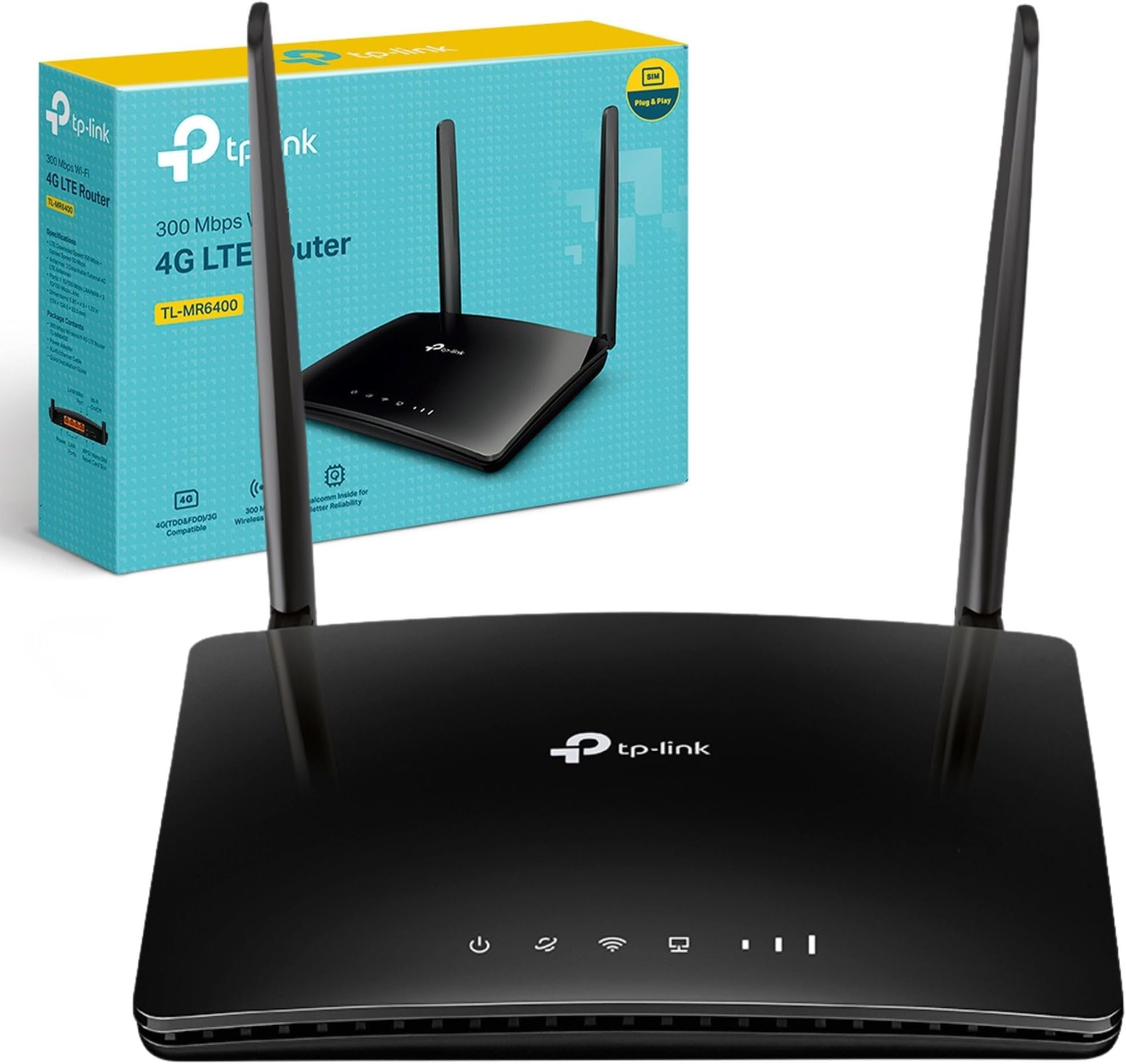
The TP-Link TL-MR6400 is a 4G LTE WiFi router designed for seamless connectivity with download speeds up to 150 Mbps and wireless N speeds up to 300 Mbps. Featuring a SIM card slot, 4 LAN ports, and dual antennas, it supports up to 32 devices simultaneously. Its plug-and-play setup, QoS priority, and parental controls make it ideal for professional millennials seeking reliable, high-speed internet at home or remotely.


| ASIN | B016ZWXYXG |
| Antenna Location | Home |
| Antenna Type | Fixed |
| Best Sellers Rank | 754 in Computers & Accessories ( See Top 100 in Computers & Accessories ) 2 in Routers |
| Box Contents | 300Mbps Wireless N 4G LTE Router TL-MR6400 | Power Adapter | RJ45 Ethernet Cable | Quick Installation Guide |
| Brand | TP-Link |
| Brand Name | TP-Link |
| Colour | Cat4 |
| Compatible Devices | Laptop, Personal Computer, Smart Television, Smartphone, Tablet |
| Compatible devices | Laptop, Personal Computer, Smart Television, Smartphone, Tablet |
| Connectivity Protocol | Wi-Fi, Ethernet |
| Connectivity Technology | Ethernet, Wi-Fi |
| Control Method | App |
| Controller Type | App Control |
| Country of Origin | China |
| Coverage | Up to 32 devices simultaneously |
| Customer Reviews | 4.3 out of 5 stars 4,827 Reviews |
| Data Transfer Rate | 300 Megabits Per Second |
| Frequency | 2.4 GHz |
| Frequency Band Class | Single-Band |
| Frequency band class | Single-Band |
| Global Trade Identification Number | 06935364092771 |
| Has Internet Connectivity | Yes |
| Is Modem Compatible | Yes |
| Item Dimensions L x W x H | 20.2L x 14.5W x 3.4H centimetres |
| Item Weight | 50 Grams |
| LAN Port Bandwidth | 300 Mbps |
| Manufacturer | TP-Link |
| Manufacturer Part Number | TL-MR6400 |
| Maximum Upstream Data Transfer Rate | 300 Megabits Per Second |
| Model Name | TL MR6400 |
| Model Number | TL-MR6400 |
| Model name | TL MR6400 |
| Number of Ports | 4 |
| Operating System | 8 . 1,Chrome,Linux,Mac Os,Vista,Windows,Windows 7 |
| Other Special Features of the Product | Indicator lights |
| Product Warranty | 3 year manufacturer |
| Router Network Type | 36G |
| Security Protocol | WPS |
| Smart Home Compatibility | Not Smart Home Compatible |
| Special feature | Indicator lights |
| Unit Count | 1.0 count |
| Voltage | 9 Volts |
| Wi-Fi Generation | Wi-Fi 4 |
| Wireless Compability | 802.11n |
| Wireless communication standard | 802.11n |
L**Y
For those with poor service and little hope of improvement this is the only option - And it's great!
Many have left technical/usability reviews of this item, and that's excellent so I'll not repeat what's been said. I also try to look for reviewer's experiences of the whole process before making the leap, being familiar only with equipment I've used for many years. I didn't appreciate how good/economical the mobile data service has rapidly become. I'll try to hopefully pass some useful info on, and add to others experiences. I've been humming and hawing whether to get one of these routers for a few months now - the cost may have been a big gamble with no guarantees; however, the usual arrangement of putting up with a sluglike broadband service, poorly maintained lines/equipment, waiting days for engineers, slow speeds when the kids are on Netflix, Prime etc.. was wearing thin. Living rurally I'm lucky to get 4-5 Gbits. The last of three engineers to visit in four weeks, attempting to resolve the same incoming line issue, suggested I look at coming off landline broadband. I noted (speaking to numerous engineers - therein lies a story! - from BT..Sorry 'Open Reach'), that every time I floated the govt promise that everyone -100%- would have fibre (1 Gbit) by 2025 they collapsed on the floor laughing. I already suspected the cost of laying line for rural properties would be enormous, and therefore wasn't too surprised. The promise is recently downsized to 85%. That's clearly minus 15% rural areas. No shock there, and there's still loads of time to reassess further! There is the notion that some providers would love you to accept inflated promises thereby making you reluctant to jump ship because a fantastic service is really (honestly!) just coming over the horizon. Clearly that is not the case. So quickly googling I looked at coverage and type - 4g, 5g etc - for my area. My son is on O2, wife on Vodafone, me on Tesco, and using those phones I checked data reception across my home. Result 15 - 30 mbits (4G). Great! Decent reception confirmed - tick. Ordered the TP Link mobile router. Put in micro sim from my phone. ID (ssid) came up on my Fire so entered passkey (from rear of modem) and connected. Opened a browser and searched for 'speed checkers'. Average from 6 checkers came in at 19 Mbits download and 17 upload. Previous fixed line gave me 5Mbits on a good day and less than 1Mbit upload. I now have an unlimited data sim from O2 (comes as mini sim - no fuss, clicks in as normal). I already have homeplugs (6 x tp link PA211 from Amazon) and they work fine with this unit. No changes are needed. I also already have two wifi extenders - bog standard under £20 models circa 2018 (my house is over 20m by 7m x 2 floors). They happily link to the router just the same as with a home hub or other line router, and in practice they perform much better than with HH5. The home plugs ( + 'wired' connections) measure at 20-25 Mbits, wifi fluctuates from 20+ down to around 15Mbits. Coverage is now full; upstairs and downstairs. Now I know some with 40+ mbits will laugh at those figures but, when 5 mbits was the best I was getting, three times that speed as a MINIMUM is a real result. Like all routers I've ever had in the last two decades you can interface with it using a browser and entering http://192.168.1.1/, so set up is easy. This unit instantly recognised both my Sims. Set up is really just confirming info and "dotting the i's" as wifi was up and running before reaching the set up, as without it access isn't possible anyway if you're not 'wired'. The interface has monitioring and limitation facilities. My unit has detachable antennas. The monthly cost of our old landline package was nearly twice that of a £33 pound/p/m unlimited sim so I'm already ahead, the unit will be paid for in a few months. You can keep your basic email or pay a few quid for a premium email with BT if your worried about losing, or the kerfuffle of changing, your email when terminating your broadband. I suspect other providers will be similar. The loss of a landline, and all the marketing/nuisance calls that came with it, caused very little pain. Mobile minutes are now very cheap. In conclusion I've vastly improved my internet service, almost cut my costs in half and have no more concerns over the age, upkeep, condition or 'committment' of the previous equipment/provider. I'm loath to use the classic 'I wish I'd done it ages ago' but it applies. Mobile internet is a winner and the only real alternative for upgrading in poorly serviced areas so I really hope this unit continues to perform. Simple and easy to set up - Go for it!
D**N
Great product
At the moment just trying it out so only got the computer on it and a phone and the ring door bell and it is as fast as Sky tv Wi-Fi. Wating for contract to run out then all house will go on it with a unlimited sim card. Set up was quite easy had to get the app on my phone but over all well pleased with it.
M**D
Getting there after a LOT of configuring
I live in a non-cable area where the BT infrastructure is terrible. Our absolute top broadband speed that we can get through conventional methods is 4Mb, yet the 4G signal is excellent, regularly giving us 40-80 Mb on our phones (how backwards is that). Since I knew devices like this were a thing, I contacted EE and as a fairly loyal customer I ended up with a 64GB data sim for £27 per month. They sent me a little diddy "Osprey" 4G router to go with it, which would probably be fine for actual mobile users but it is somewhat unsuitable for home use due to the lack of UPnP. Plus, I liked the idea of switching between home and 4G broadband on the one device, so I ordered one of these. The other reviews saying that it was a true plug and play type of thing didn't really match my experience. One issue is due to no fault of the hardware itself - we get our broadband through Sky, who it turns out actually go out of their way to try to stop you from using your own kit. As I'm not totally without technical ability I managed to circumvent all this, but if you're looking for the "plug and play" experience but have Sky as your broadband provider I'd have to recommend against a device like this. Incidentally if anyone wants to know what I did to make this work feel free to leave a comment. Secondly, while it seemed to work fine initially (and was actually our sole source of broadband for a while for reasons I won't go into), one day about a month later I switched over to 4G and was surprised to find the speed we were getting had slowed right down. It was at roughly the same speed we got through the fixed line broadband, which was horrifying when you consider the entire reason I'd bought into all this. Worse, it would completely drop every now and again. It still worked fine in home broadband mode which you would have thought would have placed the blame squarely on EE, or at least the 4G hardware inside the unit, but as it turns out it was actually the most basic of things - I had to choose a different wi-fi channel for the router. Nothing at all would have suggested a problem with the wi-fi - everything was showing good signal, even when the net had completely dropped. However setting the channel manually, and setting the bandwidth to 20hz made the 4G connection literally 10x faster and stopped the drops. Bizarrely, it would seem that if left to its own devices, the device will sometimes automatically set the wi-fi channel to something that interferes with the 4G. That's astonishingly stupid. So yeah, in summary, even if all the evidence points to something else, try messing with the wi-fi channel if you have problems as the auto channel detection is apparently rubbish. However, that aside, the product is now working perfectly and I am more than happy with it day to day. UPDATE: Removing a star. Internet drops have started to rear their head again in spite of messing with the wifi channel. It is looking like the same issue myself and others have reported - all signal bars are fine, yet the internet keeps going down for a few moments, and more frequently than is acceptable. And again, only in 4G mode. Being pretty sure this wasn't EE's fault (the signal, speed and reliability we get on our phones is outstanding) I started wondering what was unique about the 4G setup versus switching to broadband. This led me to the DNS server - for reasons I won't go into, in 4G mode it was using TP-Link's default DNS server, and in broadband mode it uses Sky's. Wondering whether the TP-Link DNS server was flaky I switched over to Google's DNS (8.8.8.8/8.8.4.4 if you're interested) and since then, the connection seems much more stable. I couldn't get it to drop once while stress testing it last night - but I won't say emphatically that the problem is resolved because I said that about the wifi channel didn't I? Something for people to try though, if you have the same problems. I'll update again when I'm satisfied the problem is resolved, or if I needed to do more work. Starting to envy the people for whom this was "plug and play" - it hasn't been my experience in the slightest. FINAL UPDATE: Well, it's been a good nine months and things have definitely settled down, so I'm re-adding a star. 4G is generally slower than our mobiles, but it's fine and definitely faster than our awful Sky broadband. To recap, using Google's DNS was ESSENTIAL, and you may also get better results by altering the wireless channel and bandwidth settings. In reference to the comment on this review, I haven't marked it down for any of Sky's issues at all.
J**R
Works perfectly : exceeds expectations 🥳
I bought this as an interim measure ss my broadband has been cut by BT open reach 🙄. This works well with a DATA ONLY SIM card. The Wi-Fi is reliable.
H**T
Just WOW
I bought this TP Link TL-MR6400 as a temporary solution while being in between fixed-line broadband providers, but from an economical point and the quality and features of this Router, I will not go back to fixed-line broadband any time soon. The Router has 4 Ethernet connections and can handle 32 devices connected via WiFi, this is enough for us as we usually use WiFi and have only 2 devices hard wired to the Router, both Solar Battery System and our Video Surveilance System work best with fixed IP addresses assigned to their MAC address. It’s very easy to set up the Router to do exactly what you want it to do; for details on full features like Firewall, VPN, Channel Forwarding, Parental Control, Guest Network, Data limit notification, Whitelist, Blacklist, etc etc please do check the User Guide PDF which Amazon.co.uk has available in the “Product Details” This Router offers many features you will not find on any consumer products but on professional equipment only, yet you won’t need a CCNA to setup your Router at all. From my point of view, the User Interface is nothing short of excellent and I think even a layman will be able to do a full setup -with all bells and whistles- like a pro. I placed a SIM card (2nd smallest setting “Micro”) into the Router, connected my computer via Ethernet cable, and logged in to the router. After updating the APN settings with what I found for my mobile phone service’s mobile internet settings, I just registered the 2 MAC addresses for reserved IP addresses, left the WiFi channel on automatic, changed WiFi network name and password and all our devices in the house were good to go. I have rarely seen a switch going that smoothly. The benefits of having a SIM card Router are, you only need a power socket and therefore it can be placed almost anywhere in the house, and there is also absolutely no hassle if ever moving house. The signal I receive with my SIM card gives currently 35MB/Sec Download, 12MB/Sec Upload, this is sufficient speed to watch a 4K movie on our Amazon Fire TV Cube and at the same time a Youtube video on another device, we even threw in a Skype Video conference for good measure. No lag, no interruptions, no issues at all. This all on a mobile internet connection? I’m seriously impressed! But I am from a generation that used acoustic coupler and speeds of 600 BAUD on dial-up. If you have found my review useful, I would be grateful if you would consider clicking the helpful button below, thank you. PS. My thanks to Vodafone Ireland. Your policy of existing, loyal customers being charged 50€ per month while new customers pay only 30€ for 12 months (on a new 12-month contract), is forcing customers to be not loyal and switch provider. You geniuses managed to burn at least this bridge, as I switched to a 7.99€ per month SIM card offering 100GB Data and I will not be coming back, ever. Let’s call it out: this Router is paid for within 3 months and then I’ll be constantly saving 22€ monthly compared even to your new customer deal. No more hassle of moving provider or trying to persuade you to appreciate loyal customers while being told to be grateful that I have a 10€ discount and pay only 40€ per month. Thanks for making my decision that easy, especially if there are great Routers like this TP-Link available - compared to your outdated and meager Huawei HG658c, on which you also frequently erased my settings via remote access. Several friends will finish their contract with you soon and they were all impressed with the Router and my monthly costs, it seems you just lost yourself a few more cash cows… continue to promote customer dis-loyalty. Bye-bye!
R**N
Seamless Connectivity Anywhere: TP-Link TL-MR6400 4G LTE Router Review
Title: Seamless Connectivity Anywhere: TP-Link TL-MR6400 4G LTE Router Review As a keen camper van enthusiast constantly on the move, maintaining a reliable connection in remote locales has always posed a challenge. However, since integrating the TP-Link TL-MR6400 4G LTE Router into my setup, my connectivity woes have become a thing of the past. First and foremost, the setup was a breeze. True to its claim, the router required no configuration, and I was up and running within minutes of unboxing. The inclusion of a UK plug was a thoughtful touch, ensuring compatibility with sockets wherever my travels took me. A standout feature of this router is its compatibility with 4G networks, which has been a game-changer for me. Even in off-grid locations where traditional Wi-Fi signals falter, the TL-MR6400 consistently delivers a stable internet connection, allowing me to stay connected to work, family, and friends. To further augment its performance, I attached an external antenna to the router, which significantly boosted its signal strength. This modification has been invaluable, especially in areas with weak signal reception. In terms of speed, the TP-Link TL-MR6400 impresses with its 300 Mbps Wireless N capabilities. Streaming videos, downloading files, and video conferencing are seamless experiences, even in areas where network coverage is typically unreliable. The inclusion of parental control features adds an extra layer of security and peace of mind, particularly for families travelling with children. The easy management interface makes it simple to customise settings and monitor usage. In summary, the TP-Link TL-MR6400 4G LTE Router is a must-have for anyone seeking reliable connectivity on the go. Its effortless setup, compatibility with 4G networks, and robust performance make it an essential addition to any camper van or travel setup. With this router by your side, staying connected in off-grid locations is no longer a challenge but a seamless experience. Highly recommended for fellow travellers seeking reliable internet access wherever the road takes them.
Z**S
Not bad, throw a data SIM in it and off you go. Signal not as good as my Mifi device though.
Was great for the first week or so, but now looses signal strength. Moving it to a bigger, more open area hasn't really helped. Otherwise easy to set up and reasonably priced. I will probably replace it longer term though as my old Mifi gets a stronger signal.
P**E
Easy to set up, works perfectly. A great alternative to broadband.
Was using a disappointing Orange France broadband for 40 euros a month. Bought this and a cheap data sim for 12 euros a month and it works far better. Better range so no need for an extender, and picks up a strong mobile signal. Top notch.
S**E
Naja
Dem Router fehlt einfach ein Anschluss der Antenne. Wahrscheinlich haben die vergessen das Teil Franzi machen und in echt funktioniert da nur eine Antenne oder so. Also echt wie kann man das so verkacken. Wenn so ein Teil eingepackt wird sieht man doch ob es defekt ist.
J**R
La conexión
Funciona muy bien
N**N
No internet.
Doesn't connect to Vodafone or Etisalat. Tried all troubleshooting tricks I could find online and couldn't get it to work.
R**P
Ex unit, does all it promises
I was having poor nbn reception, so I are now using data from my mb, and saving $50 a month
U**H
Awesome device
Working very good on Airtel and Jio sim..
Trustpilot
1 week ago
3 weeks ago