Desertcart purchases this item on your behalf and handles shipping, customs, and support to South Africa.
🖨️ Elevate your workspace with vibrant, wireless, and efficient printing power!
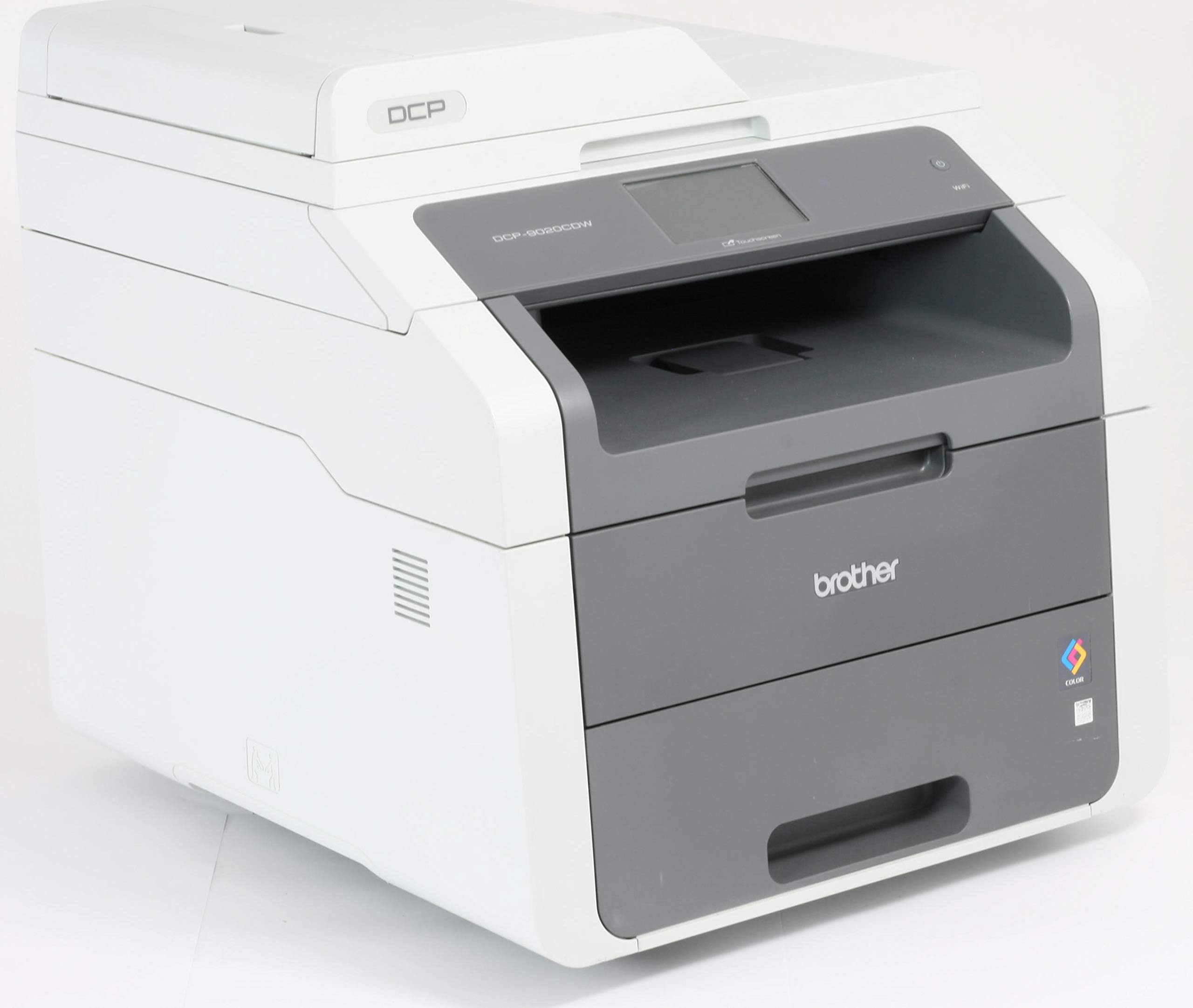
The Brother DCP-9015CDW is a versatile A4 color laser printer offering wireless connectivity (802.11b/g/n), high-resolution 2400 dpi printing, and automatic duplex printing. It combines print, copy, and scan functions in a single device, supports up to 250 sheets input, and delivers up to 16 pages per minute in black and white, making it ideal for professional environments seeking reliable, high-quality output.


| ASIN | B01587PBO4 |
| Additional Printer Functions | All In One |
| B&W Pages per Minute | 18 ppm |
| Brand | Brother |
| Brand Name | Brother |
| Color Pages per Minute | 18 ppm |
| Colour | White |
| Compatible Cartridge | TN-428, TN-450 |
| Compatible Devices | PC |
| Connectivity technology | Wi-Fi |
| Control Method | App |
| Controller Type | Android |
| Customer Reviews | 4.3 out of 5 stars 227 Reviews |
| Dual-sided printing | Yes |
| Duplex | Automatic |
| Hardware Interface | USB |
| Ink Colour | Assorted |
| Item Type Name | Brother DCP-9015CDW A4 Multifunction Colour Laser Printer |
| Item Weight | 23.13 kg |
| Manufacturer | BROTHER |
| Maximum Copies Per Run | 16 |
| Maximum Copy Resolution Black and White | 2400 dpi |
| Maximum Copy Resolution Color | 2,400 x 600 dpi |
| Maximum Copy Speed Black and White | 16 ppm |
| Maximum Print Resolution Black and White | 2400 dpi |
| Maximum Sheet Capacity | 250 |
| Maximum Supported Paper Size | A4;Legal |
| Maximum print Resolution Color | 2400 Pixels Per Inch |
| Model Name | DCP-9015CDW |
| Model Number | 99999 |
| Model Series | DCP |
| Model name | DCP-9015CDW |
| Network Connectivity Technology | Wi-Fi |
| Number of Trays | 2 |
| Other Special Features of the Product | Network-Ready |
| Paper Size | A4 |
| Print media | Paper (plain) |
| Printer Output Type | Colour |
| Printer Resolution Horizontal Max in Color | 2400 Centimeters |
| Printer Resolution Horizontal in Black and White | 2400 Centimeters |
| Printer Type | Laser |
| Printing technology | Laser |
| Product Warranty | 1 year |
| Resolution | 2400 x 600 |
| Scanner Type | Flatbed |
| Special feature | Network-Ready |
| Specific Uses For Product | Office |
| Total USB Ports | 1 |
| Unit Count | 1.0 count |
| Warranty Type | limited warranty |
S**F
Good for the money
This was bought to replace an inkjet all-in-one, which was no longer cost-effective to run (due to ink drying up between regular but infrequent use). First impression of the product was good - though it can be difficult to appreciate the sheer size (and weight) difference when moving from an inkjet printer! Installation was easy, though I found a slight disparity between what the quick setup guide said, and what actually worked (relating to the shipping tabs holding the toner cartridges in place). The one thing that was awkward about installation is the lack of covering over the individual drum units. In order to remove all the transport packaging, you have to remove all toner / drum units, but the drums are exposed, and are positioned where you would naturally set them down. In the end I removed the packaging a bit at a time which solved the issue. On first startup the printer does spend a fair amount of time clunking and whirring while it prepares for initial setup, but once it's running, it was quick and straightforward to do (set date and time). I did notice a fairly obvious ozone-y smell (which you can get with a laser printer) but presume this was just down to being a new unit. Computer installation was painless, as was setting up the wireless access. All worked as expected without any problems. A couple of minor points: there are 'props' that keep the lids open, but these were very stiff, and it almost felt that you were breaking them when closing them (it wasn't). The lid covering the scanner seems a bit flimsy, but this is just a personal impression. One final comment: after conducting research online, it seems that Brother prevent you using the printer if the toner gets below what the manufacturer deems 'empty'. Therefore, the cartridge may still have toner, but the printer won't allow you to print until it's replaced. However, like most Brother printers there is a hidden 'reset' menu on this model, which allows you to keep using the toner after this point. I found a video online which shows you how to access this; while the video shows a different printer in the same series, I can confirm that it also works with this version. All in all though, it's a good buy, and gives good prints for a reasonable initial cost. While it's not a true 'laser' printer (it uses a cheaper, LED technology) I couldn't see any quality issues with prints which show this.
A**R
Fantastic Deal
A huge printer, but it is for a small home office, so cannot really complain about the size; just be aware that this is not a small bit of kit. The price is however amazing for such a quality, robust product. The set up was not the easiest of tasks and the instructions supplied were far too simplistic for the setup job in hand. The software installation had a problem installing it in my Windows 10 PC and there were a few software fails in this fairly automated process. Despite this, it still printed without any issues once the software had finally installed and it also scans and copies. So I am not too sure what the worrying error messages were about. It works fine. So far the quality and performance of the printing, copying and scanning is superb. The only problem is that the machine switches it self off after a period of inactivity, rather than sleeping, so you have to keep switching it on when you want to print. This is not ideal. Overall, it is fantastic value and will highly recommend it to anyone who wants a colour laser printer at a low price.
R**N
Excellent home business printer - crucially: toner can be re-filled!
Works brilliantly, decided at last to never mess about with ink jets again. Nothing to add beyond other reviews which tell you what it does. We print from a pc by cable, wireless from iphones and ipads, and also wirelessly from windows laptops - no problems. Do your research before buying consumables, rather than cheaply re-filled recycled cartridges, or low quality foreign copies that don't last as long so are false economies - get on the internet for very good consumer advice: The 'starter' toner cartridges provided can have 'reset wheels' added which is a simple job as long as you have nimble fingers and can use a screwdriver. This then means they can be put back in and will carry-on for another few hundred pages, honestly! Brother equipment is good in this regard as they don't use small electronic chips on their cartridges. There is a bit of a consumer rip-off going on by many of the major printer manufacturer's whom, as we all suspect - are making a killing on consumables. After adding reset wheels, the time will come when you do need to add more toner, it is possible to do so by obtaining pots of toner that can be poured-into the cartridges (melt a hole, pour-in, plug hole with rubber bung, reset the wheel again, bob's your uncle, saved yourself a couple of hundred pounds) Note: This is top quality toner going into original cartridges, rather than dubious stuff from the far east. As far as I can see, unless you damage the toner cartridges in this process you won't need to buy any replacements for a very long time unless you're a very heavy printer user, and most people don't purchase a printer like this and expect to print half a million pages a month! There's a web-site you can find with all you need to do this plus instructions, I'm not connected in any way just a customer, search for 'diy brother laser you refill toner' or something like that.
E**G
Numerous faults with this printer
---Best to research it well before buying it. Printing is of good quality, but comes with many disadvantages, including: - It is difficult to install - It requires a complex process of re-installing every time you disconnect the internet. - It scans very slowly after the second page. - Sometimes it allows my laptop to connect to it and sometimes it does not. - It does not print as fast as it states. - It take over half a minute to warm up for each first page even if you have printed only 10 seconds earlier. - I have been on the phone with the support team for quite some time to get this printer starter, and they themselves referred to it as OUTDATED version. - The support team confirmed that the CD that comes with it is OUTDATED too and that we have to install the online version. - The online software does not put all feature into work. To my surprise (considering the feedback), overall this printer does no more and no better than a printer I bought for £35.
C**R
Average, but strangeably likeable.
I've been using this for a few months now, so have a fair idea of how it is performing, and is likely to perform in the future. With that in mind, here is my review. The first thing to mention about this printer is that it is MAHUSIVE! I had read reviews stating that it is big, and it really is, so be prepared to ensure you have plenty of desk space (and that the desk is sturdy, as it's also a heavy beast!). Secondly, I spent WEEKS trying to remedy an annoying problem whereby my PC and iMac would periodically be unable to print to it wirelessly. One minute it would work, the next minute it wouldn't (usually when I was ina rush to get a job prointed, too!), I searched the net for numerous solutions to this (apparently) common problem, none of which seemed to offer any permanent solution... I would get a couple of hours/days of joy, then get the same problem all over again! Fortunately, it appears that Brother have recently released some new drivers (and Windows and Apple have both released OS updates), and as a result of one or both of these things, I've not had the problem recur since... FINGERS CROSSED this is now sorted! With regards to print quality, this is fairly good. The colour-matching seems a bit "off", but generally it is acceptable for a laser printer (a decent inkjet will likely perform much better, but then you get all of the problems associated with inkjets such as blocked nozzles, expensve replacement ink cartridges, etc). When I print from Photoshop, I get Photoshop to take care of the colour-matching, and this produces a much more colour-accurate print, which is more pleasing. Sometimes, I get some waxy-looking lines running along the length of the page... I am presuming this is caused by some sort of rollers/guides running along the paper inside the printer, and though noticeable when viewed up-close, it's not too noticeable from a distance (or if artificial lights are shining directly on the page). The supplied "sample" toners didn't last very long before the printer told me they needed changing, but if you do a search on Google you will find a solution which allows you to reset the toner counter to use it for longer. Obviously I haven't tried this, as I am unsure if it might invalidate the warranty on the printer, but by all accounts it works rather well and extends the life of each toner considerably ;-) It seems that when The printer seems to feed card just fine from the regular paper tray. Sheets of labels wouldn't feed from the regular tray, so I have used the separate sheet feeder for this, which seems to work OK (once you get used to how far-in you need to insert the sheet to get it to start feeding). I've only used the copy feature once, and it produced acceptable results. Overall, if I'm honest, this printer is pretty "average" in terms of results, but for some reason I really quite like it. If you can get it at a good price, and supply it with cheaper "compatible" toners, I think it represents good value and a worthwhile purchase.
W**O
Great value, great spec for the price, highly recommended!
Like: I really like this printer so far. Really good value. I picked this because it had a low price, cartridge costs were low, had WIFI, a scanner, and dual sided printing. Since installing it I would add that the setup is very easy, no special software or complicated instructions, the screen is colour and easy to read, it looks professional like it should be in an office, the paper tray is large, printing is fast and you can print from your iPhone. Dislikes: Nothing. It’s big but no bigger than the Dell one I had before. It has no Ethernet port but not a big issue.
S**.
So far, top marks!
Only just got this today so I can't vouch for all the functions, durability, etc: but I can say that it was amazingly easy to set up after downloading the drivers etc. from Brother site as recommended by others (on USB connection - don't know how it would be on wifi), and that so far the print quality looks good, the print speed is much better than my previous (fast for its type!) inkjet, and duplexing seems completely effortless. It's big, of course, but it sits happily in my home office on top of a free-standing drawer unit, and as promised is very quiet except when actually warming up and printing, which I must admit is on the noisy side. The touchscreen is very responsive and everything seems easy to operate. And I've found a setting which I think should prevent it from turning itself off completely when not in use, which is how I like it. So it's full marks so far, including the delivery - it actually arrived a day earlier than stated on the notification, less than 48 hours after ordering, and that was using the standard free delivery option.
P**M
At this price, it's a 'No Brainer'.
Only had this just over a day but it is great. It is well packaged for transit and easy to setup (wireless in my case) with very good print quality. The scanner is simple to operate either from the machine itself or via the included software. I bought it because I have had Brother printers in the past and always had very good service from them. I know that colour toners, etc., are expensive but at least they don't dry up if you are not constantly using them - like problems I have had with inkjet consumables! Also, there are suppliers about that do a good job with 'compatibles' (as they also do with inkjet cartridges). I have my supplier that I have used for years and have had nothing but perfect service from them! The DCP-9015CDW looks the part and is relatively quiet in operation. When not in use (but still switched ON) it makes absolutely no noise at all. As I have said, I have only had it a day so I have to check out all the different variations for print quality, etc., but 'straight out of the box' it ticks all my boxes. For the price, it is simply 'too good to miss'.
J**.
Notre meilleur achat en tant que PME
C'est la 3ème imprimante laser couleur que nous achetons, et je pense que nous ne changerons plus jamais de marque ! En termes de volumes, nous imprimons environ 50 pages par jour. Voici les points forts qui font que nous ADORONS cette imprimante : 1- elle est laser et couleur (ça, c'est la base !) :) 2- elle imprime recto-verso (c'est la seule actuellement dans sa catégorie de prix à faire, et rien que ça c'est génial à l'usage pour les documents de plus de 20 pages) 3- le magasin de feuilles est de grande capacité (là encore, la plupart des concurrentes ont un magasin de feuilles ridicule, il faut recharger plusieurs fois par semaine) Après, elle a les mêmes qualités que toutes les imprimantes de sa catégorie : fiable, rapide, qualité d'impression (pas ouf mais ça va). Si la taille est un sujet, prenez vos mesures, elle est un schouilla grande. Ca qui manque (mais dans notre contexte on s'en fiche totalement) : 1- pas de port Ethernet, connexion obligatoirement en WiFi 2- pas de port USB pour faire des scans directs (mais tout le monde utilise son téléphone maintenant) et de toute manière c'est maladroit Nous sommes littéralement amoureux de cette imprimante. :)
B**D
bon article
efficace, reactif silencieux bonne impression de la couleur installation pas tout à fait intuitive et assez mal expliquée satisfait quand même
C**N
Economique . facile d'utilisation
Installation facile , impression correctes , très pratique . Via le wfi , aucun probleme de communication meme si beaucoup à imprimer .
Trustpilot
2 days ago
4 days ago