We remain fully operational. Our teams are working around the clock to ensure your deliveries continue safely.

DOWNLOAD THE APP


Customer Services
Copyright © 2025 Desertcart Holdings Limited
DOWNLOAD THE APP
Buy anything from 5,000+ international stores. One checkout price. No surprise fees. Join 2M+ shoppers on Desertcart.
Desertcart purchases this item on your behalf and handles shipping, customs, and support to South Africa.
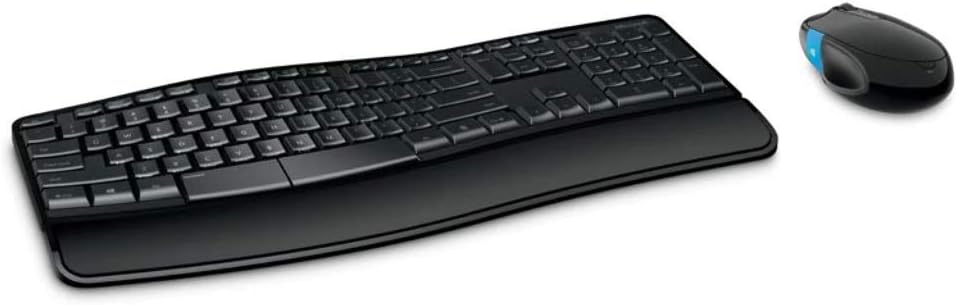
🖱️ Elevate Your Workspace with Comfort and Precision!
The Microsoft H3S-00001 Sculpt Comfort Mouse combines advanced BlueTrack technology for versatile surface compatibility with ergonomic design, Bluetooth connectivity, and customizable buttons, making it the perfect tool for professionals seeking efficiency and comfort in their daily tasks.


| ASIN | B00EO4NN6G |
| Antenna Location | Office |
| Are Batteries Required | Yes |
| Best Sellers Rank | 162,450 in Computers & Accessories ( See Top 100 in Computers & Accessories ) 1,041 in Computer Keyboard & Mouse Combos 3,018 in Mice |
| Box Contents | 4 x AA alkaline batteries, •1 x Sculpt comfort desktop (keyboard and mouse) |
| Brand Name | Microsoft |
| Colour | Monotone |
| Compatible Devices | Personal Computer |
| Customer Reviews | 4.2 4.2 out of 5 stars (1,485) |
| EU Spare Part Availability Duration | 5 Years |
| Keyboard Description | QWERTY |
| Keyboard Layout | QWERTY |
| Manufacturer | Microsoft |
| Movement Detection | infra red |
| Network Connectivity Technology | Radio Frequency |
| Number of Batteries | 3 AAA batteries required. (included) |
| Number of Keys | 107 |
| Operating System | Windows |
| Power Source | Battery Powered |
| Product Warranty | 3 years |
| UPC | 723856592337 885370595949 013088195414 758399155374 |
| Unit Count | 1.0 count |
S**V
A Perfect Bluetooth Mouse
I've had this mouse for over 4 years now and it still ranks as one of my most favourite and best purchases ever. When reading this review please bear in mind that the product specs may have changed in the intervening years. Feel: The mouse glides nicely over most surfaces with just the right amount of friction and very little noise. Weight: The weighting it great. The mouse feels solid but isn't too heavy Comfort: The size and shape of the mouse is perfect for my average size man hands. I'd tried a couple of other portable mice and found them to be too small and gave me cramp after a couple of hours use. This mouse by contrast has been nothing but comfortable since day 1. Durability: I have pampered my mouse. I bought a case for it not long after purchase to protect it when travelling. It should be noted that the mouse picks up very little dirt from either the desk or my hand. Most mice seem to develop a build up of grime around the glide pads. For some reason this mouse doesn't. After 4 years of near daily use it still looks brand new and I have unusually hot and sweaty hands. Connectivity: It's been brilliant on Windows 7, 8, 8.1 and now 10. I've also used it on various Linux distros without any problems. Mouse Functions: The accuracy, left/right buttons and scroll wheel all feel great. The scrolling action is solid and quiet with a definite notch but light enough for fast scrolling. The customisable windows button is great and the vibration feedback is a nice addition. Overall, if I had to buy another mouse it would be this one without a moments hesitation. For those interested, this is the case I use for the mouse. Its a perfect fit: https://www.amazon.co.uk/gp/product/B001LGZDXQ
L**Z
Comfortable and Elegant
Great set. Very comfortable and ergonomic. I work 8-12 hours ad day on it. Batteries last ages. Mouse controls are smooth and responsive. I do not feel any pain even after long sessions without a break. It has a button on a side to open start menu that works great with Windows 10. Keyboard is designed to be ergonomic but not in the way most of them are. If you use standard keyboard this one will suits you perfectly and there is no need to adjust your hands same as with keyboards that have keys "break" in the middle of keyboard. I personally cannot work on those and find this Microsoft one very good. There is an indicator of batteries low (that i did not see ON as of yet) as well a a manual switch to choose the action of function keys (to work as multimedia controls or standard function keys. the keys layout is the UK one and keys are very smooth and quiet in operation. It comes with a padded arm wrest that can be detached. Its of a very good quality and has a nice feel when you put your palms on it. it works well when typing too. If you work a lot with computers get one and you will not regret. Price tag is quite good as well. Last but not least it looks stylish and premium.
M**L
Brilliant mouse, accurate tracking and useful configurable button on the side.
I have this mouse connected, via bluetooth, to a Surface Pro 3. The connection is stable and has never dropped out over the last month and the included batteries are still going strong. No complaints there. It feels nice in my hand although I'm not too keen on the glossy black top, which looks a bit cheap to me compared to the Arc mouse and also attracts palm/finger prints. The rubber sides provide good grip and the BlueTrack sensor works consistently well on every surface I've tried - leather sofa, pad of paper, a black table etc. The click wheel feels like any other click wheel - i.e. a little bit loose between clicks, and stiff to push left and right (not that I ever do that). I like the left windows button and it's very configurable via the Mouse and Keyboard Centre software - you can assign it macros or shortcuts etc. I've yet to find a good use of it yet but it's great that the button is there. You can use your thumb to swipe up or down on the button for different behaviours, or click it. The only downside is that your thumb occasionally brushes against it, executing whatever action was assigned...I had swipe down to "show desktop", which happened when I wanted it to...but also several times by accident when I just put my hand over the mouse.
J**A
Works GREAT with Mac! (Yosemite)
Had my eyes on this mouse for months since I first came across it in an electronic chain. I loved the quiet, subdued click (I'd describe the sound as "velvety" ... if this makes any sense to you), the comfortable shape, the hefty weight and the nice, glossy finish. As I own a Mac and the matching Apple mice, I passed on it at the time, however, thinking that a mouse designed for the competing operating system could never provide more functionality to me. Now my Apple mouse's trackball recently jumped the shark and I was on the peripheral market once again. I ordered the Microsoft Sculpt Comfort Mouse and I love it. Apart from the blue Windows button on the left side, that doesn't do anything, all the other clicks have remained exactly the same (eg clicking the tracking wheel still brings me into Mission Control etc). The mouse is so much more user-friendly and comfortable than my Apple Mighty Mouse (USB only and "blessed" with the constantly dying trackball) or my Apple Magic Mouse (Bluetooth, but too flat to feel good). Under OS X Yosemite you can still customize left click, right click, scroll direction, etc in the Mouse menu in the settings. I have read somewhere that you could also download a third party app that allows you to give a function to the blue Windows button. For the last couple years I had been using my USB Apple Mighty Mouse (because the Bluetooth Magic Mouse is so flat and uncomfortable on my wrists) and hence was worried if having a Bluetooth mouse would drain my Macbook's battery. Absolutely not! I do not notice ANY decrease in battery life while using the mouse. I definitely recommend it and will probably purchase a second one, in case this one gets discontinued.
C**.
I recently replaced my first Sculpt Comfort Mouse which I originally bought in 2014. The size is perfect, and the design, which replaces side buttons with an ergonomic side touch sensor that you swipe up or down, is genius.
A**.
Ho avuto per anni una tastiera ergonomica a filo di Microsoft era veramente comoda. Ho comprato questo set pensando di trovare ulteriori miglioramenti . I tasti hanno una buona corsa e sono morbidi , la curva è comoda ma non eccessivamente, i supporti anteriori non sono male ma alla lunga si torna alla tastiera "piatta" Purtroppo devo segnalare alcuni difetti : i tasti funzione sono piccoli e poco leggibili ( azzurrini), i tasti speciali à ù + è à - ' ì , non sono settati da Windows automaticamente e perciò si trovano in posti diversi da dove sono segnati sulla tastiera italiana, ma non dovrebbe essere plug and play? La trovo troppo raggruppata nei comandi . Il mouse è comodo ma in linea con gli altri per ergonomia il tasto laterale non ha un gran beneficio, usa due pile, mentre ho un logitech più ergonomico e pratico con una batteria unica.
E**L
Souris Bluetooth siglé Windows. Beau confort d'utilisation. Pour le Bluetooth, quelques petits soucis de connexion,mon PC n'est plus tout jeune! Problème résolu avec un nouveau pilote/application de Microsoft,a savoir 'Clavier et Souris' pour Windows.
م**د
ممتاز ولكن الماوس يستهلك بطاريات كثيرة
S**Z
Dispositivo con diseño enfocado a la productividad y la portabilidad. No es adecuado para gaming ni para gente con manos muy grandes o capacidades nulas de aprendizaje. Muy recomendable instalar el software, este se integra dentro de la configuración de Windows 11 y permite configurar botones y gestos (incluso asignándole combinaciones de teclas). Uno de los mejores ratones que he usado en mi vida, y os puedo asegurar, que han sido unos cuantos.
Trustpilot
1 week ago
1 month ago