


Desertcart purchases this item on your behalf and handles shipping, customs, and support to South Africa.
🌍 Stay connected, secure, and in control—wherever your hustle takes you!
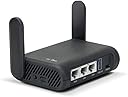
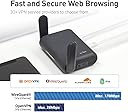
The GL.iNet GL-A1300 Slate Plus is a portable dual-band Wi-Fi 5 router delivering up to 1300 Mbps combined speed. Powered by a 717MHz IPQ4018 CPU and running OpenWrt 21.02, it offers advanced VPN support (OpenVPN & WireGuard), network-wide ad blocking, encrypted DNS, and customizable VPN routing policies. Its compact form factor and guest Wi-Fi separation make it ideal for professionals seeking secure, flexible connectivity on the move.


| ASIN | B0B4ZSR2PX |
| Antenna Location | Home |
| Antenna Type | Fixed |
| Best Sellers Rank | #1,077 in Computers & Accessories ( See Top 100 in Computers & Accessories ) #56 in Computer Routers |
| Brand | GL.iNet |
| Built-In Media | Ethernet Cable, GL-A1300 (Slate Plus) router with 2-year warranty, Power Adapter (US Plug), User Manual |
| Compatible Devices | Phone |
| Connectivity Protocol | Wi-Fi, Ethernet |
| Connectivity Technology | Ethernet |
| Control Method | App |
| Controller Type | Switch |
| Coverage | Standard indoor coverage |
| Customer Reviews | 4.2 out of 5 stars 1,564 Reviews |
| Data Transfer Rate | 1300 megabits_per_second |
| Frequency | 5 GHz |
| Frequency Band Class | Dual-Band |
| Item Dimensions L x W x H | 4.65"L x 3.31"W x 1.3"H |
| Item Weight | 429 g |
| LAN Port Bandwidth | 1000 Mbps |
| Manufacturer | GL Technologies |
| Maximum Upstream Data Transfer Rate | 867 megabits_per_second |
| Mfr Part Number | GL-A1300 |
| Model Name | GL-A1300 |
| Model Number | GL-A1300 |
| Number of Antennas | 2 |
| Number of Items | 1 |
| Number of Ports | 3 |
| Operating System | Linux |
| Other Special Features of the Product | Access Point Mode |
| RAM Memory Installed | 256 MB |
| Router Network Type | hybrid |
| Security Protocol | WPA2 or WPA3 |
| Special Feature | Access Point Mode |
| Unit Count | 1 Count |
| Voltage | 5 volts |
| Warranty Description | 2 year warranty |
| Wi-Fi Generation | Wi-Fi 5 |
| Wireless Communication Standard | 802.11a, 802.11ac, 802.11b, 802.11g, 802.11n |
| Wireless Compability | 802.11a, 802.11ac, 802.11b, 802.11g, 802.11n |
J**E
Pocket-Sized Powerhouse for Secure Connections
What a fantastic piece of technology this item is! This pocket VPN travel router immediately impressed me with its extreme versatility and impressive performance. Despite its compact size that snugly fits in the pockets, it boasts robust features that are typically associated with larger routers. The speed and range were impressive for a device of this size. I was able to connect multiple devices seamlessly, and the signal strength held up admirably even when away from the router. The interface is user-friendly, making setup and adjustments a breeze even while on the go. What struck me most was the top-notch security features of the VPN, ensuring safe and secure browsing which is crucial in this digital age. For frequent travelers like me, this product is a lifesaver. It's compact, lightweight, and efficient, ensuring I'm always connected and secure, no matter where I am. It has quickly become a must-carry item in my travel kit. This pocket VPN travel router truly punches above its weight. Five stars for a well-deserving product.
P**R
Better is the enemy of good enough
7/8/26: bought a second one for my sister, also on tds fiber, it works fine. She was initially given a tds router but it was not fully configured by the installer so rather than deal with them I replaced it with this. Updated to 5 stars for reliability and configurability. It’s not the fastest but it’s still plenty good enough. I still wish it had activity lights but the fiber media converter (ONT) does so that’s something. We have small offgrid cabins where power use is important and these sip power and can cover a 550sqft cabin with no problem. 6/15/26: moved the wan to a tds fiber connection that was recently made available in our very remote area. Works fine, zero hiccups. 2/20/26: It’s been chugging along for a couple of years now and has not given me any trouble at all. I have it plugged into an ATT Nighthawk hotspot from about 2017 that is troublesome but that’s because ATT likes to redirect us to cell towers that have terrible signal strength in an attempt to prevent us from actually using the data cap. They deny it of course but I’ve watched them doing it with other equipment. I also have a starlink mini and to switch I just move the routers wan cable from the hotspot to the starlink, works fine and doesn’t mess with the router setup. I have the starlink set to pass thru and I do not use its router at all. It’s just a modem. I finally looked into vlans with this router but couldn’t figure it out. The LuCi admin interface supports it but it’s complicated. I’m not using the Guest network tho so using LuCi I changed the firewall rule for the Guest network to send and receive from the lan but not the wan - that lets me connect some bad behaving stuff like amazon fire tablets without them using tons of my data plan doing things I can’t control. Now a cheap amazon tablet can display web pages served by my own rpi’s and thus function as annunciations for my solar panel system status without downloading 5Gb of movie trailers they think I might be interested in. Actually I HAVE had one problem - I have a pihole DNS and I point the router at it along with all the clients (manually in their wifi setups). Some of my apple clients can ping hostname.local but sometimes they can’t. Nothing on the Guest network can but all of my rpi’s can do it. It’s a pita to hardcode IP addresses in web pages not to mention poor form. 11/3/24: NOTE: to perform a factory reset press the reset button for 10 seconds. A led will flash slow for a couple of seconds, then faster and then blink rapidly. Release the reset button while it’s rapid blinking. If you keep holding it the device will not do a factory reset, it ignores you pressing the reset button. This worked for my slate+ and both 150M’s. original Dropping 2 stars: there are no activity/status lights on the ethernet connectors it’s a small thing but a big part of how I keep track of what is going on in my network. Also there are no traffic rate statistics for any of the clients other than a one-shot 10-second average - I want to know the cumulative numbers for each client. Both of these missing features are valuable tools for spotting unusual activity and in some circumstances they may be the only ones. The router is fast and has been reliable but these missing tools are very disappointing. On initial setup only the 5G wifi interface is active and this cannot be used with an iPad or iPhone for config - they never see the connection as active. The internet is not accessible on them until after the admin password is set. I had to break out an old win-7 laptop to configure it. (by 2026 I think this issue is corrected but I don’t know if it was in the router fw or in iPadOS). I hooked the wan interface to a GB switch on my existing network and using the iPad on 5G transferred large audiobook files from a WD NAS drive at about 13MB/s to a Samsung Bar thumb drive (~400mb/s) local to the iPad. During those transfers the power utilization bounced between .6a and 1.03a (at 5v) so reasonably miserly given the data rate.
W**I
This is the best travel router out of all the GLiNet offerings
I have tried the Beryl AX as well as this unit and for my purposes, as a travel VPN/router, I prefer this slate plus A1300 router. Here are the reasons: 1) Low powered. The A1300 uses less power than the beryl AX. I can easily power the A1300 with a battery pack and carry it around a cruise ship, for example, or airplane. It also barely gets warm. I can also power it with any 5V 3A compliant supply, PD or battery pack. 2) Has all the login protocols including EAP, which the beryl doesnt have. 3) Runs wireguard VPN and openVPN out of the box 4) Very fast setup. For some reason, I struggled for many days getting the beryl set up and the A1300 took me an hour. I ended up returning the Beryl AX 5) Plenty fast enough. For home use, permanent install, you may want the faster speed of the Beryl. For a travel router, this unit will not be the limiting speed, even with VPN. For example, I tested this at a starbucks and the starbucks connection was the limit. Sometimes faster theoretical speed is not practical speed and has additional overhead. Finally, it really is important to have this work out of the box since support is not that great. The user interface was much better than the Beryl AX. Edit: After using this for a while and taking it on a cruise, I upped it to 5 stars. It worked flawlessly on a cruise and saved me $480 in internet fees for 2 additional people. Secondly, I had trouble connecting via VPN to my home firewall and the support forum provided the answer right away on how to change my script to get it to work. Recommended.
R**O
4 stars except
I got this to upgrade my travel router. I'm a certified and advanced degree computer geek. It took me two hours to get this router to connect to the internet via a Wan connection through a switch. The problem is with the app and the instructions. First, it takes a long time for the router to fully boot and acquire an IP address. The app seems to prevent internet access until you complete the setup. But you can't complete the setup via the app until you have internet access. What I did was restart my tablet several times to force the app to the password setup. Once you are able to setup the admin password and the passwords for 2.4 and 5G ssids then after a reboot of the router and app, it suddenly gained internet access. The Wireguard installation via the app was relatively easy. I connected my TV and tried to access YouTube via the TV browser and an IP check from my VPN. Ugh...too slow. The IP check never came back. Via my tablet everything was fine. My VPN provider gave me a thumbs up and showed a new IP. YouTube on tablet works fine through the Wireguard. MAX on the TV through the router with Wireguard connected. Hulu, Netflix and Paramount did not. Paramount wanted me to login. Hula just a blank screen. Netflix kept trying but never got to the main screen. From the tablet, I only have MAX installed and it was fine with a US termination via my VPN. Bottomline. I only paid 74.98 and it has Wireguard. So for travel it is much better than my current travel router. It can do Open VPN as well, I went with Wireguard as the app had the setup files for my VPN. App and instructions both need major improvements Update: I had two major issues setting the router up. I strongly recommend that you use the admin access first via the router IP. If you use the app, you get stuck in reverse action loop. To do anything, you have to change the admin password, but the app doesn't want to move forward to point where you can change the admin password. Frustrating. Then when a client like a phone or tablet tries to connect they can't access the internet. This is because each client has to be granted access via a menu you get when you click on the connected client in the client list. Clients are automatically denied access until granted access via the app or the built-in admin access router website. The router gateway IP might change if you use the Wan port. Oh, and you have configure the Wan port to be a Wan port in app. Configuring WireGuard VPN is fairly easy for most VPN providers. But for some weird reason mine drops the VPN, if I choose a server in the same country that I am located. If I choose a different country then all is good. OpenVPN works well, but I have to load separate configuration files for each server and authenticate each time I switch to a new server.
T**R
Complete unsupported crap
This thing has had problems after just a month of use. I contacted support and they provided a beta firmware from 2024 that is defective. So it's supposed to connect to 5G Wi-Fi and repeat it and created its own Wi-Fi 5G, but that doesn't work. If you set the repeater mode to automatic defaults to 2.4 gigahertz and if you force it to 5G then the 5G Wi-Fi that it creates fails to broadcast and you can't connect to it. It is completely flaky as a device. It seems to work one minute doesn't work the next constantly reconnects. It's just not as stable device. And it seems like they're not interested in supporting it anymore because they want you to buy the more expensive 1800 model. Which means that the company is not very great. Why you sell a device that you have no intent on supporting? When I first got the device the speed was relatively good. The Wi-Fi provided that it's connected to is over 200 megabits of speed, but it would only do about 90 megabits. I thought that was okay but it is slowly and slowly decreased over time. Now I'm lucky to get 10 megabits even though it still has the potential for 250 megabits. How do I know this? When I connect my phone to the Wi-Fi that this device is supposed to connect to I routinely get over 200 megabits. When I connect to this device right now I'm getting seven megabits. This thing is complete junk. There's no value for the money, it worked for a short time basically the return window normally. And then it's complete junk. Only because when I bought it I get the returning because of the holidays can I return it. Otherwise this would have been a scam to rip me off of the $70-$80 at this device cost.
D**O
Great travel router; fast, nice features, great VPN support
I bought this for use on an overseas trip, as well as for RV camping. It's proven itself nicely on a recent overseas trip. Why I like travel routers, in general: (1) Connect all my devices to the router before leaving for a trip, and then when I arrive at a destination, I only have to connect one device (the travel router) to the Internet. This allows me to use multiple devices where some destinations limit the number of connected devices. It also allows family members to not have to connect their own individual devices to the wifi. (2) Use a VPN when connecting to WiFi hotspots of unknown quality. I don't know how safe a hotel's WiFi is, or a campground's WiFi. Some may be great, but some may be run by people who aren't very good at securing the network. By connecting my devices to the travel router, and having it set up to use a VPN, I'm establishing my own security. I can also choose a VPN server in the region of the world that makes the most sense for my use case. (3) Range extension: Whether I'm plugging into a network jack in a hotel, or connecting the router wirelessly to the hotel or campground's network, the router has better antennas than some of my devices, and can be situated in a location that gets better signal. In my RV I can put it near the ceiling or near a window, for example. Then I'm able to rebroadcast my own wifi bubble that my devices connect to with fewer problems. The reason I like *this* travel router are: (1) Size. It's slightly larger than the previous travel router I used, but still compact enough to take anywhere. (2) Capabilities: Adguard, DNS over HTTPS, Wireguard / OpenVPN, and the configurability of OpenWRT. It's a full-featured router. (3) Range: Its antennas seem to work very well to pull in wifi signals in tricky places like campgrounds. (4) Speed: On my recent trip overseas I was able to stream movies over WireGuard VPN (using ProtonVPN) without any difficulty, while other devices still were browsing the internet fine. It's the fastest travel router I've ever owned (it's my 4th travel router). I really was surprised at how well it performed with WireGuard VPN. Its speeds with WireGuard are as fast as the unprotected speeds of my older travel routers. Places where this router is a perfect fit: (1) 3-bedroom or smaller apartments. I've set up good quality travel routers as the primary routers in apartments before, and have found them perfectly satisfactory. This, being the fastest travel router I've used, and having very good range, is ideal in such situations. Why mess with a big ugly router in a small apartment when this will do the job just fine? (2) RV camping in campgrounds that provide Wifi. Often these locations have difficult wifi. So placing the router in a position within the RV that seems to get the best signal, can help in rebroadcasting a usable signal to the rest of your devices. (3) Travel to hotels that limit number of devices. (4) Anywhere a VPN can be useful. Sometimes I'll leave this router running at home so that if I want my device to connect through a VPN I just select this router's wifi SSID. When I don't need the VPN, I select my home's router's SSID. It's often useful to be able to select VPN points of presence in other parts of the world. (5) Sharing a hotspot. I can allow several devices to connect to my phone when it's on hotspot mode. But it's sometimes easier to just connect a travel router to my phone's hotspot and let family members connect to the travel router; stronger signal, for example.
S**R
Great little router for mobile Starlink setup.
This router is running on my 12v powered starlink setup. I'm using 12v to 9v buck converter to step voltage down. This thing powered right up and talked to the starlink dish right out of the box. With a few tweaks in the settings it's working perfectly. I chose this particular router for a few reasons. It has built in VPN compatibility so when we are outside the USA we can use VPN to localize our connection and still access things like video streaming accounts, VOIP/FaceTime calls using our US phone #, not to mention security when doing banking etc. In addition, it has both 2.4ghz and 5ghz capability so I can choose one to the other based on what is working best in wherever we are parked. It also has a guest network feature. We are often posted up in areas with no other Internet access and this allows me to share our internet with others without giving them access to our main network. I can turn the guest network on/off as needed. I have the router installed in a cavity between a couple of cabinets and the signal is strong and carries 50+ feet away from the camper. It is also full strength inside the cab of the truck so we have high speed internet in the cab while driving. This is a GREAT feature for off-road navigation as I can use Google earth or similar for top-down Satalite view of our location in real time. Can't beat that! Overall setup was easy, the admin menu is pretty simple, and the feature set is more than enough for me. The ONLY thing that I wish it had built in was the ability to block websites on the guest network. We end up places where I don't want to allow others to post to their 'effing social media accounts. I prefer some places to be left for others to discover on their own instead of blasted out for the world to see. But hey, that's just me. Overall this is a fantastic little router for our mobile setup.
T**Y
GL.iNet GL-A1300
Works great and easy setup.... Highly recommend!
S**R
Best value for money
This travel router is amazing, I am able to keep all my Wi-Fi devices in my own group and LAN devices while connecting to the local Wi-Fi service. Although I am not travelling, this is exactly what I needed and it works extremely well. Great value for money!
N**A
Eficiente y confiable, muy compato y versátil
Excelente. Muy configurable lo utilizo especialmente para VPN. Eficiente , funciona hasta con la energía de mi móvil por USB C. Hasta ahora perfecto. Debes terner un poco de conocimiento porque este router es para configurarlo, pero es súper compacto, lo llevo de viaje y siempre me conecto por medio de éste para mi VPN con Surfshark o con un servidor VPS que tengo completamente privado. Super recomendado. Este incluso te permite conectar un modem USB (ejemplo, he conectado mi móvil y compartido internet por USB con el router y funciona perfecto). No sé si con todos los móviles, solo he hecho esto cuando no consigo un punto de red. Lo he hecho con Samsung Galaxy s22 Ultra y s25 ultra.
C**N
Ottimo come VPN personale!
L’ho acquistato come VPN personale e funziona molto bene tramite il protocollo WireGuard. La configurazione può necessitare di un po’ di pazienza e ricerca sul web, ma il risultato é garantito.
J**F
Nice travel router - even better with real OpenWRT onboard
Used on several work trips so far. Immediately installed full OpenWRT and was able to do some pretty funky networking with it to allow access to internet, but also connect into customer network. Myself and my fellow worker could connect to both via Wifi, all while not concerned at all about the Wifi security, or about having to VPN back to our company and then out to the site we were at. Very nice.
T**E
This is the 2nd one of these travel routers that I’ve bought so obviously I recommend it.
This is the 2nd one of these travel routers that I’ve bought. That’s the best recommendation I can give. I’m using my first one as a router for Streamlocator where it performs very well. It also performed well on the few occasions when I had the opportunity to use it as an actual travel router.
Trustpilot
2 weeks ago
2 weeks ago