Desertcart purchases this item on your behalf and handles shipping, customs, and support to South Africa.
🚀 Upgrade your workflow with speed and reliability that keeps you ahead!
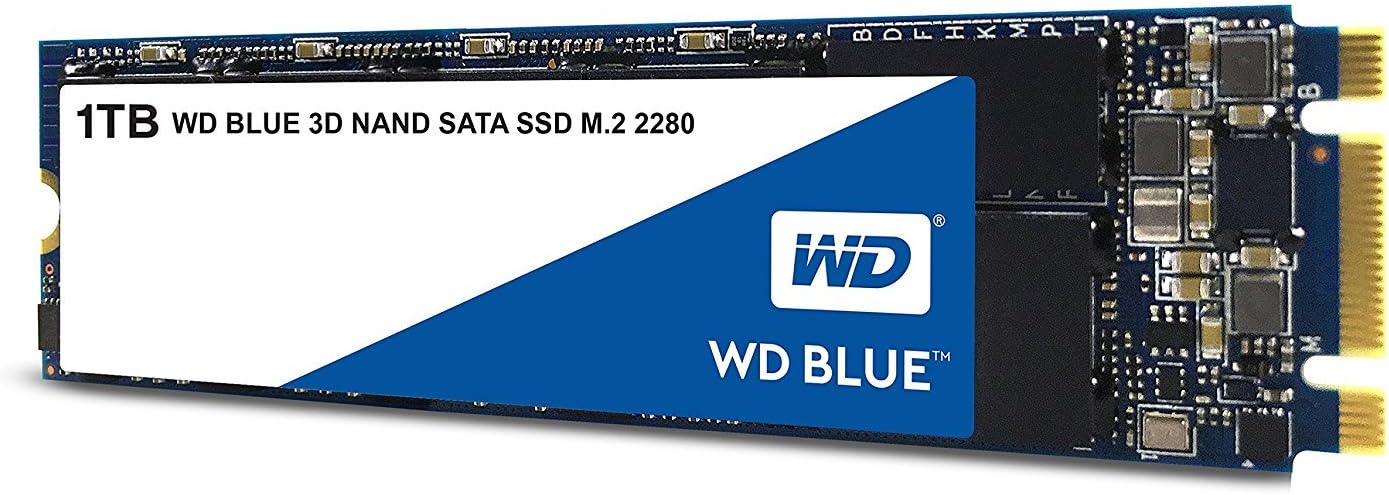
The Western Digital 1TB WD Blue 3D NAND Internal SSD combines cutting-edge 3D NAND technology with SATA III interface to deliver up to 560MB/s read speeds and 530MB/s write speeds. Designed for professionals seeking a reliable and energy-efficient storage upgrade, it offers an industry-leading 1.75 million hours mean time to failure and up to 500TB written endurance. Its compact M.2 2280 form factor fits seamlessly into laptops and desktops, making it the go-to choice for enhanced system responsiveness and long-lasting performance.


| ASIN | B073SB2MXT |
| Additional Features | Portable |
| Best Sellers Rank | #679 in Internal Solid State Drives |
| Brand | Western Digital |
| Built-In Media | cloning software |
| Cache Memory Installed Size | 1 |
| Color | Blue |
| Compatible Devices | Laptop |
| Connectivity Technology | WD Blue Internal SSDs boost a variety of computing applications like gaming, HD media playback, or creative software. |
| Customer Reviews | 4.7 out of 5 stars 7,541 Reviews |
| Data Transfer Rate | 750 megabits_per_second |
| Digital Storage Capacity | 1 TB |
| Enclosure Material | PEX |
| Form Factor | M.2 2280 |
| Global Trade Identification Number | 00718037856322, 10718037856329 |
| Hard Disk Average Latency | 0.1 milliseconds |
| Hard Disk Description | Solid State Drive |
| Hard Disk Form Factor | 2.5 inches |
| Hard Disk Interface | Serial ATA |
| Hard-Drive Size | 1 TB |
| Hardware Connectivity | SATA 6.0 Gb/s |
| Hardware Platform | PC, laptop |
| Installation Type | Internal Hard Drive |
| Item Dimensions L x W x Thickness | 4.96"L x 4.06"W x 0.87"Th |
| Item Weight | 11.07 g |
| Manufacturer | Western Digital |
| Media Speed | 530 megabytes_per_second |
| Mfr Part Number | WDS100T2B0B |
| Model Name | WESTERN DIGITAL TECHNOLOGIES |
| Model Number | WDS100T2B0B |
| Number of Items | 1 |
| Read Speed | 560 megabytes_per_second |
| Special Feature | Portable |
| Specific Uses For Product | Multimedia, Gaming, Personal |
| UPC | 718037856322 |
| Unit Count | 1 Count |
| Warranty Description | Western Digital ("WD") values your business and always attempts to provide you the very best of service. No limited warranty is provided by WD unless your WD Product ("Product") was purchased from an authorized distributor or authorized reseller. Distributors may sell Products to resellers who then sell Products to end users. Please see below for warranty information or obtaining service. No warra… |
A**S
Understand your equipment, a great drive!
If you haven't done much research on this form factor of drive and how they work in a computer, you should read this whole review. If you know what you want already, this is a solid performer for the ssd type m. 2 and vastly out performs sata cable drives with a good price point to boot. Western digital is an old school drive maker, and this is a good example of solid hardware. If installing one of these on a desktop is new to you... If this is a new installation in a motherboard or you're switching to a new hard drive make sure you look at your motherboard specs. There are two kinds of M.2 drives that are common right now. Mid range Motherboards handle them in different ways. This drive is an m.2 ssd sata drive, so when you put it in, it uses a sata lane in order to work. This means that it may disable a sata plug on your motherboard. If your operating system (ie windows or Linux) is installed in the sata port you just shut off by installing this your system will fail to boot and you will have to move the plug on the old drive to get the computer to load or to clone your hard drive to this one. You may have to tell your bios what the new load order is. The other kind of common m. 2 drive is a m. 2 pcie ssd. It uses a pcie lane to work. If you have something plugged into a pcie expansion slot it may turn that slot off. Some folks have network cards or video cards plugged into these slots and it could be an inconvenience. These pcie drives are faster, but honestly I doubt most people will see a big difference and the list item I am posting this review on is perfect for most uses. Look at your motherboard book or do a little research before you install one of these if you are new to them so that you know what the install is going to change in your computer. This is a really great drive, it runs well, and I love how small it is... It lost one star from me in the gaming catagory because it does not come with a heatsink. I don't think it necessarily should have one for this price but I bought a cool led one because for that application it needs to have a heat spreader.
S**F
It works.
The Western Digital 1TB WD Blue 3D NAND SSD is a solid all-around performer in both internal and external use cases. In a Dell 7559 laptop, it not only boosts storage capacity over the stock drive but also noticeably improves system responsiveness and load times thanks to its SATA III interface and up to 560 MB/s read speeds. Later as an external drive in a good enclosure, it continues to perform reliably for backups, file transfers, and portable project storage. Overall, it is a versatile, dependable upgrade that works well in either role.
V**N
Very happy with the unit
I bought the 2950x, Corsair 760T chassis, Asus Zenith Extreme, Corsair HX1000I PSU, Thermaltake Floe Riing 360, Corsair LPX 32GB (2x16GB) 3200MHz C16 DDR4 DRAM Memory Kit, Black (CMK32GX4M2B3200C16), SamSung EVO 970 512G NVMe, WD 1TB Blue NVMe, Toshiba HD 6TB x3 from Amazon. The CPU arrived but the chip was loose inside the box. I could not install Windows 10 but was able to install Ubuntu 18.04 LTS. When I ran Chrome or Firefox under , the CPU kept hanging up. I changed to Corsair Vengeance LPX 32GB (2x16GB) DDR4 DRAM 2133MHz (PC4 17000) C13 Memory Kit - Black, thinking may be memmory compabibil;ity from what I read on Youtube, web. But the problem still occured, can not install windows, kept on hanging when runing Chrome, FireFox under Ubuntu. Changed to G.SKILL Flare X Series 16GB (2 x 8GB) 288-Pin DDR4 SDRAM DDR4 3200 (PC4 25600) AMD X370 Memory Model F4-3200C14D-16GFX. Same problem occrued. I changed the mem clock to from 1600-3200 for 3200 MHZ and 1600-2133 MHZ for 2133 MHZ and 1600-3200 for G.Skill. Same problem. Can not install Windows 10. hung when ran Chrome under Ubuntu. Hung when ran Geekbench when it run under multi core, single core is ok. I ran mem test and it was ok. Thinking the CPU was damage during ship, I ask for replacement and got one. When i installed in the system ansd ran with G.Skill, It was able to boot windows 10, Ubuntu and no problem. I had to upgrade the BIOS to 1402 for the Asus Zenith to boot with 2950x. Now it works very smoothly. It run fast!!!!, Very happy with the unit.
L**6
It's a game changer! Exponentially sped up my XPS 15
If you're not running a SSD, you might as well be using dial up. This is such an easy upgrade, and for around 100 bucks you can exponentially speed up your pc. Games load faster, loading screens are slashed to moments, your computer will boot in seconds, and maybe best of all no more annoying "Clicky" noise from the old hard drive! SSDs are loads faster, but also more reliable and less easily corruptible. Took around 20 minutes to install in my XPS 15. a quick Google search will lead you to free cloning software, and once the new drive is in, you basically just copy your old hard drive onto the new one, change the boot order and you're good to go! (note, I did need to buy a P5 Torx wrench, so make sure you have the right one!) I used EaseUS Todo Backup and made the process easy (and free!) Upgrade your PC, safe yourself time and frustration, and improve your overall computing experience. I went with WD as they have a stellar reputation and I've been buying internal and external memory from them for years.
M**S
Great Entry-Level SSD
If you're looking to significantly speed up your PC, I recommend this SSD. It's so much faster than my 7200RPM Hard Drive, especially when booting up my computer. Games load much faster too. Everything in general feels snappier. I tried booting from my spinning hard drive after installing this SSD just to see the difference, and man, there certainly was one. The price is super reasonable too - 1GB for a little over $100 was unheard of just a couple years ago. HOWEVER, while this is an upgrade from traditional spinning drives, this is on the slower side when compared to other SSDs out there, especially the ones from Samsung. So if you really need/want truly fast read/write speeds, I would recommend staying away from this product. But if you only have a spinning drive, and want to make your computer a bit faster on a budget, go for this one.
C**R
SSD is great, software is junk
The SSD itself is great so far. It arrived today and so far it's working perfectly. However, the Acronis cloning software provided by WD is absolute junk. First of all it's a huge download that failed several times when I tried to get it and my connection was perfectly stable so I know it's not on my end. Secondly the software is not easy to use, it wouldn't let me easily resize my OS partition; I had to fight with it for a few minutes to get the settings the way I wanted them. Thirdly the software is glitchy - it does this thing where it reboots the computer and then works on copying the partitions without running the OS - while it was cloning my old drive it just went to a black screen with only the mouse/spinner showing. If not for my HDD light I wouldn't know anything was happening at all. After over 2 hours of waiting for this thing to finish (as I read online people waited a long time and eventually it finished and rebooted the computer normally) I decided that it wasn't going to work. I was cloning an existing, smaller, SSD and I knew that it shouldn't be taking this long. So I tried to reboot my PC to get out of this black screen and guess what - it boots right back into the black screen again. The only way to break out of it was to remove the new drive, restart, boot normally, shutdown, reinstall the new drive again. Do yourself a huge favor and use Macrium Reflect instead - it's free and works much much better. It's not that obvious how to resize partitions with Marcium (if you need to do that, which I did as I was going from smaller drive to larger one), so go watch a youtube video about it or poke around a while until you find it. Macrium was done cloning in about 20 minutes and no reboot or crazy black screen required. So far the cloned drive is working perfectly, no issues at all after playing a huge game for hours.
S**E
Works, good support
Works as expected ,easy to install Has good support although the free version of Acronis provided on the WD support we site failed to clone my old drive , the image was not bootable I ended up using Ubuntu terminal and the DD command to clone the drive and then after making a a bootable clone I used Aomi partition assistant 9.4 to very easily merge the unallocated space with my boot partition My original boot drive had several backup partitions between the boot partition and the unallocated space I tried both Acronis and Macrium reflect to clone the drive and to move the partitions also mini tool partition wizard and windows disk management They all failed to create a bootable clone image and they all failed to move and resize the boot partition They all turned out to. E completely useless So if you have trouble I suggest just using the Linux terminal in Ubuntu to clone the drive and rhent using the free version Aomi to merge the unallot space to the boot partition , it was super easy and very fast Do not get aggravated trying to use a ronid and Macrium reflect or mini partition wizard to do this they are overly complicated and do not even work So many people recommended these to me bitbkt was just a waste of time
A**R
M.2 WD Blue Sata III 1TB
My laptop is an Acer Predator Helios 300. A great laptop but the M.2 SSD provided with the machine is only 250gb and I need plenty of storage space on my computer. I found the M.2 WB Blue 3D NAND 1TB on Amazon and noticed it's giant 1TB of space, low power requirement and excellent price. There are much faster M.2 PCIE drives for sale but the price is double the amount so I figured as long the WD Blue drive can mach the speed of the current fast M.2 Sata drive installed in my laptop it will be just fine. After a fresh install of windows with this disk installed I ran ASSD disk benchmark and the "WD Blue 3D Nand" beat my old drive with a 20-25% speed increase. I think it's about as fast as Sata can be! I'm really happy, it's fast for a Sata disk and the low power requirement gives my laptop battery an easy time. The 5 year read-write warranty on this disk is also brilliant and the price is superb... Buy one :)
M**O
Ottimo per un HUAWEI Matebook D
Ottimo SSD per sostituire quello da 256 GB per il Huawei Matebook D di un mio amico. La versione da 1 TB è perfetta per chi lavora con foto, video ed ha la necessità di archiviare una quantità di dati notevole. Il montaggio è fin troppo facile. Per il portatile in questione, dopo aver clonato il vecchio SSD con quello nuovo tramite il software ACRONIS TRUE IMAGE, è bastato rimuovere le viti sul pannello inferiore con l’aiuto di una ventosa e una sim ed estrarre semplicemente il vecchio sostituendolo con quello nuovo. Un gioco da ragazzi! Consigliatissimo!
Z**F
Great Product for its price
When I ordered this product I was unsure if it was reliable because it seemed cheaper than the others. However, I received this product the next day (Shipping was on time, for once). I instantly plugged it in and set it up. My boot time has decreased from 3 minutes to 15 seconds. It's an amazing and fantastic product and is very reliable.
K**.
Producto confiable y eficiente
Llevo 3 años usándolo y estoy más que satisfecha con el producto, mejora mucho la velocidad del equipo y a día de hoy no he tenido ningún problema con él. Sobre sus puntos fuertes: Rendimiento Mejorado: La tecnología 3D NAND y la conexión M.2 SATA proporcionan velocidades de lectura y escritura significativamente mejoradas en comparación con los discos duros tradicionales. Esto se traduce en tiempos de carga más rápidos para el sistema operativo y las aplicaciones, así como una mayor capacidad de respuesta general, si siempre has utilizado un HDD normal vas a notar mucho la diferencia cuando cambies a este. Capacidad Espaciosa: Con 1 TB de almacenamiento, este SSD ofrece una capacidad generosa para almacenar una amplia variedad de archivos, desde documentos hasta juegos y archivos multimedia. Fiabilidad y Durabilidad: Los SSDs son inherentemente más resistentes que los discos duros tradicionales debido a la falta de piezas móviles. Además, la marca WD es conocida por su calidad y fiabilidad en el campo de almacenamiento. Facilidad de Instalación: La interfaz M.2 SATA facilita la instalación En comparación con otros SSDs M.2 SATA de marcas competidoras, el WD Blue 3D NAND destaca por su equilibrio entre precio, rendimiento y fiabilidad. Marcas como Samsung con su serie 860 EVO y Crucial con la serie MX500 ofrecen productos similares en términos de rendimiento, pero a menudo a precios ligeramente superiores. Puntos Débiles: Precio en Comparación con HDDs: Los SSDs, en general, tienden a ser más caros por unidad de almacenamiento en comparación con los discos duros tradicionales. Sin embargo, la diferencia de precio se ha reducido con el tiempo y el rendimiento adicional justifica el costo. En resumen, el WD Blue 3D NAND Internal SSD M.2 SATA de 1 TB ofrece un rendimiento confiable y una capacidad espaciosa, haciendo de él una excelente opción para aquellos que buscan mejorar la velocidad y la eficiencia de almacenamiento en su sistema. Espero que te haya resultado útil mi reseña :)
J**E
Todo bien
Hasta ahora todo bien. Funcionando sin problemas. Tenía que incrementar el espacio en el disco de mi laptop y este ha sido una muy buena opción.
O**E
Satisfaction
Super fonctionnel, parfait.
Trustpilot
2 months ago
1 week ago