
๐จ Unleash Your Creativity with Every Print!
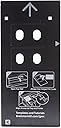
The Inkjet PVC Card Tray is a replacement for the standard CD/DVD tray in Canon PIXMA PRO-10 and PRO-100 printers, allowing users to print high-quality PVC ID cards. It supports dual card printing, ensuring efficiency, and produces waterproof, durable cards when used with compatible inkjet PVC cards.
| ASIN | B072MBP733 |
| Best Sellers Rank | #239,304 in Office Products ( See Top 100 in Office Products ) #90 in Computer Printer Trays |
| Brand | Brainstorm ID |
| Cartridge Type | Compatible |
| Color | Black |
| Compatibility Options | Compatible |
| Compatible Devices | Printer |
| Compatible Printer Models | Canon PIXMA PRO-10, Canon PIXMA PRO-100 |
| Customer Reviews | 4.5 out of 5 stars 46 Reviews |
| Ink Base | Water |
| Ink Color | CMYK |
| Ink Colour | CMYK |
| Item Weight | 5 ounces |
| Manufacturer | Brainstorm ID |
| Mfr Part Number | Brainstorm-ID-Canon-K-Tray |
| Model Name | Canon PIXMA PRO-10 and PRO-100 |
| Model Number | 8541632255 |
| Model Series | PRO |
| Number of Items | 1 |
| Number of Packs | 1 |
| Number of Trays | 1 |
| Other Special Features of the Product | high quality |
| Page Yield | 500 |
| Print media | Card stock |
| Printer Model Compatibility | Canon PIXMA PRO-10, Canon PIXMA PRO-100 |
| Printer Output Type | multiple colors |
| Printer Type | Inkjet |
| Special Feature | high quality |
| UPC | 758576600666 |
| Unit Count | 1 Count |
| Warranty Type | No Warranty |
J**J
Love the tray k!
I love this product just make sure to follow the directions given. Also if the card slips out itโs user error. Make sure the cards are snug in the inset. Wipe the tray after each print as youโll get smudges on your project. It works on the canon pro 100! Highly recommend.
D**C
Works perfectly with Canon Pro-100 Inkjet Printer
When utilizing their photoshop template and printer setting instructions this tray has functioned perfectly with borderless printing. I am impressed as this allows home DIY performance that visually rivals professional services.
M**.
Works great!
I wanted to make PVC luggage tags, and test badge designs before I sent them off to our registration guy for bulk printing. It worked perfectly right out of the box! The alignment was slightly off using the website's template, but I can work around that, I think. All in all, great product; be sure to read the documentation on the site if you're confused!
B**D
Excellent high quality system, easy to use
I'm using this tray with a Canon PIXMA PRO-100. It fits in the printer exactly as it should. It looks nearly identical to the CD-ROM tray the printer came with. If It didn't say "Brainstorm ID" on it, I would have assumed it were an official accessory. Printing is easy. There is a simple web-based layout tool on their website. Once you get the right settings figured out, you can save a preset in your printer settings and not have to fuss with it again. Instructions for printing are right on the tray, on the boxes for the cards, and on their website. It's really hard to miss. I ended up making my own HTML/CSS-based system for generating cards, based on the dimensions and offsets used in Brainstorm ID's PDF. It was very easy to do in just regular CSS, with inch offsets. I can print right from Chrome, directly to the card. (No extra driver or anything needed for this tray. The printer thinks it's the CD-ROM tray.) The tray wipes down easy after printing full-bleed. I've been using alcohol wipes, and the ink comes right off. Once I accidentally left ink on the tray overnight, and I was able to clean it off in the morning without effort. There are ridges along the edge of the card to catch excess print bleed. Support is responsive as well. I e-mailed them with questions on two occasions, and they got back to me right away.
H**H
Works perfectly but beware of messy ink when printing full bleed.
Configuring the printer is very easy if you just follow the direction on the BrainstormID website. I had my first card printed within about 5 minutes of opening the package. If you need to print cards with bleed beware that the overprinted ink will just sort of bead up on the plastic tray and you can end up with ink everywhere if you're not very careful. If printing with bleed you will have to clean the tray after each print otherwise ink will end up on printer's rollers and track all over your print job! Aside from this one little annoyance which just comes with the territory, the tray works perfectly in my Canon Pro-100 printer.
S**W
Product Works as Advertised!! - Pro-100 Printer
Easy to use. Really works.
J**N
Great option to expensive iD printer
This works well
D**I
Not impressed
Took me most of the day to get my printer to even recognize & allow me to choose tray k, which I blame on Canon. But then it finally works just to be disappointed! Every time it prints it is crooked, cuts off the picture & gets wet ink all over the tray. I am using their template on their website which is obviously not correct for a type K tray. The document size populated by their tamplate for tray K doesnโt even match the size of the actual tray. Not sure where to go from here because as of now itโs a waste of $. I canโt believe how much time I wasted for this.
A**T
Works Great just as advertised
Just as advertised, but make sure to buy cards you can print with ink.
A**I
very sharp
tnx
Trustpilot
2 months ago
1 week ago