Desertcart purchases this item on your behalf and handles shipping, customs, and support to South Africa.
⌨️ Elevate your workspace—wireless power and precision in one sleek package!
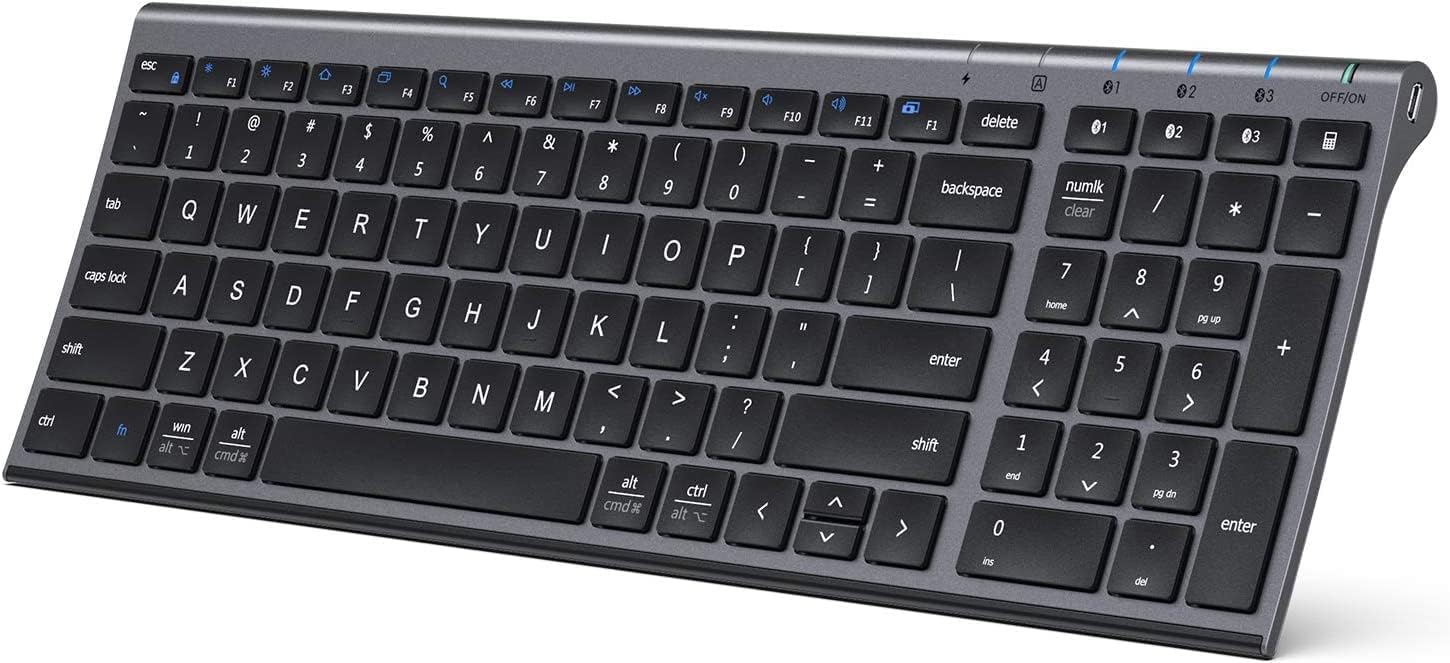
The iClever BK10 is a universal, ultra-slim Bluetooth keyboard featuring a full numeric keypad and ergonomic 10° tilt design. It supports seamless multi-device connectivity via Bluetooth 5.1 across Windows, iOS, and Android platforms. With a rechargeable battery offering up to 45 days of use after a quick 2-hour USB-C charge, it combines durability with quiet, responsive scissor-switch keys to boost productivity in any professional setting.


| Additional Features | USB-C Charge, Multi-devices, Laptop typing experience, Multi-OS |
| Antenna Location | Home office typing, multi-device workflows, laptop and tablet setups, study and writing, everyday productivity |
| Asin | B08LD5LV22 |
| Best Sellers Rank | #605 in Computers (See Top 100 in Computers) #10 in Computer Keyboards |
| Brand | iClever |
| Built In Media | USB Cable |
| Button Quantity | 61 |
| Color | gray black |
| Compatible Devices | Windows laptops and desktops, MacBook and iMac, iPad and iPhone, Android tablets and phones, Chromebooks with Bluetooth |
| Compatible Operating System Family | Android |
| Connectivity Technology | Bluetooth |
| Country Of Origin | China |
| Customer Reviews | 4.1 4.1 out of 5 stars (19,170) 4.1 out of 5 stars |
| Enclosure Material | Aluminum Acrylonitrile Butadiene Styrene |
| Generation | 1st Generation |
| Hand Orientation | Ambidextrous |
| Item Dimensions L X W X H | 36.6L x 12.5W x 1.7H centimeters |
| Item Type Name | Laptop Keyboard |
| Item Weight | 320 Grams |
| Keyboard Backlighting Color Support | Single Color |
| Keyboard Description | Full-size ergonomic wireless keyboard with numeric keypad, rechargeable, Bluetooth compatible and designed for office use. |
| Keyboard Layout | QWERTY |
| Manufacturer | iClever |
| Mechanical Keyboard Switch Model | Scissor Switch |
| Mfr Part Number | BK10 |
| Model Name | iClever BK10 Bluetooth Keyboard |
| Model Number | BK10 |
| Number Of Batteries Required | 1 |
| Number Of Items | 1 |
| Number Of Keys | 3 |
| Number Of Sections | 5 |
| Power Source | Battery Powered |
| Series Number | 10 |
| Style Name | Modern |
| Switch Type | scissor-switch |
| Theme | Bluetooth keyboard |
| Unit Count | 1 Count |
| Warranty Description | 1 Year Manufacturer |
User
No waste money
Very good product orginal genuine
User
Perfect 😍
Just amazing , i literally charged this one time and hae been using it for 5 hours a day for almost 10Months , soooo worth the price and looks nice as well
User
Bluetooth connection died after 6 months
Well it WASa nice keyboard but it stopped connecting after 6 months. The bluetooth connection buttons don’t even light up. Their troubleshooting tips don’t fix it. Stick with the expensive big brands i guess.The home, pgup,& pgdwn hot keys are annoying too.
User
Lightweight, rugged, and
This keyboard is very functional, but could be better.The pros: It is very lightweight, but made of (probably) aluminum, so it is still a sturdy unit for portability. It is extremely thin. The key feel is OK, but I'd personally like a little more travel. It is the standard layout with a little more compactness than the full layout that is popular with larger keyboards; however, it is much better than the no-keypad minimalist keyboards that one usually gets in a bluetooth keyboard. It does not require the "wireless" dongle that almost all non-bluetooth keyboards need, freeing up a standard USB A port. Selecting which bluetooth device is a simple pushbutton that has so far worked flawlessly for me. Mine came with a silicone overlay that I kept to use to keep contamination from getting under the keys.The cons: There is no backlight, although there is a lighted power indicator, cap lock indicator, and 3 bluetooth momentary selection indicators. There is no angle or height adjust, which means that it is a bit too low to use comfortably and if the angle isn't right - I would like mine tilted toward me another centimeter or so - you are stuck; this is why I deducted one star.This is a better-than-average wireless keyboard. I am content with it for the many pros, and will likely kluge some kind of stand for angle/height adjustment.
User
Really good!
Sturdy, it's metal! Not too heavy and the connection via Bluetooth works like a charm. It's also rechargeable (since bought only 1 charge).
User
Perfect
With additional support to lift the back side it feels super
User
Good Product. Value for Money.
Great product. Value for money. The keyboard is very compact on the table and convenient to use. The charge holds up good. The package also comes with a silicone cover as dust protection.
User
Laptop typing experience
The keyboard works great and the keys are not soft and spongy , They feel very similar to a Macbook / Surface book keyboard .In terms of typing speed , once u get used to the layout and spacing of the keys ,Typing is a breeze.Initially , I did find the keys too tightly spaced and even after using it as my primary keyboard since the last few days . I still find them a little small .However i am sure in a week or so I would get used to themThe Bluetooth connectivity is seamless and has not faltered even once. I have not noticed an lag or anything to mark down this keyboardI am using it primarily with my NUC. and the wireless bluetooth without the need of a USB dongle is a added advantage
User
No sirve, no dura mala compra
Primero no tiene la n con tilde ya que es americano y segundo mis teclas numericas fallan y no se porque, me arrepiento de haberlo comprado
User
Bluetooth Setup Was Glitchy, Keyboard Action Lacking. iClever Support is Awesome
Update: Nov. 17th, 2020I've had this keyboard for more than 30 days and struggled with it quite a bit. The lack of tactile feedback was difficult to get used to. To "correct" that I installed a keyboard clicking app for my Ubuntu Linux 20.04 workstation that this keyboard is connected to. Hearing the "clicking" feedback from my speakers helped more than I thought it would and I actually began enjoying using this keyboard. My fingers "stopped tripping over themselves" and all in all, I'd say it's been a pleasant experience with this keyboard.And then ... the battery stopped charging. No matter what I did, the battery refused to charge. I'd plug it in for a few hours, the battery meter would read 100% and then drop to 10% when I unplugged the keyboard. I was three days past the return date of the keyboard when it happened, so I contacted iClever support. They responded in less than 12 hours and successfully remediated the issue to make me happy. I have to say, their response and support in my case was world-class. I'm disappointed that the keyboard failed as I was finally beginning to enjoy using it and with that said --- I'm going to give it another try and purchase another. I very much appreciate their Customer Service and am happy to give their product another chance as a result. I like to support companies with excellent customer service and iClever's support is awesome. Nice job!!Original Review:I bought this keyboard to replace an Apple Magic Keyboard (Aluminum, bluetooth model) because a few keys broke on it due to wear and tear and finding replacement keys was very problematic. Placed multiple orders with multiple vendors only to be told after the fact parts were backordered because of the tarrif's and such with China.So I opted to buy this keyboard instead and hey why not, it was actually cheaper than replacing the keys on my Apple Bluetooth keyboard.Aesthetically, this is a very pleasing keyboard. It matches my blacked out workstation and I like the fact it's laid out like a 101k keyboard with the number pad off to the right. It's a sturdy keyboard, there is no "flex" when I type on it and it appears to be very well thought through and constructed. 10/10 for that.Getting it to connect to my Bluetooth 4.x on my Ubuntu Linux workstation presented a few issues to overcome.First was that it wasn't visible to my bluetooth. It seemed to take a very long time to be discoverable. Minutes and minutes long. Once found, I connected they keyboard via the first channel. Nothing happened until after another lengthy delay it started repeating the "d" character despite my not touching the keyboard. I had to turn the keyboard off to make it stop repeating "d" and then removed the keyboard from the list of bluetooth devices in Ubuntu.I repeated the setup instructions documented and the same thing happened. Examining the keyboard the "d" key appeared fine and didn't appear stuck, so I tried pairing the keyboard with my Ubuntu workstation again, this time on the second channel. It worked. No repeating "d" character, the keyboard functioned as normal.For giggles I removed the keyboard from my bluetooth devices and again followed the instructions to connect on the first channel, only to see the "d" key repeating itself again. Dropped the bluetooth connection to the keyboard, re-setup on channel 2 and it's working like a champ. Not sure what's wrong with the first channel, it's definitely kaput. That doesn't matter to me, I'm only connecting this keyboard to one device so that's a non-issue for me and not something I'd return the keyboard for.My last comments are specific to the action in the keys and the feedback they provide while typing. I typically clock anywhere from 95 - 110 wpm on every keyboard I own, whether it's an old IBM CLICKY keyboard (my favorite) an old Logitech K570 and my beloved Apple Wireless bluetooth keyboard. I'm used to the response action on all these keyboards and can switch pretty seamlessly.On this keyboard the action is lacking. The response from the time I press a key to it reverting back to it's resting state seems lacking to me. I expected the action to be similar to that of my Apple wireless bluetooth keyboard. It's not. If that's what you're expecting with this keyboard, do not buy it.The last thing I want to say is that the lack of keyboard "action" for me inhibits how quickly I can type on it. I've found my fingers "tripping over themselves" trying to type on it. That means more mistakes and backing up to correct. As I typed this review, I switched back and forth between my Apple bluetooth keyboard and this one. The difference in the keyboard action and my ability to type so much faster on my Apple keyboard vs. this one is absolutely noticeable. I'm going to give myself a little more time to get used to this keyboard and if that doesn't do the trick then I'll be sending it back. The "dealbreaker" for me isn't the bad bluetooth channel it has, it's the keyboard action and not being able to go as fast as I can on my Apple bluetooth keyboard which has a similar layout and key spacing (I measured the gaps between the keys on both keyboards, they're identical.)About me: I've been in the Information Technology field for 35 years. Yep, I'm an old fart. I write reviews for products I buy because I like to share what I find, both good and bad. I also read others reviews before I purchase a product and rely on the truthfulness of those reviews. If you found my review helpful, please indicate such. Thanks for reading.
User
Compact, easy and works well
Love this keyboard. Is easy to connect via Bluetooth to my laptop. It’s comfortable to use and is rechargeable. I am very happy with this product
User
A Significant Upgrade from My Logitech K480 – Excellent Battery, Connectivity, and Typing Experience
I’ve been using the iClever Bluetooth Keyboard BK10 with my MacBook Air for nearly a month, and it has exceeded expectations in every way. Having previously used the Logitech K480, I constantly struggled with intermittent connectivity and frequent battery drain. Switching to the BK10 has been a game changer.The connectivity on the BK10 is fast, stable, and seamless—my MacBook Air picks it up instantly every time. The battery life is equally impressive; after almost a month of regular use, it still shows 50% remaining, which is a huge improvement over my previous keyboard. Typing is smooth and remarkably quiet, making it ideal for both work and late-night use.Overall, the iClever BK10 is a reliable, well-built, and high-performing keyboard that offers outstanding value. Highly recommended for anyone looking for a dependable Bluetooth keyboard for their MacBook.
User
Great keyboard for what it is!
This keyboard is great for people who need a small keyboard to write and do general day to day tasks. It doesn’t run out of battery (I charged mine when I got it to full and now almost 6 months later it’s only on 40%). It comes with a keyboard protector which is great to avoid it getting dirty. Overall it’s a good overall keyboard with a small footprint and without any hassle of wires, the triple connection for 3 devices works flawlessly. This is a great keyboard for the price with a metal frame.
Trustpilot
1 month ago
2 months ago