Desertcart purchases this item on your behalf and handles shipping, customs, and support to South Africa.
๐ Control your comfort, save the planet, and never come home to the wrong temp again!
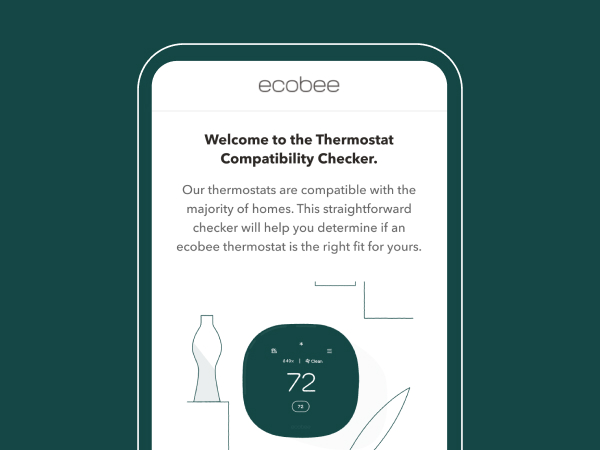
The ecobee Smart Thermostat Enhanced is a sleek, Energy Star-certified device that integrates with major smart home platforms to optimize your HVAC system. Featuring Wi-Fi connectivity, occupancy sensing radar, and compatibility with 90% of systems, it delivers up to 26% annual energy savings by automatically adjusting temperatures based on your presence and preferences. Included accessories ensure easy DIY installation, while app and voice controls provide seamless management from anywhere.


| ASIN | B09XXTQPXC |
| Additional Features | Wired Smart Thermostat |
| Backlight | Yes |
| Best Sellers Rank | #1,803 in Tools & Home Improvement ( See Top 100 in Tools & Home Improvement ) #8 in Home Programmable Thermostats |
| Brand | ecobee |
| Brand Name | ecobee |
| Color | Black |
| Connectivity Protocol | Wi-Fi |
| Connectivity Technology | Wi-Fi |
| Control Method | App |
| Control Type | App Control |
| Controller Type | Amazon Alexa, Android, Apple HomeKit, Google Assistant, iOS |
| Customer Reviews | 4.4 out of 5 stars 3,596 Reviews |
| Display Type | LCD |
| Finish Types | Glossy |
| Included Components | ecobee Smart Thermostat Enhanced, Backplate, Wire labels, Screws & drywall plays plugs, power extender kit (for sysytems without a c-wire), trim plate, and quick start guide |
| Item Dimensions D x W x H | 0.94"D x 4.09"W x 4.09"H |
| Item Type Name | Smart Thermostat |
| Item Weight | 0.45 Kilograms |
| Manufacturer | ecobee |
| Manufacturer Part Number | EB-STATE6L-01 |
| Manufacturer Warranty Description | 3 year manufacturer. |
| Material Type | Metal |
| Model Name | Smart Thermostat Enhanced |
| Model Number | EB-STATE6L-01 |
| Mounting Type | Wall Mount |
| Number of Batteries | 1 Lithium Ion batteries required. (included) |
| Power Source | Corded Electric |
| Product Dimensions | 0.94"D x 4.09"W x 4.09"H |
| Product Style | Thermostat |
| Screen Size | 4 Inches |
| Shape | Rectangular |
| Smart Home Compatibility | Smart Home Compatible |
| Special Feature | Wired Smart Thermostat |
| Specific Uses For Product | Furnace |
| Specification Met | Energy Star |
| Temperature Control Type | Heating |
| UPC | 627988005003 |
| Voltage | 24 Volts |
V**R
Awesome thermostat.
I was extremely impressed by the ecobee smart thermostat enhanced. The device is attractive and easy to use. It integrated quickly with my SmartThings and works flawlessly with the schedules. The installation process was extremely easy. The app walks you through step-by-step from removing your old thermostat to installing the new one. Set up was a breeze. I love the fact that it provides reports, hourly daily weekly or monthly on the usage of your HVAC system. Mine is a heat pump and it differentiates between regular heat and aux heat, which is good to know to help me be able to conserve my energy usage. I highly recommend this thermostat. The only downside is that there is no circulation settings for the fan. There is an option to set the fan to run a minimum of a certain number of minutes an hour, but thatโs not the same as a circulate mode which runs it as needed. I hope in the future enhancement they add this to their thermostats.
K**N
Get Good YouTube info B4 DIY install. Know if your C wire is active. Good unit.
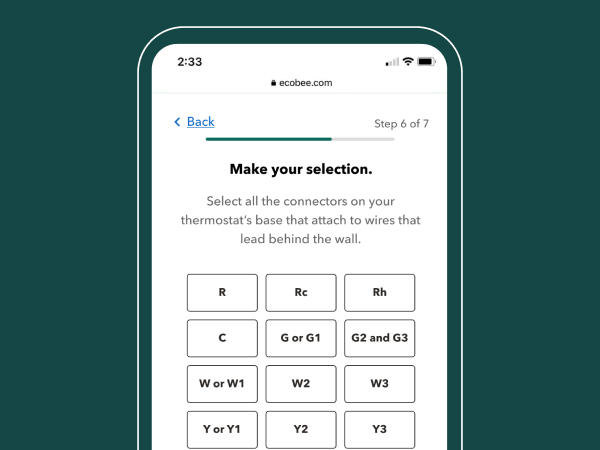
Just got through installing my new Ecobee smart thermostat โ enhanced version. Itโs not the easiest thing to get up and running, but if you watch a few YouTube videos and pay close attention to the wiring requirements prior to attempting it, youโll have it set up in 30 minutes. This was important because while youโre installing it, the AC has to be shut off. Mine came with a trim ring included, which was important because my previous thermostat footprint was a lot bigger than this so it saved me having to patch up paint around the edges.Make sure you know whether or not you have an active C wire connected to your existing thermostat (normally a blue wire) AND โoperableโ - meaning itโs hooked up to a C post on your existing thermostat โ because if you donโt, this could complicate installation requiring you to install a wireless adapter to your main AC unit (included with mine but not needed). I donโt use Apple or Google to control it. I just use my wireless router and an Ecobee iOS application on my iPad, which seems to work fine. You to set it up manually if youโd like without using your phone or tablet, which is what I did. The main menu on the unit itself is pretty intuitive. Granted, its day one right now so Iโll post more if I see any issues. It seems to be working great and I like the schedule capability that allows you to set home, away, and sleep modes to adjust the temperature differently and automatically which is light years ahead of my ancient Honeywell unit. There is also a motion detector on the unit which can determine if youโre home or not and reset the temperature automatically. I turned that function off because we come and go often during the day and donโt want my AC ramping up every 2 hours.
J**N
Great, tricky in some houses
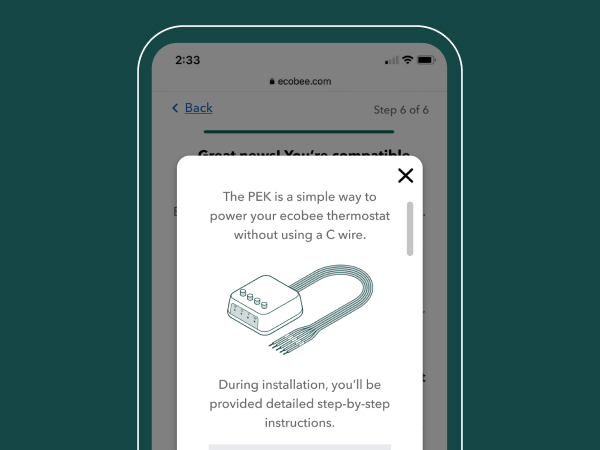
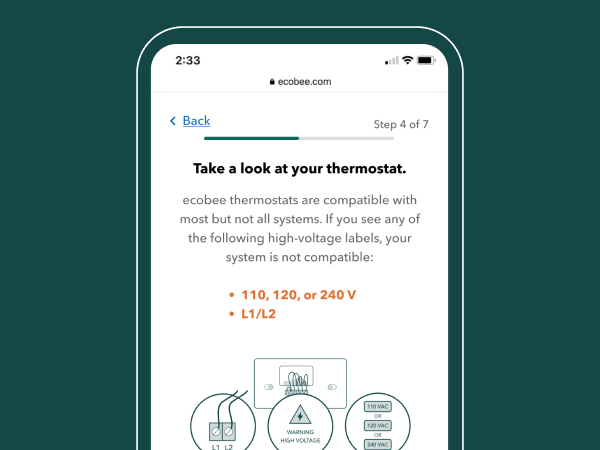
This is not battery operated. If your houseโs thermostat wiring doesnโt come with a C wire, consider paying for professional installation. The C wire is what supplies constant power to this thermostat, but some houses didnโt bother to run that wire because they assumed your thermostat will use batteries. This does NOT mean youโre out of luck, but it does make the install more complicated. You will either need to run an additional wire through your walls or youโll need to install the included PEK (not all thermostats of ecobee include it, so check your model and house wiring before buying). The PEK is, in my opinion, an ingenious piece of technology that deserves praise for how magical it seems. It repurposes 2 existing signal wires so that one wire becomes the C wire carrying constant power, and then the other wire carries various voltage levels to indicate multiple signals between thermostat and PEK; the PEK then translates those voltages and splits them back into separate wires for the rest of the system. However, it does require work near or in your HVAC unit. I had to spend a good bit of time carefully inspecting the colored wires, making sure I knew exactly which is which. Again, houses are all different and some might use nonstandard wire colors; for example, my blue wire functioned as the Y wire, with no yellow in sight! You should be absolutely sure of what does what; youโll probably want to read up on the purpose of each wire. ecobee includes stickers to help you label the wires as you investigate. But once the PEK is installed, the thermostat works beautifully. The touch screen is responsive, it walks you through startup easily, and the app is full of features and settings galore. Again, paying for a professional will save you wiring confusion whether you need the PEK installed or just run a new wire.
J**H
From Nest Loyalist to Ecobee EvangelistโThis Thermostat Wins
I used to be a die-hard Nest thermostat fan. Thought nothing could top itโuntil the Ecobee Smart Thermostat Enhanced came along and completely changed the game. This isnโt just a thermostat; itโs a lifestyle upgrade. From the moment we installed it, I knew we were onto something better. The interface is sleek, intuitive, and incredibly user-friendly. No confusing menus or clunky settingsโjust smart, responsive controls that make managing your homeโs climate effortless. It learns quickly, adapts intelligently, and makes temperature adjustments feel seamless. And letโs talk savings. Our AC and heating bills have noticeably dropped since switching to Ecobee. Itโs not just about comfortโitโs about efficiency. The way it optimizes usage without sacrificing performance is impressive. Itโs like having a personal energy manager working behind the scenes. The design is modern and clean, blending perfectly into our home without drawing attention. Setup was a breeze, and the app is just as polishedโgiving us full control whether weโre home or away. Iโve gone from Nest loyalist to Ecobee evangelist, and Iโm not looking back. If youโre serious about saving money, simplifying your life, and upgrading your homeโs tech, this thermostat is a must-have. Donโt hesitateโthis is the one youโve been waiting for.
S**G
Fix a few things and then it will 5 stars.
Ecobee Smart Thermostat Enhanced: A Mixed Review The Ecobee Smart Thermostat Enhanced is a high-quality device that performs its primary function well, but it presents significant integration hurdles for advanced users. The Good: Device Quality and Performance From a hardware perspective, this thermostat is excellent. The unit is well-made and feels like a premium product. Installation and initial setup were easy for our use case, and the thermostat has been working as intended, providing predictable temperature control. The display is nice and bright, and the device itself looks great. Setting up the Wi-Fi was also straightforward, offering options both on the device and within the app. The Bad: Integration and API Problems My major issue is with Ecobee's handling of smart home integration. They have pulled their API Key program, making connection to platforms like Home Assistant (HA) a major pain. Had I known this, I would have certainly considered other thermostats. After extensive research and troubleshooting, I found a workaround by using the built-in HomeKit integration. Although I don't use Apple products, I was able to successfully connect it: Access the HomeKit QR code on the thermostat. In Home Assistant, start the HomeKit Device integration. Enter the 8-digit access code displayed on the thermostat. The connection now works as it should, but this is a poor way to treat paying customers. Ecobee needs to either fix its API system or adopt open-standard protocols like Z-Wave, Zigbee, or Matter to simplify integration. Overall Conclusion I am ultimately very happy with the device itself. The hardware is great, and it excels at managing our home temperature. However, the accompanying app needs work, as it can be confusing with some functions difficult to locate. With a few minor tweaks to their software and integration methods, this could easily be a five-star product.
C**M
Seems really good so far
I got this to replace my existing (formerly) smart t-stat, the Honeywell T6. One morning I started getting an error that the t-stat and app couldn't communicate with one another, and after following every troubleshooting step I could find online, and two calls to tech support to repeat those steps, tech support gave up. They said they would escalate to their developers, which is code for "we're done here". Months went by and following up with Residio (they are Honeywell's partner for the smart app tech) bore no fruit. To be clear, the t-stat was still functioning fine, but I'd bought a smart t-stat, and this one was no longer smart. So I decided to try the Ecobee. It was very easy to install. I'm pretty handy and work in tech, but I was still surprised how easy the install was and getting it up and running. All smart features are fully functional, it has more usage reporting available trough their portal than my old one, which I like to look at even though I never do anything with the data. And for some money, you can add more sensors to other rooms to keep the house evenly conditioned rather than just at the t-stat. I installed the Ecobee yesterday and already like it so much that last night I ordered the two pack of remote sensors, received them today, the setup for those was almost comically easy. There is no way they could have made it more simple and user friendly. As stated, I've only been using it for about 24 hours, but I'm so happy to have my smart t-stat to adjust to my demands as I call them out to the room, and since my bedroom is far from the t-stat and gets a little warmer at night, I'm pretty exited about the remote sensors. As long as this lasts longer than two years, I'm coming out ahead already.
V**E
Very flexible if you know what you are doing
Fantastic product with unmatched flexibility for uncommon setups. This was the only thermostat I could find that would readily support a reversible heat pump with a dual speed fan and electric backup heat. Competing products either don't include the necessary information in their listings, or only support a single fan speed. Even those with multistage heating/cooling support (that could maybe be used treating fan speeds as different "stages") are unclear whether they support a common wire for a higher power cooling and heating together that is separate from an auxillary heat source. This ecobee explicitly supports tagging the Y2 input as G2, treating it as a shared high speed fan control line. As with anything but a basic dumb thermostat, a user needs to know what they are doing to connect and configure it properly. The software does a pretty good job, but due to the high degree of configurability, if you are not at all technical, this may not be the product for you unless you hire a pro to set it up. As for possible improvements, the firmware could be little more clear when setting up electric auxillary backup heat for a heat pump. The menus tend to refer to it only as a "furnace" which can be confusing. Also, the firmware gives great controls over thresholds that determine when auxillary heating can kick in, but doesn't indicate how overlapping options interact. For instance, one can disable auxillary heat if the outside temperature is higher than a set minimum, but this rule is ignored if a different threshold is exceeded for a minimum time the heat pump has been running without reaching the set temperature. A logic flowchart on how all the options interact or better documentation would be helpful to configure all the options as desired. Lastly, the andoid app is handy but has a few bugs. Recorded temperatures in the reports function are "time-shifted" to the wrong date/time if the recorded data starts after the beginning of the time window being displayed. For instance, if you install the thermostat in the middle of the month, the recorded temperature data from the day you turned it on are shown in the month view as starting on midnight on the 1st. This means reports aren't all correct until the second month after installation. Secondly, I found manual fan speed overrides set in the app are always at low speed (ignoring the speed you choose), but the selected speed is respected when you perform the same steps on the thermostat itself.
S**D
Feature rich and integrates easily.
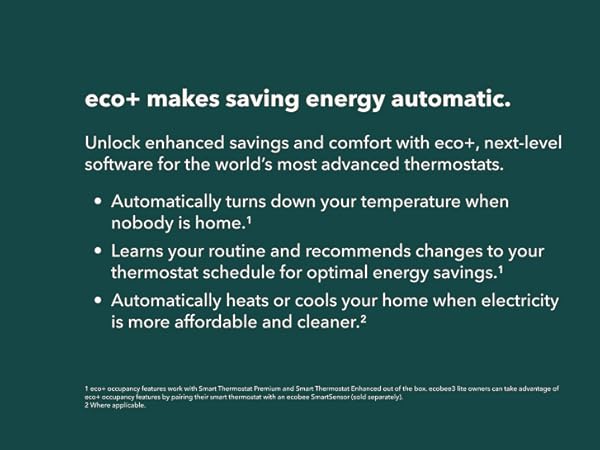
We have used a Nest in our home for many years, but with the changes in parent company and obsolescence of our first-generation device, it was time to change our smart thermostat. The ecobee looks like a great alternative for a family used to a Nest. One of the main features that we liked was the built-in support for remote sensors. Like many houses, our thermostat is located in a hallway that is rarely traveled. The temperature tends to be cooler at the location, and there is not enough traffic for home-away mode to function effectively. Spreading out the sensors into multiple rooms was a must-have feature. I would like to say that installation was a breeze, but it was not. The Nest worked a little differently, and our wires were labeled for how the Nest worked. Following how the wires were labeled meant that the Ecobee did not function correctly at first. Once I opened the HVAC unit and followed the wires back, they were color-coded correctly. Changing two wires and the Ecobee started working flawlessly. The Ecobee is definitely larger than our old thermostat, but that is really not a problem. It has a bigger screen that is easier to read and use. The Ecobee connected to our eero 6 mesh wifi without any problems, and we configured it with the application. It immediately started providing outside temperatures and configuration for comfort. It was also picked up in our Apple HomeKit without a problem. The one area we continue to struggle with is the granularity of control with the Ecobee. With our old system, we were able to define a sophisticated schedule for temperatures. The Ecobee just gives you Sleep, Home, and Away options with predefined temperatures. The temperatures are set in the comfort settings. This is also adjusted slightly by the eco+ settings. We were used to much more control with the old system. However, the important part is that we are comfortable. The hot spots in the home have been nearly eliminated by the sensors. It is different and takes getting used to. The ecobee was less expensive considering the features you get.
M**D
Best Smart thermostat ever literally
With out even thinking, this product must buy, i bought two for my HVAC system, very happy with it, very smart and can control from outside home easily.
E**R
Excelente
Excelente calidad
Y**F
Great product
Highly recommend ecobee. Integrates seamlessly with iOS. The seller was great too - quick and efficient communication
M**H
Not suitable for UK
Product looks good , but not suitably for UK
D**O
Especificaciones
El producto lo tuve que devolver porque no vienen las especificaciones pertinentes con la compatibilidad de ciertos equipos hvac. Antes de comprar preguntar con proveedor...
Trustpilot
1 month ago
1 month ago