


🌟 Command your PC’s cool and color like a pro with Corsair iCUE Commander PRO!
The Corsair iCUE Commander PRO is a compact, all-in-one fan speed and RGB lighting controller that supports up to 6 fans, 8 RGB LED strips, and 4 temperature sensors. It integrates seamlessly with Corsair’s iCUE software, enabling precise thermal management and stunning synchronized lighting effects, while offering dual USB 2.0 headers for expanded connectivity and cleaner cable management.

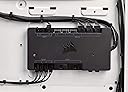


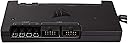




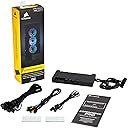


| ASIN | B0725HP1J2 |
| Best Sellers Rank | #524,478 in Toys & Games ( See Top 100 in Toys & Games ) #1,051 in Toy Construction Tools |
| Customer Reviews | 4.5 4.5 out of 5 stars (11,149) |
| Date First Available | May 23, 2017 |
| Display Type | LED |
| Global Trade Identification Number | 00843591094344 |
| Is Discontinued By Manufacturer | No |
| Item Dimensions LxWxH | 5.24 x 2.72 x 0.61 inches |
| Item Weight | 10.6 ounces |
| Item model number | CL-9011110-WW |
| Manufacturer | Corsair |
| Power Source | Corded Electric |
| Product Dimensions | 5.24 x 2.72 x 0.61 inches |
| Series | iCUE Commander PRO Smart RGB Lighting and Fan Speed Controller |
| UPC | 843591094344 |
E**A
Excellent centralized fan control + monitoring (great iCUE integration)
A very useful hub if you want centralized fan control and monitoring. It enables detailed fan curves and profile switching through iCUE, which is especially helpful in builds with many fans and different load scenarios (quiet idle vs higher airflow under load). It also helps keep wiring/control cleaner than relying on multiple motherboard headers and separate controllers. Pros: flexible fan curves and profiles; strong iCUE integration; improves organization in multi-fan builds. Cons: best experience is within the Corsair ecosystem; setup takes some time to dial in. Overall, it adds real functionality and control beyond basic fan headers.
M**G
Install and Review from an average person
Thought I would go ahead and write a review/install walkthrough since no one wrote one on here! Take about an hour if you don’t care for cable management. INSTALL: Setup fans, follow instructions and label each fan, they must be plugged into the commander pro IN ORDER. If you don’t then all the fans will malfunction. You need to plug the commander pro into your power supply with the computer completely off via SATA, then plug the USB 2.0 into the MB. Don’t plug the commander pro into a dedicated fan pin on the MB because the commander pro will not work. After setting up your CORSAIR RGB fans into the “lighting node pro” that comes with the 3 pack (in order). This must also be plugged into the power supply via SATA. Then plug the Power cords into the command pro ports labeled “fan” (in order). Instead of using the lighting controller, use a 3 pin female adapter to connect the lighting node pro into the commander pro port labeled “LED 1”. Make sure to do this same technique if adding more than 3 fans, and keep the fans plugged into the commander pro in order. I’m attaching a diagram I found on corsairs website. Hopefully this helps! REVIEW: The commander pro is an amazing product! I is an essential to anyone who wants to control their fan speed and colors with iCue. I did previously use Corsair fans without the commander pro, and honestly you’re only getting half of usage out of them because settings are limited without the commander pro. It’s still possible to use fans without it but honestly being able to control everything from the iCue app is worth it, so if you can’t get it right away save up. I would say this product is essential to anyone using Corsair fans and iCue. Disclaimer: I am just an average person that set this up.
M**S
Necessary for Extensive Fan Control
I have the SP 120 high performance fans, which are great fans overall. Out of the box, though, their speed cannot be controlled at all - unless you hook them up to your motherboard, and leave them at the mercy of your motherboard's proprietary software. I tried that and trust me, it's not ideal. Also, I hated having to reach into my case for the included RGB controller. Sure, I could've mounted that outside of my case, but making that work with my case would be nothing short of a pain. Thankfully, the Commander Pro solves both of these problems. It allowed me to quiet my PC down SIGNIFICANTLY - I use the "quiet" fan speed mode, and I can barely hear the fans at all. Even when gaming, the PC is very quiet, contrary to before I had the controller, when the fans were running loud all the time - even at idle. This is a must-have if you care about acoustics, or for that matter, not wasting electricity, especially given the power-hungry nature of gaming PCs. And I'm not noticing any increase in temps of my CPU or graphics card. I love being able to adjust the RGB settings right within the Link software. I saw several complaints about this software, but it works flawlessly from my experience - and it looks way nicer than software for my other hardware. Now, the only reason I gave this product 5 stars is because it works so well. I think it's absolutely ridiculous, as you'll see in my photo, there are two boxes - the RGB controller, then the Commander Pro. Why couldn't the functionality be combined into one box? This is really messy on Corsair's end, and makes for a ton of extra cables. There's gotta be some way this could be made more streamlined. Also, $60 for this? That seems a bit high. But in the end, despite these issues, the Commander Pro has worked wonders for my PC, quieting it down by a huge margin. If you have Corsair SP or HP fans, I recommend getting this.
S**M
Just if they have provide more extension cables that will be better, the 3 PIN Lighting cable both side is male header, so you could only extend to lighting node pro.
M**L
Ho acquistato questo prodotto data la necessità di poter controllare tramite software tutte le ventole del mio case, in modo da poter avere totale silenziosità nel normale utilizzo e allo stesso tempo poter aumentare gli RPM delle ventole durante sessioni di gioco o di alto carico della CPU. La qualità costruttiva è di primissimo livello, e nella confezione troviamo anche 4 sensori termici, utili per visualizzare la temperatura in punti precisi del nostro PC. Attenzione alle dimensioni, non è proprio piccolissimo e in base al vostro case potreste avere problemi di posizionalmento, anche se personalmente non ne ho avuto nessuno, l'ho attaccato facilmente sul retro con comodo accesso a tutti gli ingressi (CASE: NZXT Noctis 450). Non ho utilizzato le funzionalità di controllo LED del dispositivo perchè non ne ho necessità, ma ho collegato 4 ventole e 4 sensori termici, e funziona tutto a meraviglia. Il software permette di controllare indipendentemente tutte le ventole e di impostarle a valori fissi (fino allo 0% e spegnerle) o con delle curve personalizzate, e la cosa migliore è che le curve possono essere impostate per rispondere alla temperatura di QUALSIASI componente interno rilevato. Potete ad esempio impostare le ventole in base alla temperatura della GPU, dettaglio che potrebbe risultare utile a molti. Il software, Corsair LINK, funziona perfettamente, almeno per me. Lo trovo fatto benissimo e pieno di utili funzioni, come quella di creare vari profili personalizzati, che contengono impostazioni per LED e ventole, e poterli cambiare e selezionare comodamente con due click in qualsiasi momento tramite l'icona del programma presente nella taskbar. Ultima nota importante è la presenza di due porte USB 2.0, fondamentale per me visto che per collegare il dispositivo ho dovuto rimuovere il collegamento USB del dissipatore della CPU (Corsair H110i V2) che ho quindi potuto facilmente collegare al Commander stesso. Il prezzo è forse un po' alto (pagato 69€), ma è sicuramente utilissimo viste le sue particolari funzionalità, e non mi sento di togliere una stella per questo.
J**L
Mucha gente critica el precio, pero el problema del mismo estaría en que utiliza un conector propietario para las luces RGB y, por lo tanto, estás obligado a utilizar las tiras led de la marca, que esas si son caras de narices. Lo que está claro es que quien critica este controlador como tal NPI de comprar otro tipo de controladores. Empezaré valorando lo que a mí me interesaba: Un controlador de rpm para ventilador PWM. Tiene seis puertos para ventilador de 2, 3 y/o 4(PWM) pines, con salida de 1A por cada uno y 4,5A combinados, siendo recomendable no pasar de los dos ventiladores por enchufe. Todo controlado por software (Corsair Link), programable individualmente desde Windows para hacer el ajuste de velocidad asociado a cualquier sonda térmica que posea el resto del hardware instalado de una manera bastante precisa y pudiendo utilizar diferentes perfiles. Teniendo en cuenta que Corsair cuida muy bien este software y es bastante intuitivo, ESTO ya lo sitúa entre los mejores controladores de ventilador sacados al mercado, por no decir el mejor. Ahora a esos +-60€, que para cualquiera con sentido común ya estarían justificados, habría que añadir las cuatro sondas térmicas que se pueden instalar y vienen incluidas, otro "extra" que para equipos de gama media o ciertas aplicaciones viene muy bien. También trae dos conectores RGB propietarios que admite cuatro conexiones en línea y control+sincronización también por software. Otro añadido que tiene peso para los amantes de las "lucecitas". Luego están los dos puertos USB 2.0 internos que añade, pero que no recomendaría para otra cosa que no fueran aparatos o Hub Corsair (yo tengo ahí mi Corsair HX850i, lo que me da también control sobre ella). Yo veo más que justificado el precio. -------------------------------------------------------------------------------------------------------------- Por supuesto tiene partes negativas: Una sería lo mencionado de las tiras led, que usan conexiones propietarias de Corsair, por lo que te ves obligado a comprar un pack de la propia marca que, para el tipo de producto que es, tiene un precio totalmente desproporcionado. Y a pesar de las "alabanzas" a la calidad de las tiras RGB Corsair siempre puede existir la persona que no sea capaz de adaptar su idea estética a ellas y preferiría más variedad, como es mi caso. El tamaño del aparato es bastante grande a pesar de que lo anuncian como de perfil bajo. A mi no me entra donde estaba puesto el controlador genérico que traía mi actual torre, por lo que tuve que conformarme con una posición más "visible". También se echa en falta unos imanes para la fijación aparte de la cinta de doble cara, así no perdería la capacidad de ser removible fácilmente. Otro detalle que no vendría mal sería tener la posibilidad de atornillar el mismo de alguna forma, ya que por ejemplo mi torre permitiría hacer eso en diversos puntos donde me interesaría que estuviera situado. Aunque lo peor para mi es la escasa cantidad de líneas de ventilador que controla, aparte de que no existe aparato para ampliar las mismas excepto el RGB Fan Hub Controller que, como no, trae conexiones también propietarias y no las estándar para ventilador. Corsair si pensó en quienes quieren añadir más y más luces RGB al Pc, pero no en quien pretende una refrigeración avanzada con varios sistemas RL, necesitando de muchos controles de rpm para controlar todo el sistema y ventiladores de altas prestaciones que no fueran los de la marca. En teoría se pueden conectar dos en línea y el software lo soportaría, pero no tengo visto esto de manera práctica (si a alguno hacer comentarios vagos de que tienen este sistema) y si quejas al respecto de que no funciona. Puede que con mi próximo Pc termine intentando hacer esto y entonces lo probaré en la práctica. Por todo lo demás, es un gran aparato plenamente recomendable y de precio está muy bien. EDITO para añadir que tiene también compatibilidad con el Corsair iCue, que es una castaña de software totalmente orientado al RGB y no al control de ventiladores, pero al menos conserva la compatibilidad con Corsair Link, que había alcanzado la excelencia en ese aspecto. También que se pueden conectar en línea para añadir más ventiladores de ser necesario. Dicho de otra forma, que el sistema te reconoce dos Corsair Commander Pro conectados en el mismo Pc. Me parece una solución radical, pero está bien que Corsair piense en ese posible escenario y se tenga esta opción.
C**E
As a PC enthusiast, I recently purchased the Corsair CL-9011110-WW Fan Controller Commander Pro Temperature Monitor, and I am extremely impressed with its performance and features. This device has made it easy for me to manage and control the temperature and fan speed of my computer components, and has made my overall computing experience much smoother and more enjoyable. First and foremost, the Corsair Commander Pro is incredibly easy to install and set up. It comes with a clear and concise manual, and the software provided by Corsair is intuitive and easy to use. I was able to connect all of my components, including my fans, RGB lighting, and temperature sensors, with ease. The Commander Pro is also incredibly versatile in terms of its compatibility with different components. It supports up to six PWM fan connectors, two RGB lighting channels, and four temperature sensors, making it easy to manage all of your components in one place. It is compatible with most popular motherboards, including those from ASUS, Gigabyte, MSI, and more. One of the standout features of the Corsair Commander Pro is its ability to monitor and control the temperature of my computer components. The four included temperature sensors allow me to monitor the temperature of my CPU, GPU, and other important components, and adjust the fan speed accordingly. This has allowed me to keep my computer running at optimal temperatures, which has improved overall performance and reduced noise levels. In addition to temperature monitoring and fan control, the Commander Pro also supports RGB lighting control. I was able to connect my RGB lighting strips to the device and control the lighting effects using the Corsair software. The ability to control both my fans and RGB lighting from a single device has made managing my PC components much simpler and more streamlined. Overall, the Corsair CL-9011110-WW Fan Controller Commander Pro Temperature Monitor is an excellent device that has greatly improved my computing experience. Its ease of use, versatility, and range of features make it an essential tool for anyone looking to build a high-performance PC or improve the performance of their existing system. I highly recommend this product to anyone looking for a high-quality fan controller and temperature monitor.
A**K
De fans zijn zonder probleem te koppelen, en de algemene indruk is positief. Echter is het jammer dat er alleen LED-aansluitingen zitten voor Corsair fans. Ik heb via internet kabels besteld voor LED naar ARGB aansluitingen omdat er geen universele aansluitingen zijn voor LED control. Verder fijne aankoop.
Trustpilot
1 day ago
2 months ago