


Desertcart purchases this item on your behalf and handles shipping, customs, and support to South Africa.
๐ Unlock Next-Level 5G WiFi Power โ Stay Connected, Stay Ahead!
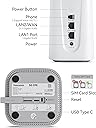
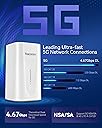
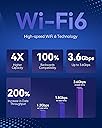
The Yeacomm NR330 5G Router AX3600 combines cutting-edge 5G NR speeds up to 4.67Gbps with WiFi 6 technology, supporting up to 64 devices simultaneously. Featuring 6 built-in high-gain antennas, dual gigabit ports including a 2.5G LAN/WAN, and a Nano SIM slot for plug-and-play 5G connectivity, it ensures ultra-fast, stable internet for home or office. Advanced features like Band Lock, VPN protocols, Voice VoLTE, and intelligent heat dissipation make it a professional-grade router designed for seamless multi-device performance and secure networking.





| ASIN | B09W2CYVTD |
| Antenna Location | Business, Gaming, Home, RV, Vacation rental |
| Antenna Type | Internal |
| Best Sellers Rank | #95,374 in Computers & Accessories ( See Top 100 in Computers & Accessories ) #2,040 in Computer Routers |
| Brand | Yeacomm |
| Built-In Media | 1 x NR330 5G WiFi6 Router, 1 x RJ45 Cable, 1 x User Manual, Power Adapter |
| Color | 4.7Gbps 5G |
| Compatible Devices | Gaming Console, Personal Computer, Printer, Smart Television, iPhone |
| Connectivity Protocol | Wi-Fi |
| Connectivity Technology | 5G, Ethernet, LTE, RJ11, Wi-Fi |
| Control Method | Remote, Touch |
| Controller Type | Push Button |
| Coverage | Wide range of signal coverage |
| Customer Reviews | 3.8 out of 5 stars 58 Reviews |
| Data Transfer Rate | 4.6 gigabits_per_second |
| Frequency | 5 GHz |
| Frequency Band Class | Dual-Band |
| Item Dimensions L x W x H | 3.94"L x 3.94"W x 6.89"H |
| LAN Port Bandwidth | 2.4G |
| Manufacturer | Yeacomm |
| Maximum Upstream Data Transfer Rate | 934 megabits_per_second |
| Mfr Part Number | NR330 |
| Model Name | NR330 |
| Model Number | NR330 |
| Number of Antennas | 6 |
| Number of Items | 1 |
| Number of Ports | 3 |
| Operating System | RouterOS |
| Other Special Features of the Product | 4 x 4 MIMO, Band Lock, Connects Up to 64 Devices, Up to 4.67Gbps, Voice Volte |
| RAM Memory Installed | 32 GB |
| Router Network Type | cellular |
| Security Protocol | WPA3 |
| Special Feature | 4 x 4 MIMO, Band Lock, Connects Up to 64 Devices, Up to 4.67Gbps, Voice Volte |
| Unit Count | 1 Count |
| Voltage | 12 volts |
| Wi-Fi Generation | Wi-Fi 6 |
| Wireless Communication Standard | 802.11a, 802.11ac, 802.11ax, 802.11b, 802.11g |
| Wireless Compability | 802.11a, 802.11ac, 802.11ax, 802.11b, 802.11g |
T**C
Fantastic device, super capable and leading design. US 5G Bands supported, excellent performance
This is a fantastic CPE/Cellular Router. I have tried it successfully on Boost Mobile, Verizon, T-Mobile, and T-Mobile Home Internet. You will need to/want to configure the APN, TTL, and MTU settings which can be easily googled on the internet for each carrier. I have successfully used the TMHI sim card from the latest TMO CPE and also got this device to work perfectly fine, with speeds matching exactly what the TMO device provided. This device does require basic networking config experience, but is not hard - for any MVNO/prepaid carriers and pretty much anything other than a cellular line based SIM, do expect some configuration will be required. Tech support is super responsive, there are secret menus in this device which enable even more capabilities than advertised. Contact tech support for more info. Using a Cellular Line based SIM, you can even get land line phone service working perfectly fine off the device as well! Bridge mode works very well, although I would like to have seen the ability to configure the router some way after activating bridge mode without having to fully reset the device and starting over again. Either way, small issue, as config is capable and not overly complex. WiFi 6 is fast (although I don't need to use it) and if using a TMHI SIM, a telephone number is assigned to the account BUT it is NOT provisioned to the SIM, so you can't use the landline component if using a TMHI Sim. Again though, Boost Mobile, T-Mo regular line sim, all work perfectly and with landline/sim access given you configure it properly. My only challenge with the device is really the price point. It's not outrageous but hard to justify, I think, for the addition of the few incremental bands here in the US. Other CPE (telus ZTEMC8010CA and others) get you several other 5g bands, with similar (not exact performance) for a much lower price point. Given the stark price difference $500 vs $100-150 for others, unless you need the WiFi 6 and must have the extra bands, its hard to justify current $500 cost. I think it needs to be lower as in my use case, the only thing this device gives me if I want to use TMHI sim card for $30/mo (w/Magenta Max plan) is the passthrough public IP. If I can live with the double nat, it saves me $500. If I can live without Band n41, I can get an alternative @ $100. Again, great piece of equipment overall, great support, just would like to see it a bit cheaper.
B**M
Not For My Money!!!!!!
Never able to get it connected to ATT 5G. Did connect to T-Mobile 5G but very SLOW!! The Tech Support claim customer got 400Mbps but didn't say how!! Support did have many ideas about the Yeacomm parms to adjust but no luck. Because they are on the other side of the world they made suggestion while I slept while gave results while they slept. Let's talk about Amazon locker return process. DON'T DO IT!! Normally for returns I would drop off items to a live person and get a receipt!!!!!!! Locker gives you NOTHING when you close the door. Not even a thank you. My return stayed in the lock for a week plus. I finally have to call UPS/Amazon to determine WHY! Took me four days talking to Amazon people before finding a person who understood the problem and the required action. UPS tracking finally showed locker pickup and item being sent to Amazon return center. Wait there's more!! During this process Amazon removed the order return status so I had NO Idea when I would get the refund! More calls to Amazon and return status was restored. Finally refunded but Never use the Amazon Locker!!!!!
T**S
This 5G Cellular Router rocks!
For me I had to reach out to the manufacturer for updated firmware for the device. I also got the login info for the secret "super admin" account. I used a IMEI generator to set the device to a custom IMEI. Now it looks like a iPhone to the cellular carrier so it does not get flagged by any automated hotspot detection. I also set a custom TTL for both the IPv4 & IPv6 to 65. Don't forget to set both or you will have TTL leaks and Verizon will slow you down as deprioritized hotspot data. This made Visible (Verizon Wireless) treat the traffic as normal cellphone data so you don't get slow hotspot speeds. I used a Verizon Wireless SIM card with the MVNO, Visible. I was able to lock specific frequency's and network types in the settings. The connectivity when streaming is stable and solid, when I drove around to other places and tested the streaming I was often getting 4K video on my devices. Attached is a screenshot of my speed test results getting over 600Mbps with this router. I was impressed with the speed of this device and it seems very reliable. I highly recommend this product to anyone interested in a travel router, also the input range for the power of DC 9~24V is nice. The support for this device when I reached out for firmware and for the super admin account to set custom IMEI was fast! In less than 24H I had all my concerns covered with no language barrier. All said the device has been solid for me and I enjoy fast speeds in my area with it. Support was fast with no language barriers. However if you can get this device on discount I would because it's price is a bit hefty at the $407 price tag I paid at the time. I also tested T-Mobile with similar speeds and quality, I did not get to test AT&T as I do not have service with them, but I do know you MUST set a custom IMEI or AT&T will nuke your SIM the moment it tries to connect because this router is not in there whitelist. If I end up able to test AT&T in the future I will update this review to include my results.
I**Y
Works with Verizon - Sort of
This being the first 5G modem I have ever setup, it was a challenge finding the information I needed to get it working so I am hoping this helps someone in the future. My specific use case was to use this modem to connect to Verizon as a backup internet connection on a Unifi network (UDMPro). The first thing to note is the IMEI on this device will NOT get through Verizon's IMEI check if you try to add this device to an existing Verizon account as I was trying to do, Verizon says it is not compatible. After much trial an error though, I was actually able to get it to work on Verizon. What worked for me is to use a "IMEI Generator" (you can google this to find several) and to generate an IMEI number for a 5g capable tablet (like an iPad 10th generation or newer). That IMEI will get through Verizon's check on their site and then you can add the device to your account, and order a free activated 5G SIM card. I picked the SIM card up at my local Verizon store for no cost, no issue but you can also have it delivered with 2-day delivery for free too (don't buy the SIM on Amazon, eBay or other sites!). I put that SIM card in this modem and a signal immediately came up and worked. However, I noticed the speeds were very slow. On my phone I could easily get 100Mb+ in my area on 4g, and gigabit on 5GUW. On the modem, it would only get about 15Mb on a speed test. What resolved this is in the menu on the modem, go to "Network Settings", "Mobile Network", and then click the "Advanced Settings" tab. In there, change the TTL to "65" (the default is 64). Leave everything else alone. Save your settings and when the signal comes back, you will get full speeds. If it appears the cell signal keeps flip flopping, going to 4g+, 4g, disconnecting, etc you will need to use the signal lock function (on the same menu page as described above, just scroll to the bottom). You will need to use a site like cellmapper.net to determine what bands your local tower transmits, then select ONLY those bands in the checkboxes in the modem settings. You may have to try different bands on this page to see what gives you the best performance and reliability. I am docking one star on this review as it was not clear on any of the documentation on how to get this thing to work with Verizon, I had to figure it out on my own. I did email their support, but never got a reply. Otherwise the hardware works fine. One last tip I would recommend is there is a NR330-Q version of this device that has the latest X62 mobile chipset that is considered the best one currently supporting the most channels if you can find it. That is not the one that gets shipped from this listing though. I found this out during all my digging. I wasn't willing to go through the exchange because the normal NR330 I got (that uses a different older chipset) still worked with all the channels from my local cell tower.
C**.
it works with my Tmobile Magenta Max Line
it was easy setup , when I first plug my Tmobile sim in it take 2-3min for it to recognize it and it will work after you go to " http://192.168.1.1/ " to setup your wifi setting/password. after using it 3 days the download speed drop to almost zero. its because I need to change the setting so I can get truly unlimited . I have included a pic of my setting TTL = 65 if you want truly unlimited. instead of using your hotspot data. when TTL is set to 65 , it will recognize as if this was a cell phone. so with Magenta Max data plan you basically get truly unlimited .
J**W
I wanted to like this.
I really wanted to like this modem. It had the all-in-one capability. You can port forward with it which is nice. However I could not get the same speeds as I could with my T-Mobile internet. I also could not get all my ring cameras to connect to this for some reason. No matter what I tried. Also the directions look like they were printed from a '90s printer on a very small piece of paper. Lol at this price point I would expect at least quality directions. Also in the directions I found no way to contact customer support for anything. This product might work for you if you are in an RV or boat. But it's just not there for me. And especially at this price point. The build quality seems good. Hopefully in time it will improve with future updates. But for me I returned it
M**Z
T-mobile magenta max plan
Finally, I figure out whoever wanna use this product. I recommend even you can connect a phone. On the device and it's work well , On the band selection, you can choose which band it worke for you. Because, In my case the band 71 it was a lot of ping That's why I take it off. and I'm only connected to LTE band 2 and band 66 & N71 Happy family living in rural aria. Hope this setup help you enjoy.
4**Y
Do not recommend
The unit I got looks like a refurbished unit that I paid for a new model price. I used it with a tmobile phone sim set with TTL 65 and MTU 1420. My data usage recorded by tmobile used both hotspot data and regular data. Therefore it could not bypass the throttling or deprioritization by devices. I couldn't get DDNS to work even with its listed providers- free dns afraid.org in particular. Imei settings only available in superuser mode. Superuser settings were very limited.
Trustpilot
1 month ago
2 weeks ago