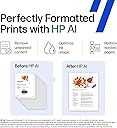
๐จ๏ธ Elevate your home office with AI-smart, vibrant prints that keep you ahead of the curve!
The HP Envy Inspire 7255e is a versatile all-in-one wireless inkjet printer designed for home use, delivering up to 15 ppm black and 10 ppm color print speeds. It features AI-enabled formatting for flawless prints, automatic duplexing, and specialized photo printing capabilities. With easy wireless setup, mobile app control, and a 3-month Instant Ink trial, it combines convenience, quality, and sustainabilityโcrafted with 45% recycled plastic to reduce environmental impact.


| ASIN | B09NS5HDWY |
| Additional Printer Functions | Copy, Scan |
| B&W Pages per Minute | 15 pages_per_minute |
| Best Sellers Rank | #69,879 in Office Products ( See Top 100 in Office Products ) #99 in Inkjet Computer Printers |
| Brand | HP |
| Built-In Media | HP ENVY Inspire 7255e All-in-One Printer; HP 64 Setup Black Ink Cartridge; HP 64 Setup Tri-color Ink Cartridge; Power cord; Ink Caution Flyer; User guide; Setup poster; Legal Flyer, Photo Media Pack |
| Color | White |
| Color Depth | 24 bits |
| Color Pages per Minute | 10 |
| Compatible Devices | Laptops, PC, Smartphones, Tablets |
| Connectivity Technology | wireless |
| Control Method | App |
| Controller Type | Apple Airprint, Mopria-certified |
| Customer Reviews | 3.9 out of 5 stars 2,866 Reviews |
| Display Type | Color Touchscreen |
| Duplex | Automatic |
| Hardware Interface | USB |
| Initial Page Print Time | 16 seconds |
| Ink Color | Cyan, Magenta, Yellow, Black |
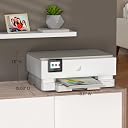
| Item Dimensions D x W x H | 15.08"D x 18.11"W x 7.5"H |
| Item Type Name | Multifunction Printer |
| Item Weight | 15.2 pounds |
| Manufacturer | HP |
| Maximum Copies Per Run | 50 |
| Maximum Copy Resolution Black and White | 600 dpi |
| Maximum Copy Resolution Color | less than 4800 x 1200 dpi |
| Maximum Copy Speed Black and White | 13 pages_per_minute |
| Maximum Media Size | 8 x 10 |
| Maximum Print Resolution Black and White | 1200 x 1200 dots_per_inch |
| Maximum Sheet Capacity | 125 |
| Maximum print Resolution Color | 4800 x 1200 dots_per_inch |
| Model Name | ENVY Inspire 7255e |
| Model Number | 1W2Y9A#B1H |
| Model Series | 7250 |
| Number of Trays | 2 |
| Other Special Features of the Product | Built in Photo Tray, Dual Band Wi-Fi, Energy Star |
| Output sheet capacity | 125 |
| Paper Size | 4 x 6 in, 5 x 7 in, 8 x 10 in, 4 x 12 in inches |
| Power Consumption | 14 watts |
| Print media | Envelopes, Glossy photo paper, High-resolution paper, Labels, Paper (plain) |
| Printer Connectivity Type | wireless |
| Printer Output Type | Color |
| Printer Type | Thermal Inkjet |
| Printing Technology | Thermal Inkjet |
| Resolution | 1200 x 1200 |
| Scanner Type | Flatbed |
| Special Feature | Built in Photo Tray, Dual Band Wi-Fi, Energy Star |
| Specific Uses For Product | Home, Office |
| Total Usb Ports | 1 |
| UPC | 195697738722 |
| Unit Count | 1 Count |
| Warranty Description | One-year limited hardware warranty with option to extend to 2 years with HP+ Offer. |
| Warranty Type | limited warranty |
| Wattage | 14 watts |
A**X
Fantastic Budget-Friendly Color Printer for Photos, Posters, Signs, etc.
[Original Review: March 3, 2024] [Purchase Date: July 19, 2022] I gave my previous HP Envy 5055 away and kept my Brother laser printer. Then I found myself wanting to do color posters on photo paper for a non-profit. I wasn't looking to break the bank and reviews for this printer were great. I purchased it in July 2022. While I do have a love/hate relationship with HP's newer software, the printer installed easily, it rarely has connection issues and the remote Smart printing came in useful a few times. A feature I never figured I'd use. I did probably 30-50 posters with this printer. Granted that eats up the extremely expensive, HP Genuine ink I was buying, they printed BRILLIANTLY. Especially on photo paper and then laminating them afterwards. They were beyond my expectations. There was fading when the ink was low, but that is to be expected. New cartridges had me right back to the stunning quality the first batch had. However, over time, I wasn't printing as often and the line streaking began. I'd print a document and every other line would either me faded or non-existent. After multiple print head cleanings, an alignment and page smear, it would print correctly. Here is the problem with that: the ink cartridges, especially the XLs I buy are expensive and it's wasting ink to do those tests and cleanings. Fast forward to March 2024 the time of this review. I'm not sure how old the cartridges in the printer are. I've not done much printing, and I have probably printed 15 pages now and it's still streaking no matter what I try. I plan to buy one more batch of ink and test those. Maybe these cartridges have just sat too long and will not work correctly no matter what I try; which is a shame because they are half full. In the next month or so I will try one more time with HP Genuine cartridges, either the 64XLs or 64s. If everything works correctly, I will amend this review. In the meantime, my suggestion would be unless you print in color and often, I would avoid this printer. If you do print in color and often, like I said at the beginning the first 30-50 prints were full color posters and they looked amazing. Cartridges can start to have issues after 6 months in an ink jet printer from my experience. [UPDATED REVIEW: March 16, 2024] I ordered some Official HP 64 cartridges... not the XLs as I didn't know how much printing I'd be doing if they did fix the problem, and if they didn't, well I'm not paying double to test something. Removed the old cartridges, the black one looked dried out for sure. I replaced with the new cartridges. Printer acknowledged "genuine" cartridges were in. I've only used the official/genuine cartridges. It did one alignment/cleaning and the page came out perfect. I had it do a page smear which came out clean too. I did a full color graphic print and it came out perfectly. Problem solved. The cartridges were the culprit. So my suggest to anyone who doesn't print as often as I do. If you know you're doing a bulk color print job, buy the XLs, you'll go through the ink. If you aren't doing any bulk jobs but need to replace your cartridges, just buy the regular 64s and if 6 months goes by and you haven't replaced them, at the first sign of ugly printing, replace them. It solved my problem and my faith is restored in this printer. 5 Stars. I highly recommend this printer for anyone who wants a budget friendly color printer that can do high quality photo or graphic printing on regular or photo paper.
N**O
Excellent All-in-One Printer for Home Use
The HP Envy Inspire 7255e has been a great addition to my home. Setup was quick and straightforward, and connecting it to Wi-Fi and mobile devices was very easy. The touchscreen is intuitive and makes navigating options simple. Print quality is excellent for both documents and color photos. Scanning and copying work smoothly, and the printer runs quietly. I also appreciate the Instant Ink trial, which is very convenient and helps avoid running out of ink unexpectedly. Overall, this is a reliable, modern, and user-friendly printer. Perfect for everyday home use. Iโm very satisfied with this purchase and would definitely recommend it!
A**H
Terrible Printer, Terrible Service, Terrible App, Terrible "Instant Ink"
Do not buy this printer! It was a nightmare from start to finish. The printer would work for a few days, then get muddy, or just simply stop working. It would tell me I was out of paper when I wasn't. Over and over again. It would only print half a page, no matter how many cleaning cycles I would run. And on top of that, HP "Instant Ink" is a nightmare of a program. The Web site is buggy, the help function is useless, and the app would constantly crash or freeze or repetitively ask me to change my passwordโlike, three times in five minutes. And finally, the printer really isn't yoursโHP is constantly monitoring it like some Big Brother. And you can't troubleshoot unless your printer is online, but if your printer CAN'T get online, if that's the problemโthen you are toast. I wanted to just give the cursed thing away, but HP wouldn't let me remove the printer from my account until my Instant Ink subscription was cancelled. So I cancelled it. Then I had to wait until the day it ran out to remove the printer, which was another few weeks. So here I am, a few months later, and I STILL CANNOT remove the printer, because the software tells me I have to cancel Instant Inkโdespite the fact it's been cancelled for months! After running through a receptive and broken loop on this, I just threw my entire printer into a dumpster. And to top it off, I cannot terminate my account with HP! There's no mechanism for that. So I bought a comparable Epson printer, and it works perfectly! No hassle. No "instant ink" garbage, no constant sense you are leasing a printer instead of owning it. It just...works, no hassle. DO NOT BUY AN HP PRINTER!
L**N
Printer works great. HP Support not.
After 10 years, my Envy 5530 went belly-up. Ordered this Envy Inspire 7255e. Installation was easy with HP Smart on my #1 Dell desktop. Works great, prints really good photos. So far, very pleased with the printer. I have this printer on my home network, along with 3 PCs. However, my #2 Dell desktop prints, but only after getting an โError-Printingโ message, and about 30 seconds afterward. My #3 Lenovo laptop prints with no problems. Contacted HP Support, had a ticket created asking if I needed to install any HP software on it. Requested a call back, and received call a couple minutes later. Apparently the support person didnโt read my initial comments, asked me about the problem. He asked the manufacturer of the PC, and after responding it was a Dell, he said to call Dell โItโs their problemโ. REALLY??? No answer to my question. Conclusion: the printer is working fine; HP Support isnโt.
G**E
I have used Hewlett-Packard printers for more than 25 years.
HP makes a fantastic printer. I had a situation with mine it worked for a month and then it stops working. I was upset I have to admit. I called their support team and ask for help. I got the runaround for a month, calls everyday back and forth. I couldn't believe it. And then it went on for another month. I don't know if it's because I'm a woman or what but I sure got the runaround. Finally they agreed to replace my printer. The replacement printer was a refurbished printer. I agreed to that because I figured it had been somebody else's problem and they fixed it. It has worked very well, I'm very happy now.
H**.
Great printer for home office. But HP cartridges are expensive.
This is a great printer for a home office. Reasonably priced. But I don't like that you have no choice but to buy the expensive cartridges from HP.
C**Y
HP ENVY 7255e PRINTER
After having my HP 895cse printer form 20+ years it finally died and went to the printer grave yard. This was my first and only paper printers I ever owned and purchased from HP. It gave me more than the service I needed for the projects that I worked on. However, since I have purchased my new HP Envy 7255e printer I am quite happy now. This printer was very easy to set up and easy to use and print copies. It does have two types of connectivity, Wi Fi and a USB port. The print and color quality is very good and acceptable for me. It is a very good 3 in one printer that has the capability of scanning, copying and printing documents. HP has gone several steps further and advancing the technology on their printers. These printers they make today are more advanced than the one that I owned since the year 2000. I hope to have this printer for as long as it will deliver good service.
F**E
Poor Quality. Jam issues.
Horrible printer. Iโd purchase this printer in December. Five months later, the printer makes a grinding noise, then indicates the โphoto tray is blocked. Please adjust the tray and try again.โ I have no paper inserted in the photo tray but yet I cannot continue further with any printing projects because of this error message. We have been dedicated HP customers because the product has always outlasted the test of time. Our last printer performed well for us for seven years and, yes, it finally outlived its usefulness. But sticking with the HP product, and purchasing this printer has been a disappointment; only getting five months out of it before needing repair.
V**N
Simply amazing!
I absolutely love this printer. Itโs reliable, the print quality is great, and itโs just a wonderful all-in-one machine. Best purchase I've made in a while!
C**N
Easy Set Up
I bought this printer because other reviews mentioned the easy set up, and there's nothing I hate more than fiddling with technology and spending hours struggling with tech that isn't intuitive. This printer was so easy and quick to set up. I originally set it up on my phone, then added it to my laptop, then sent a link right from the app (also easy to navigate) to a family member so they can send documents to print right from their home which is in a different city! The 6 months of free ink was an easy addition right through the app (you do have to enter credit card info), and there's an option for them to notify you that the subscription will run out two weeks before you start to get charged-- I set up the printer yesterday and I already have a confirmation that ink is on the way. The only draw back is that new printers always come up with "set up" cartridges that don't have much ink and don't last long at all. Overall, very happy so far even though I've only started using it. I had an HP years ago and I don't remember it being this easy or intuitive, and it looks great too!
C**S
Great Printer, Paper arm is not automatic tho
Great printer, only thing i dont like is that the paper arm doesn't automatically come out when you start printing like my last hp printer did. If you forget to pull it out, your printed paper just falls on the floor
L**P
Does a Great Job
Excellent machine, just not thrilled with the loop hole regarding the ink.
C**N
DO NOT BUY HP PRINTERS
Never buy an HP printer you'll spend more time trying to get it to work then it's worth, Hard to connect, constant print spooler problems, constant troubleshooting, invasive software, poor exception handling, constantly stuck on cleaning cartridges and just circling, the ink is expensive, it Doesn't last long, it's just the worst printer and i had an HP deskjet dame problems DO NOT BUY HP PRINTERS. Just get a brother printer!
Trustpilot
1 month ago
1 month ago