

Desertcart purchases this item on your behalf and handles shipping, customs, and support to South Africa.
🤖 Elevate your clean game—because your home deserves AI-powered perfection.
The Shark AV2501S AI Ultra Robot Vacuum combines powerful suction, advanced 360° LiDAR home mapping, and Matrix Clean navigation to deliver thorough, precise cleaning on all floor types. Its bagless self-empty base stores up to 30 days of dirt, while HEPA filtration traps 99.97% of allergens, making it ideal for pet owners. With up to 120 minutes of runtime and smart voice control compatibility, it offers seamless, hands-free cleaning tailored for modern, busy lifestyles.
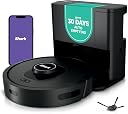


| ASIN | B09H8CWFNK |
| Battery Life | 120 minutes |
| Battery Type | Lithium Ion |
| Best Sellers Rank | #94 in Home & Kitchen ( See Top 100 in Home & Kitchen ) #1 in Robotic Vacuums |
| Brand | Shark |
| Brand Name | Shark |
| Capacity | 0.09 liters |
| Color | Dark Grey |
| Compatible Devices | Amazon Alexa, Google Home |
| Control Method | Voice |
| Controller Type | App Control |
| Customer Reviews | 4.0 out of 5 stars 41,684 Reviews |
| Filter Type | Foam |
| Form Factor | Robotic |
| Global Trade Identification Number | 10622356585757 |
| Included Components | Filter, HEPA Self-Empty Base, Shark AI Robot, Side Brush |
| Indoor Outdoor Usage | Indoor |
| Item Dimensions L x W x H | 13.7"L x 13.7"W x 4.1"H |
| Item Type Name | Shark AV2501S AI Robot Vacuum with HEPA Self-Empty Base, Bagless, 30-Day Capacity, LIDAR Navigation, Perfect for Pet Hair, Compatible with Alexa, Wi-Fi Connected, Dark Grey |
| Item Weight | 14.4 pounds |
| Manufacturer | SharkNinja |
| Manufacturer Part Number | AV2501S |
| Manufacturer Warranty Description | 1 year limited warranty. |
| Model Name | AI Ultra |
| Model Number | AV2501S |
| Number of Items | 1 |
| Number of Packs | 1 |
| Number of Speeds | 1 |
| Number of Wheels | 2 |
| Other Special Features of the Product | Bagless, Pet Hair Pick Up, Self-Cleaning Brushroll, Self-Emptying |
| Power Source | Battery Powered |
| Product Dimensions | 13.7"L x 13.7"W x 4.1"H |
| Recommended Uses For Product | Regular home cleaning, Pet hair cleaning |
| Special Feature | Bagless, Pet Hair Pick Up, Self-Cleaning Brushroll, Self-Emptying |
| Style Name | Matrix Dry Auto Empty (30 days) |
| Surface Recommendation | Carpets & Hard Floors |
| UPC | 622356585750 |
| Voltage | 120 volts |
M**A
Dog Owners Battling Mountains of Dog Hair........BUY THIS ONE
I wanted to wait a bit before I gave a review. I've owned this model Shark robot vacuum for about two months now. Before buying this I had a Eufy robot vacuum, specifically targeted towards pet owners. We have two very hairy beasts living with us. The biggest hair offender is a golden retriever/shepherd mix, 85 pounds, probably 80 pounds of hair, but the looks of my floor. The other is a shepherd/sheltie mix, just a tad less hairy, but not by much. We have a mix of hardwood, and a little tile, and many islands of runner rugs, for the oldest dog's stability. I bought the EUFY robot vacuum because it said it was specifically for dog hair and had a cutter for the roller, so it doesn't get all jammed up. It was easy to set up and set up mapping. The interface with the app was good. The cutter worked for about the first 9 months, then I was cutting the hair off the roller. That is the biggest issue with that vacuum for me. The hair would get wound up in the ends of the roller brush and I would meticulously pull everything apart that I could to clear the hair. Many times I replaced the entire roller, and not many weeks later, I'd get an error message saying roller brush was stuck. I bought the off brand, and I bought the Eufy replacements and neither seemed to be better than the other. I needed something that didn't take daily maintenance. I didn't want to buy the same thing, knowing the outcome, but nothing else was advertised for dog hair specifically. I crossed my fingers and bought this Shark. I'm kicking myself for not doing it sooner!! My two favorite things about this are that the roller is not longer an issue. This roller comes off easily, the cap comes off one end so you can clear the hair, the other it comes off in one nice clump- no issues at all. I also love that the dust bin is not a bag you have to replace, but just a container that easily comes off and you toss the contents. The replacement parts don't even require a tool for the side brush. only using it two months, nothing has been replaced yet, but the weekly upkeep is very easy. It's doing a good job with cleaning. I think it's best used on hard surfaces, it's fair for the rug runners, but honestly hair on carpet requires a bit more work for a deep clean. Also, this vacuum is much more quiet than the Eufy, thankfully. I think this is a very good option for anyone wanting a robot vacuum that battles loads of dog hair.
Z**A
Not perfect but better than me having to vacuum
First time with a robot vac. Did research and read all reviews, pros and cons and decided this was best for price. Ran for first time today and here are initial observations. Will update as I use it more. 1) this is not a plug and play item. I did have to spend time going around the house taping down extension cords, moving small items that can get knocked over, and marking where certain items of furniture are because apparently if an item moves from location it was at when robot mapped area it will get confused ( there were several reviews that mentioned that as an issue so I just went ahead and marked items that tend to be moved like a coffee table, and chairs (I used little pieces of a tape called “ gaffer tape” which is excellent because it holds well but doesn’t leave ANY residue when removed. Available on Amazon. 2) the model number used on amazon for this item is NOT the same as the model number on the robot, important because when calling tech support if you give this model # they don’t know what you’re talking about. 3) Had no problems setting up and connecting to wifi. 4) ran it on ECO mode because some of the reviews said it was better while it’s still mapping the house -will map it faster because battery lasts longer. I HAVE PETS therefore endless hair and debris and was impressed with suction at the ECO level which is the least strong suction setting. I Won’t try the other two modes until robot finished mapping. 5) there were a couple of areas where it got stuck but after a min or two it found its way out on its own, probably best not to help it unless it’s stuck for more time 6) it lasted 2 hrs and had to return to dock to empty itself twice (2nd time there was an issue described below. at times it seemed it wasn’t going to find its way back to dock but it did. 7) when it went through living room it missed area between sofa and coffee table, however, after doing the kitchen it went back to living room and found the missed area. 8) TWO BIG CONS: the previous model RV1000AE (apparently the one I bought is pretty new as of DEC 2020) has a SELF CLEANING BRUSH which is supposed to prevent long human hair wrap around the brush as was a feature I really wanted because this household has long haired humans , this model DOES NOT come with that. It has what they call a multi surface brush which is basically a regular bristle brush where my long hair got tangled and i had to tear, cut it off brush. Big bummer. ACCORDING to tech support one cannot buy the self cleaning brush to attach to this model. You would think Shark would make the bots so you could switch brushes if you wanted. Also, in the first 2 hr run an error message to empty the dust bin in the robot ( not the base) came up. While the bot and bristle brush did a great job of scraping the pet hair off the carpet, it bunched up in the dust bin and the base was not able to suck it up the 2nd time, I had to manually empty robot dust bin. Big bummer. 9) You need BOUNDARY STRIPS to keep bot out of areas you don’t want it. This model DOES NOT COME WITH THEM, whereas the previous model does. Chintzy move by Shark. OVERALL I am happy with it. I hope the problem with the dust bin clogging to the point of not self emptying will resolve itself after continuous use. I have both carpet and hardwood floors ( on which I have area rugs) and it has no problem transitioning from one to the other. Even though it’s not perfect I can now have a daily vacuuming of my house without me having to do it (I have a very bad back and knees and there is no way I could vacuum every day). As the bot is not finished mapping I haven’t tried any of the APP features-scheduling or picking a specific room to clean— I’m hoping the APP will work well because that was one of the major complaints I read in all the reviews.....the reviews I read were for the previous model because at time of purchase there was only one review for this model. As of now worth the money, it was on sale for $499 when I bought it. 12/25 update. On original review I had given it only 3 stars, now I give it 5. One of the CONS mentioned previously seems to have resolved, running it every day means less pet hair and debris so the dust bin on bot has not clogged again. still have to check brush for tangled human hair and rip/cut it off but I have to do that with normal vacs so I can live with it. Bot finished mapping house after 4.6 hrs of running ( a lot faster than what reviews had complained about). IMPORTANT, it is best to have the “CHARGE N RESUME feature on while mapping if big house, mine is 1900 sq ft, so it completes map faster. This feature does not mean the bot will re start vacuuming after it charges, it just means it will resume in area where it stopped. Final floor plan was pretty darn accurate (lot of negative reviews about the mapping being inaccurate), also found it relatively easy to create rooms. Have an iPhone 11, don’t know if type of phone was the issue for those who complained about difficulty with the feature. I do wish there was an option to create CUSTOM room labels. When creating rooms I found it’s best to zoom the floor plan when creating room lines, otherwise the named room may not correspond exactly to the actual room. This feature is a must because bot only completes 80% of house on ONE charge, then have to wait 3 hrs, so if u don’t want to wait that long to get a specific room done ....... The actual run time on ECO mode is approx 1hr40mins not 2 as previously stated, and the charge time is approx 3 hrs. The dust bin gets emptied at least once during that time. Many times bot seems to be lost- it will do 1/2 living room then go to bedroom then go back to missed area in living.. not a big deal as it gets it done. BOUNDARY STRIPS- don’t know yet if the NO GO ZONE feature in APP can replace the use of strips- for big areas maybe, but I have strips around pet water bowl and I don’t think I can make that a no go zone so I don’t have to have the strips. Will experiment with that feature as I’m not thrilled about having boundary strips in certain areas. My silly dog was initially scared of the strips and wouldn’t walk over them to get to her bed. Dog doesn’t love the bot she’s a scaredy-cat so she goes outside when in use... it only took the cat 2 runs of bot before she realized it’s harmless... hope to see her riding it some day :-) .... I am still impressed about the amount of stuff this thing is sucking up on ECO mode, and it is not overly noisy.I can only assume the other 2 modes are suction beasts but probably a lot noisier and drain battery faster. Though not perfect, if one is willing to spend the time for set up and understanding it’s quirks, it is definitely worth the $$$ ...I’m very happy.
C**S
UPDATED -- app only gets worse and ruins an otherwise good product
UPDATE 9/27/2024 AFTER ~2 MONTHS OF USE As a vacuum I continue to love this device. It's app enrages me more every single day and I'm about to simply put it in the attic because without the app it becomes increasingly useless; I wish I could take away more stars this app is so bad. I'm hoping SharkNinja cares enough to read these reviews and actually takes action, otherwise they may go the way of Sonos with their horrible app decisions. This isn't 2005 when iRobot could do stupid things and get away with it because there was no competition. While I'm not one to throw money away, I will replace this with something else that actually works and doesn't need an app to do simple scheduled cleaning runs. I could give two hoots about whether it has a "map" at this point, just clean the doggone floor -- do the basic thing you claim to be able to do and do it well. Is that so hard? I'm guessing they don't care given they can't seem to do simple things like when I log into their website with exactly the same credentials I use in the app, it doesn't show my registered products, or when I scan the QR code in the app to store the Model and S/N it can't store it for more than about 5 minutes before it literally just disappears. If you can't do simple things, complex ones are probably out of reach. The system has some kind of serious software bug in it related to map storage. I work for a software company, and all the signs are present that there is a significant problem with the storage system for maps and/or the communication between the app and the robot relating to the map. I say this because our robot just lost its map one day about a month ago. No errors, no problems running, it just literally disappeared. The schedule continued to run, so I didn't notice it until I looked at the cleaning notification one day and noticed that it was reporting a run time of almost 2 hours (which sounded about right) but a 0 ft squared cleaned. It sure made a lot of noise and picked up a lot of dirt for not cleaning any square footage of my first floor! When I dug into the app, the map was gone. Just not there. When going into settings to look at the map, I just get the infuriating purple spinner. No messages, no indicators of a problem, just a total lack of communication about what is going on and no map. So I set about the task of trying to correct the problem. First, I delete the map and go to try and re-explore. It seems to delete, and it will run an exploration run, but then it just sits with that obnoxious purple spinner and the question about whether the map represents the home properly or should it re-explore, with the Accept button greyed out and NO OTHER OPTIONS AVAILABLE. I've re-explored 20 times and left it sitting on that screen overnight for 8 hours with it never finishing. Ever. And this is why it's about to become trash!!! Without running the explore successfully, you can't set the schedule! You can't run a manual cleaning run with the app! If I wanted a vacuum I had to physically go push the button on, I could have bought something a heck of a lot less expensive (which is what I'm likely to do at this point). SO then I thought, like most technology of this sort, it might just need a complete fresh start. Stuff happens, memory gets corrupted and needs wiped, no problem. So I deleted the robot from the app and had to go through the mind-numbing and excruciating process of re-joining to my post 1995 WiFi network which is too fancy and elaborate with its new-fangled 5GHz technology for these developers to figure out (or Shark is too cheap and obsessed with profits to use a more modern WiFi SoC). Go through that process and run the explore another 10 times with no change. Then I reset to supposedly factory settings. Same result. Same absolute rage-inducing nonsense getting it to connect to the WiFi (though I think I finally figured out the trick on that). I am not convinced it actually DOES reset to factory settings or wipes the memory clean, because I'm continuing to have the same problem. Exploration simply will not finish successfully and so I can't schedule or make it clean without having to go under the table and push the button. Total ridiculousness. A factory reset should restore a copy of the firmware as it was when it came out of the factory -- and mapping worked out of the box. Now it doesn't. I am left with the conclusion the reset does NOT actually reset the memory. This is just infuriating. Oh, and before you say "contact support". I have. Crickets and bullfrogs, ladies and gentlemen. So far, crickets and bullfrogs. If that changes, I'll post a new update, though. Message to SharkNinja -- when you released an app, you became a software company. That has certain requirements and sets certain expectations. You are FAILING to meet any of them. +++ HOW TO DEAL WITH MODERN WIFI AND THIS RIDICULOUS TWELVE CENT WIFI CHIP +++ The key to making this work is whether your phone is trying to access the Internet or any from anything other than the same 2.4GHz connection this unit is using. So what I have to do: 1. Log into Eero and turn of 5GHz (on my version this is under troubleshooting; nearly every mesh single-SSID system has a mechanism to temporarily disable 5GHz b/c this cheapness is so prevalent in so many devices) 2. Turn WiFi off on phone and leave off for a couple of minutes (this is a precaution to make sure 5GHz is truly not picking up the connection) 3. Turn mobile data off on my phone (airplane mode didn't cut it 2 out of 3 times; turning off mobile data always worked) 4. Turn WiFi back on and make sure Bluetooth is on; if you tried airplane mode and left bluetooth off and don't turn it back on again until the app prompts you, you're hosed and will have to start over from the beginning - I experienced this multiple times 5. Put robot into discovery mode 6. Connect to the robot and go through the unnecessarily plentiful prompts full of stupid and useless information in the "wizard" 7. When you get to the network selection screen, your WiFi network SSID should show up --- if it doesn't, one more thing to do is go into your phone WiFi settings and join your 2.4GHz network (keeping the Shark app in the background), which will disconnect you from the WiFi Direct connection with the robot; let it connect fully; then go disconnect from your access point and reconnect to the robot WiFi Direct AP in your phone settings. 1 out of 3 times I had to initiate that re-connection, which I'm guessing is due to some sort of timeout happening, but I'm not sure. ***** PREVIOUS REVIEW ***** I got a previous version of this vacuum robot for my wife's business space and was super impressed with it. It didn't really NEED me to use WiFi and the app to make it work, and wow, she knew the floors were dirty, but not THAT dirty. It's done really well for her in the couple of months she's had it. Come Prime Day 2024, I figured I'd pick something up for the house. Our Jack Russell terrier is getting older and shedding like a monster, and I abhor dog hair, so having something that could help us keep up with that was desirable. Having been an early adopter of the Roomba back in the day, the one thing I abhorred and has kept me from a robot vacuum since going through 2 or 3 early versions was emptying the anemic dust bins on these things. The self emptying on my wife's has been awesome and I was looking at this to be even better because AI, right? Well, yeah, not so much. As a physical vacuum, the unit cleans pretty well. I don't have any real complaints there, and the self-emptying is nice and has worked well so far. LOTS of dog hair in that bin. More than I realized was present, actually. Gross. But it is hands-free to empty which is pretty awesome. So it does clean (perhaps) even better than I expected. This unit leaves me utterly disappointed in the app and it's supposed AI, however. The intelligence is pretty artificial from what I can tell, and not in a good way. Getting the system to map the house took three tries before it decided it actually did need to go into the big 20 square foot, devoid of any furniture, people or other obstructions area in my mud room. It did finally map the full space, and shows the area to be roughly 900 feet. By my calculations that's roughly right, and the map is pretty close in its shape, though there is a big blob in one of the rooms I still don't quite think aligns to reality. But it's close enough, and the vacuum will still go into the area represented by the blob, so I'm not really sure what that's about. I guess I could be misinterpreting the display, after all I don't have Artificial Intelligence, I just have my brain. Where the app falls utterly short, though is there is no true practical use of the intelligence the system has built about the area. It has a map, but can't really use it in a meaningful way! The value of a robot vacuum isn't to make a bunch of racket while running around a specific room while I'm entertaining or trying to watch a movie. The value proposition of a vacuum robot is to automate tasks I don't want to do on my own. Like scheduling a cleaning job in a specific room at one time, and scheduling another cleaning job in another room during another time window. Being able to send the robot to a specific room ad hoc isn't in the top 5 basic requirements I would post for a system like this. Top 10, maybe? But not before actual honest-to-goodness helpful AUTOMATION. But Shark has not deemed the utilization of the map with the schedule to be an important feature for their app. It's an FAQ as to whether you CAN do that, so it isn't like they don't KNOW people want this capability. And multi-point scheduling is something that vacuum robots have been able to do for years (iRobot's app can do this for most models now, for instance, as can other brands). Multi-point scheduling is such a simple app task at this point there are libraries available for plugging that kind of function into a mobile app. Come on, Shark, you aren't in the least bit intelligent if you can't actually use the intelligence to do something useful!!! THIS IS SHAMEFUL and speaks to a complete lack of either 1) understanding your customer use cases or 2) caring enough about your customer to do something besides put your shortcomings into an FAQ. SO you can't schedule the vacuum to work on specific rooms it has mapped out at specific times, scheduled cleaning is an all or nothing thing. BUT, if you enable a no-go zone to try and, say, keep the dogs from being too overly disturbed during the all or nothing scheduled cleaning, that area is now apparently a black hole singularity for the vacuum and can never be gone into again as long as the circuits of the poor little creature draw power. Unless you of course go to the pain of deleting the no-go zone to get it spot cleaned, and then have to work with the app to maybe successfully recreate it. The creation of rooms and no-go zones has been a spotty and painful action within the app. Sometimes it works, sometimes it hasn't. I've had to go so far as to reboot my phone to get the "resizer" of a no-go zone to resize or move around on the map and the app acknowledge and save it properly. I'm done recreating the zones and will just sweep those from now on, I'm so fed up with it. The fact that you can't override these zones for a spot clean, is again a sign of either complete development laziness or incompetence. It's a simple matter of a question -- "you've asked to spot clean this area, would you like to override the no-go zone for this session" and then let the little guy run wild in his heretofore restricted space. It's AI, after all, not just common human intelligence we're working with here!! The reason that the all or nothing approach to scheduled jobs sucks so bad is that this thing is LOUD. My wife's unit is not loud like this one (I'm guessing the 'superior' AI brain of this model must be making the loud clacking sound on our home model, but I'm not sure). From the first run taking it out of the box, it has made a terribly loud clacking sound as it runs around picking up dirt. I've looked at all the troubleshooting steps and the brush isn't clogged, there's nothing stuck in it, and it is firmly in place like it should be, but it definitely seems as if the bristles or the little blue sweeper stripes are hitting the cross bar of the guard hard enough to make an obnoxious sound. I know it's brush bar related, because when the super brain was running around the house for three hours mapping things, it was actually relatively quiet -- enough so that if that's how it was when doing its job, I'd have no other problems; alas that's not the case. SO, when you're trying to get that scheduled all or nothing cleaning done overnight, and the kids are downstairs in the basement trying to sleep, all they hear is a thwack-thwack-thwack-thwack-thwack sound as it runs around the first floor. And since it seems ~900 square feet of space is too much for the system to do on a full charge, it starts doing that thwack-thwack-thwack thing at 3am after it has returned to the dock and recharged. I do really like the "return to recharge" and "return to empty" features, don't get me wrong they're awesome, but with all the racket and the all or nothing approach, I can't get the whole first floor vacuumed and the kids a full night's sleep. It's rather sad (first world problem, I know, I know, I should put brooms in the kids hands -- we do that too!) but for what you pay for this device (even on Prime Day) that claims to have an AI engine at play in its favor, I expect more. And just to be clear, this isn't a house that's filthy with layers of dirt all over the floor by the time the little dude gets going. We swiffer and sweep throughout the day to clean up spot messes and we're not living on a farm or something where we're tracking in mud three inches deep a day. There's kid chaff and some dog chaff around, but this isn't a "heavy" mess we're dealing with on a daily basis. While I don't love the unit, it does appear to me that proper app development and updates would resolve the problems I have (outside of the noise). I could work around the noise with more powerful intelligence brought to the scheduling, though, so I'm hopeful they'll put the work in and resolve the shortcomings. If that happens, stars could easily be added to the review.
N**.
Nice robot vacuum! Shorter battery life but picks up all messes!
I bought is vacuum as an upgrade for our original shark vacuum. It cleans both my rugs and hard wood floors and does great cleaning up any messes! I would say its compatible with wood or low to mid high rugs. It may have some trouble with denser rugs or fluffy ones to get up all the dirt. It performs amazing when it comes to daily cleaning and ensuring there isnt any dirt on my floors. When it comes to coverage, you can customize this in the shark app. There is even an option to spot clean if you just want a mess vacuumed up! It is fairly easy to use as long as you are okay having an app. I enjoy using it and not having to vacuum myself daily! For the money, I feel its best to get this when it goes on sale. I personally would not buy this full price. I will also note the battery life is short and does not last as long as I would like. Its able to do most of my house but sometimes has a room left before it taps out and has to charge again.
J**C
Shark AI Vacuum
I'm in love. I'm an older lady who doesn't find moving as easy as I used to. I got new carpet and got this as something that could do something I was finding it hard to do anymore. This vaccum gets almost everything off of the floor. It knows my house perfectly. It has mapped it well. It makes perfect lines in my carpet. It looks beautiful every time it's finished. I couldn't have spent my money in a better way! There are 2 minor problems, which I've been able to overcome. First I don't think it cleans quite as deep as an old fashioned vacuum. I go over it with the big vacuum about once a month just to make sure it's done the way I like it. The second is that every so often it does get stuck. Not a problem. You bust go retrieve it. I know where it happens now in my house so I try to block it. All in all I'd give it an A+ and if it broke I'd go get another one.
B**N
All around great robot vacuum
TL;DR: This robot vacuum is awesome and worth every penny. Highly recommend this vacuum to everyone, my wife agrees! Happy wife, happy life! Might buy another for my upstairs. For a robot vacuum, it does what I expect and makes my life easier. I don't make it pick up large debris, robot vacuums seem to perform best with small debris. Large debris may get stuck or caught. Lidar works phenomenal, but with some hiccups when mapping house (mostly human error). Routing around obstacles works well, slows around objects and if anything is bumped it's so light and cushioned, it's not a problem. 5 stars overall. 4 stars deep cleaning and suction leaving room for improvement, it's a robot vacuum, what do you expect? Probably has Alexa integration, but I use Google assistant and it works great! --- I ordered this back in July 2022 and got it end of the month. I waited some time to let the excitement die a little before posting a review, but it never really did. This is my first robot vacuum and one of the best purchase decisions I have made this year. When researching for the right robot vacuum, I found that most of the highly rated vacuums don't seem to make it past 6 months or a year when reading reviews. Also manufacturers seems to make new models every year, so finding something that is reliable and lasts longer than this timeframe is hard to find. Of course, I am only onto my 5th month of owning this vacuum. When I broke the vacuum out of the box, my first inclination was to take it out and get it started. But thinking about the other reviews I have read on this vacuum and others like it, I wanted to read the instructions first. This is not a regular vacuum that you plug in and push. It has lots of little parts that make it different and potentially not taking care of it properly could damage the device. So anybody reading this, read the instructions first. Understand how to properly take care of it and clean it. Also, comparing to other reviews, clean it regularly. Now for my somewhat long review: Is it quiet? Yes and no. It is a robot vacuum, how loud do you expect it to be? You're not doing the work, but it is. It is quieter than a regular vacuum, but no idea how quiet other robot vacuums are. If a robot vacuum is loud or quiet, who cares? What matters is that it can clean stuff. Can you watch tv while it runs? Yes you can watch tv. Just turn up the volume a little, no need to blast it like when running a normal push vacuum. Can it pick up everything? No, it's a robot vacuum. Don't put too much trust in it. What I typically do is remove all obstacles (cords, bags, blankets) from the ground and any larger debris that might get caught in the motors (cotton balls left from the dog, pieces left behind from chewed up toys, strings from rope toys). Dog hair? My dog constantly sheds, but has short hair. I run it twice per week on thin carpet and once per week on hard floors. I don't notice the dog hair until I see what the vacuum picked up and it does a great job! The majority of stuff this picks up is dog hair and a lot of it. For longer haired dogs or thicker haired dogs, I assume this will get the job done as long human hair doesn't get stuck at all like my regular vacuum does. Small leaves? It picks up small leaves and debris similar size, but may leaf some behind. It also might get caught in spinning brushes and make a slightly louder noise on hard floor. I waited for it to finish and then pulled the leaf out, no harm. Dog kibble? Ok this one was an accident, didn't see it against the brown colored floor before starting vacuum. Sounded like the robot was choking and about to die, literally. I had to stop it right away and retrieve the small rock sized (width of thumbnail) dog food from the vacuum. Can you run it when away from home? I read too many horror stories of vacuums cleaning pet poop, but it is not the reason I don't start it when I'm not home. Like the last two points, if something gets caught, you need to be there to fish it out. I may have spot checked the floor, but even that sometimes isn't good enough. Also, one time a week or two ago, it finally got confused and couldn't move past a futon leg. It kept spinning back and forth (maybe for 5 minutes) until I nudged the futon half an inch, then it broke free of its endless loop. This was the only time this ever happened since I got it. Every other time it does an excellent job of finding its way through, even finding its way through a jungle of table and chair legs. Lidar mapping floorplan? Simply amazing! I had it map 4 different rooms. The first time was great, but missed a few minor areas, of which was my fault. I left things on the floor and in the way of the robot when it mapped the floorplan. The second time, I removed the obstacles, but it didn't map another room properly. The third time, I removed a chair, which the robot vacuum had just enough clearance to fit under (1st time it went under, 2nd time it did not), so that it can map that area of the carpet and not count it as a wall. Lidar in general? It works great to avoid obstacles and get around legs of any sort. Only thing is if the leg is curved, like my kitchen table, it doesn't know when to properly maneuver around it. But no worries! The bumper is amazing! It lightly bumps in to obstacles and the vacuum does a minor adjustment to figure out how to go around it. Damaging furniture? Nope! Doesn't happen. The robot is so careful around obstacles and even when it does bump things, its lightly bumps it and doesn't scratch or anything. When it approaches obstacles (walls or furniture) it moves at a slower pace. This thing is intelligent. Suction? For a robot vacuum, it does everything it needs to and does it very well. There are different levels for suction in the app, I have only needed to use the normal section. The max suction I have never needed to use, but it is an option if things get too out of hand. There is also an ultra clean option, not tried it, but think it just spends more time going over stuff. If I ever try ultra clean option, maybe need to change deep clean star to a 5, but I'm making the assumption that it will never perform as well as a normal vacuum. Battery? I run two rooms per day I run it, but sometimes do all 4 rooms when I forget to run it. It lasts easily to finish all 4 rooms with charge left over. I'm guessing lowest percentage of battery life was 35% or 40% after doing all 4, this is a wild guess though, could've been higher. For 2 rooms it's usually at 60% after it's done, that I know for sure. Emptying? It has a bin that it empties to. If the robot either runs for too long (or not sure if it senses if it is full of junk) it may return to the docking station to empty itself. This system works great, but the bin needs to be cleaned out occasionally. There is also a filter in the bin system that needs to be cleaned, just like regular vacuums may have. App? No issues running it on my Android. Can select rooms and see the layout easily. Drawing rooms works great as well! Robotiness? It makes all the noises a robot vacuum should and it's awesome! Just thought you should know! Beep boop boop! Ratings: I give it 5 stars because as it is a robot vacuum, it meets all of my expectations. 4 stars on deep cleaning and suction because it isn't perfect, but is excellent as a robot vacuum. I haven't used my regular vacuum in the areas that this one runs because it seems to do such a great job. Integration with Google works great! I don't use Alexa with this one. Again, this is one of the best purchases I made this year. Definitely recommend this vacuum to everyone. Don't spend $1k on something else.
J**A
A full and complete review of a Shark robot vacuum that I've actually used and put to the test!!!
PLEASE READ MY FULL REVIEW!!! I will not be attaching photo evidence of my review, for reasons that will become clearly understood once you've read this review to completion. I highly recommend you read all other reviews for a well rounded understanding, but here is a review of 1 whole month worth of use, not just a review of anticipation of happiness after two days of ownership... While the benefits of having something effectively clean your floors for you is the best feeling ever for busy households, this Shark is extremely efficient! Excellent suction power, mapping is more effective than the last Shark I had, and does great with thin rugs used for mud and gravel, and keeps up with 3 active crazy dogs. Although it is much noisier than any other model to my knowledge, it's because the suction of the robot and the emptying of it's bin into the charging dock is worth it. The description of this Shark advertises that it scans it's surroundings so it does not run over dog mess, cords, etc. Coming from a month of experiences, I can tell you that is a lie!!! I threw my last Shark away because after having 2 separate incidents of running through dog mess and spreading it ALL OVER the house, it was a lost cause. I was highly anticipating having the newest latest and greatest in the Shark line of robot vacuums, and became instantly attracted to this very specific feature. It is taller than the last robot, which now does not clean underneath our elevated couch and a few other items of furniture. Not a big deal. I understand that with this new feature, some things must be sacrificed. The scanner on top should be worth the few areas I'll need to clean under, right!?! Negative ghost rider. In the instructions, it does state to make sure that all rooms are lit up to help aid in the scanners ability to see it's surroundings and adjust accordingly. In the middle of the afternoon, if it's not bright enough in the house, I can't help it any. The following incident is the third straw that has about broke the camels back. The puppy left a present in the hallway, of which no one noticed until late the following evening, well after the incident occurred, smearing the contents literally over the house!!! With technology, there will be issues. However, I strongly feel this is false advertisement. The horror stories of these robot vacuums and animal presents are very real and a clear and present danger....horror stories straight from Poe's library. Technology as a whole, I do not feel, is able to address this very real issue. Please DO NOT purchase this robot vacuum with hopes of avoiding this danger. Please plan your robots cleaning for later in the day after you've fully inspected all areas of your home for potential smear factors, as well as the most light penetrating every hidden corner where presents may be left... I AM happy with how well it cleans my rugs, all of which are area rugs and indoor/outdoor rugs, with dog hairs of all lengths and colors, and dirt and gravel woven all inside it. Also, with my husband and I both in construction, you can only imagine how dirty we get. I was lucky enough to get mine on a black Friday sale, which has eased the unhealthy level of anger I have inside me at this point in time, as I'm now on day two of a full deep clean/sanitize of all the floors in my home after said incident. In conclusion to this lengthy emotional heartfelt review.... I do feel like this Shark vacuum has overall performed very well. It cleans much better than my previous model and I absolutely love the self emptying feature, as I do not have to remember every single day to dump the bin. I can absolutely deal with the elevated level of noise, in exchange for a cleaner house. Just don't be mislead and let your guard down. For the risk of coming home to a house of horrors is not something I'd wish on my worst enemy. I don't often give reviews on products, but after my last 2 days of nauseating scrubbing and cleaning, I finally have a reason to contribute to the greater good. Hopefully somebody benefits from me venting and I've changed someone's life with my diserte. Knowledge is power. Enjoy the privilege of first world comforts of house cleaning robots, but just remember the dangers. No pictures necessary.... And rant over. Good day.
A**R
Overall very happy with this product.
My Usage and Overall Comments: ============================== Have had the Bot for 2-3 weeks now. Mostly used on 2nd floor (bedrooms/bathrooms/Loft area) which is 90% carpet. I mapped this floor only. Occasionally used on 1st floor, which is about 50% carpet. (Not mapped). Overall it seems to do a pretty good job, keeping in mind these Bot Vacs are not meant for DEEP cleaning carpets. Much quieter than my old Neato Botvac80! Cleans my 2nd floor on a single charge with BOOST cleaning, and recharging takes about 3 hours. Overall I feel it's a good Robot Vac, but wouldn't spend more than $300 for it. Floor Mapping Review: ============================== - My 2nd floor is about 1,000sq ft and it takes about 10-12 mins to map it. - It's not the greatest at mapping. It will sometimes take 2-3 "Explore" runs for it to get it right because it occasionally misses entire wall sections. - Adding/Changing/Removing Room Labels and No-Go Zones on the app is pretty easy. If you're older, it's easier to do it on a Tablet vs the phone. - I noticed that once it completes the entire cleaning run on the 2nd floor, it seems like it internally compares the results with the full map(??), and if it detects area's that it missed it will go back to them to clean them. When it does do that, it doesn't always clean them in the most efficient order, often running from one end of the house to the other to address these areas. I have also seen this behavior when tasked with cleaning a specific room. It's will sometimes bounce around in the room getting the spots it feels it missed. - There have been times where I've seen it do several clockwise/counter-clockwise spins in the same spot as if it's trying to decide where to go next. Sometimes these crazy spins can last 30-40 seconds. - So far no problems with it finding the Base Unit and Docking with it. - Mapping is only required if you need to specify No-Go Zones or want the ability to vac a specific room(s) so you CAN do like in my case, map the most commonly vacuumed floor (ie: 2nd floor) then manually initiate a cleaning for the 1st floor. (see more about mapping in my "CONS" section). Detailed Review: ============================== PROS: - It's fairly quiet. You can actually have a conversation standing next to it as it's cleaning. - Their SHARK CLEAN app is easy to use. Again, if you are older using it on a Tablet (larger screen0 will be a better experience. - The self-vacuuming / evacuation unit works well, typically removing 95% of the bot vac's contents. - So far have not had any issues with it getting stuck in a corner, going over room thresholds/transitions, etc. - Bump avoidance it pretty good as long as objects are high enough for the Lidar Sensor to see it. - No issues transitioning between carpet and hardwood/tile surfaces. - Although it may not take the most efficient paths on occasion, and sometimes re-cleans a section(s) 2-3 times during it's total run, it does appear to do a very through clean, cleaning all the places that it possibly can reach. - It does well respecting No-Go Zones. - Ledge detection works well also, but the fall-off is only detected after about 25% of the bot is hanging over the edge - depending on it's speed. It can be nerve wracking to watch near stairs!! - The Evacuate and Resume feature is nice to have. (After every 30 mins of cleaning, it will return to the Dock to empty its dust bin then return to clean where it left off. - The Do Not Disturb Schedule works well. - The No-Go Zones work well. - Although I have not had a need for it as of yet, I'm confident the Recharge and Resume feature will work fine. FYI: - Initial WiFi Setup: I did have an issue trying to pair the Bot with my phone. I think after I rebooted my phone it finally worked. - Annoying - if you remove the Bot's dust bin while it's ON, it will complain stating it's dust bin needs to be replaced. - The foam roll filter in the Docking station gets VERY dirty real fast and needs to be cleaned every 2-3 runs. It's easy to clean, just tap over a garbage can to get the bulk off, then slide off the foam roll from it's base and rinse in a sink. Let dry completely before returning to docking station. - The Evacuation system will engage EVERY TIME you return the Bot to the dock. So if you pull the Bot off just to check the roller, as soon as you re-dock it, the evacuation system will turn on. - The Evacuation system is as loud as a typical upright vacuum, so keep that in mind when deciding on a location for it!!! - I have not tried the SCHEDULED Cleaning at all. I personally prefer to manually initiate when/where I want it to clean. CONS: - I was not able to Register the Bot via the app - kept saying "Something went wrong". Had to do it online. - The app could use some improvements/updating, like showing the current location of the BOT and what it's cleaned so far as it's running, estimated time of completion, etc. - Deleting your map when you want to do a "Re-explore" (ie: Re-Map) can take a minute or two to complete. - "Matrix" cleaning can only be performed on one room at a time. So if you have 3 kids bedrooms you want to Matrix clean you have to select one, do the cleaning, then send it out again to do the Matrix cleaning on the 2nd bedroom, etc. You might be able to work around this by setting up 3 Scheduled cleanings(??), one for each room. - The Mapping system could be MUCH better. I can understand it not mapping a shoe on the floor, but missing an entire 10-FOOT WALL SECTION??? Would be nice to have Multi-Floor/Level mapping also. - I've run into an occasional issue where after doing a manual cleaning (via press of the CLEAN button) on the 1st floor (not mapped), then using the app to vac a specific room on the 2nd floor (mapped), it will clean the room, but then starts re-cleaning the last 3-foot section over-and-over until I manually stop it. Others also have reported odd issues jumping between "Mapped" cleaning and "non-Mapped" cleaning areas. The fix for me was to delete my map and have the bot do a re-explore to build it again (and hope it does it correctly on the 1st pass). If this issue continues, I'm toying with the idea of not doing any mapping at all and just letting the Bot figure it out as it goes regardless of the floor it's on. I'll loose the No-Go Zones and Specific Room Clean functions and it will likely take longer to run, but it might be worth it until the Mapping Logic is improved. CUSTOMER SUPPORT: ============================== I did reach out to them when I had the "re-cleaning the same 3-foot section" issue after bouncing between a Mapped and Un-Mapped floor. This was during Black Friday weekend, and I only waited 5-10 minutes to speak with someone. They were OK, some easier to understand than others. I was eventually connected with one of their Technical Support staff and had to re-explain the issue. He asked if I could run the cleaning session again (I was fine with that) and he wanted to video record the Bot in action, so he sent me a link for the video connection. I was unable to get that working (Android phone issue??). He asked me to re-explain the issue to him again, and we got into a brief disagreement about how the MATRIX CLEAN function worked - he claimed that was only for "Spot cleaning", which I told him was NOT true. He finally suggested I delete my floor map and re-run another mapping session then try to replicate the problem again. I was assigned a Ticket# to reference when I called them back with my findings. After re-doing the mapping, I haven't been able to replicate the problem yet, and I'm leaning towards assuming the Bot works best with Mapped areas only, and jumping between Mapped/Non-Mapped floors is not 100% supported (???)
C**A
A pet owner must!
This has been a house saver! Our labsky and long haired kitty were driving me wild with the amount of cleaning I had to do with all the hair. This has reduced the workload and I'm so grateful we invested in one. We unload it everyday because of all the hair and stuff it picks up. It runs on time and love doing it first thing when I get up to keep an eye on it. The only con is it gets stuck on our screen door track, but problem solved by closing it. It will get caught in clothes and towels left on the floor, so run it only when your floors are clear of that. 200$ sounds like a lot, but it has paid for it self with saving me time, energy and stress over cleaning. Put it in your cart and buy it if you want something to help you maintain cleanliness without the headache.
S**E
Dificil conexão com o app
Demorei mais de 4 horas tentando conectar ele no wi fi, realmente muito dificil e pelo que vi muitas pessoas tem o mesmo problema. O app não está disponível em todas as regiões então vc tem que ter conta na loja de uma região que tenha o app e para quem fez a compra internacional na amazon, ao abrir o app vc precisa selecionar a região que comprou o robo e não região que vai usar.
H**B
Worst Product Ever!
1- Does not work in the UAE as an app (need to download an apk) 2- after working for 2 days - it broke - does not self empty 3- Suction power and maintenance is bad. Do not waste ur money. other options are better i got the Roborock Q7 max and is wayyyyyy better and is supported.
A**F
Keeps breaking down and refund problems
This device kept breaking down and the company keeps stalling on my refund. Its been 2months since its been picked up But STILL they have not refunded me.
C**Z
DEBORADORA
Gran product de limpieza
Trustpilot
2 months ago
1 day ago