Description
⌨️ Unlock learning with every colorful keystroke!
- BUILT TO LAST - Splash-proof polymer casing ensures durability against spills and rough handling—because learning should never stop.
- INCLUSIVE DESIGN - Specifically crafted to support children and users with impaired sight or special needs, making tech accessible for all.
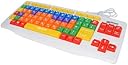
- BIG BOLD BRIGHT - Extra-large keys designed for easy identification and comfortable typing, perfect for kids and special needs users.
- COLOR CODED LEARNING - Vowels, consonants, numbers, and function keys are distinctly color-coded to accelerate recognition and boost confidence.
- PLUG PLAY SIMPLICITY - USB-powered with no batteries required, compatible with Windows 10 and PC platforms for instant use.
The Playlearn Children's Special Needs Computer USB Keyboard features large, double-sized keys with clear uppercase and lowercase letters, enhanced by vibrant color coding to differentiate vowels, consonants, numbers, and function keys. Designed for children and users with impaired sight or special needs, it offers a splash-proof, durable polymer casing to withstand spills and rough use. USB-powered and compatible with Windows 10 PCs, this keyboard combines educational support with robust build quality to make computer learning accessible and fun.