Buy anything from 5,000+ international stores. One checkout price. No surprise fees. Join 2M+ shoppers on Desertcart.
Desertcart purchases this item on your behalf and handles shipping, customs, and support to South Africa.
🚀 Mesh your way to flawless WiFi — because buffering is so last decade.
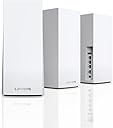
The Linksys Velop MX12600 AX4200 3-Pack is a premium WiFi 6 mesh system designed to deliver ultra-fast 4.2Gbps speeds and expansive coverage up to 830 m². Ideal for busy homes and home offices, it supports over 120 devices simultaneously with intelligent mesh technology that eliminates dead zones. Easy app-based setup, robust parental controls, and advanced security features including WPA2 and HomeKit integration make it a future-proof networking solution backed by a 3-year warranty.
| ASIN | B08WYCP4TZ |
| Antenna Location | Home |
| Antenna Type | Internal |
| Best Sellers Rank | #71,742 in Computers ( See Top 100 in Computers ) #1,118 in Routers |
| Brand | Linksys |
| Built-In Media | 1 year technical support, Linksys Velop MX12600 AX4200 3 Pack Mesh |
| Color | White |
| Compatible Devices | Laptop, Smartphone, Tablet |
| Connectivity Protocol | Wi-Fi |
| Connectivity Technology | Wi-Fi |
| Control Method | App |
| Controller Type | App Control |
| Coverage | 830 m² |
| Customer Reviews | 4.2 4.2 out of 5 stars (231) |
| Data Transfer Rate | 2400 Megabits Per Second |
| EU Spare Part Availability Duration | 3 Years |
| Frequency | 5 GHz |
| Frequency Band Class | Tri-Band |
| Global Trade Identification Number | 04260184672035 |
| Has Internet Connectivity | Yes |
| Has Security Updates | Yes |
| Is Modem Compatible | Yes |
| Item Dimensions L x W x H | 11.4L x 11.4W x 24.4H centimeters |
| Item Type Name | Wireless LAN Access Points |
| Item Weight | 2.83 Kilograms |
| LAN Port Bandwidth | 1000 megabits_per_second |
| Manufacturer | Linksys |
| Maximum Upstream Data Transfer Rate | 2100 Megabits Per Second |
| Mfr Part Number | MX12600-EU |
| Model Name | MX12600 |
| Model Number | MX12600-EU |
| Number of Antennas | 6 |
| Number of Ports | 5 |
| Operating System | RouterOS |
| Other Special Features of the Product | Parental Control |
| RAM Memory Installed | 32 MB |
| Router Firewall Security Level | High |
| Router Network Type | Mesh |
| Security Protocol | WPA3 |
| UPC | 745883821228 |
| Wi-Fi Generation | Wi-Fi 6 |
| Wireless Compability | 802.11ac, 802.11ax |
H**H
DO NOT BUY! I have quite a decent sized apartment, the modem is placed in the living room and behind it in parallel there are the bathroom and guest bathroom and then the 3 bedrooms right after the bathrooms, my biggest issue is that there is no outlets between the bedrooms and living room, so I placed the first mesh next to the modem and the other 2 in the bedrooms to create a Y shape, it worked perfectly I had around 500 mbps in the furthest room which was a blessing, then I proceeded to update the firmware, and everything came crashing down my lovely 500 has officially become a 7 mbps, my internet speed is around 1gbps, I get around 900 mbps to my modem. With no clue why I kept moving the nodes around hoping to fix the issue, nothing. I had to buy 30 euros worth of cables and extensions since I have an outlet issue to move the parent node closer, and finally it worked again perfectly having a lovely 890 mbps peak in the furthest bedroom. Then it all came crashing down again, with the furthest node even with a -59 dbm connection signal, kept dropping the connection. I decided to do a small test I disconnected all nodes, execpt for the parent, sat right on top of it and got a speed of 700-ish which I was okay with a 200 mbps difference we'll blame it on wifi signal. I then moved to the dining table which is in the same room behind a flipping couch and I dropped down to 300 mbps. TLDR, signal is extremely extremely fragile, a gust of wind could drop your connection, highly unstable, no debugging, diagnostic makes no sense, a toddler has more knowledge than the linksys support, all their guides tells you "restart", I had already factory resetted disabled the HK apple integration because apparently that is extremely buggy and yet nothing changed I'd recommend the TPLINK deco xe75, 100ish difference but a much better investment.
S**1
Ich bin sehr zufrieden. Habe bis jetzt keine Probleme festgestellt. Sehr gut ist auch, dass es keinen Unterschied zwischen Router und Node gibt. Nodes können auch über Kabel angebunden werden, dafür wird dann der Internetanschluss verwendet. Der MAC Adressen Filter gilt nur für WLAN und ist auf ca. 32 Einträge begrenzt. Was mich etwas stört ist, dass für die Kopplung eine App notwendig ist und das nicht über das Webinterface funktioniert. Auch störend: Die App am iPad kann nicht im Querformat verwendet werden.
S**S
Installé dans ma maison à plusieurs étages, finis les problèmes de portée du wifi ! Le plus: les ports ethernet et usb sur les bornes qui permettent de se connecter en filaire ou de connecter un disque dur standard pour qu il soit sur le réseau !
P**E
System does not come with Australian power adapters and you are unable to purchase the Aus adaptor clip through the seller, Linksys, or any other retailer. I had to buy new adaptors but the odd size/shape plug means the power cord falls out at the slightest touch. Recommend trying a different brand/seller.
K**Z
Prosta instalacja stabilne działanie - czyli dokładnie to czego się oczekuje od tego sprzętu. Mało informacji o minimalnych pokryciach w niesprzyjających warunkach (np. grube ściany, itp.), jedyny minus to powolna instalacja - aby uzyskać dobre efekty niestety trzeba to powtarzać, nie do końca też wiadomo co się dzieje w trakcie konfiguracji.
Trustpilot
1 week ago
2 weeks ago