Desertcart purchases this item on your behalf and handles shipping, customs, and support to South Africa.
โก Power Your Space with Next-Gen Wi-Fi 6 โ Stay Connected, Stay Ahead!
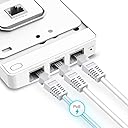
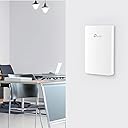
The TP-Link EAP615-Wall is a sleek, in-wall Wi-Fi 6 AX1800 access point designed for professional environments, delivering ultra-fast dual-band wireless speeds up to 1800 Mbps. Featuring 4 Gigabit Ethernet ports with PoE support, it enables flexible, clean installations while supporting dedicated private networks per room. Integrated with Omada SDN, it offers versatile network management options including cloud-based control via the Omada app, making it ideal for modern offices and hospitality settings seeking reliable, scalable connectivity.
| Antenna Location | Home |
| Antenna Type | Fixed |
| Asin | B09KYK1S9R |
| Best Sellers Rank | #14 in Computer Networking Wireless Access Points |
| Brand | TP-Link |
| Built In Media | AX1800 Wall Plate WiFi 6 Access Point EAP615-Wall, Installation Guide, Mounting Kits |
| Color | White |
| Compatible Devices | Laptop, PC |
| Connectivity Protocol | Wi-Fi, Ethernet |
| Connectivity Range | 538 square_feet |
| Connectivity Technology | Ethernet |
| Control Method | App, Remote |
| Controller Type | Switch |
| Coverage | 538 square feet |
| Customer Reviews | 4.6 4.6 out of 5 stars (382) 4.6 out of 5 stars |
| Data Transfer Rate | 1.8 gigabits_per_second |
| Frequency | 5 GHz |
| Frequency Band Class | Dual-Band |
| Item Type Name | Access Point |
| Item Weight | 0.2 kg |
| Lan Port Bandwidth | 1000 Mbps |
| Manufacturer | TP-Link |
| Maximum Upstream Data Transfer Rate | 1800 megabits_per_second |
| Mfr Part Number | EAP615-Wall |
| Model Name | EAP615-Wall |
| Model Number | EAP615-Wall |
| Number Of Antennas | 2 |
| Number Of Ports | 4 |
| Operating System | Linux |
| Other Special Features Of The Product | Access Point Mode, WPS |
| Ram Memory Installed | 256 MB |
| Router Network Type | Access Point |
| Security Protocol | WPS |
| Unit Count | 1 Count |
| Upc | 840030703607 |
| Voltage | 48 volts |
| Warranty Description | 5 Year Manufacturer |
| Wi Fi Generation | Wi-Fi 6 |
| Wireless Compability | 802.11ax |
User
great access point, great support, some critical flaws for guest networks
Great access point and range for indoor use. The white status LED is not too bright at night and the 3 ports on the bottom are great for connecting additional devices if needed. Easy to mount to a standard single-gang electrical/data box.This was installed as part of an Omada deployment for a campground guest WiFi network that was replacing aging/outdated Ubiquiti equipment. Coupled with outdoor WiFi 6 EAP610s, these indoor units were used in trailers and campers that had weak signal from the outdoor units. Overall, these are great APs for short range needs like single rooms and small areas and works just fine. However, there is an overall flaw with all Omada APs regarding guest networking that was confirmed by TP-Link engineers that is important to note.TP-Link Omada access points of any flavor do not support Layer 2 client isolation. Even with guest network settings applied in the controller (or on the AP itself if using standalone), Layer 2 communication between clients still works despite not being able to ping those devices or reach any kind of a webpage or open port. While the guest settings do block the above types of client access, multicast packets still flow freely and everywhere. As such, our guest campground network let anyone anywhere wirelessly cast their screen via AirPlay, Google Cast, or Miracast to anyone's unsuspecting smart TV without warning. That is a huge security issue not to mention asking for problems to occur, so unfortunately I was left no choice but to return all of the Omada units and return to Ubiquiti equipment.With that being said, if that is not an issue for you, they work great in any other environment that does not require L2 isolation. they boot up incredibly quick, offer good signal and speed, and overall are a great product for the price. After escalating this issue with support, I was eventually put in touch with their engineering team running diagnostics with them and submitting Wireshark logs to get to the root of the problem. They said it would be added to a list for future firmware development, but I cannot wait for that to happen. It was upsetting to leave TP-Link because I know for a fact I would not get this kind of support with Ubiquiti (part of the reason I was trying to leave that ecosystem), but I didn't have much choice.
User
Clean install and steady WiFi
This TP-Link EAP615-Wall has been a great access point for getting stronger WiFi exactly where I needed it. The in-wall design keeps everything looking clean instead of having another box sitting out, and the setup through Omada was straightforward. Connectivity has been steady, the signal strength is noticeably better in that part of the house, and phones and laptops stay connected without fuss. I also like having the extra features and security settings available without the interface feeling confusing. For the price, it feels like a really solid upgrade and it has been one of those purchases that just does its job quietly every day.
User
Work great
Easy setup. Strong signal. Omada controller manages them great.FYI: I ordered three, two were US version, one was Canada version. Unsure if there is any practical difference but they have different firmware versions.
User
Pretty awesome idea, make sure it fits your scenario
Bought these to install in our new construction home. I ran cat6 throughout the whole house to boxes in the wall. Purchased these as our "wall plates". The install is easy and they are super low profile. The only thing I would make sure of with them is placement, these provide a more directional type of wifi signal. Meaning really it only shoots wifi foward not all around. The signal is good enough from them but in a few rooms I had the ethernet boxes in closets or behind doors, in these rooms the wifi signal is just okay not great.Thats kind of on me though, I should've looked into what these are built for a little more.All in all, a great little unit that is easy to use and install.
User
If you can't put in your own router or mesh system, this is your next best option.
If your ISP won't let your bridge your isp modem router combo, and you want better coverage in your home without running two routers (double nat) get these, a omada controller and a tplink 5 port poe switch. With this little setup, you can get whole home wifi with a wired backhaul that is pretty much bulletproof.This particular access point also has 3 Ethernet ports to the bottom of the device, so if you put this behind your entertainment center, you can hardwire your tv, game consoles and streaming devices easily. You can also set up multiple wifi connections, so a dedicated 2.4ghz ssid for your smart devices and a dedicated one for internal use and a third for guests. Its really damn flexible. its a bit of a cost up front, not quite as pricey as ubiquiti, but still a fair amount.But overall, these are just a modular, bullet proof solution for those with isp limiting situations.
User
A Great PoE WiFi AP With Three Gigabit Ports.
First, the minimal packaging was fantasticโeco-friendly and efficient. Installation and setup were a breeze, including the mesh configuration. The three Gigabit ports, including one PoE port, are a great feature. This AP solved my Wi-Fi issues without requiring an additional switch or PoE switch. Since I only needed to connect it to a Zigbee hub and a workstation, I replaced my five-port PoE switch with this AP. I simply moved the switch port to the PoE port to power the AP, and it worked perfectly.
User
POE access point with multiple SSID and VLANs
This is my second EAP615-Wall. I already have Omada Controller and needed this access point to broadcast 4 different SSID's, each on its own VLAN. Omada App sees these on the network immediately and once you adopt, setting the AP is very easy. If you already have a similar device, you can even copy the configuration. These provide good coverage for one room, it does not provide signal to the upper floors like Omada ceiling units, but works great if you want to increase coverage into one room.
User
Multi Room Access point Upgrade
My House has a lot of wall Obstructions, my Prior install had 2 TP-Link EAP225 installed 1 @ the middle of the house Up High & 1 @ the front Entry way, alothough they still work great, We have been having issues with Internet in General, So i decide its time to upgrade, I upgraded to all Cat-6 cable & newer equipment. I was trying out the newer All inone Wifi 7 Routers from TP-Link, they worked well, but due to the wall obstructions some areas of the huse still had weak signals. After alot of thought i decide to go with 4 TP-Link Wall Mount AP's, it looks more discrete and now i have Strong Signal @ all areas of my House. No Room left with a Weak Signal. Thanks TP-Link for making a Good Budget Friendly Product. Oh by way I did try like the Mesh System, and didn't work well as a wired Backhaul for my case use. TP-Link VPN ER605 is SOLID, just upgraded to the newer ER706w to add to the mix & decomishin my ER605. I wanted the upgrade to have the capabilties of the USB Storage, and now an Extra Wifi point that is built in.
User
facil instalacion, discreto y practico
eap facil instalacion, discreto y practico, facil manejo gracias a omada
User
Fast, reliable and easy to use Omada powered wifi
Nearly perfect WiFi access point for villa or large apartment when you need fast and stable WiFi in every corner. With this access point and Omada controller you can achieve seamless roaming between multiple access point distributed. It also provides enough wired ports to connect your wired devices
User
Good performance and very neat - an excellent piece of kit.
As with other TP-link wall access points, this one performs well, having good range despite being small and fixed next to a metal wall box. It provides as much coverage as the larger Tp-link ceiling access points. It's a 3-port switch as well.Perfect for upgrading an office, home or work, from a single network point. Also, with a few of them, a jolly neat way of providing coverage in a larger house.The only reservation is price but I suppose TP-link sets it at that level because there is simply no competition.
User
Tp
Very good
User
Easy installation on existing wall box, may require more than one to give complete coverage.
Installed two of them on different floors of a three story town house. Initially tried just one but coverage wasn't enough. Installation is quick an easy into an existing outlet box and the box itself is discrete. The LED on the front can be disabled as well. A POE supply isn't included but required, I purchased a tp-link 4 port POE+ switch to power them.With the two running and adopted into an Omada controller WiFi coverage is seamless, updates are quick and easy and management is centralized. Without the controller running coverage was spotty but they still work fine in standalone mode, client devices just took longer to switch between AP's.The Omada software controller is pretty heavy software, uses a lot of RAM for what it is (I run it in a Proxmox LXC) and installation is difficult/poorly documented. The AP's support SNMP polling as well, so 3rd party software can be used to monitor traffic if preferred.I much prefer these to running a higher power centralized WiFi router.
Trustpilot
2 weeks ago
5 days ago